The Tool Desk
Outbyte Driver Updater FREEScan for outdated or missing drivers - takes under a minuteDriver Scan →Outbyte PC Repair FREEClear out junk files and repair common Windows errorsFree Scan →The Legend of Zelda: Breath of the Wild has no official native PC edition. Playing it on a PC means using an emulator, such as Cemu to emulate the Wii U version or Ryubing to emulate the Switch version. Emulation can expose more graphics and frame-rate settings than Nintendo’s Switch listing specifies, but what a particular PC can achieve depends on its hardware, emulator, game build, and settings. The Switch offers the straightforward supported-console route, with TV, tabletop, and handheld play modes.
Is Breath of the Wild available on PC?
Nintendo lists Breath of the Wild as a Nintendo Switch game, not as a native PC release. A PC player therefore runs a console version through an emulator rather than installing an official Windows port. The emulator route is not one single configuration: Cemu emulates the Wii U version, while Ryubing is a Switch emulator. Their capabilities and results should not be treated as interchangeable.
As an Amazon Associate I earn from qualifying purchases.
Nintendo’s Australian listing identifies the Switch game and its supported play modes: TV, tabletop, and handheld. It also lists the software size as 14.4 GB; that is the Nintendo listing’s file-size figure, not a PC storage recommendation or performance measure. Nintendo Australia’s game listing
Do these 3 things before closing this tab:
1Fix the driver behind crashes, sound loss and screen glitches2Repair Windows errors before they cause bigger problems3Scan for outdated or missing drivers - takes under a minuteHow do graphics compare?
PC emulation: more settings, more hardware demand
Cemu’s community graphics pack provides options to change resolution, shadow resolution, and anti-aliasing. The cited rules file defaults to 1280 × 720 at a 16:9 aspect ratio; those are configuration defaults, not a promise about every PC setup or a general statement about the Switch’s output. Cemu graphics-pack rules
#1 Best Overall

- Discover Hyrule as never before: by making your own path, choices, and consequences
- Ingenuity is the key to survival: find multiple solutions to tons of dynamic puzzles
- Surprises hide around every corner: scavenge weapons, armor, plants, animals, and more
- Live off the land: find weapons and armor, cook food, and brew elixirs
- Utilize special technology: the in-game Sheikah Slate controls, objects and enemies in fun ways
Cemu’s guide describes higher resolution options and notes that they increase computational demands. Shadow settings likewise involve a tradeoff between image detail and performance. A PC can therefore be configured for a sharper image or adjusted to ease the load, but the attainable result depends on the computer and chosen settings. Cemu’s Breath of the Wild optimization guide
Ryubing documentation lists graphics enhancements available in the emulator generally: disk shader caching, resolution scaling, anti-aliasing, scaling filters such as FSR, anisotropic filtering, and aspect-ratio adjustment. These are emulator features, not measured results for Breath of the Wild on a particular PC. Ryubing graphics settings guide
Rank #2
![The Legend of Zelda: Breath of the Wild - Nintendo Switch [Digital Code]](https://m.media-amazon.com/images/I/51xVZUUZ1hL._SL160_.jpg)
- Discover Hyrule as never before: by making your own path, choices, and consequences
- Ingenuity is the key to survival: find multiple solutions to tons of dynamic puzzles
- Surprises hide around every corner: scavenge weapons, armor, plants, animals, and more
- Live off the land: find weapons and armor, cook food, and brew elixirs
- Utilize special technology: the in-game Sheikah Slate controls objects and enemies in fun ways
Switch: supported modes, without a comparable output figure here
Nintendo’s cited Switch listing establishes TV, tabletop, and handheld play, but does not state technical resolution figures. That means these sources do not support a precise numerical resolution comparison between Switch and an emulated PC. The practical distinction is that emulation exposes configurable graphics options, while the official listing describes supported Switch play modes rather than comparable settings.
How do frame rate and gameplay compare?
Cemu can target 60 FPS, but that is not a guarantee
Cemu’s FPS++ option defaults to a 60 FPS target. Its guide warns that it can cause issues and recommends setting the limit to 30 FPS until past an issue. The target should not be read as a result guaranteed on every computer: Cemu describes the game as demanding, particularly at higher resolution and frame rate. Cemu’s Breath of the Wild optimization guide
Rank #3
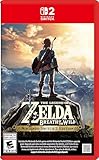
- Enhanced resolution, framerates, and load times optimized for Nintendo Switch 2.
- Explore a massive open-air version of Hyrule with complete freedom.
- Solve physics-based puzzles, survive dynamic weather, and uncover hidden secrets.
- Customize your adventure with weapons, gear, and food you craft yourself.
- Use the ZELDA NOTES app for bonuses, item sharing, and social features.
A higher frame rate can affect game behavior
FPS++ modifies the game to allow a dynamic frame rate, while the game expects a constant timestep for much of its physics. The Cemu compatibility notes explain that changing frame rate can affect that timestep and some physics; they suggest limiting FPS++ to 30 or disabling it if issues arise. More frames per second is therefore not automatically equivalent to the original behavior or issue-free. Cemu compatibility notes for Breath of the Wild
Nintendo’s Switch product listing does not specify a frame rate, so it cannot support a matched numerical FPS comparison against a PC emulator target. Nor do the cited sources provide a controlled cross-platform benchmark. A fair benchmark would need to hold the scene, hardware, game version, emulator version, graphics settings, and measurement method constant; user-submitted configurations and observations are not representative measurements.
Rank #4
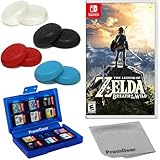
- Included is the following: The Legend of Zelda: Breath of the Wild - Nintendo Switch for Nintendo Switch – OLED Model, Nintendo Switch, Nintendo Switch Lite, 8 pack of PremGear 4 different Colors Thumb Grips (Joystick Cap Covers Compatible with Nintendo Switch/Lite/OLED), PremGear 24 Slot Game card Case/Holder with 2 Slot MicroSD Memory Card Adapter and PremGear Quality Cleaning Cloth
- Discover Hyrule as never before: by making your own path, choices, and consequences
- Ingenuity is the key to survival: find multiple solutions to tons of dynamic puzzles
- Surprises hide around every corner: scavenge weapons, armor, plants, animals, and more
- Live off the land: find weapons and armor, cook food, and brew elixirs
Which version makes more sense for you?
| Consideration | PC emulation | Nintendo Switch |
|---|---|---|
| What you are playing | Emulated Wii U version with Cemu, or emulated Switch version with Ryubing; neither is a native PC port. | The Switch game listed by Nintendo. |
| Graphics controls | Emulator and graphics-pack options can adjust image settings; higher settings increase hardware demands. | Nintendo lists TV, tabletop, and handheld modes; the cited listing does not provide technical resolution figures. |
| Frame-rate control | Cemu FPS++ defaults to a 60 FPS target, but performance varies and frame-rate changes can affect gameplay behavior. | The cited Nintendo listing does not state a frame-rate figure. |
| Portability | Depends on the particular PC or device and setup; there is no universal portable-PC conclusion. | Supports TV, tabletop, and handheld play. |
| Setup | Requires an emulator and configuration; results depend on the computer, game build, emulator, and settings. | Play on Switch hardware using Nintendo’s supported modes. |
Choose PC emulation if adjustable resolution, shadows, anti-aliasing, or frame-rate settings matter more to you than a guaranteed result across systems—and accept that tuning may be necessary. Choose Switch if you want the official console experience and its supported TV, tabletop, and handheld modes. For readers considering Nintendo’s newer hardware, the Switch 2 Edition is a separate upgrade that requires the Switch game; Nintendo describes improved resolution, frame rates, and HDR, but the cited pages do not give numerical output specifications. Nintendo Australia’s Switch 2 Edition page Nintendo UK’s Switch 2 Edition page
Recommended Free Tools
Quick Recap
Product prices and availability are accurate as of the date/time indicated and are subject to change. Any price and availability information displayed on Amazon at the time of purchase will apply.




