Build a Blender interface around the work you do: use workspaces to arrange editors for different tasks, adjust interface scale or local zoom for readability, and change the theme only when you want a different appearance. Save project-specific layouts in the .blend file, or save a custom workspace set in Defaults for reuse.
Start with the task you do most
A Blender workspace is an arrangement of editor areas, not a color scheme or a global readability setting. Blender’s 5.2 LTS Manual describes workspaces as “essentially predefined window layouts.” The default Layout workspace brings together a 3D Viewport, Outliner, Properties editor, and Timeline. Treat it as a starting point, then choose a workspace that fits the job you are doing.
As an Amazon Associate I earn from qualifying purchases.
Blender includes workspaces for activities such as modeling, UV editing, shading, animation, compositing, and scripting. You can keep different stages in separate workspaces instead of trying to make one screen serve every task. There is no single ideal arrangement prescribed for all users: the useful layout is the one that keeps the relevant editors and controls visible while preserving familiar input behavior.
Choose and organize workspaces
Keep editors together when the task needs them
Think about which editors you need to see at the same time. For example, a task may call for a large 3D Viewport alongside the Outliner and Properties editor, while another may benefit from a different combination. These are layout decisions, not rules about a universally best screen arrangement. Use separate workspaces when the combination of editors or the way you interact with them changes substantially.
#1 Best Overall
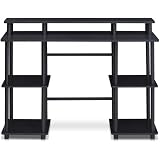
- Experience effortless setup with our tool-free assembly design, allowing you to quickly transform your space into a productive workstation without the need for any tools or complicated instructions, perfect for students, professionals, and anyone seeking a convenient furniture solution.
- Crafted from durable engineered particle board and robust PVC tubes, this computer desk is built to withstand daily use and provide long-lasting stability, ensuring a reliable surface for your computer, books, and other essential items.
- The multipurpose design of this desk makes it ideal for various activities, including computer work, reading, studying, or gaming, offering a versatile and adaptable solution for your home office or living space needs.
- Enjoy a clean and organized workspace with ample display and storage space, providing plenty of room for your monitor, keyboard, mouse, books, and other accessories, promoting a clutter-free and efficient environment.
- Embrace a modern and minimalist aesthetic with the desk's simple, clean lines and neutral color palette, seamlessly blending into any decor style and adding a touch of contemporary elegance to your home or office.
Add, duplicate, rename, or reorder a workspace
Use the workspace controls to add a workspace from a template. To preserve an existing arrangement while adapting it, duplicate that workspace. Double-click a workspace tab to rename it; right-click a tab to access workspace actions, including duplication, deletion, and reordering. Use Ctrl+PageUp and Ctrl+PageDown to move between adjacent workspaces. Blender prevents deletion of the final workspace.
Make controls easier to read
Readability settings are separate from workspace layout. In Preferences > Interface, Resolution Scale changes font and button size relative to the automatically detected DPI. Many areas also have their own zoom controls.
Rank #2

- 【71" EXTRA-LARGE WORKSTATION】 Featuring an expansive 71.0" x 31.5" desktop, this large computer desk comfortably accommodates multiple monitors, laptops, and office essentials. The spacious underneath clearance gives your legs full freedom to stretch, making it an ideal long office desk for heavy-duty productivity or daily home office use.
- 【EXTRA-THICK DESKTOP & HEAVY-DUTY LEGS】 Built for ultimate stability and strength. Featuring a solid, extra-thick desktop paired with premium triangular reinforced steel legs and a heavy-duty metal frame, this executive office desk provides a rock-solid, wobble-free foundation. The thickened tabletop effortlessly holds heavy office equipment and desktop PC setups for long-term durability.
- 【ELEGANT INDUSTRIAL WOOD FINISH】 Crafted with a high-quality textured wood top paired with durable metal elements, this modern industrial writing desk seamlessly blends timeless charm with contemporary style. It adds a sophisticated, high-end centerpiece look to any executive suite, home study room, studio, or corporate office.
- 【VERSATILE 2 TO 6-PERSON TABLE】 Thanks to its generous 71-inch surface and open design, this multipurpose table easily transforms into a 2-person workstation, a 6-person meeting conference table, a spacious craft workspace, or even a sleek dining table. Perfect for collaborative office setups or family work-from-home spaces.
- 【EASY ASSEMBLY & PREMIUM QUALITY】 The smooth engineered wooden surface is water-resistant, scratch-resistant, and effortless to clean. Package includes clear step-by-step instructions and numbered hardware for fast, hassle-free assembly. Our professional customer support team is available 24/7 to assist with any questions.
- If one editor or area is difficult to read, try its local zoom first, where available.
- If text and controls across Blender need adjustment, change Resolution Scale in Preferences > Interface.
- Check the result in the areas you use most and adjust until the interface is comfortable on your display.
The Blender 5.2 LTS Manual explains these controls but does not prescribe a universally best numeric scale. Choose based on your display and comfort rather than treating a particular value as an accessibility standard.
Do these 3 things before closing this tab:
1Repair Windows errors before they cause bigger problems2Fix the driver behind crashes, sound loss and screen glitches3Clear out junk files and repair common Windows errorsChange the theme only to change appearance
Theme preferences control interface appearance and colors; they do not rearrange editors. Blender’s documentation describes individual editor color adjustments, changes displayed in real time, and theme presets that can be saved as XML. Use workspace changes to organize the work area, and theme settings when you want to alter its visual presentation.
Rank #3

- 27.5” W x 14” D top shelf – Multi-tier mobile workstation design This rolling standing desk features a 27.5-inch wide by 14-inch deep top shelf designed to support monitors, laptops, and presentation materials. The secondary 27.5” W x 15.6” D shelf accommodates keyboards and accessories, creating a functional mobile computer workstation for office, classroom, or home use.
- Adjustable height 37.25”–54.7” – Standing desk cart with 11 locking intervals The telescoping frame allows this adjustable standing desk with wheels to raise from 37.25 inches to 54.7 inches. Eleven locking positions support seated or standing configurations, making it suitable as a rolling standing desk, teacher lectern, or standing desk cart for presentations and daily computer work.
- Four shelves, 132 lb total capacity – Rolling computer desk for equipment support Includes a 27.5" x 14" top shelf, 27.5" x 15.6" middle shelf, 18.9" x 9" accessory shelf, and 26" x 18" bottom platform. Each shelf supports up to 33 lbs (132 lbs total), suitable for monitors, laptops, CPUs, printers, and peripherals. Designed as a mobile computer workstation for organized storage.
- Compact 26” W x 23.5” D footprint – Space-efficient rolling desk The 26-inch wide by 23.5-inch deep base provides stability while maintaining a compact footprint. This rolling desk fits easily into offices, classrooms, training rooms, medical spaces, and hybrid work environments where a mobile standing desk is required.
- 1.5” locking casters – Mobile workstation with controlled movement Four 1.5-inch casters allow the rolling laptop desk to move smoothly across floors. Two locking wheels secure the unit in place during typing, presenting, or operating equipment, functioning as a stable rolling computer desk.
Save the setup for the right scope
Keep a layout with one project
Workspaces are stored in the .blend file. When opening a project, the File Browser’s Load UI setting determines whether Blender uses the screen layout saved in that file. If a project opens with an unexpected arrangement, check whether its saved UI is being loaded.
Reuse a workspace set
If you want a custom set of workspaces available beyond one project, include it in Defaults. This is distinct from saving a workspace arrangement in a particular .blend file: decide whether the layout belongs to a project or should be reusable as a default setup.
Rank #4

- 【Simple Desk】Enjoy a simple yet spacious work space with this sleek rustic-brown desk. Measuring 54''x19.7''x29.5'', it is the perfect solution for your study, kid's room, or home office. With a wide desktop, it accommodates your computer, calendar, lamp, and other essentials, leaving enough room to enjoy a cup of coffee
- 【Versatile Desk】Whether you need a large office desk, a bedroom desk, a gaming setup, or a desk for your child's room, this versatile desk fits seamlessly into any space, serving multiple purposes with ease
- 【Reinforced Structure】Crafted from durable particleboard and thick steel tubes, this work from home desk offers a stable and sturdy structure. Reinforcement struts beneath the tabletop provide additional stability, ensuring its longevity for working or gaming
- 【Variety of Styles and Colors】Featuring a selection of 5 on-trend hues - sleek grey, black, warm rustic brown, a unique blend of rustic brown and black for a distinctive look, and white - along with multiple sizes, this home desk is designed to effortlessly match any home decor theme and enhance a wide range of design aesthetics
- 【Easy Assembly】Say goodbye to complicated setups. This PC desk has a simple structure, visually demonstrative instruction and provided tools, and it will be finished in less than 40 minutes
Compare layouts before settling on one
- Task fit: Are the editors and controls you need for this activity available together?
- Visibility: Can you see relevant tools and scene context without repeatedly rearranging windows?
- Readability: Does local zoom or global Resolution Scale make the text and controls comfortable to use?
- Persistence: Should this layout travel with one project, be reused through Defaults, or be replaced by a file’s saved UI when that file opens?
- Consistency: Does the arrangement preserve input behavior you already know?
These are practical criteria, not a Blender-prescribed scoring system. Keep the layout that serves the task without making familiar actions harder.
Recommended Free Tools
Sources and version scope
The workspace behavior and labels described here are based on the Blender 5.2 LTS Manual. The preferences and theme details are release-sensitive and may change in future Blender versions. Blender’s developer documentation discusses interface design goals such as visibility of relevant options and predictable interaction; it does not establish a user study or quantify productivity gains from customization.
Quick Recap
Best Value
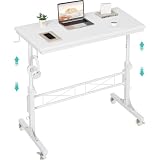
- Perfect For Teachers & Home Office: Moves where you move. Our 4-wheel caster system lets you roll from classroom to hallway in seconds. No more being stuck behind a stationary desk all day. Height adjusts from 30.7 inches to 41.9 inches for standing or sitting. Includes a retainer with four fixed height settings to prevent the table from slipping and ensure safe use
- Works with Your Treadmill or Walking Pad: 32-inch desktop surface holds laptop, tablet, documents and coffee cup. Stay active while teaching or working from home — the healthy productivity upgrade you've been putting off.
- Multiple Usage Functions: A treadmill-compatible workstation seamlessly blending fitness and work, A classroom teacher podium for instruction, an adjustable wheeled standing desk for mobility, a rolling teacher lectern for flexible teaching, and a compact laptop desk for small spaces
- Sturdy & Stable Structure: Tested to 100 LBS capacity. Constructed with high-quality particleboard and a sturdy metal frame, this side table offers exceptional stability. The desktop features a scratch-resistant, anti-collision, and waterproof finish to protect your home office workspace from daily wear and tear
- Easy Assembly & After-Sales Service: Includes a detailed instruction manual and all necessary tools for quick and easy assembly. We offer professional customer support and efficient replacement services for any quality issues you may encounter
Product prices and availability are accurate as of the date/time indicated and are subject to change. Any price and availability information displayed on Amazon at the time of purchase will apply.




