Recommended Free Tools
For a controlled, like-for-like layout comparison, capture the website in a desktop browser’s mobile emulation and set the same viewport width, height, and device pixel ratio (DPR) for both images. If you need to show what people actually see on each phone, take native screenshots on the iPhone and Android instead—but the results may not be pixel-identical.
Choose the method for your goal
| Goal | Best method | What to expect |
|---|---|---|
| Compare the site layout at controlled dimensions | Chrome DevTools mobile emulation, or Apple Responsive Design Mode for a Safari-oriented preview | You can align viewport dimensions and DPR, but emulation does not reproduce every physical-device behavior. Apple describes presets as approximations; Chrome documents Device Mode. |
| Show what a visitor sees on each actual phone | Capture natively on both phones | Browser chrome, viewport, pixel density, rendering, and platform behavior can differ. |
| Save a long webpage for reference | Use iPhone Safari Full Page or Android Capture more | These capture scrollable page content, not matching fixed-height viewport images. |
Make a controlled comparison with desktop browser emulation
- Open the same URL in Chrome on a desktop computer and open DevTools. Turn on Device Mode.
- Select or enter a mobile viewport width and height. Use exactly the same values for both captures.
- Set the same DPR, orientation, browser zoom, and page state. Make sure both pages are at the same scroll position, and wait for loading to finish. If a consent banner or modal appears, put it in the same state for both captures.
- Capture the visible viewport to compare the above-the-fold layout. If you need the whole document, use DevTools’ full-size screenshot option. See Chrome’s Device Mode documentation for the emulation and screenshot workflow.
For a Safari-oriented preview, use Responsive Design Mode in Safari and set the viewport and pixel ratio explicitly. Treat a preset as an approximation, not a guarantee of what a physical iPhone will render: Apple notes that browser interface, keyboard behavior, and device-specific form behavior can differ. Apple Responsive Design Mode documentation.
As an Amazon Associate I earn from qualifying purchases.
Take a full webpage screenshot on iPhone
- Open the webpage in Safari.
- Take a screenshot: on an iPhone with Face ID, press the Side button and Volume Up together; on a model with a Home button, press Side and Home together.
- Tap the screenshot preview, choose Full Page, then save the result as an image or PDF.
Full Page is for content beyond the visible screen; it is not equivalent to a screenshot with a fixed viewport height. Apple’s instructions are at Take a screenshot on iPhone.
Take a scrolling screenshot on Android
- Open the webpage and press Power and Volume Down together.
- In the screenshot preview, tap Capture more and adjust the crop guides to include the scrollable content you want.
- Save the capture.
Google says this flow works on Android 12 and later on most screens that allow scrolling. If the button combination or Capture more option is unavailable on your device, consult the phone manufacturer’s support instructions. See Google Android Help: Take a screenshot or record your screen.
#1 Best Overall

- Professional Noise Cancelling: Easily create on-the-go content with Rythflo's noise-cancelling technology. Record confidently with a DSP chip and a windscreen
- 18-Hour Battery Life: The wireless microphone transmitter has a built-in 110 mAh rechargeable battery and a low-power chip. When you're putting in overtime on a shoot, the wireless lavalier microphone keeps up with 9 hours on a single charge or 18 hrs with 2 mics in total
- 100 ft Transmission: State-of-the-art 2.4G provides a stable connection, so you can record ultra-wide shots with 100 ft of wireless transmission and super-low latency for less lip-syncing in post
- Reverb/Mute Function: The reverb function provides 3D sound and an immersive feeling. The mute function allows for temporary mute during team communication, device setup, and other unexpected situations without shutting down the system
- Universal USB-C Compatibility: The wireless lavalier microphone's Type-C receiver is designed for use with USB-C devices, including Android phones, laptops, and the latest iPhone 15 series
Why screenshots from the two real phones may differ
Matching the URL alone does not make two screenshots comparable. Physical phones can use different effective viewport dimensions, pixel ratios, browser interfaces, and rendering behavior. The page itself may also be in a different state—for example, after a modal appears, content loads, or the user scrolls.
- For a controlled layout test, match URL, viewport width and height, DPR, orientation, zoom, page state, and scroll position.
- For a real-device comparison, capture on both phones and label each image with the device, OS, browser, and capture type. Do not imply that different phones should produce pixel-identical images.
- Keep viewport captures and full-page/scrolling captures separate: they answer different questions and have different dimensions.
Or skip the browser setup
For repeatable captures in an application or workflow, ScreenshotNeo returns a website screenshot or PDF from one GET request. It can also be used as an MCP server by AI agents. Cookie banners, newsletter popups, and chat widgets are removed before the shot; those cleanup steps can be turned off. Bot checks, blank pages, timeouts, failed loads, and cache hits are not billed, and the response reports the page verdict and billing status.
Example cURL request (replace the key and URL):
curl -G "https://api.screenshotneo.com/v1/shot" -d access_key=YOUR_API_KEY --data-urlencode url=https://stripe.com -o shot.webpSee the ScreenshotNeo API documentation for request options. One thousand screenshots a month are free with no card; paid plans start at $5 for 3,000. Learn about ScreenshotNeo, or sign up for 1,000 free screenshots a month with no card.
Free tools Windows power users keep installed
One-click scans. No signup required.
Quick Recap
Best Value
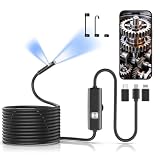
- IP67 Waterproof Borescope: Ideal IP67 waterproof, dustproof and splash-proof grade, supporting short-term underwater detection. Great for automotive mechanical repair, pipeline & drain inspection and wall wire detection.
- 1920P HD Resolution: Equipped with an 8mm ultra-thin probe and 8 adjustable fill LED lights,this inspection camera allows you to freely adjust brightness to avoid shadows and overexposure in dark, narrow gaps.The built-in high-sensitivity sensor produces crisp 1920P HD photos and fluent videos,helping you clearly capture tiny dirt,carbon buildup and hidden components during inspection.
- Dual Lens Endoscope: This borescope camera with light comes with a front main lens and a side auxiliary lens. You can switch viewing angles by long pressing for 3 seconds to check pipe walls & narrow gaps without twisting the long flexible cable, which greatly improves inspection efficiency.
- Semi-Rigid Cable: This 16.4FT semi-rigid snake design can bend freely and hold any shape you set,no collapse or random twisting during deep inspection.Long enough for car engines,sewer drains,wall cavities,HVAC ducts and tight machinery spaces,far easier to operate than fully flexible snake camera.
- Plug & Play: Works with Any Device.Includes 3 detachable connectors:Type-C+Lightning+Android.Free dedicated APP for real-time preview,photo capture and video recording.No extra charger needed,connect and inspect in seconds, perfect portable mobile endoscope.
Rank #4

- Upgraded 28x Telephoto Lens – Wider View & Easier Framing: Designed for everyday users, this 28x telephoto lens delivers a wider field of view than most 28x lenses, making it easier to find and frame distant subjects. Whether you're at a concert, a sports game, or just exploring nature, you'll get crisp, high-resolution close-ups without the hassle of perfect alignment.
- Advanced Optical Performance with Reduced Edge Darkening: Features a breakthrough light path design for an ultra-wide view and excellent light intake. The field-of-view ring helps reduce edge darkening, so you get a cleaner image with fewer dark corners (results may vary by phone model). High resolution and true color reproduction significantly enhance your mobile photography.
- Stable Long-Distance Capture & Monocular Function: With 28x magnification, capture clear and steady shots of distant subjects. The lens can also be used as a monocular telescope for extended observation—perfect for birdwatching, wildlife, or scenic views.
- Wide Compatibility & Versatile Use: Perfect for sports events, concerts, bird watching, wildlife observation, and travel. Compatible with iPhone, Samsung, Huawei, Xiaomi, OPPO, Vivo, and most other smartphones.
- Portable & User-Friendly: Crafted with high-quality glass and a durable yet lightweight body. The universal clip attaches securely to your phone, and the compact design fits easily in a pocket or bag—ideal for travel and outdoor adventures.
Rank #3

- Easy Plug & Play: Simply plug the endoscope camera with light into your phone or tablet’s USB port—no Bluetooth, Wi-Fi, or extra power required. View live images instantly and capture photos or videos directly on your device for fast and convenient inspections
- HD Camera & Flexible Cable: This borescope camera for iPhone and Android features a 2MP HD camera with 1920×1440 resolution and a 7.9mm slim probe, allowing it to reach narrow spaces easily. The 16.4 ft semi-rigid cable bends and holds its shape for stable and flexible inspections
- IP67 Waterproof & Adjustable LED Lights: The snake camera probe is rated IP67 waterproof and can operate underwater up to 3.28 ft for 1 hour. Built-in 8 adjustable LED lights ensure clear visibility even in dark or hard-to-reach areas
- Wide Compatibility & Reliable Performance: Includes Type-C, Lightning, and Micro USB adapters, compatible with iOS 9.0+ and Android 4.2+ devices. Independently EMC tested to ensure strong electromagnetic compatibility and stable performance in different environments
- Versatile Tool & Perfect Gift: This drain inspection camera is ideal for automotive inspection, dryer repair, plumbing, drain cleaning, HVAC inspection, mechanical repair, and home maintenance. Suitable for DIY enthusiasts, homeowners, and professional technicians. It also makes a practical gift for fathers, husbands, and boyfriends who enjoy tools and repairs
Rank #2

- UNIVERSAL USB-C COMPATIBILITY: As an upgraded version of TC002C, the TOPDON TC002C Duo now works seamlessly with all USB-C smartphones and tablets (iOS, Android & Windows), ensuring compatibility with the latest Apple & Android devices. Note: Not compatible with Mac device or Android 16 device temporarily
- SUPER RESOLUTION (TISR): The TOPDON TC002C Duo thermal camera enhanced 256×192 thermal imaging to reveal sharper details at 512×384 with TISR(TOPDON Image Super Resolution). It complemented by a 25Hz refresh rate and a high heat sensitivity of 40mK, ensure smooth, real-time heat tracking, perfect for dynamic environments
- EXTENSIVE TEMPERATURE RANGE: The thermal camera can read temperatures ranging from -4 ℉ to 1022 ℉ with a maximum of ±2℃ or 2% for error, catering to diverse applications. You can view real-time temperature variations by waveform change and customize temperature limits with colorful displays for ultimate convenience. Plus, it supports photo & video recording
- WIDE APPLICATIONS: The TC002C Duo thermal camera allows you to measure temperature differences from a safe distance of up to 16.4ft (5m), making it an ideal tool for home inspectors, HVAC technicians, electricians, automotive technicians, etc. Beside, it is a perfect gift for family event like hide-and-seek, playing with you pet
- COMPACT DESIGN: The thermal camera is lightweight and portable for on-the-go use, measuring 2.8” x 1.7” x 0.55” (71x42x14mm) and weighing 1.1 oz (30g). Use the TopInfrared App for seamless control of your device. Plus, enjoying 24/7 US-based customer service for your convenience
Product prices and availability are accurate as of the date/time indicated and are subject to change. Any price and availability information displayed on Amazon at the time of purchase will apply.
Independent reader supportYour contribution helps us test, update, and keep practical guides available for everyone.



