Quick wins for a faster PC:
Clear out junk files and repair common Windows errorsFree Scan →Fix the driver behind crashes, sound loss and screen glitchesFind Drivers →Repair Windows errors before they cause bigger problemsFix Now →There is no evidence here for a defensible ranking of 14 rotating-proxy services. A current comparison supports a shorter shortlist of nine providers, but its network-size and performance figures are publisher claims, not results from a shared independent test. Choose by the session behavior, proxy type, targeting, and billing terms your workload actually needs—not by a headline pool size.
What makes a proxy “rotating,” and when do you need sticky sessions?
A proxy routes a request through an intermediary IP address. A rotating proxy service changes the address according to its rotation rules; a sticky session attempts to keep the same address for a configured period or session. Those behaviors serve different needs.
Automatic rotation
With per-request rotation, successive requests can use different IPs without you manually selecting a new one. This may suit workflows that do not need a consistent identity between requests. Check whether rotation happens on every request, at a time interval, or under another rule; “rotating” by itself does not tell you which.
As an Amazon Associate I earn from qualifying purchases.
Sticky sessions
A sticky session keeps an IP assigned for a session window. It can be useful when a multi-step workflow needs continuity, such as maintaining a session across related requests. The session duration and what happens if the IP disconnects vary by provider. Confirm those controls before building a workflow around them.
Do not assume a provider offers the same session controls across every proxy type. Ask whether the selected network supports per-request rotation, how to request a sticky session, and what duration or configuration is available.
Residential, datacenter, and ISP proxies: which type fits?
Proxy type describes the network and address characteristics, not a guarantee that a site will accept a request. A target site’s controls can block any proxy type, and no IP category guarantees access or successful collection.
- Residential: Addresses associated with residential networks are often offered with rotation. They may be considered for targets that apply stricter IP checks, but availability and acceptance depend on the target and provider. Bright Data describes its residential proxies as rotating; that is the company’s description of its service, not a universal rule.
- Datacenter: Machine-generated addresses can be a cost-effective option for less sophisticated targets, according to Bright Data’s pricing FAQ. They may be less suitable where a target applies stronger network-based controls. That distinction is not a promise about how any particular site will respond.
- ISP: ISP proxies use residential addresses supplied through internet service providers. Bright Data describes its ISP network as static, making it a possible fit when a workflow needs a persistent address rather than rotation. Confirm the actual session and IP terms for the product you buy.
Mobile proxies are also offered by some providers, but the available comparison does not establish enough consistent detail to assess their terms across this shortlist.
#1 Best Overall
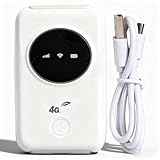
- 300Mbps High Speed: This unlocked 4G supports LTE CAT4 standard, allowing for high-speed internet access of up to 300Mbps. The actual speed may depend on the strength. It supports various network bands such as B1/2/3/5/7/8/20/40
- Main Features: This portable device comes with a SIM card slot and a 3200mAh battery. It can be powered externally, meaning there is no working time limit. Charging options include a computer USB port, car USB charger, and power supply
- Connect up to 10 Devices: This 4G LTE portable can connect up to 10 devices simultaneously, making it suitable for smartphones, tablets, laptops, and more. The can reach an effective distance of 10m/32.8ft
- Using Method: To use the device, simply insert the SIM card and install the battery. However, note that even if your SIM card is compatible, it may not be plug and play. You might need to disable the PIN code of the SIM card and modify the APN settings
- 4G Hotspot: With a portable mobile device, you don't need a broadband connection anymore. Simply insert a 3G or 4G SIM card and connect to a 4G network. Even if there is no 4G network available, it still offers incredibly fast internet speed for your device
Which rotating proxy services are worth comparing in 2026?
The table captures the nine providers named in a Bright Data comparison page accessed in 2026. Its reported residential-network counts are claims from that comparison, not independently verified counts of unique addresses available to each customer at a given time. Definitions may differ, so the figures should not be treated as a standardized ranking.
| Provider | Residential-network figure reported by Bright Data’s comparison | Published positioning reported in the reviewed comparisons |
|---|---|---|
| Bright Data | 400M+ residential IPs, as reported by the comparison in 2026 | Feature-rich, with extensive targeting, as characterized by Decodo’s provider-authored comparison |
| Oxylabs | 175M+ residential IPs, as reported by the comparison in 2026 | Enterprise-oriented, as characterized by Decodo’s provider-authored comparison |
| Decodo | 125M+ residential IPs, as reported by the comparison in 2026 | Decodo describes its network as spanning 195+ locations and offering rotating and sticky sessions with geo-targeting |
| SOAX | 155M+ residential IPs, as reported by the comparison in 2026 | Granular targeting, as characterized by Decodo’s provider-authored comparison |
| IPRoyal | 34M+ residential IPs, as reported by the comparison in 2026 | Lower-cost and smaller-pool option, as characterized by Decodo’s provider-authored comparison |
| Webshare | 80M+ residential IPs, as reported by the comparison in 2026 | Self-service and value option, as characterized by Decodo’s provider-authored comparison |
| Rayobyte | 40M+ residential IPs, as reported by the comparison in 2026 | |
| ProxyEmpire | 30M+ residential IPs, as reported by the comparison in 2026 | |
| DataImpulse | 90M+ residential IPs, as reported by the comparison in 2026 |
The positioning descriptions are the comparison publisher’s characterizations, not independent findings. The available material does not support a like-for-like account of each service’s targeting levels, protocols, session limits, support, trial terms, or compliance process. Treat those as questions to verify with the provider rather than assumptions based on this shortlist.
Rank #2

- SIM Type: Nano-SIM or eSIM
- Desktop stand, wall, window mount (Included)
- 5G NR Frequency Bands: n1, n2, n3, n5, n7, n8, n12, n13, n14, n18, n20, n25, n26, n28, n29, n30, n38, n40, n41, n48, n66, n71, n75, n76, n77, n78, n79
- 4G LTE Frequency Bands: B1, B2, B3, B4, B5, B7, B8, B12, B13, B14, B17, B18, B19, B20, B25, B26, B28, B29, B30, B32, B34, B38, B39, B40, B41, B42, B43, B46, B48, B66, B71
- 3G UMTS Frequency Bands: B1, B2, B4, B5, B8, B19
How should you compare proxy prices and trial terms?
Compare the complete billing terms, not just a per-gigabyte headline. Residential proxy costs may depend on bandwidth, while other products may charge by IP or offer different purchase structures. Check minimum spend, whether unused bandwidth expires or rolls over, and whether the advertised rate applies to the amount you expect to use.
Bright Data’s official rotating-proxy page displayed a promotional residential pay-as-you-go rate of $4 per GB when accessed in 2026; the offer may change, and its page identifies USD as the binding billing currency. A Bright Data comparison page accessed in 2026 listed entry residential prices ranging from $1 per GB for DataImpulse to $6 per GB for Oxylabs. Those comparison-page figures are not normalized quotes or verified checkout prices. Confirm current checkout terms before purchasing.
The Tool Desk
Outbyte PC Repair FREERepair Windows errors before they cause bigger problemsFix Now →Outbyte Driver Updater FREEScan for outdated or missing drivers - takes under a minuteDriver Scan →Rank #3

- FAST 4G LTE CONNECTIVITY: Allowed for downloads at speeds up to 150Mbps and uploads 50Mbps for uninterrupted HD streaming, gaming, video calls and more. Please check with preferred carrier on data plan details and limitations. This 4G router works with AT&T and T-Mobile only. (NOT for Verizon or Sprint and SIM Card not included)
- DUAL BAND SIGNAL TECHNOLOGY: With both 2.4GHz and 5GHz Wi-Fi bands, AC1200 Router will give you a more stable network. 2.4GHz band can meet the basic network tasks, such as web browsing, reading emails, chatting online and more. It will switch to 5GHz frequency band to get a refreshing and practical experience when playing online games or watching HD videos
- 1200MBPS WIFI SIGNAL SPEED: Convert 4G LTE signal to Wi-Fi providing 900Mbps 5.0GHz and 2.4GHZ 300Mbps speed. It can support 32 devices at the same time, keep all of wireless devices connected
- UNINTERRUPTED NETWORK CONNECTION: 1x RJ45 WAN port to connect to modem; 4x RJ45 Ethernet ports to connect wired device or network switch. Automatically switch to the 4G network when the broadband network is disconnected
- USER-FRIENDLY 4G ROUTER SETUP: Extremely easy to set up for beginners. All you have to do is simply insert your standard 4G SIM card, followed by keying-in the password. No hassle. No extra equipment needed
Trial access also needs close inspection: a trial may be limited by time, traffic, product type, or verification steps. The reviewed material mentions a short trial for Decodo but does not establish comparable trial details for all nine providers. Ask whether a trial uses the same network, targeting, and session controls as a paid plan.
- Confirm whether charges are based on bandwidth, IPs, or another unit.
- Check the minimum purchase, expiration or rollover rules, and any required commitment.
- Verify that a trial covers the proxy type and locations you intend to use.
- Ask about supported protocols, concurrency limits, and the exact session controls for your plan.
- Review support channels and response terms before relying on a service for a production workflow.
How do you choose a provider for your workload?
- Define the session requirement. If a workflow needs continuity between related requests, look for documented sticky-session duration and recovery behavior. If it does not, compare the provider’s automatic rotation rules.
- Choose the network type. Decide whether residential, datacenter, or static ISP addresses fit the target and workflow. Do not treat a proxy category as a guarantee of access.
- Specify the location you need. Check whether the provider documents targeting at the required level—such as country, city, state, ZIP, carrier, or ASN—and whether that targeting is available on the chosen network.
- Estimate total cost. Match your expected traffic or IP usage to the actual billing unit, minimum spend, expiration rules, and current checkout price.
- Test the real workflow lawfully. Where a trial or paid test is available, check whether it reproduces your needed location, session behavior, protocols, and concurrency. Follow the target site’s rules and the provider’s acceptable-use terms.
What do the published pool and performance claims tell you?
The Bright Data comparison page accessed in 2026 also reported 99.99% uptime and a 99.99% success rate for Bright Data. These are figures displayed by the publisher, not independently tested results in a shared benchmark. A success-rate claim is meaningful only with its measurement method, target sites, time period, and failure definition; those details are not established here.
Rank #4

- For T-Mobile only
- Plug-and-Play USB-C Connection
- Portable Slim Design
- Secure Single-Point Access
- Supports Windows/MacOS/iPadOS/Android/Linux
Likewise, a larger claimed pool does not prove that more unique IPs will be available to your account, in your chosen location, at the time you need them. Providers may define or count pools differently. Use pool figures as a prompt for questions about availability and targeting, not as a direct measure of expected performance.
Independent reader supportYour contribution helps us test, update, and keep practical guides available for everyone.What compliance checks matter before using proxies?
A proxy does not grant permission to access a site or collect its data. Check applicable law, the target site’s policies, and the provider’s acceptable-use terms before starting. Bright Data says its residential and mobile proxy use entails customer verification and a compliance process; that is a provider-specific policy, not a description of every service in the shortlist.
Quick Recap
Best Value

- [Easy Plug and Play Setup] : Just plug in using the convenient usb power source, insert your sim card, and enjoy seamless 4g network access anytime, anywhere.
- [High Speed Connection] : Experience up to 300mbps speeds, making it for all your devices including phones, tablets, laptops, computers, and tvs.
- [Support 4g and 3g] : Enjoy fast fdd lte b1 b3 b5 b8 and tdd lte b38 39 40 41, as well as wcdma b1 b8 connectivity for reliable internet access.
- [Multi-device Connectivity] : Connect up to 10 devices simultaneously with this mobile hotspot, ensuring everyone stays connected on the .
- [Enhanced Security Features] : Stay protected with wpa, wpa2 encryption and advanced security, preventing network intrusions and ensuring data control.
- Confirm that your intended activity is permitted by the target and the provider.
- Ask how the provider obtains and governs access to the addresses in the network.
- Check whether identity verification or additional approval is required for your proxy type or use case.
Product prices and availability are accurate as of the date/time indicated and are subject to change. Any price and availability information displayed on Amazon at the time of purchase will apply.




