Quick wins for a faster PC:
Scan for outdated or missing drivers - takes under a minuteDriver Scan →Repair Windows errors before they cause bigger problemsFix Now →Fix the driver behind crashes, sound loss and screen glitchesFind Drivers →For a compact retro radio or intercom that needs to capture voice and play it through one small speaker, start with the Raspberry Pi Codec Zero and a Raspberry Pi computer with a 40-pin GPIO header. Codec Zero combines a built-in microphone, an external electret microphone input and a mono speaker driver rated at 1.2 W into 8 Ω. It is a practical compact starting point—not a high-power amplifier.
Which audio board fits your project?
Choose according to the kind of speakers and audio connections you need. The key distinction is whether the board can drive a passive speaker itself or provides line-level output for separate amplification.
As an Amazon Associate I earn from qualifying purchases.
| Board | Best fit | Inputs and outputs | Power and constraints |
|---|---|---|---|
| Codec Zero | Compact mono radio, voice intercom or smart-speaker-style build | Built-in MEMS microphone, external electret microphone input, auxiliary stereo input/output and one mono speaker terminal | 1.2 W into 8 Ω; requires a Pi with a 40-pin GPIO header |
| DigiAMP+ | Stereo build using passive speakers or a project needing more speaker power | Direct connection to passive stereo speakers | Raspberry Pi’s product page specifies up to 35 W per channel; requires an external 12–24 V supply. The documentation says it is designed for Pi 3 and earlier and notes power caveats for later models. |
| DAC+ | Stereo analog output to active speakers or an external amplifier | RCA line output and headphone output | Does not drive passive speakers directly |
| DAC Pro | Higher-fidelity line output and headphone use, with optional balanced output | RCA line output, headphone output and optional balanced/differential output | For active speakers or external amplification, not direct passive-speaker drive |
Raspberry Pi describes Codec Zero as a starting point for projects including a “vintage radio hack.” Its combination of microphone inputs and a mono speaker connection makes it the closest fit here when the design calls for one compact board to handle voice input and playback. Raspberry Pi Codec Zero product page; Raspberry Pi audio-board documentation.
The Tool Desk
Outbyte Driver Updater FREEFix the driver behind crashes, sound loss and screen glitchesFind Drivers →Outbyte PC Repair FREEClear out junk files and repair common Windows errorsFree Scan →Codec Zero: a compact mono voice-and-speaker setup
Microphone and audio connections
Codec Zero has a built-in MEMS microphone and an input for an external electret microphone. It also provides auxiliary stereo input and output, alongside its mono speaker terminal. That mix suits a small radio or intercom where local voice pickup and single-speaker playback matter more than stereo output.
#1 Best Overall
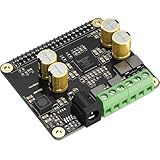
- 【High-Efficiency Audio Amplifier】This Raspberry Pi Ampilifier Audio Hat on-board MERUSTM MA12070P which is a super-efficient audio power amplifier based on proprietary multi-level switching technology. It is a 2x80W Peak Output Class-D digital-audio power amplifier for driving stereo bridge-tied speakers. Offers low distortion and acoustically accurateaudio reproduction.
- 【Easy Installation】Compatible with all series Raspberry Pis through the 40-pin connector. Connects directly to the Raspberry Pi boards, no additional cables required, no soldering required. Easy to get more beautiful and fantastic sound.
- 【HiFi Performance】Supports audio sample rates from 44.1kHz to 192kHz with up to 92% power efficiency and low EMI emissions. Ideal for use in soundbars, multi-room audio setups, and home theater systems.
- 【System Compatibility】Fully supports popular Raspberry Pi audio systems, including LibreELEC, OSMC, Raspbian, RuneAudio, Volumio, Moode, and Ubuntu. Seamlessly plays music from USB drives, hard disks, or over your home network.
- 【Built-in Power Protection】Equipped with a power protection mechanism to prevent damage from high-energy voltage surges. Please avoid hot plugging the power supply, as this may still harm the amplifier components.
The product page lists 24-bit/96 kHz audio capability. That specification describes the codec; it does not establish how loud a finished enclosure will be or how an assembled project will sound. Raspberry Pi Codec Zero product page.
Match the speaker to the output
Use a small 8 Ω passive speaker and stay within the board’s published rating: 1.2 W at 5 V into 8 Ω, with total harmonic distortion under 10%, according to Raspberry Pi’s audio-board documentation. The rating is modest, so do not treat Codec Zero as a room-filling amplifier. Raspberry Pi says a small passive speaker is probably sufficient for its toy chatter-box example, but that does not establish the loudness of a different radio enclosure. Raspberry Pi audio-board documentation.
Rank #2

- Parameters: DROK audio amplifier board working voltage is DC 5V, output power is 5W (2Ω 5V)/3W (4Ω 5V) / 1.8W (8Ω 5V). Input method is monaural input.
- Artificial Material: this New-designed mini power amplifier is made of noble black immersion gold circuit board, imported KEMET speaker capacitor, large-capacity filter capacitor for channels. Besides, we customized black copper terminal blocks and gold-plated audio input terminal blocks for this new amplifier module.
- High Performance: the digital amplifier module is with high efficiency of over 90%, general harmonic distortion noise is less than 10%, low quiescent current and noise suppression.
- Safe Protection: the class D dual-channel amp board is designed with input reverse connection protection, short circuit protection, over heat protection; what's more, EMI is allowed to pass.
- Additional Function: it is available to connect amplifier type to choose different function (MODE: high electricity level is Type D, low electricity level is Type AB. Factory defaults high electricity level); available to add an external Shutdown (SD: the chip will be Shutdown at low electricity level, factory default high electricity level.
When to choose a different board
DigiAMP+ for stereo passive speakers
DigiAMP+ is the alternative to consider when you want direct stereo output to passive speakers. Raspberry Pi’s product page lists output of up to 35 W per channel, while the audio documentation describes connecting two passive speakers up to 25 W. These are different published figures and should not be treated as interchangeable guarantees for a particular setup. Check the product and documentation guidance alongside the speakers you plan to use. Raspberry Pi DigiAMP+ product page; Raspberry Pi audio-board documentation.
DigiAMP+ requires an external 12–24 V DC supply. Raspberry Pi warns not to power the Pi through its own input while DigiAMP+ is in use: the board supplies the Pi through the GPIO header. The documentation says DigiAMP+ is designed for Pi 3 and earlier and gives a USB hub/power warning for later devices, so check model-specific guidance before building around it. Raspberry Pi DigiAMP+ product page; Raspberry Pi audio-board documentation.
Rank #3

- Subwoofer Audio Amplifier Board: 100W+100W Bluetooth 5.0 wireless connection, Bluetooth, USB and AUX audio input, 2.0 channel stereo output, just a little sound distortion. Note: When using AUX mode, please confirm that the Bluetooth connection of this module has been disconnected;
- Treble and Bass Adjustment: This digital Amp board with independent treble and bass adjustment buttons,you can directly adjust the treble and bass through the module, without using the player or speaker;
- Perfect Sound Quality Experience: The audio power subwoofer amplifier module with powerful chip, AM interference suppression function, shielding power inductance, low noise front stage operational amplifier, let you enjoy a more perfect sound quality experience;
- With Protective Function: This Bluetooth Amp module is designed with over-voltage protection, under-voltage protection, over-heat protection, short-circuit protection, with case to protective it;
- Easy Installation and Use: The illustration of each interface is printed on the protective plate, making it easy to install and use even without instructions. Small size: 4.4 in*2.75 in*0.78 in, easy to carry;
DAC+ or DAC Pro for line-level audio
Choose DAC+ or DAC Pro if your speaker is active (has its own amplification) or you intend to connect a separate amplifier. Both provide analog outputs, but neither is a direct amplifier for passive speakers. Raspberry Pi’s general setup documentation also cautions that the 3.5 mm TRRS jack on Pi 1–4 is line-level, not speaker-level. Raspberry Pi audio-board documentation; Raspberry Pi getting-started documentation.
Check Pi compatibility and room for controls
Raspberry Pi’s audio-board documentation says these HATs fit computers with a 40-pin GPIO header. The boards use GPIO/I2S-related pins, and ordinary attachment does not require soldering. If the radio or intercom also needs buttons, LEDs, sensors or a rotary encoder, check the pin use and physical layout before choosing the enclosure. Raspberry Pi audio-board documentation.
Rank #4
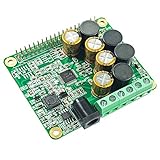
- The HiFi AMP Hat compatible with Raspberry Pi 5, 4, Zero, Zero W, 3B, 3B+ through the 40-pin connector. Connects directly to the Raspberry Pi board, no additional cables required, no soldering required. Easy to get more beautiful and fantastic sound by this RPI+AMP HIFI suits.
- Absolutely perfect to support all Raspberry Pi music player system, such as OSMC, Max2Play, RuneAudio, Volumio, Moode, Pi CorePlayer, Pi MusicBox, OpenELEC, Debian, Ubuntu etc. Support playing music from a hard disk or over the network. Support DSD over PCM(DOP) mode.
- On-board TAS5713 is a 25-W Class-D digital-audio power amplifier for driving stereo bridge-tied speakers. Offers low distortion and acoustically accurate audio reproduction.
- Accept a wide range of input data 8-Khz to 48-Khz, Up to 90% Efficient, Supports speakers 4 Ohm impedance allows you to enjoy high quality audio.
- Comes with software, document and friendly technology support. For more information please refer to our wiki(view the link on color page comes with the goods).
A momentary button, rotary encoder, enclosure and mounting hardware may be useful, but they are project choices rather than required Codec Zero parts. Raspberry Pi’s example includes a button and enclosure as optional items and lists rotary encoder examples. Raspberry Pi audio-board documentation.
A practical selection path
- For one small passive speaker and voice capture: choose Codec Zero, a small 8 Ω passive speaker and a Pi with a 40-pin GPIO header.
- For louder stereo passive-speaker output: assess DigiAMP+ and the speakers together; plan for its external 12–24 V supply and check the documentation for your Pi model.
- For active speakers or a separate amplifier: use DAC+ or DAC Pro for line output, then connect the speakers or amplifier to the board’s analog output.
- Before fixing the case layout: account for the HAT’s GPIO use and any controls or sensors you plan to add.
Published board specifications do not establish the loudness of a particular enclosure or the latency and range of a two-way intercom. Those outcomes depend on the complete build; no specific finished-project measurement is available in the cited Raspberry Pi material.
Quick Recap
Best Value

- This is a USB sound card/USB audio module with 8Ω 5W Speaker that supports recording and playback, a stereo codec, a built-in microphone, and a speaker. It is suitable for Raspberry Pi/Jetson Nano, driver-free, plug-and-play
- "Listening / Speaking" Two-In-One-- onboard microphone, and speaker header, easy audio input / output. Plug and Play, easy to use--standard USB 2.0 port, driver-free, portable size
- Multiple sampling rates support--supported sampling rates including 8K, 11.025K, 12K, 16K, 22.05K, 24K, 32K, 44.1K, and default 48K (Hz)
- Support Multiple systems--Compatible with mac/Win7/8/8.1/10, Linux, Android, WinCE
Product prices and availability are accurate as of the date/time indicated and are subject to change. Any price and availability information displayed on Amazon at the time of purchase will apply.




