Freedom251 › Point-of-Sale Software
Zoda POS
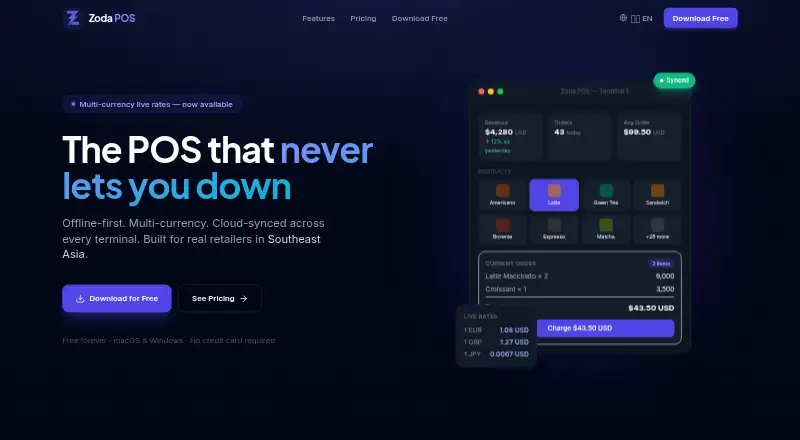
What Zoda POS is
Zoda POS is a desktop point-of-sale system for retailers that can keep checkout running offline. It supports Linux, macOS, and Windows. Sales, stock changes, and receipts are saved in a local SQLite database, so they can be handled without an internet connection. Business data stays there unless Pro cloud sync is enabled.
Inventory tools cover product catalogs, categories, stock tracking and adjustments, purchase orders, suppliers, and low-stock alerts. The system accepts mixed or split payments and connects to ESC/POS receipt printers over TCP/IP, USB, serial, or CUPS. It supports MMK, USD, THB, CNY, and custom currencies, with live rate updates and rates recorded for each sale.
The Starter plan supports one terminal and up to three staff accounts. Pro adds cloud sync for up to three terminals, unlimited staff accounts, multi-currency, loyalty, promotions, cash shift management, sales trends, top-product and profit-margin reports, and PDF export. Daily Z-Reports are available. Staff use PIN authentication and Cashier, Manager, or Admin roles. Zoda POS describes its audience as retailers in Southeast Asia, including Myanmar and Thailand.
Who it suits
Zoda POS suits retailers who need desktop checkout that can continue during internet outages, with inventory and purchasing tools in the same system. Its named audience includes retailers in Myanmar and Thailand; businesses needing cloud sync across terminals or advanced reports can consider Pro.
What it does well
- Offline sales, stock updates, and receipts use local SQLite storage.
- Inventory tools include purchasing, suppliers, and low-stock alerts.
- Supports mixed or split payments and several printer connection routes.
- Staff access includes PINs and Cashier, Manager, and Admin roles.
- Business data can be exported from the app.
What to know first
- Starter is limited to one terminal and three staff accounts.
- Cloud sync and advanced reports are Pro features.
- Multi-location support is unavailable.
Limits
Starter is limited to one terminal and up to three staff accounts. Cloud sync, multi-currency, loyalty, advanced reports, promotions, and cash shift management are listed for Pro, which costs $29 a month when billed monthly.
Plans
| Plan | Billed and limits | Price |
|---|---|---|
| Pro | Billed monthly · Annual saves 20% · Up to 3 terminals · Unlimited staff accounts · Cloud sync, multi-currency, loyalty, advanced reports, promotions, cash shift management | $29 a month |
| Starter | Unlimited orders · 1 terminal · Up to 3 staff accounts · Core POS, inventory, purchase orders, daily Z-Report, receipt printing | Free |
As zodapos.com lists them, read 5 Oct 2026. The maker's own page has the final word.
Getting started
- Visit the Zoda POS website.
- Choose the Starter plan for one terminal or Pro for up to three terminals.
- Install the desktop app on Linux, macOS, or Windows.
- Set up staff accounts with PIN access and roles.
- Add products and inventory, then connect a supported ESC/POS receipt printer.
Verdict
Pick Zoda POS if you need a desktop retail system that keeps sales and stock updates available offline, with inventory, purchasing, payments, and receipt printing. Pro is the option for cloud sync across up to three terminals, unlimited staff, and advanced reports. Look elsewhere if you need multi-location support.
Questions
Is Zoda POS free?
Yes. Zoda POS has a free Starter plan; paid plans start at $29/mo.
What does Pro cost?
Pro costs $29 a month, billed monthly. Annual billing saves 20%.
Which platforms does it support?
Zoda POS supports Linux, macOS, and Windows.
Can it work offline?
Yes. Sales, stock updates, and receipts are stored locally in SQLite and can continue without an internet connection.
How many terminals and staff accounts are included?
Starter allows one terminal and up to three staff accounts. Pro allows up to three terminals and unlimited staff accounts.
Can I export or delete business data?
Users can export business data from the app and request deletion of cloud-stored data by contacting Zoda POS.
Facts from Zoda POS's own pages
- Audience and region
- The product is described as built for modern retailers in Southeast Asia, with Myanmar and Thailand specifically named. · zodapos.com, 5 Oct 2026
- Data handling
- Business data stays in the local SQLite database unless Pro cloud sync is enabled; the app does not store payment card numbers, CVV codes, or cardholder names. · zodapos.com, 5 Oct 2026
- Employee permissions
- Yes · zodapos.com, 24 Sept 2026
- Free plan
- Yes · zodapos.com, 24 Sept 2026
- Hardware support
- third_party · zodapos.com, 24 Sept 2026
- Integrations
- Live exchange rates are fetched through the backend from ExchangeRate-API; the privacy policy also identifies Supabase for authentication and Sentry for crash reporting. · zodapos.com, 5 Oct 2026
- Inventory and purchasing
- Features include product catalog and categories, inventory tracking, purchase orders, supplier management, stock adjustments, and low-stock alerts. · zodapos.com, 5 Oct 2026
- Inventory management
- Yes · zodapos.com, 24 Sept 2026
- Multi-currency
- The system supports MMK, USD, THB, CNY, and custom currencies, with live rate updates and rates recorded at the time of sale. · zodapos.com, 5 Oct 2026
- Multi-location support
- No · zodapos.com, 24 Sept 2026
- Offline mode
- Yes · zodapos.com, 24 Sept 2026
- Offline sales
- Sales, stock updates, and receipts are stored locally in SQLite and can continue without an internet connection. · zodapos.com, 5 Oct 2026
- Payments and printing
- It supports mixed or split payments and ESC/POS receipt printers over TCP/IP, USB, serial, or CUPS. · zodapos.com, 5 Oct 2026
- Product
- Zoda POS is an offline-first desktop point-of-sale system for retailers, with optional Pro cloud features. · zodapos.com, 5 Oct 2026
- Sales and reports
- The POS provides daily Z-Reports; Pro adds sales trends, top-product and profit-margin reports, and PDF export. · zodapos.com, 5 Oct 2026
- Sales reporting
- Yes · zodapos.com, 24 Sept 2026
- Security
- The privacy policy says staff PINs are bcrypt-hashed, three failed attempts trigger a 30-minute lockout, and cloud data is encrypted in transit and at rest. · zodapos.com, 5 Oct 2026
- Staff access
- Staff access uses PIN authentication and Cashier, Manager, and Admin roles; Starter allows up to three staff accounts and Pro allows unlimited accounts. · zodapos.com, 5 Oct 2026
- Paid from
- 29 · zodapos.com, 24 Sept 2026
- Support and data rights
- Users can export business data from the app and request deletion of cloud-stored data by contacting Zoda POS. · zodapos.com, 5 Oct 2026
- Terminal sync
- Pro cloud sync supports up to three terminals, and the homepage says changes propagate across counters within minutes using HMAC-signed outbox syncing. · zodapos.com, 5 Oct 2026
Where Zoda POS stands on Freedom251
- Point-of-Sale Software#16 of 113