Freedom251 › Point-of-Sale Software
SalesPlay POS
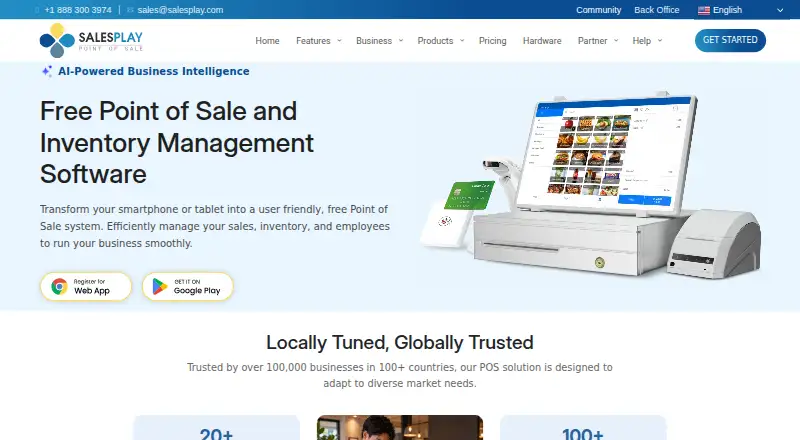
What SalesPlay POS is
SalesPlay POS is a cloud point-of-sale system with inventory management, reporting, and support for multiple locations. A free plan covers point-of-sale and inventory functions, while paid add-ons extend employee management, advanced inventory, unlimited sales data, and AI business intelligence. Sales can continue without an internet connection and synchronize after reconnection. The system runs on smartphones and tablets, with a web back office and dashboard app. Administrators create users, assign shop access, and set permissions; employees sign in with a PIN. Reports can be exported to spreadsheets. Payment providers listed include PAX, Dejavoo, Wallee, Paystack, and Teya, while APIs connect accounting, e-commerce, inventory, marketing, CRM, and other platforms. Stripe handles card details, which SalesPlay says it does not store. Add-on trials last 14 to 30 days without requiring card details to start.
Who it suits
It suits retailers and other businesses needing a free POS with inventory, offline selling, permissions, and multi-location support. Businesses wanting advanced tools can add paid modules.
What it does well
- Free cloud POS and inventory management plan
- Offline sales synchronize after reconnection
- Supports multiple locations and third-party hardware
- Employee permissions and PIN access
- Spreadsheet report exports and broad API connections
What to know first
- Advanced features require paid add-ons
- Cancelled trials cannot be reused
- Saved add-on settings are lost after cancellation
- Some plans have no listed price
Limits
The free tier places employee management, advanced inventory, unlimited sales data, and AI business intelligence in paid add-ons. Add-on trials last 14 to 30 calendar days, and cancelling a trial prevents reuse.
Plans
| Plan | Billed and limits | Price |
|---|---|---|
| SalesPlay POS | Point of sale · Back office · Inventory management · Multi-store management | On request |
| Employee Management | billed monthly · User roles and access rights · Login alerts · Sales by employee | $4 a month |
| Advanced Inventory | billed monthly · Purchase orders · Goods receive notes · Inventory history reports · Stock management | $20 a month |
| Unlimited Sales Data | billed monthly · Unlimited sales history · Trend analysis · Report export | $4 a month |
| SalesPlay AI for Business Intelligence | billed monthly · Natural-language questions · Charts · Custom reports | $10 a month |
| SalesPlay Customer Display | — | On request |
| SalesPlay Kitchen Display | — | On request |
| SalesPlay Dashboard | — | On request |
The first 8 of 10 plans, as salesplay.com lists them, read 28 Sept 2026. The maker's own page has the final word. Every plan
Getting started
- Open the SalesPlay website
- Start the free POS plan
- Use the web back office or dashboard app
- Connect supported smartphones, tablets, or third-party hardware
- Add payment or business-system integrations as needed
- Try an add-on without entering card details
Verdict
SalesPlay POS offers a free operational core with offline capability, inventory, reporting, and location management. Add-on prices range from $4 to $20 per month for listed modules, while other options use unlisted pricing.
Questions
Is SalesPlay POS free?
Yes. A free cloud-based POS plan includes point-of-sale and inventory management. Paid add-ons start at $4/mo.
Which platforms does it support?
The POS works on smartphones and tablets, with a web back office and dashboard app.
What do the paid add-ons cost?
Employee Management and Unlimited Sales Data are $4 a month each. Advanced Inventory is $20 a month, and SalesPlay AI for Business Intelligence is $10 a month.
Does it work offline?
Yes. Sales can continue offline and synchronize automatically after the connection returns.
Can staff permissions be managed?
Admins can create users, assign shop access, and grant different access rights. Employees can sign in with a PIN.
Can it connect to other systems?
Listed APIs connect accounting, e-commerce, inventory, marketing, CRM, and other platforms. Payment providers include PAX, Dejavoo, Wallee, Paystack, and Teya.
Facts from SalesPlay POS's own pages
- API Integrations
- APIs connect accounting, e-commerce, inventory, marketing, CRM, and other platforms. · salesplay.com, 28 Sept 2026
- Card Data Handling
- SalesPlay does not store card details; Stripe handles them. · salesplay.com, 28 Sept 2026
- Company Reach
- SalesPlay is used by more than 100,000 businesses in over 100 countries. · salesplay.com, 28 Sept 2026
- Employee Access
- Employees can access the system using a PIN. · salesplay.com, 28 Sept 2026
- Employee permissions
- Yes · salesplay.com, 24 Sept 2026
- Free plan
- Yes · salesplay.com, 24 Sept 2026
- Free Tier Limits
- Paid add-ons cover employee management, advanced inventory, unlimited sales data, and AI business intelligence. · salesplay.com, 28 Sept 2026
- Free POS
- A free cloud-based POS system includes point-of-sale and inventory management. · salesplay.com, 28 Sept 2026
- Hardware Support
- The system connects receipt printers and barcode scanners. · salesplay.com, 28 Sept 2026
- Hardware support
- third_party · salesplay.com, 24 Sept 2026
- Industry Coverage
- The platform supports more than 20 industries. · salesplay.com, 28 Sept 2026
- Inventory management
- Yes · salesplay.com, 24 Sept 2026
- Multi-location support
- Yes · salesplay.com, 24 Sept 2026
- Offline mode
- Yes · salesplay.com, 24 Sept 2026
- Offline Sales
- Sales can continue offline and synchronize automatically after reconnecting. · salesplay.com, 28 Sept 2026
- Payment Integrations
- Payment providers include PAX, Dejavoo, Wallee, Paystack, and Teya. · salesplay.com, 28 Sept 2026
- Report Exports
- Reports can be exported to spreadsheets for further analysis. · salesplay.com, 28 Sept 2026
- Sales reporting
- Yes · salesplay.com, 24 Sept 2026
- Paid from
- 4 · salesplay.com, 24 Sept 2026
- Subscription Cancellation
- Subscriptions can be cancelled at any time; unused balance moves to subscription credits. · salesplay.com, 28 Sept 2026
- Supported Platforms
- The POS works on smartphones and tablets, with a web back office and dashboard app. · salesplay.com, 28 Sept 2026
- Team Permissions
- Admins can create users, assign shop access, and grant different access rights. · salesplay.com, 28 Sept 2026
- Trial Cancellation
- A cancelled free trial cannot be used again, and saved add-on settings are lost. · salesplay.com, 28 Sept 2026
- Trial Period
- Add-on trials last from 14 to 30 calendar days. · salesplay.com, 28 Sept 2026
Where SalesPlay POS stands on Freedom251
- Point-of-Sale Software#15 of 113