Freedom251 › Bookkeeping Software
ZipBooks
by ZipBooks
What ZipBooks is
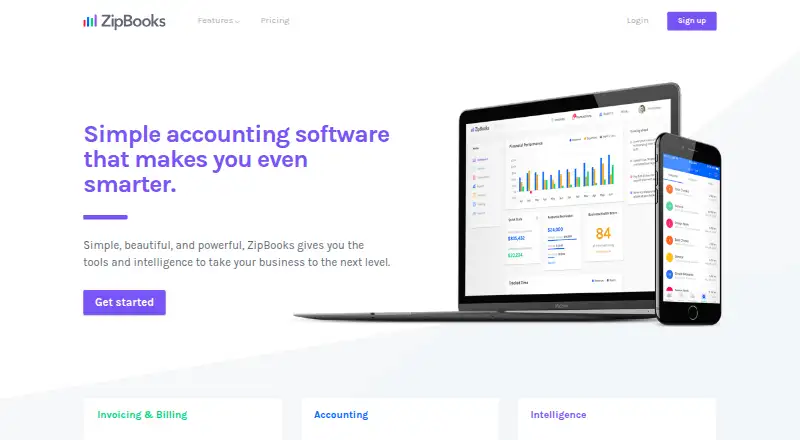
ZipBooks is accounting software from ZipBooks, a maker headquartered in Utah, USA. It combines invoicing, bookkeeping, reporting, and business intelligence for small businesses, with web, Android, and iOS access. Users can send invoices and estimates, accept card payments, create recurring auto-billing, and automate payment reminders. Accounting features include bank connections, reconciliation, transaction categorization, and financial reports. ZipBooks says it can import transactions automatically from thousands of financial institutions, including many leading banks in the United States and Canada.
The product also includes project and task time tracking through a browser or iOS app, with time entries available for invoices. ZipBooks lists integration with Gusto, and supports digital payments through Square or PayPal. Time entries can sync to Gusto for payroll, while payroll transaction details are recorded in ZipBooks. Team permissions can be set for invoicing, accounting, reporting, and time tracking. The maker describes a mobile web experience and native mobile app for invoicing, payments, receipts, and expense categorization. ZipBooks offers a free plan and a free trial. Its named plans are Starter, Smarter, Sophisticated, and Accountant; plan features include options such as bank connections, recurring billing, time tracking, financial reports, and client account management. The listed product information does not give plan prices.
Who it suits
ZipBooks suits small businesses that want to handle invoicing, payments, bookkeeping, and reports in one product. It may also fit teams that need time entries on invoices, bank transaction imports, or Gusto payroll syncing.
What it does well
- Free plan and free trial are available.
- Supports recurring invoices, payment reminders, and digital payments.
- Imports transactions from thousands of financial institutions.
- Time entries can be added to invoices and synced with Gusto.
- Team permissions cover invoicing, accounting, reporting, and time tracking.
- Native mobile apps support invoicing, payments, and expense categorization.
What to know first
- Prices for the named plans are not provided in the listed plan details.
- Two-factor authentication must be enabled through support.
- Live chat and email support hours are limited to weekdays.
Plans
| Plan | Billed and limits | Price |
|---|---|---|
| Starter | unlimited invoices · unlimited vendors and customers · Square or PayPal payments · basic reports · 1 bank account | Free |
| Smarter | per month · Starter features · recurring auto-bill invoices · automated reminders · multiple bank accounts · time tracking · 5 team members | $15 a month |
| Sophisticated | per month · Smarter features · smart tagging · account reconciliation · locked books · secure document sharing · insightful reports · unlimited users | $35 a month |
| Accountant | client-account time tracking · financial-package export · firm cobranding · bulk transaction editing · client dashboard · data migration | On request |
As zipbooks.com lists them, read 15 Oct 2026. The maker's own page has the final word.
Getting started
- Visit the ZipBooks website.
- Start with the free plan or use the free trial.
- Access ZipBooks on the web, Android, or iOS.
- Connect a bank account to import transactions.
- Set up invoicing, payment options, or time tracking as needed.
ZipBooks is accounting software for small businesses that brings invoicing, bookkeeping, reporting, and business intelligence together. It suits owners who want bank-connected accounting alongside payment tools and time tracking, with a mobile app for everyday billing and expense tasks. The main trade-off is that plan prices are custom, and several useful capabilities are reserved for higher tiers.
Overview
ZipBooks covers both sides of routine small-business finances: it can send invoices and estimates, accept card payments, categorize transactions, and produce financial reports. Automatic imports from thousands of financial institutions, including many leading banks in the U.S. and Canada, can cut down on manual entry. The Starter plan's single bank connection may be enough for a simple setup, but businesses managing several accounts will need a higher tier.
Square and PayPal support digital payments, and Gusto integration links time entries with payroll while recording payroll transaction details in ZipBooks. That combination is useful for service businesses that bill for time and need payroll activity reflected in their books. ZipBooks says payment processors handle sensitive card data; it uses 256-bit TLS for data in transit and AES256 or AES128 encryption for stored data. Two-factor authentication requires contacting support to enable it.
Key features
Billing and accounting
Recurring auto-billing and automated payment reminders can reduce follow-up work on repeat invoices. Reconciliation, transaction categorization, and financial reports support ongoing bookkeeping, while smart tagging and secure document sharing appear on the Sophisticated plan. Those tools make the higher tier more relevant to businesses that need more structured financial workflows; a solo operator with basic reporting may have less reason to move beyond Starter.
Time, teams, and mobile work
Time tracking works in a browser or iOS app, and entries can be added to invoices. Smarter includes time tracking and five team members, while Sophisticated allows unlimited users. Team permissions can control access to invoicing, accounting, reporting, and time tracking, which helps businesses divide work without giving every teammate the same access.
ZipBooks offers an optimized mobile web experience and native mobile apps for invoicing, payments, receipts, and expense categorization. The stated mobile app support is for iOS; Android is also listed as a platform, so buyers who depend on a native Android app should confirm which mobile tasks it supports.
Pricing
ZipBooks has a freemium model, a free plan, and a free trial.
- Starter: Unlimited invoices, vendors, and customers; Square or PayPal payments; basic reports; and one bank connection. It is the fit for a small operation with straightforward bookkeeping, but the bank connection cap limits businesses with multiple accounts.
- Smarter: Recurring invoices with auto-bill, automated reminders, multiple bank accounts, time tracking, and five team members. This is the clearest step up for businesses with repeat billing, several accounts, or a small team; it still has a five-person ceiling.
- Sophisticated: Smart tagging, account reconciliation, secure document sharing, financial reports, and unlimited users. It suits a larger team or a business that needs more complete accounting workflows, though the plan's price is custom.
- Accountant: Client account management, financial package exports, bulk transaction editing, and data migration. These tools target accountants or firms managing client books rather than a business seeking only its own invoicing.
Platforms
ZipBooks is available on the web, Android, and iOS. Browser-based time tracking and an iOS app give mobile workers a way to record billable time, while the mobile experience also covers invoices, payments, receipts, and expense categorization.
Who it's for
ZipBooks is a strong candidate for small businesses that want billing and bookkeeping in one service, especially those that accept Square or PayPal payments, connect bank accounts, or invoice for tracked time. The Accountant plan also makes it relevant to firms handling client accounts. Businesses that need several bank feeds or more than five users must choose a higher plan, and those comparing costs closely may prefer a service with a published price.
Pros and cons
- Pros: Invoicing, estimates, recurring billing, payment reminders, bank imports, and accounting reports cover a broad set of small-business finance tasks in one product.
- Pros: Time entries can flow into invoices and sync with Gusto, useful for teams coordinating client billing and payroll.
- Pros: Starter has unlimited invoices, customers, and vendors, avoiding caps on those core records for a small business.
- Cons: Custom pricing across the named plans makes it difficult to compare the cost of moving up as team and accounting needs grow.
- Cons: Starter supports only one bank connection, and Smarter is capped at five team members.
- Cons: Enabling two-factor authentication involves contacting support, adding a step for users who want that account protection.
Alternatives
Invoice Ninja is worth considering if you want a free plan with a stated forever-free term, five clients, unlimited invoicing, and 11 invoice templates, or need its wider platform coverage, including self-hosted, desktop, and API options.
FreeAgent is an alternative if you prefer a freemium accounting product with published monthly prices for sole traders and partnerships or LLPs.
Zoho Invoice may suit readers seeking a free invoicing option; its free plan is for Indian businesses and allows up to two users, three projects, and 500 invoices per year.
Bookipi is a fit to compare if a free plan with a three-invoice monthly cap and a published Starter price better matches your billing volume and budget.
Fakturoid offers a free tier with unlimited invoices for up to five customers, one user, and 1,500 API requests per month, making it an option for a smaller customer list.
Invoice Home is another freemium invoicing service to compare.
Invoicely has a free plan with five monthly invoices, three saved clients, no team members, and PayPal-only payments, so it may work for very low-volume billing.
Wave is a free-plan alternative with unlimited estimates, invoices, bills, and bookkeeping records; credit card payments are available at 2.9% plus $0.60 per transaction.
Verdict
Choose ZipBooks if you want invoicing and accounting in one small-business service, with bank imports, digital payment options, and time tracking that can feed invoices and Gusto payroll. Its free tier and unlimited core records on Starter give small operations room to handle routine billing, while higher plans add multiple accounts, team capacity, reconciliation, and accountant tools. Look elsewhere if published prices are essential to your decision or if your business needs more than five users without moving to a custom-priced plan.
Verdict
Choose ZipBooks if you want small-business accounting with invoicing, bank connections, payment tools, and time tracking across web and mobile. Check plan details before choosing, since the listed plan features do not include prices and the feature sets vary by plan.
Questions
Does ZipBooks have a free plan?
Yes. ZipBooks lists a free plan and also offers a free trial.
What platforms can I use?
ZipBooks is available on web, Android, and iOS. Time tracking is available in a browser or iOS app.
What are the ZipBooks plans?
The named plans are Starter, Smarter, Sophisticated, and Accountant. Their listed features include different combinations of invoicing, bank connections, reporting, time tracking, and client account management.
How much do the plans cost?
The listed plan details do not provide prices.
Does ZipBooks integrate with Gusto?
Yes. Time entries can sync with Gusto for payroll, and payroll transaction details are recorded in ZipBooks.
Who makes ZipBooks?
ZipBooks is made by ZipBooks, headquartered in Utah, USA.
Facts from ZipBooks's own pages
- Accounting
- The accounting tools provide bank reconciliation, reports, automatic categorization and color-coded transaction views. · zipbooks.com, 15 Oct 2026
- Account protection
- Two-factor authentication is available by contacting ZipBooks support to enable it. · zipbooks.com, 8 Oct 2026
- API
- The public API uses JSON API responses, JWT authentication and documented contacts, estimates and invoice endpoints under api.zipbooks.com/v2. · developer.zipbooks.com, 15 Oct 2026
- API documentation status
- ZipBooks warns that its API documentation can become outdated and that future API changes may be incompatible. · developer.zipbooks.com, 15 Oct 2026
- Bank connection
- Bank and credit-card connections import transactions daily to support bookkeeping and reconciliation. · zipbooks.com, 15 Oct 2026
- Bank connections
- ZipBooks says it supports automatic transaction imports from thousands of financial institutions, including many top banks in the U.S. and Canada. · zipbooks.com, 8 Oct 2026
- Business intelligence
- ZipBooks says its data-driven insights help users get paid faster, retain customers and compare performance with competitors. · zipbooks.com, 15 Oct 2026
- Company
- ZipBooks says its mission is to provide tools and intelligence to help small businesses succeed and that it is made in Utah, USA. · zipbooks.com, 8 Oct 2026
- Company legal name
- Crunchbase identifies the legal entity as Phlo, Inc. · crunchbase.com, 15 Oct 2026
- Company location and founding
- Crunchbase places ZipBooks in American Fork, Utah, while LinkedIn lists the company as founded in 2015. · crunchbase.com, 15 Oct 2026
- Company size
- LinkedIn lists ZipBooks as a privately held financial-services company with 11–50 employees. · linkedin.com, 15 Oct 2026
- Documentation
- The help center covers invoices, transactions, reports, contacts, tracking, accountant workflows, account settings and FAQs. · help.zipbooks.com, 15 Oct 2026
- Free plan
- Yes · zipbooks.com, 19 Sept 2026
- Gusto integration
- ZipBooks says time entries can sync with Gusto for payroll and payroll transaction details are recorded in ZipBooks. · zipbooks.com, 8 Oct 2026
- Headquarters
- Utah, USA · zipbooks.com, 28 Sept 2026
- Integrations
- Official pricing names Gusto integration, while the product accepts payments through Square or PayPal; reviewers also mention Stripe, Google Drive and Slack. · zipbooks.com, 15 Oct 2026
- Invoices
- Users can send invoices and estimates, accept card payments, set recurring auto-billing, and automate payment reminders. · zipbooks.com, 8 Oct 2026
- Invoicing
- Users can create invoices and estimates, accept card or PayPal payments, automate recurring billing and send payment reminders. · zipbooks.com, 15 Oct 2026
- Licence
- The terms identify ZipBooks software and site content as company or licensor property and restrict copying, resale and modification, indicating a proprietary licence. · zipbooks.com, 15 Oct 2026
- Limit: customization
- Capterra reviewers mention limited dashboard, invoice branding and recurring-invoice customization, including difficulty with payment terms and part payments. · capterra.com, 15 Oct 2026
- Limit: free tier depth
- Reviewers say the free version or trial becomes restrictive for advanced accounting needs and deeper reporting. · getapp.com, 15 Oct 2026
- Limit: integrations
- Independent reviews characterize the integration ecosystem as small, with about seven integrations and less breadth than QuickBooks or Xero. · merchantmaverick.com, 15 Oct 2026
- Limit: mobile apps
- TechRadar reports no Android edition and says the iOS experience is only adequate; Merchant Maverick says ZipBooks currently lacks a mobile app. · techradar.com, 15 Oct 2026
- Limit: payment reliability
- A Trustpilot reviewer reported recurring Square auto-billing failures that required disconnecting and reconnecting the integration. · trustpilot.com, 15 Oct 2026
Where ZipBooks stands on Freedom251
- Bookkeeping Software#15 of 75
- Accounting & Finance Software#8 of 26
- Freelance Invoicing Software#12 of 30
- Gym Accounting Software#14 of 31
- Bookkeeper Software#12 of 26
- Salon Accounting Software#14 of 29