Freedom251 › Chiropractic Practice Software
zHealthEHR
What zHealthEHR is
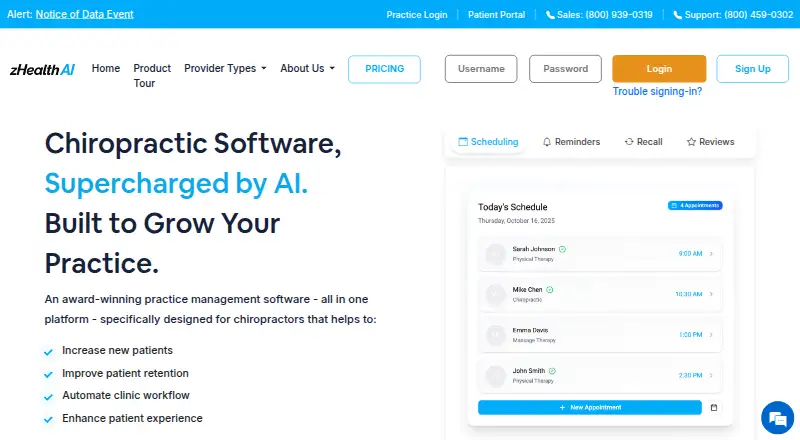
zHealthEHR is practice management software for wellness providers, including chiropractors, massage therapists, physical therapists, and acupuncturists. It brings together appointment scheduling, custom SOAP notes, billing, and reminders for recalls, missed appointments, and telehealth. Patient tools include digital intake, online check-in, two-way text messaging, waiting-queue alerts, online bill payments, and access to past notes. The Essentials plan includes insurance billing, integrated payment processing, online appointments, text and email reminders, a patient mobile app, memberships, and automated outcome assessments. Professional adds online reviews, two-way patient texting, inventory management, a provider mobile app, exercise videos, intake from home, and Google Calendar integration. Pricing is $119 a month per provider for Essentials or $249 a month per provider for Professional; discounts are available for practices with three or more providers. AI Scribe, Practice Analytics, Eligibility Verification, and Patient Recall are paid add-ons. The service is available on Android, iOS, macOS, web, and Windows. Plans include 24/7 customer support.
Who it suits
It is aimed at wellness practices such as chiropractic, massage therapy, physical therapy, and acupuncture providers. Practices that need scheduling, clinical notes, billing, and patient communication tools may find its feature set relevant.
What it does well
- Supports custom SOAP notes and appointment scheduling
- Essentials includes insurance billing and payment processing
- Patient tools include online check-in and two-way texts
- Professional adds inventory management and exercise videos
- Plans include 24/7 customer support
What to know first
- No free plan is listed
- Essentials is $119 a month per provider
- Professional is $249 a month per provider
- Several features are paid add-ons
Limits
The lowest-priced plan, Essentials, costs $119 a month per provider. AI Scribe, Practice Analytics, Eligibility Verification, and Patient Recall are add-ons with additional fees; Google Calendar integration is included with Professional.
Plans
| Plan | Billed and limits | Price |
|---|---|---|
| Essentials | billed monthly · per provider · discounts available for practices with 3 or more providers | $119 a month |
| Professional | billed monthly · per provider · discounts available for practices with 3 or more providers | $249 a month |
As zhealthehr.com lists them, read 3 Oct 2026. The maker's own page has the final word.
Getting started
- Visit the zHealthEHR website.
- Choose Essentials or Professional, priced per provider and billed monthly.
- Subscribe to a plan to access the platform.
- Use the web version or an app on Android, iOS, macOS, or Windows.
- Set up clearinghouse, zHealthPay, or Mailchimp integrations as needed.
zHealthEHR is practice-management software for chiropractors and other wellness providers. It is best suited to practices that want clinical records, billing and patient workflows in one system. Its broad feature set is a draw, but per-provider pricing and paid add-ons can raise the cost as needs grow.
Overview
Scheduling, patient records, custom SOAP notes, care plans, billing and reminders for recalls, missed appointments and telehealth cover much of a practice’s daily work. Patient-facing tools include digital intake, online check-in, waiting-queue alerts, text messaging, online bill payments and access to past notes. That combination is more useful to practices seeking an operational hub than to those looking only for charting.
The product is aimed at chiropractors, massage therapists, physical therapists and acupuncturists. Its support for chiropractic workflows, insurance billing and care plans makes it a particularly relevant option for chiropractic practices.
Key features
Practice and patient workflows
Essentials includes online appointments, insurance billing, integrated payment processing, memberships, automated outcome assessments, a patient mobile app and unlimited text and email reminders. Unlimited reminders can support regular follow-up, but they do not provide two-way patient texting; that requires Professional.
Professional adds online reviews, two-way patient texting, inventory management, a provider mobile app, exercise videos, intake from home and Google Calendar integration. Those additions suit practices that want patients to respond by text or need provider-facing mobile tools. Smaller practices that do not need them may find Essentials sufficient.
Payments, integrations and safeguards
zHealth Pay supports in-person and online card payments, text-to-pay, recurring membership payments and Apple Pay or Google Pay-enabled devices. The maker also describes setup for clearinghouse, zHealthPay and Mailchimp email-marketing integrations. Google Calendar integration is included with Professional.
The product tour describes zHealthEHR as HIPAA-compliant, and subscribed customers handling protected health information can obtain a Business Associate Agreement. Its security notice describes encrypted service communications, role-based permissions, account lockouts and hosting with SOC 2 Type 2-certified providers. All plans include 24/7 customer support; onboarding, technical and product support are also described as around-the-clock services.
Pricing
Essentials costs $119 a month (billed monthly; per provider). It includes insurance billing, payment processing, unlimited text and email reminders, online appointments, a patient mobile app, memberships and automated outcome assessments. It is the more economical fit for practices that need core operations and reminders but can do without Professional’s two-way texting and additional tools.
Professional costs $249 a month (billed monthly; per provider) and includes Essentials features plus online reviews, two-way patient texting, inventory management, a provider mobile app, exercise videos, intake from home and Google Calendar integration. It is better suited to practices that will use those additions; otherwise the higher per-provider cost buys features they may not need.
Discounts are available for practices with three or more providers. Front-desk staff, office managers and billing personnel can access a subscription without an additional user charge, but the provider-based pricing still matters as a clinical team grows. AI Scribe, Practice Analytics, Eligibility Verification and Patient Recall carry additional fees. zHealthEHR has no free plan.
Platforms
zHealthEHR is available on Android, iOS, macOS, web and Windows, giving practices across those environments a way to access the platform.
Who it's for
Consider zHealthEHR if your wellness practice needs scheduling, documentation, billing and patient communication together, especially if you run a chiropractic practice or rely on insurance billing. Essentials is the more practical starting point when reminders and online appointments are enough. Professional is a stronger fit when two-way texting, provider mobile access, inventory management or home intake are important. Practices seeking only a focused SOAP-note tool, or those with multiple providers sensitive to per-provider charges and add-on costs, should compare alternatives.
Pros and cons
- Pros: Scheduling, SOAP notes, billing, patient records and patient-facing workflows are combined, reducing the need to treat charting as a separate tool.
- Pros: Essentials includes unlimited text and email reminders, while Professional adds two-way texting for practices that need patient replies.
- Pros: Front-desk, office-management and billing staff do not incur an additional user charge under a subscription.
- Cons: Both plans are priced per provider, so costs can rise with the clinical team even though non-provider staff can share access without a user fee.
- Cons: Several useful capabilities, including AI Scribe and Eligibility Verification, are paid add-ons, adding potential cost beyond the plan price.
- Cons: Two-way patient texting and other Professional additions are not included in Essentials, which may push practices needing them to the higher-priced tier.
Alternatives
Chiropractic Practice Software is a useful category comparison for practices weighing chiropractic-focused options.
Soap Notes is worth considering if a freemium SOAP-note option matters more than a full practice-management package: its free Starter plan supports up to five active clients, with email support and a limited workflow.
IMS for Chiropractic is another paid option to compare if you want chiropractic software across Android, iOS, self-hosted, web or Windows environments.
EMR Chiro may suit buyers comparing a paid EMR and practice-management package with a published monthly price of $350 a month plus 3.99% collections.
CoAction Software is an alternative to compare for a macOS or Windows practice.
Align is another paid option for practices seeking web-based chiropractic practice-management software.
ChiroHD is worth comparing if you prefer its Standard Plan at $299 a month with unlimited providers and users and cancellation without penalty.
ChiroSpring 360 is another paid chiropractic-focused option to assess, including its separately priced ChiroSpring AI and GrowthHub plans.
ChiroTouch may be a better fit for a new practice comparing a $99 a month Launch plan, with payment processing fees applying.
Verdict
zHealthEHR is a strong candidate for wellness and chiropractic practices that want clinical documentation, billing and patient workflows under one subscription, with a choice between core operations and richer patient engagement. Choose Essentials if reminders and online appointments cover your needs; choose Professional when two-way texting and its additional tools justify the higher per-provider price. Look elsewhere if you need a free plan, a narrower SOAP-note tool, or want to avoid add-on costs as your provider count grows.
Verdict
zHealthEHR combines practice operations and patient-facing tools, with features varying by plan. Compare Essentials and Professional, and account for the per-provider price and any add-ons you need.
Questions
Does zHealthEHR have a free plan?
No. The listed plans are paid.
How much do the plans cost?
Essentials is $119 a month per provider, and Professional is $249 a month per provider. Discounts are available for practices with three or more providers.
Which platforms can I use?
zHealthEHR is available on Android, iOS, macOS, web, and Windows.
What does Essentials include?
It includes insurance billing, integrated payment processing, unlimited text and email reminders, online appointments, a patient mobile app, memberships, and automated outcome assessments.
What does Professional add?
Professional adds online reviews, two-way patient texting, inventory management, a provider mobile app, exercise videos, intake from home, and Google Calendar integration.
Are there extra fees for add-ons?
Yes. AI Scribe, Practice Analytics, Eligibility Verification, and Patient Recall are paid add-ons.
Facts from zHealthEHR's own pages
- Company background
- The maker's story says founder Sukhi Singh developed zHealth after visiting more than 250 wellness providers in California and identifying a technology gap for those businesses. · zhealthehr.com, 3 Oct 2026
- Essentials features
- Essentials includes insurance billing, integrated payment processing, unlimited text and email reminders, online appointments, patient mobile app, memberships, and automated outcome assessments. · zhealthehr.com, 3 Oct 2026
- Headquarters
- San Francisco, California, United States · zhealthehr.com, 28 Sept 2026
- HIPAA
- The product tour describes the platform as HIPAA-compliant, and the maker provides a Business Associate Agreement for subscribed customers handling protected health information. · zhealthehr.com, 3 Oct 2026
- Integrations
- The maker lists Google Calendar integration in Professional and describes setup for clearinghouse integration, zHealthPay, and Mailchimp email marketing integration. · support.zhealthehr.com, 3 Oct 2026
- Paid add-ons
- AI Scribe, Practice Analytics, Eligibility Verification, and Patient Recall are add-ons with additional fees. · zhealthehr.com, 3 Oct 2026
- Patient tools
- Patient features include digital intake, online check-in, two-way text messaging, waiting-queue alerts, online bill payments, and access to past notes. · zhealthehr.com, 3 Oct 2026
- Payment platform
- zHealth Pay supports card-present and online payments, text-to-pay, recurring membership payments, and Apple Pay or Google Pay-enabled devices. · support.zhealthehr.com, 3 Oct 2026
- Practice operations
- The platform includes appointment scheduling, custom SOAP notes, billing software, recall and missed-appointment reminders, and telehealth reminders. · zhealthehr.com, 3 Oct 2026
- Pricing limits
- Pricing is per provider, and the maker says front-desk staff, office managers, and billing personnel can access a single subscription without an additional user charge. · zhealthehr.com, 3 Oct 2026
- Professional features
- Professional adds online reviews, two-way patient texting, inventory management, provider mobile app, exercise videos, intake from home, and Google Calendar integration to Essentials. · zhealthehr.com, 3 Oct 2026
- Purpose
- zHealth is an all-in-one practice management platform designed for wellness providers, including chiropractors, massage therapists, physical therapists, and acupuncturists. · zhealthehr.com, 3 Oct 2026
- Security
- The security notice says service communications use public-key encryption and that hosting is with SOC 2 Type 2-certified providers; it also describes role-based permissions and account lockouts. · zhealthehr.com, 3 Oct 2026
- Support
- The pricing page says all plans include 24/7 customer support, while the product tour specifies onboarding, technical, and product support around the clock. · zhealthehr.com, 3 Oct 2026
Where zHealthEHR stands on Freedom251
- Chiropractic Practice Software#29 of 33