Freedom251 › AI Agents for HR Software

Zendesk Employee Service
What Zendesk Employee Service is
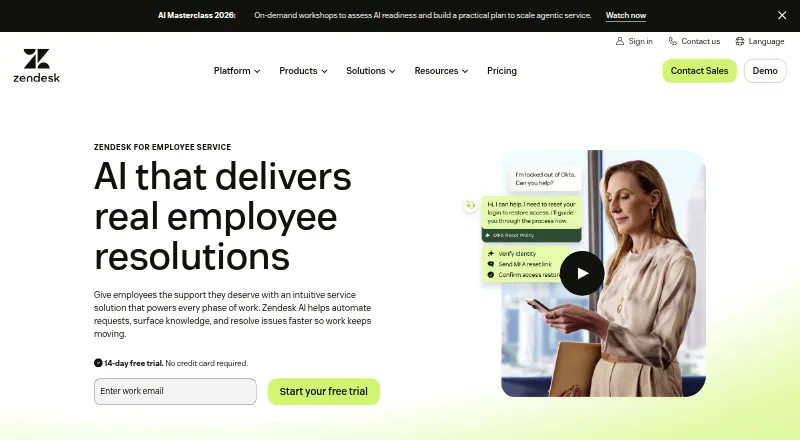
Zendesk Employee Service is an employee support platform for IT, HR, and other teams that serve people inside an organization. Its IT workspace brings together requests, incidents, knowledge, and asset management. HR teams can use automated workflows for onboarding, offboarding, approvals, and employee life events. AI agents can take on routine requests that involve multiple steps, following organizational workflows and policies. They can draw on content in Google Drive, SharePoint, and Confluence without copying the source material, while applying existing identity-provider permissions such as Okta or Active Directory. Employees can reach the agents through Slack, Microsoft Teams, or the internal Help Center. The product also offers AI-based quality assurance to flag possible SLA risks and policy gaps in employee service interactions. It connects with HR and IT systems through Marketplace apps, integrations such as Workday, and APIs. Plans are priced per agent per month and billed annually, starting with Suite Team at $29 a month. There is no free plan; a 14-day trial defaults to Suite Professional features with Copilot. Supported platforms are Android, iOS, web, and API.
Who it suits
Zendesk Employee Service suits IT and HR teams supporting employees across an organization. It is particularly relevant to teams that want internal requests, HR workflows, AI assistance, and service quality monitoring in one platform.
What it does well
- Combines IT requests, incidents, knowledge, and assets in one workspace.
- Automates HR onboarding, offboarding, approvals, and life-event workflows.
- AI agents can use existing identity-provider permissions.
- Employees can access agents through Slack, Teams, or the Help Center.
- Offers quality assurance monitoring for SLA risks and policy gaps.
What to know first
- There is no free plan.
- Suite Team starts at $29 per agent per month, billed yearly.
- Some features can incur usage-based charges beyond plan allowances.
Limits
There is no free plan. The 14-day trial defaults to Suite Professional features with Copilot; paid plans start at $29 per agent per month billed yearly, and some features may have usage-based charges beyond plan allowances.
Plans
| Plan | Billed and limits | Price |
|---|---|---|
| Suite Enterprise | Sandbox environment · Custom agent roles · Customizable reporting · Audit logs · Department spaces | On request |
| Suite Team | paid yearly; per agent/month · AI Agents · Knowledge Base · Action Builder · Email support · Prebuilt analytics dashboards | $29 a month |
| Suite Growth | paid yearly; per agent/month · Suite Team features · IT Asset Management · Service catalog · Self-service employee portal · Tasks & approvals · SLA | $59 a month |
| Suite Professional | paid yearly; per agent/month · Suite Growth features · Admin Copilot · App Builder · Writing Tools · Quick Reports · Skills-based routing | $99 a month |
| Suite Enterprise + Copilot | Contact Sales · Suite Professional features · Intelligent Triage · Auto Assist · Generative AI for Voice · Approval workflows · Sandbox environment | On request |
As zendesk.com lists them, read 20 Sept 2026. The maker's own page has the final word.
Getting started
- Visit the Zendesk Employee Service website.
- Start the 14-day trial, which defaults to Suite Professional features with Copilot, or choose a paid plan.
- Select a plan priced per agent per month and billed annually.
- Use the web, Android, or iOS platform, or connect through the API.
- Connect relevant HR and IT tools through Marketplace integrations or APIs.
Verdict
Choose Zendesk Employee Service if IT or HR needs an internal support platform with automated workflows and AI agents that can follow organizational permissions. Teams should look elsewhere if they need a free plan or want to avoid possible usage-based charges for features such as App Builder, Action Builder, or Voice.
Questions
Does Zendesk Employee Service have a free plan?
No. It has a 14-day free trial.
How much does it cost?
Suite Team costs $29 per agent per month, billed yearly. Suite Growth is $59.00 USD and Suite Professional is $99 per agent per month, also billed yearly.
Which platforms does it support?
The listed platforms are Android, iOS, web, and API.
Which employee channels can use its AI agents?
Employees can reach agents through Slack, Microsoft Teams, or the internal Help Center.
What systems can it connect to?
It connects with HR and IT tools through Marketplace apps and integrations, including Workday, and through APIs. AI agents can also connect to Google Drive, SharePoint, and Confluence.
Who makes Zendesk Employee Service?
Zendesk was founded in 2007 and is headquartered in San Francisco, California.
Facts from Zendesk Employee Service's own pages
- AI automation
- AI agents can handle routine, multi-step employee requests using organizational workflows and policies. · zendesk.com, 29 Sept 2026
- Employee channels
- Employees can use AI agents in Slack, Microsoft Teams, or the internal Help Center. · zendesk.com, 29 Sept 2026
- Founded
- 2007 · zendesk.com, 28 Sept 2026
- Headquarters
- Zendesk lists its headquarters as San Francisco. · zendesk.com, 29 Sept 2026
- HR workflows
- The HR service offering supports onboarding, offboarding, approvals, and life-event management with automated workflows. · zendesk.com, 29 Sept 2026
- Integrations
- Zendesk says Employee Service connects with HR and IT tools through Marketplace apps and integrations, including Slack, Microsoft Teams, and Workday, as well as APIs. · zendesk.com, 29 Sept 2026
- IT service
- The IT service offering combines request and incident management, knowledge, and assets in one workspace. · zendesk.com, 29 Sept 2026
- Knowledge access
- AI agents can connect to Google Drive, SharePoint, and Confluence without moving or copying source information. · zendesk.com, 29 Sept 2026
- Permission controls
- AI agents can use existing identity-provider permissions, including Okta or Active Directory, so employees see only authorized information. · zendesk.com, 29 Sept 2026
- Plan structure
- Pricing is primarily per agent per month, and some features such as App Builder, Action Builder, and Voice can incur usage-based charges beyond plan allowances. · zendesk.com, 29 Sept 2026
- Purpose
- Zendesk for Employee Service is an AI-powered platform for internal support across IT, HR, and other employee-facing teams. · zendesk.com, 29 Sept 2026
- Quality assurance
- AI-powered quality assurance monitors all employee service interactions to identify SLA risks and policy gaps in real time. · zendesk.com, 29 Sept 2026
- Security
- Zendesk lists SOC 2 Type II audits and certifications including ISO 27001:2022, ISO 27018:2019, ISO 27701:2019, ISO 27017:2015, and ISO 42001. · zendesk.com, 29 Sept 2026
- Trial
- The free trial lasts 14 days and defaults to Employee Service Suite Professional features, with Copilot included. · zendesk.com, 29 Sept 2026
- Who it is for
- The product is presented for IT and HR teams supporting employees across their organization. · zendesk.com, 29 Sept 2026
Where Zendesk Employee Service stands on Freedom251
- AI Agents for HR Software#6 of 24
- IT Help Desk Software#38 of 49
- AI IT Service Desk Software#18 of 23