Freedom251 › Screen Recording Software
ZD Screen Recorder
What ZD Screen Recorder is
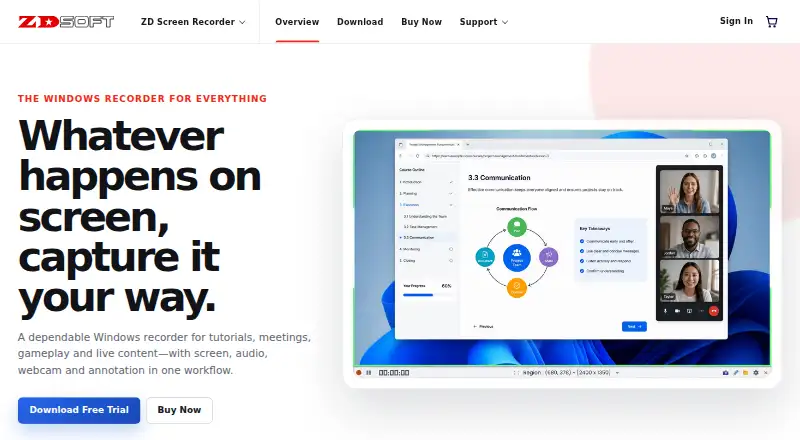
ZD Screen Recorder is a Windows application for recording tutorials, meetings, gameplay, presentations, live streams, and other on-screen activity. It can capture the desktop, a selected area, an application window, webcam video, microphone input, system audio, and game content separately or in combinations. A webcam overlay can accompany narration and system sound. Live drawing, cursor emphasis, and zoom tools help explain actions while recording, and a game mode balances image quality, frame rate, and system load. Scheduled and long-running recordings are supported. Paid licenses allow recordings of 48+ hours per recording without a watermark. The 15-day trial limits each recording to 15 minutes and adds a zdsoft.com watermark; there is no free plan. Windows downloads cover versions 7, 8, 8.1, 10, and 11, with 32-bit and 64-bit EXE and MSI installers. The maker lists creators, educators, support teams, and remote teams as audiences.
Who it suits
It suits Windows users who need screen, webcam, microphone, and system-audio recording for instruction, meetings, gameplay, or live content. Creators, educators, support teams, and remote teams are specifically identified audiences.
What it does well
- Captures screen, webcam, microphone, and system audio
- Supports scheduled and long-running recordings
- Includes drawing, cursor, and zoom annotations
- Game mode balances quality, frame rate, and load
- Paid output supports 48+ hours per recording
What to know first
- No free plan
- Trial recordings limited to 15 minutes
- Trial output carries a zdsoft.com watermark
- Windows only
Plans
| Plan | Billed and limits | Price |
|---|---|---|
| Trial | 15 minutes per recording | On request |
| 50 PCs | 45% OFF one-time payment; page also shows $1950 · Team and enterprise license · 50 PCs | $1,072, paid once |
| 5 PCs | 30% OFF one-time payment; page also shows $195 · Lifetime license for 5 computers · 48+ hours per recording · watermark-free output · free technical support | $136, paid once |
| 100 PCs | 50% OFF one-time payment; page also shows $3900 · Team and enterprise license · 100 PCs | $1,950, paid once |
| 10 PCs | 35% OFF one-time payment; page also shows $390 · Team and enterprise license · 10 PCs | $253, paid once |
| 1 PC | One-time payment · Lifetime license for 1 computer · 48+ hours per recording · watermark-free output · free technical support | $39, paid once |
| 20 PCs | 40% OFF one-time payment; page also shows $780 · Team and enterprise license · 20 PCs | $468, paid once |
| 2 PCs | 25% OFF one-time payment; page also shows $78 · Lifetime license for 2 computers · 48+ hours per recording · watermark-free output · free technical support | $58, paid once |
As zdsoft.com lists them, read 22 Sept 2026. The maker's own page has the final word.
Verdict
ZD Screen Recorder combines broad capture options with annotation, scheduling, streaming, and game recording tools. The trial is restricted, while paid licenses remove the watermark and permit recordings of 48+ hours per recording.
Facts from ZD Screen Recorder's own pages
- Annotation
- Live drawing, cursor emphasis and zoom are available to help explain on-screen steps. · zdsoft.com, 11 Oct 2026
- Audience
- The maker identifies creators, educators, support teams and remote teams as users of ZD Screen Recorder. · zdsoft.com, 11 Oct 2026
- Audio and webcam
- The product can combine microphone narration with system audio and add a webcam overlay. · zdsoft.com, 11 Oct 2026
- Capture
- It can record the desktop, selected region, application window, webcam, microphone, system audio and game content, separately or in combinations. · zdsoft.com, 11 Oct 2026
- Deployment
- The maker recommends the MSI installer for enterprise deployment. · zdsoft.com, 11 Oct 2026
- Founded
- 2005 · zdsoft.com, 28 Sept 2026
- Free plan
- No · zdsoft.com, 22 Sept 2026
- Gameplay
- Game-optimized capture balances visual quality, frame rate and system load. · zdsoft.com, 11 Oct 2026
- Integrations and security
- The product pages opened describe local recording and provide no named third-party integrations or product security/compliance certifications. · zdsoft.com, 11 Oct 2026
- Max recording length
- 2880 · zdsoft.com, 22 Sept 2026
- Microphone recording
- Yes · zdsoft.com, 22 Sept 2026
- Output limit
- Paid licenses allow recordings of 48+ hours per recording and provide watermark-free output. · zdsoft.com, 11 Oct 2026
- Supported platforms
- Windows · zdsoft.com, 22 Sept 2026
- Purpose
- ZD Screen Recorder is a Windows recorder for tutorials, meetings, gameplay and live content. · zdsoft.com, 11 Oct 2026
- Scheduling and streaming
- The product supports scheduled and long-running recordings, as well as live streaming and presentations. · zdsoft.com, 11 Oct 2026
- Support
- The maker lists free technical support with paid licenses and offers a support center for self-service help and direct contact. · zdsoft.com, 11 Oct 2026
- System audio
- Yes · zdsoft.com, 22 Sept 2026
- Trial limit
- The 15-day trial limits each recording to 15 minutes and adds a zdsoft.com watermark; commercial use and free technical support are listed for paid licenses only. · zdsoft.com, 11 Oct 2026
- Webcam recording
- Yes · zdsoft.com, 22 Sept 2026
- Windows support
- The download page lists Microsoft Windows 7, 8, 8.1, 10 and 11, with 32-bit and 64-bit EXE and MSI installers. · zdsoft.com, 11 Oct 2026
Where ZD Screen Recorder stands on Freedom251
- Screen Recording Software#121 of 131