Freedom251 › DVD Authoring Software
Xilisoft DVD Creator
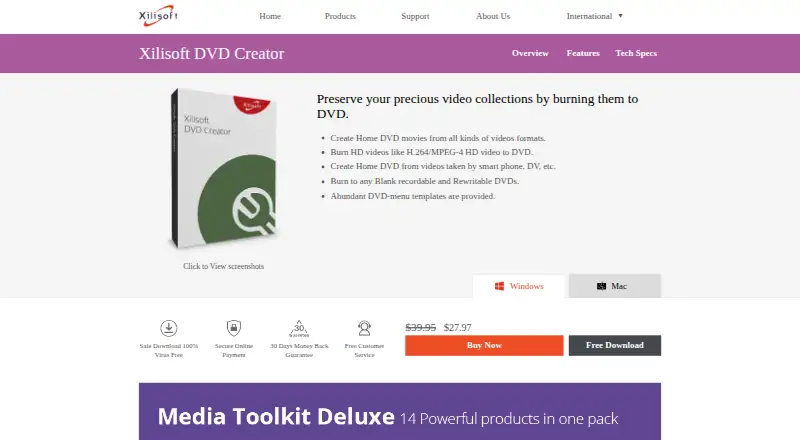
What Xilisoft DVD Creator is
Xilisoft DVD Creator converts video files into DVDs for home viewing, with options to burn discs or save a DVD folder or ISO image. It accepts formats including H.264, MP4, MKV, AVI, WMV, MOV, MPEG, MTS, and M2TS. Users can clip or merge segments, crop frames, adjust image effects, and add subtitles, watermarks, or audio tracks. Menu templates support background pictures or music and chapter arrangement. The listed disc formats include DVD-R, DVD-RW, DVD+R, DVD+RW, DVD+R DL, DVD-R DL, DVD-5, and DVD-9. The product page says it supports up to 32 SRT subtitle files, while the FAQ says users can add up to eight subtitles to the list and up to eight audio tracks to a video. It is paid software, with a listed plan at $27.97, paid once and a paid-from price of 39.95 one-time. It runs on Windows and macOS and has a free trial. The FAQ lists older Windows requirements, a recordable DVD drive, and 10 GB for temporary files.
Who it suits
It suits users who want to turn video files into DVDs, folders, or ISO images and customize menus, chapters, subtitles, or audio tracks. It is available for Windows and macOS.
What it does well
- Burns discs or saves DVD folders and ISO images
- Includes menu templates and chapter arrangement
- Accepts a range of listed video formats
- Supports dual-layer DVD formats
What to know first
- No free plan
- FAQ lists Windows XP SP2 or later through Windows 7
- FAQ lists 10 GB for temporary files
Limits
There is no free plan; a free trial is offered. The FAQ lists Windows XP SP2 or later, Vista, or Windows 7, a recordable DVD drive, and at least 10 GB for temporary files.
Plans
| Plan | Billed and limits | Price |
|---|---|---|
| Xilisoft DVD Creator | One-time purchase; billing frequency not stated · DVD Creator license · 30-day money-back guarantee | $27.97, paid once |
As xilisoft.com lists them, read 8 Oct 2026. The maker's own page has the final word.
Getting started
- Visit the Xilisoft DVD Creator website.
- Choose a free trial download, available in 32-bit and 64-bit versions.
- Use a Windows or macOS computer.
- Import video in a listed input format.
- Edit clips and add menus, chapters, subtitles, or audio tracks.
- Burn to a supported DVD disc or save a DVD folder or ISO image.
Verdict
Xilisoft DVD Creator offers video editing, menu customization, and several DVD output options. The trial is available, but the FAQ's listed system requirements are for older Windows versions.
Questions
How much does Xilisoft DVD Creator cost?
The listed starting price is $39.95 one-time. A separate DVD Creator license is listed at $27.97 as a one-time purchase.
Is there a free plan or trial?
There is no free plan, but a free trial is offered.
Which platforms does it support?
The listed platforms are Windows and macOS.
What output formats can it create?
It can burn video to DVD discs or save it as a DVD folder or ISO image.
How many subtitles and audio tracks can I add?
The product page says it supports up to 32 SRT subtitle files. Its FAQ says users can add up to eight subtitles to the list and up to eight audio tracks to a video.
Who makes Xilisoft DVD Creator?
Xilisoft makes the software and lists email support, with a stated aim to reply within 24 hours excluding weekends and holidays.
Facts from Xilisoft DVD Creator's own pages
- Audio track limit
- The product’s FAQ says users can add up to eight audio tracks to a video. · xilisoft.com, 8 Oct 2026
- Disc support
- Listed disc formats include DVD-R, DVD-RW, DVD+R, DVD+RW, DVD+R DL, DVD-R DL, DVD-5, and DVD-9. · xilisoft.com, 8 Oct 2026
- DVD menus
- It provides menu templates and lets users add background pictures or music and arrange chapters. · xilisoft.com, 8 Oct 2026
- Input formats
- Listed inputs include H.264, MP4, MKV, AVI, WMV, MOV, MPEG, MTS, and M2TS. · xilisoft.com, 8 Oct 2026
- Output options
- It can burn video to DVD discs or save it as a DVD folder or ISO image. · xilisoft.com, 8 Oct 2026
- Privacy
- Xilisoft’s privacy policy says it collects personal information during activities such as purchases, product registration, downloads, and support contacts. · xilisoft.com, 8 Oct 2026
- Purpose
- The software converts video files into DVDs for home viewing. · xilisoft.com, 8 Oct 2026
- Security and purchase claims
- The product page labels its download “100% Virus Free,” describes online payment as secure, and advertises a 30-day money-back guarantee. · xilisoft.com, 8 Oct 2026
- Subtitle limit
- The product page says it supports up to 32 subtitle files in SRT format. · xilisoft.com, 8 Oct 2026
- Subtitle limit in FAQ
- The product’s FAQ says users can add up to eight subtitles to the list. · xilisoft.com, 8 Oct 2026
- Support
- Xilisoft lists support by email and says it aims to reply within 24 hours, excluding weekends and holidays. · xilisoft.com, 8 Oct 2026
- System requirements
- The FAQ lists Windows XP SP2 or later, Vista, or Windows 7, a recordable DVD drive, and at least 10 GB for temporary files. · xilisoft.com, 8 Oct 2026
- Trial download
- The product page offers free downloads, including 32-bit and 64-bit download links. · xilisoft.com, 8 Oct 2026
- Video editing
- It can clip and merge video segments, crop frames, adjust image effects, and add subtitles, watermarks, and audio tracks. · xilisoft.com, 8 Oct 2026
Where Xilisoft DVD Creator stands on Freedom251
- DVD Authoring Software#18 of 26