Freedom251 › DVD Authoring Software

AnyMP4 DVD Creator
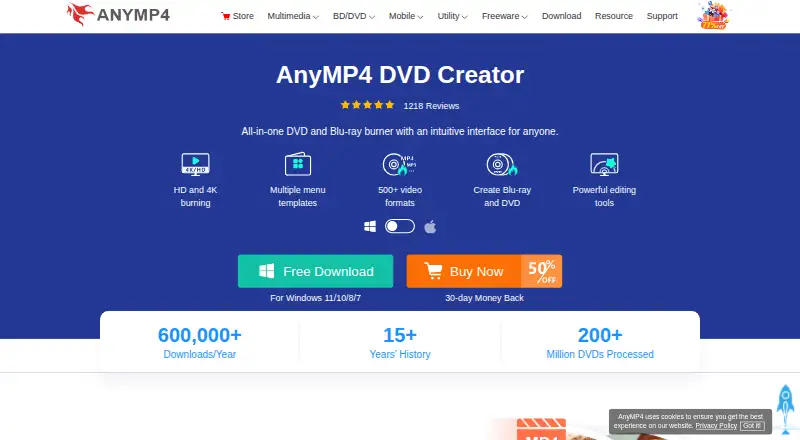
What AnyMP4 DVD Creator is
AnyMP4 DVD Creator turns video files into DVD or Blu-ray discs, ISO files, or folders. It runs on Windows and macOS and accepts formats such as MP4, WMV, MOV, 3GP, AVI, TS, FLV, MKV, M2TS, MTS, M4V, VOB, and MPG. It supports DVD and Blu-ray media, including single- and dual-layer types such as DVD-5, DVD-9, DVD-R, DVD+R, BD-R, BD-RE, and BDXL.
To shape a disc, users can choose menu templates themed around holidays, family, travel, or weddings, then customize thumbnails, buttons, frames, text, and backgrounds. Editing tools include trimming, merging, rotation, cropping, filters, effects, watermarks, and changes to audio or subtitles. Subtitles can be added in SRT, ASS, or SSA formats. Burn controls include GPU acceleration, PAL or NTSC output, four quality settings, and VSO, CdrTool, or IMAPI SDK burning engines. The product page states compatibility with Windows 11, 10, 8, and 7. A free download is available, and the listed licenses are $12.45 a month for one month or $39.96, paid once for a lifetime license.
Who it suits
It suits people who want to author DVDs or Blu-ray discs from video files, with options to edit clips and customize disc menus. It can also suit users who need ISO or folder output, or subtitle support in SRT, ASS, or SSA formats.
What it does well
- Creates DVD and Blu-ray discs, ISO files, or folders.
- Accepts a wide range of video formats.
- Includes menu templates and customization controls.
- Built-in tools cover trimming, cropping, filters, and effects.
- Supports SRT, ASS, and SSA subtitles.
- Offers GPU acceleration and PAL or NTSC output.
What to know first
- There is no free plan.
- The listed one-month license costs $12.45 a month.
- Full-version activation requires an internet connection.
Plans
| Plan | Billed and limits | Price |
|---|---|---|
| 1 Month License | Use it for 1 month and renew if satisfied. · 1 month license | $12.45 a month |
| Lifetime License | Lifetime license · 1 PC Mac · free lifetime update | $39.96, paid once |
As anymp4.com lists them, read 30 Sept 2026. The maker's own page has the final word.
Getting started
- Visit the AnyMP4 DVD Creator website.
- Download the product for Windows or macOS.
- Add video files in a supported format.
- Choose disc, ISO, or folder output and configure menu or editing options.
- Select burn settings and activate a license for the full version.
Verdict
Choose AnyMP4 DVD Creator if you need to make DVD or Blu-ray discs and want menu customization, editing, and subtitle tools in one product. Look elsewhere if you need a free plan.
Questions
Does AnyMP4 DVD Creator have a free plan?
No. The product is listed as having no free plan, though its page offers a free download.
How much does a license cost?
The one-month license is $12.45 a month. The lifetime license is $39.96, paid once.
Which operating systems does it support?
It runs on Windows and macOS. Its product page states compatibility with Windows 11, 10, 8, and 7.
What kinds of output can it create?
It can burn video to DVD or Blu-ray discs, ISO files, or folders.
Can I add subtitles?
Yes. It supports subtitles in SRT, ASS, and SSA formats.
Does full-version activation work offline?
No. Full-version activation requires an internet connection.
Facts from AnyMP4 DVD Creator's own pages
- Burn settings
- The product supports GPU acceleration, PAL or NTSC output, four quality settings, and VSO, CdrTool, and IMAPI SDK burning engines. · anymp4.com, 30 Sept 2026
- Company
- AnyMP4 describes itself as a software producer; its About page does not state a headquarters or founding year. · anymp4.com, 30 Sept 2026
- Compatibility
- The product page states compatibility with Windows 11, 10, 8, and 7. · anymp4.com, 30 Sept 2026
- Disc types
- It supports single- and dual-layer DVD and Blu-ray types, including DVD-5, DVD-9, DVD-R, DVD+R, BD-R, BD-RE, and BDXL. · anymp4.com, 30 Sept 2026
- Editing
- Built-in editing features include trimming, merging, audio and subtitle changes, rotation, cropping, filters, effects, and watermarks. · anymp4.com, 30 Sept 2026
- Free download
- The product page offers a free download, but does not specify whether it is a free plan or a time-limited trial. · anymp4.com, 30 Sept 2026
- Input formats
- The product supports video formats including MP4, WMV, MOV, 3GP, AVI, TS, FLV, MKV, M2TS, MTS, M4V, VOB, and MPG. · anymp4.com, 30 Sept 2026
- Menus
- It offers menu templates in holiday, family, travel, and wedding styles, with options to customize thumbnails, buttons, frames, text, and background images. · anymp4.com, 30 Sept 2026
- Privacy and activation
- AnyMP4 says full-version activation requires an internet connection and periodically checks license validity online, transmitting the license key, a checksum, product code, and version numbers. · anymp4.com, 30 Sept 2026
- Purpose
- AnyMP4 DVD Creator burns video files to DVD or Blu-ray discs, ISO files, or folders. · anymp4.com, 30 Sept 2026
- Refunds and updates
- The Support Center advertises a 30-day money-back guarantee and free product updates. · anymp4.com, 30 Sept 2026
- Subtitle formats
- Users can add subtitles in SRT, ASS, and SSA formats. · anymp4.com, 30 Sept 2026
- Support
- AnyMP4's Support Center lists email support at [email protected] and says customer support is available 24/7. · anymp4.com, 30 Sept 2026
Where AnyMP4 DVD Creator stands on Freedom251
- DVD Authoring Software#14 of 26