Freedom251 › DVD Authoring Software
GiliSoft Movie DVD Creator
What GiliSoft Movie DVD Creator is
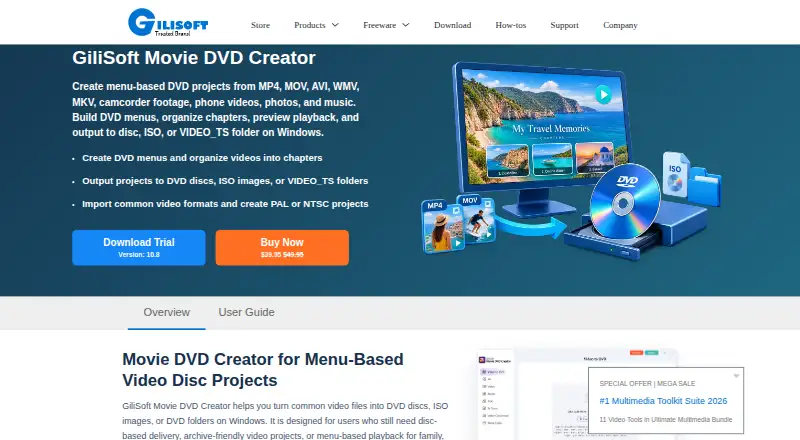
GiliSoft Movie DVD Creator is Windows software for authoring video files to DVDs with menus and chapter navigation. Projects can also be saved as ISO images or DVD folders, so a physical disc is not needed for those outputs. Listed video sources include MP4, MOV, AVI, WMV, MKV, MPG, MPEG, VOB, MTS, M2TS, FLV, 3GP, DV, and H.264/AVC. Users can choose menu templates, add custom backgrounds and graphics, arrange chapter buttons, and customize menu titles. Editing tools cover trimming, cropping, brightness, contrast, and saturation adjustments, along with subtitles and watermarks. A project can combine video clips, photo slides, and background music. Output supports PAL and NTSC, and listed media includes DVD-R, DVD+R, rewritable discs, dual-layer formats, and DVD-RAM. Physical disc creation requires a compatible DVD writer and suitable blank media. GiliSoft identifies family archives, schools, events, training teams, and business delivery as use cases.
Who it suits
This software may suit Windows users creating DVDs for family archives, schools, events, training, or business delivery. It also supports ISO and DVD folder output when a physical disc is not needed.
What it does well
- Creates menus and chapter navigation
- Can save ISO images or DVD folders
- Projects can mix video, photos, and music
- Supports subtitles and watermarks
What to know first
- Windows only
- Physical burning requires a compatible DVD writer
Limits
Creating a physical disc requires a compatible DVD writer and suitable blank media; ISO and DVD folder output do not require a disc.
Plans
| Plan | Billed and limits | Price |
|---|---|---|
| Movie DVD Creator | $39.95 (shown alongside $49.95) · Windows DVD authoring software · disc, ISO, or DVD folder output | $39.95, paid once |
As gilisoft.com lists them, read 8 Oct 2026. The maker's own page has the final word.
Getting started
- Visit the GiliSoft Movie DVD Creator product page
- Download the trial from the product page or user guide
- Install it on Windows
- Add video, photo slides, or background music to a project
- Save as an ISO image or DVD folder, or use a compatible writer and blank media for a disc
Verdict
GiliSoft Movie DVD Creator combines DVD authoring, menu design, and basic video editing, with ISO and folder output as alternatives to burning a disc. Check the listed price and disc hardware requirements before choosing it.
Questions
How much does Movie DVD Creator cost?
The listed plan is $39.95 per once, shown alongside $49.95.
Which platform does it support?
The product supports Windows.
Can I save a project without burning a disc?
Yes. Projects can be saved as ISO images or DVD folders without inserting a disc.
What disc formats does it support?
The listed media includes DVD-R, DVD+R, DVD-RW, DVD+RW, DVD+R DL, DVD-R DL, and DVD-RAM. Output supports PAL and NTSC.
Who makes Movie DVD Creator?
GiliSoft describes itself as a Windows software company founded in 2005.
Facts from GiliSoft Movie DVD Creator's own pages
- Company
- GiliSoft describes itself as a Windows software company founded in 2005. · gilisoft.com, 8 Oct 2026
- Disc standards
- The product supports PAL and NTSC output and lists DVD-R, DVD+R, DVD-RW, DVD+RW, DVD+R DL, DVD-R DL, and DVD-RAM media. · gilisoft.com, 8 Oct 2026
- Editing tools
- The product page describes trimming, cropping, brightness, contrast and saturation adjustments, subtitles, and watermarks. · gilisoft.com, 8 Oct 2026
- Founded
- 2005 · gilisoft.com, 28 Sept 2026
- Input formats
- The product page lists support for MP4, MOV, AVI, WMV, MKV, MPG, MPEG, VOB, MTS, M2TS, FLV, 3GP, DV, and H.264/AVC video sources. · gilisoft.com, 8 Oct 2026
- Intended users
- The product page identifies family archives, schools, events, training teams, and business delivery as use cases. · gilisoft.com, 8 Oct 2026
- Menu and chapters
- Users can choose menu templates, use custom backgrounds and graphics, arrange chapter buttons, and customize menu titles. · gilisoft.com, 8 Oct 2026
- Mixed media
- The product page says a DVD project can combine video clips, photo slides, and background music. · gilisoft.com, 8 Oct 2026
- Privacy and security
- GiliSoft says it uses administrative, technical, and physical safeguards intended to help protect personal information and that it does not sell personal information to third-party marketers. · gilisoft.com, 8 Oct 2026
- Purpose
- The product authors video files into DVDs with menus and chapter navigation, and can save projects as ISO images or DVD folders. · gilisoft.com, 8 Oct 2026
- Requirements
- Physical disc creation requires a compatible DVD writer and suitable blank media; ISO and DVD folder output can be created without inserting a disc. · gilisoft.com, 8 Oct 2026
- Support
- GiliSoft lists email support, live chat during business hours, and a comment section as support channels. · gilisoft.com, 8 Oct 2026
- Trial download
- The product page and user guide provide a Download Trial link but do not state a trial duration. · gilisoft.com, 8 Oct 2026
Where GiliSoft Movie DVD Creator stands on Freedom251
- DVD Authoring Software#12 of 26