Freedom251 › Physics Simulation Software
Xcos
by Xcos
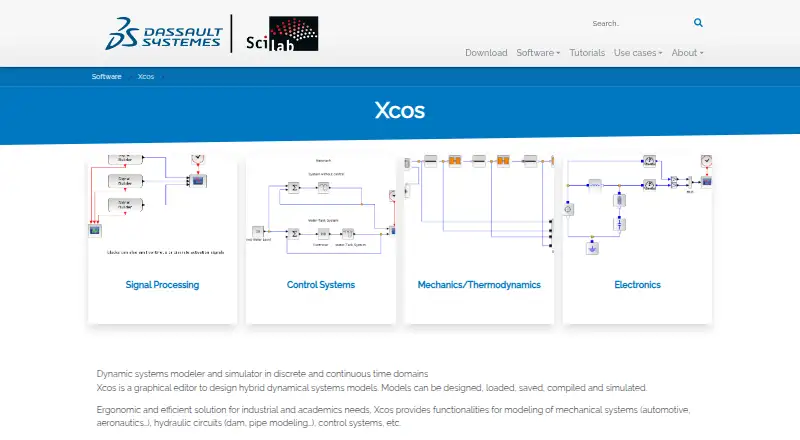
What Xcos is
Xcos is a graphical editor for designing models of hybrid dynamical systems in discrete and continuous time. It is distributed with Scilab and is available as desktop software for Windows, Linux, and Intel or ARM macOS. Models can be designed, loaded, saved, compiled, and simulated. Xcos includes standard palettes and blocks, and users can define palettes of their own. Superblocks can help manage model reuse and simplify models; subsystems can be configured or set to execute conditionally. All Scilab data types are available for defining signals, and Xcos supports creating and customizing Modelica blocks. The maker describes it as suited to industrial and academic needs, including modeling mechanical systems, hydraulic circuits, and control systems. An FMI toolbox is offered for Model-Exchange and Co-Simulation with Scilab and Xcos, with enterprise integration services available. Offline access and authoring tools are listed. A C compiler is optional for general installation but is needed when using Modelica in Xcos. Xcos is free: its Free plan costs 0.00 USD, and the software is distributed with Scilab. Xcos is headquartered in Vélizy-Villacoublay, France.
Who it suits
Xcos suits industrial and academic users who need to design and simulate hybrid dynamical-system models, including mechanical, hydraulic, or control systems. It is also suitable for users who want desktop authoring across Windows, Linux, or Intel and ARM macOS, with offline access.
What it does well
- Free software distributed with Scilab.
- Runs on Windows, Linux, and Intel or ARM macOS.
- Models can be designed, loaded, saved, compiled, and simulated.
- Supports user-defined palettes and reusable superblocks.
- All Scilab data types are available for signal definition.
- Works offline and includes authoring tools.
What to know first
- A C compiler is needed to use Modelica in Xcos.
- Xcos is delivered as desktop software.
Plans
| Plan | Billed and limits | Price |
|---|---|---|
| Free | Freely available and distributed with Scilab | Free |
As scilab.org lists them, read 11 Oct 2026. The maker's own page has the final word.
Getting started
- Visit https://www.scilab.org/software/xcos.
- Install the Scilab distribution that includes Xcos for Windows, Linux, or Intel or ARM macOS.
- Use the Free plan, which is distributed with Scilab.
- Install a C compiler if you plan to use Modelica in Xcos.
Overview
Xcos is a desktop graphical editor for constructing and simulating hybrid dynamical-system models. It suits engineers, researchers, and students working with mechanical, hydraulic, or control systems; its breadth of modeling tools is compelling, though Modelica work adds a setup requirement.
Models can be designed, loaded, saved, compiled, and simulated in both discrete and continuous time domains. That makes Xcos a focused environment for system modeling rather than a general-purpose simulation tool. Its offline access is useful for desktop workflows, but there is no lesson library for people who need built-in instruction.
Key features
Standard palettes and blocks give modelers a starting point, and user-defined palettes let them build reusable collections for their own work. Superblocks help organize and reuse model components, while configurable and conditionally executed subsystems support more involved model structures. These are practical strengths for users maintaining complex models, but they are less relevant to someone seeking a simple, guided introduction to simulation.
Signals can use any Scilab data type. Xcos also supports creating and customizing Modelica blocks, a useful extension for Modelica-oriented workflows, but those blocks require a C compiler. A C compiler is optional for general Scilab installation, so users who only need other Xcos capabilities can avoid that dependency.
The maker offers an FMI toolbox for Model-Exchange and Co-Simulation with Scilab and Xcos, as well as enterprise integration services. Professional services and support for Scilab are also offered.
Pricing
Xcos is free: its Free plan costs nothing and is distributed with Scilab. There are no paid plan tiers to weigh against the included modeling capabilities. This suits users who want a desktop modeling environment without a software charge; the trade-off is that advanced Modelica use still depends on a C compiler.
Platforms
Xcos is delivered as desktop software through the Scilab distribution for Windows, Linux, and Intel or ARM macOS. Offline access supports work without a web connection, but the desktop-only delivery will not suit readers who need a browser-based modeling environment.
Who it's for
Xcos is a sensible fit for industrial and academic users building models of mechanical systems, hydraulic circuits, or control systems. Its reusable superblocks, custom palettes, and configurable subsystems favor people with structured modeling workflows. It is a weaker fit for readers looking for guided lessons, a web app, or Modelica support without installing a C compiler.
Pros and cons
Pros
- Free access to the modeling environment: the Free plan is distributed with Scilab at no cost.
- Supports model organization and reuse: user-defined palettes and superblocks can help users build consistent libraries and simplify larger models.
- Wide system-modeling scope: it covers discrete and continuous time and use cases including mechanical, hydraulic, and control systems.
- Works offline across three desktop operating systems: Scilab provides the distribution for Windows, Linux, and Intel or ARM macOS.
Cons
- Modelica use needs a C compiler: this adds a dependency for users who want to create or customize Modelica blocks.
- Desktop delivery only: users seeking browser access will need another tool.
- No lesson library: learners looking for built-in instruction will need to find guidance elsewhere.
Alternatives
For a broader set of physics simulation software, compare tools by the systems and workflows they support. OpenFOAM is another free option for Linux, macOS, Windows, and self-hosted use; its support and code-customization services are separate and limited by hours. Choose it when those services and that deployment range better fit your needs.
OpenSim is free, open-source, and available for Linux, macOS, and Windows, with API access; downloading it requires a SimTK account. It is worth considering when that platform and account-based download suit your workflow. ngspice is a free circuit simulator for Linux, macOS, Windows, and self-hosted use, but it uses command-line or file-based input rather than schematic entry. It is the more direct alternative when circuit simulation is the priority and schematic drawing is not required.
SimFlow offers a free plan and a free trial across Linux, macOS, Windows, and web. GNU FisicaLab is free GPL-licensed software for Linux and Windows. FeenoX is free open-source software with API, Linux, self-hosted, and web availability, but has no graphical interface and targets GNU/Linux. Step is a free option for Linux. ASCEND is free open-source software for Linux, macOS, and Windows.
Verdict
Choose Xcos if you need a free desktop editor for designing and simulating hybrid dynamical-system models, particularly for industrial or academic work. Reusable model components, customizable palettes, and a broad system-modeling scope are its strongest reasons to choose it. Look elsewhere if you need browser delivery, built-in lessons, or Modelica capabilities without a C compiler requirement.
Verdict
Choose Xcos if you need a free desktop editor for building and simulating hybrid dynamical-system models, especially for industrial or academic work. Its palettes, reusable superblocks, configurable subsystems, and Modelica support cover a range of modeling workflows. Modelica use requires a C compiler, and the listed delivery mode is desktop.
Questions
How much does Xcos cost?
Xcos is free. Its Free plan is listed at 0.00 USD, and it is distributed with Scilab.
Which operating systems does Xcos support?
The Scilab distribution that includes Xcos is available for Windows, Linux, and Intel or ARM macOS.
Can Xcos be used offline?
Yes. Offline access is listed.
What can I model with Xcos?
Xcos is for hybrid dynamical systems in discrete and continuous time. Listed use cases include mechanical systems, hydraulic circuits, and control systems.
Does Xcos support Modelica?
Xcos supports creating and customizing Modelica blocks. A C compiler is needed for Modelica use in Xcos.
Who makes Xcos?
Xcos is headquartered in Vélizy-Villacoublay, France. The Scilab history page says the company offers professional services and support for Scilab.
Facts from Xcos's own pages
- Audience
- The maker describes Xcos as suited to industrial and academic needs. · scilab.org, 11 Oct 2026
- Authoring tools
- Yes · scilab.org, 21 Sept 2026
- Compiler requirement
- A C compiler is listed as optional for general installation but is needed for Modelica use in Xcos. · scilab.org, 11 Oct 2026
- Delivery mode
- desktop · scilab.org, 21 Sept 2026
- FMI integration
- The maker offers an FMI toolbox for Model-Exchange and Co-Simulation with Scilab and Xcos, with enterprise integration services available. · scilab.org, 11 Oct 2026
- Free plan
- Yes · scilab.org, 21 Sept 2026
- Headquarters
- Vélizy-Villacoublay, France · scilab.org, 28 Sept 2026
- Lesson library
- No · scilab.org, 21 Sept 2026
- Model composition
- Users can manage superblocks for model reuse and simplification, and create configurable or conditionally executed subsystems. · scilab.org, 11 Oct 2026
- Modelica
- Scilab lists Modelica block creation and customization among Xcos capabilities. · scilab.org, 11 Oct 2026
- Model workflow
- Models can be designed, loaded, saved, compiled, and simulated. · scilab.org, 11 Oct 2026
- Offline access
- Yes · scilab.org, 21 Sept 2026
- Palettes
- Xcos provides standard palettes and blocks, and supports user-defined palettes. · scilab.org, 11 Oct 2026
- Platform availability
- The Scilab distribution that includes Xcos is available for Windows, Linux, and Intel or ARM macOS. · scilab.org, 11 Oct 2026
- Purpose
- Xcos is a graphical editor for designing hybrid dynamical systems models in discrete and continuous time domains. · scilab.org, 11 Oct 2026
- Signal types
- All Scilab data types are available for signal definition. · scilab.org, 11 Oct 2026
- Support
- The Scilab history page says the company offers professional services and support for Scilab. · scilab.org, 11 Oct 2026
- Use cases
- Xcos supports modeling mechanical systems, hydraulic circuits, and control systems for industrial and academic needs. · scilab.org, 11 Oct 2026
Where Xcos stands on Freedom251
- Physics Simulation Software#6 of 89