Freedom251 › Physics Simulation Software
Step
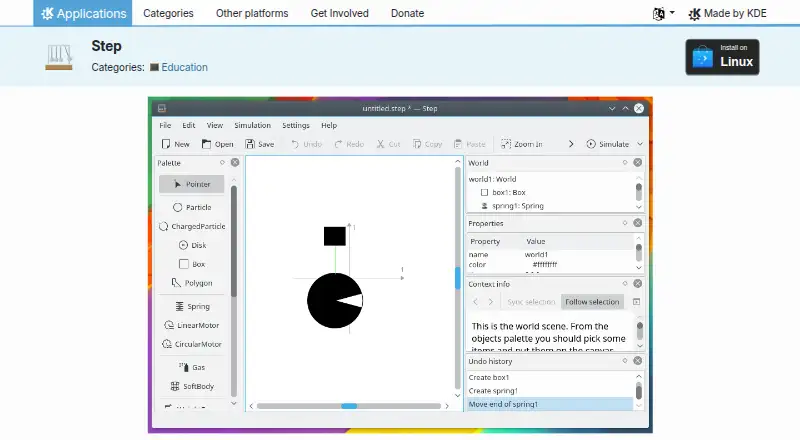
What Step is
Step is a free Linux desktop application for exploring physical systems through interactive simulations. Users can change the properties of bodies and forces, including while a simulation is running. It supports two-dimensional classical mechanics, molecular dynamics, sound waves, and deformable bodies, with elements such as particles, damped springs, gravitational and Coulomb forces, rigid bodies, and collision handling. Step can calculate unit conversions, expressions, error propagation, and solver error estimates. Its explicit and implicit solvers go up to 8th order, with or without adaptive timesteps; most solvers require GSL. Graph, meter, and tracer tools visualize results, and a controller can adjust properties during a run using custom keyboard shortcuts. Tutorials, sample experiments, object context information, and an integrated Wikipedia browser provide learning resources. Additional example experiments are available through KNewStuff. Expression calculations such as unit conversion require libqalculate. Step is licensed under GPL-2.0+, and its StepCore simulation library can also be used separately in code or other software. The listed release is Step 26.08.2, released 2026-10-08.
Who it suits
Step suits Linux users exploring or teaching physical systems through simulations, especially those working with mechanics, molecular dynamics, sound waves, or deformable bodies.
What it does well
- Supports four types of physical simulation.
- Users can edit properties during a simulation.
- Includes graph, meter, and tracer visualization tools.
- Tutorials and example experiments are included.
- StepCore can be used separately in other software.
What to know first
- Available on Linux only.
- Most solvers require GSL.
- Unit conversion expressions require libqalculate.
Limits
The free plan is listed for Linux. Most solvers require GSL, and expression calculations such as unit conversion require libqalculate.
Plans
| Plan | Billed and limits | Price |
|---|---|---|
| Step | GPL-2.0+ · Linux | Free |
As apps.kde.org lists them, read 11 Oct 2026. The maker's own page has the final word.
Getting started
- Visit the Step website.
- Use Step on Linux as a desktop application.
- Start with a tutorial or example experiment.
- Download additional example experiments with KNewStuff if needed.
Verdict
Step offers a range of physics simulations, editing controls, and visualization tools in a free Linux desktop application. Check its GSL and libqalculate requirements for the functions you intend to use.
Questions
How much does Step cost?
The listed Step plan is free. Step is listed under GPL-2.0+.
Which platforms does Step support?
Linux is the listed platform, and Step is delivered as a desktop application.
Does Step have a free trial?
No. The listed pricing facts say there is no free trial; Step has a free plan.
What can Step simulate?
It supports two-dimensional classical mechanics, molecular dynamics, sound waves and deformable bodies.
Does Step include learning resources?
Yes. It includes tutorials, example experiments, object context information and an integrated Wikipedia browser. More example experiments can be downloaded with KNewStuff.
Can StepCore be used separately?
Yes. StepCore is the underlying simulation library and can be used without Step in code or other software requiring simulation functionality.
Facts from Step's own pages
- Additional experiments
- More example experiments can be downloaded with KNewStuff. · apps.kde.org, 11 Oct 2026
- Authoring tools
- Yes · apps.kde.org, 20 Sept 2026
- Calculations
- Step can calculate unit conversions, expressions, error propagation, and solver error estimates. · apps.kde.org, 11 Oct 2026
- Delivery mode
- desktop · apps.kde.org, 20 Sept 2026
- Dependency
- Expression calculations such as unit conversion require libqalculate. · apps.kde.org, 11 Oct 2026
- Experiment editing
- Users can change body and force properties, including while a simulation is running. · apps.kde.org, 11 Oct 2026
- Forces and objects
- Supported elements include particles, damped springs, gravitational and Coulomb forces, rigid bodies, and collision handling. · apps.kde.org, 11 Oct 2026
- Free plan
- Yes · apps.kde.org, 20 Sept 2026
- Latest listed release
- The page lists Step 26.08.2, released 2026-10-08. · apps.kde.org, 11 Oct 2026
- Learning resources
- The application includes tutorials, example experiments, object context information, and an integrated Wikipedia browser. · apps.kde.org, 11 Oct 2026
- Lesson library
- Yes · apps.kde.org, 20 Sept 2026
- Library
- StepCore is the underlying physical simulation library and can be used without Step in code or other software requiring simulation functionality. · apps.kde.org, 11 Oct 2026
- License
- Step is listed under the GPL-2.0+ license. · apps.kde.org, 11 Oct 2026
- Purpose
- Step is an interactive physical simulator for exploring the physical world through simulations. · apps.kde.org, 11 Oct 2026
- Simulation types
- It supports two-dimensional classical mechanics, molecular dynamics, sound waves, and deformable bodies. · apps.kde.org, 11 Oct 2026
- Solver options
- It offers explicit and implicit solvers up to 8th order, with or without adaptive timesteps; most solvers require GSL. · apps.kde.org, 11 Oct 2026
- Support
- Help is available through the Step Handbook, KDE forum, the kde-edu mailing list, and the #kde-edu Libera.chat channel. · apps.kde.org, 11 Oct 2026
- 3D visuals
- No · apps.kde.org, 20 Sept 2026
- Visualization and controls
- Graph, meter, and tracer tools visualize results, and a controller tool can adjust properties during simulation using custom keyboard shortcuts. · apps.kde.org, 11 Oct 2026
Where Step stands on Freedom251
- Physics Simulation Software#19 of 89