Freedom251 › Prototyping tools
Wondershare Mockitt
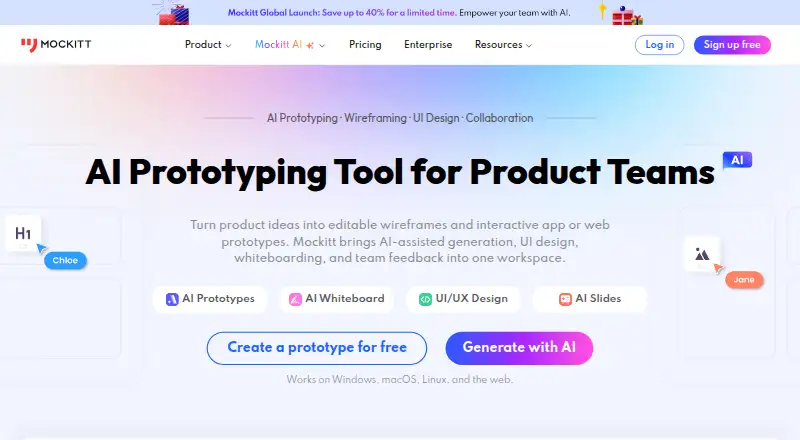
What Wondershare Mockitt is
Wondershare Mockitt is a design and prototyping tool for creating interactive prototypes and sharing them. Its listed capabilities include real-time collaboration, design systems, developer handoff, variables and tokens, and a desktop app. It is available on the web, Windows, macOS, and Linux. The Free Plan costs nothing, billed monthly, and includes 1 workspace, 3 files, and 200 AI credits per person. Pro costs $10 a month, billed monthly, and includes 1 editor seat and 100 files. Team costs $24 a month, billed annually, with 3 workspaces, a maximum of 10 team collaborators, and 15,000 AI credits per member. Enterprise costs $40 a month, billed annually, and includes unlimited workspaces, collaborators, and files, plus 18,000 AI credits per member. The maker is Wondershare Mockitt, founded in 2014 and headquartered in Hong Kong. Its plans differ in workspace, file, editor, collaborator, and AI-credit allowances, giving individuals and teams several listed capacity levels to consider.
Who it suits
Mockitt suits people creating interactive prototypes and teams that need collaboration, design systems, or developer handoff. Its plan limits distinguish individual use from team and enterprise needs.
What it does well
- Supports interactive prototyping and prototype sharing.
- Includes real-time collaboration and design systems.
- Available on web, Windows, macOS, and Linux.
- Free Plan includes 1 workspace and 3 files.
What to know first
- Free Plan is limited to 3 files.
- Pro includes 1 editor seat.
- Team and Enterprise are billed annually.
Limits
The free plan includes one workspace, three files, and 200 AI credits per person. Pro lists one editor seat and 100 files. Team lists three workspaces and up to 10 collaborators; Enterprise lists unlimited workspaces, collaborators, and files.
Plans
| Plan | Billed and limits | Price |
|---|---|---|
| Free Plan | 1 workspace · 3 files · 200 Mockitt AI credits/person | Free |
| Pro | billed monthly · 1 editor seat · 100 files | $10 a month |
| Team | Billed annually · 3 workspaces · Maximum 10 team collaborators · 15,000 AI credits per member | $24 a month |
| Enterprise | Billed annually · Unlimited workspaces · Unlimited collaborators · Unlimited files · 18,000 AI credits per member | $40 a month |
| Team - Annual Subscription | Billed annually · 3 workspaces · up to 10 collaborators · real-time collaboration · team design systems and component libraries · member roles and permissions · 15,000 AI credits/member | $24 a month |
| Enterprise - Annual Subscription | Billed annually · Unlimited workspaces · unlimited collaborators · unlimited files · centralized account management · data ownership and transfer · activity and audit logs · dedicated support · 18,000 AI credits/member | $40 a month |
| Pro-Month Subscription | Monthly; page shows $6/mo promotional price, formerly $10/mo · 1 editor seat · 100 files · unlimited canvas and elements per file · auto-saved version history · 12,000 AI credits/member | $6 a month |
As mockitt.com lists them, read 15 Oct 2026. The maker's own page has the final word.
Getting started
- Visit the Mockitt website.
- Choose the free plan or a paid plan.
- Open Mockitt on the web or use its Windows, macOS, or Linux platform.
- Import a Figma or Sketch file if continuing work from either tool.
- Use the whiteboard to collaborate with teammates in real time.
Wondershare Mockitt is a cloud-based product design platform for interactive prototyping, UI design, whiteboarding and developer handoff. It is best suited to product, design and development teams that want those workflows in one workspace. Its range is a strength, but the free plan’s three-file limit and Pro’s single editor seat narrow the fit for growing teams.
Overview
Mockitt brings several stages of product work together: teams can create interactive prototypes, collaborate on a whiteboard, make AI-assisted slides and hand designs to developers. The combination can suit groups working across product, design and development, as well as product managers and marketers. For someone who needs only a focused prototyping tool, that wider scope may be more than necessary.
Figma and Sketch imports let teams continue work on existing designs in Mockitt. Enterprise cloud storage syncs files and supports access to historical versions, which can help teams track changes over time.
Key features
- Interactive prototyping: Drag-and-drop creation, animations and device previews support more expressive prototypes than static screens. Variables and logical jumps can represent conditional flows, useful when a team needs to communicate how a product should behave.
- AI tools: Mockitt AI can generate high-fidelity prototypes and product-solution drafts from ideas. The AI slides tool exports presentations to PPTX, giving teams a way to turn concepts into shareable presentations.
- Whiteboard collaboration: Multiple users can work together in real time, with comments, annotations and task assignment. That supports discussion and coordination alongside design work.
- Design and handoff: The platform supports UI design, design systems and developer handoff. Importing Figma and Sketch files can ease migration or allow teams to continue existing work.
- Enterprise options: Private deployment is an option to discuss with Mockitt. Enterprise support includes 24/7 ticket and phone support, community services and real-time online response; teams should confirm encryption, backup and audit requirements with the enterprise team.
Pricing
Mockitt uses a freemium model, with a free plan and paid plans. The free plan costs nothing and includes one workspace, three files and 200 AI credits per person. That is enough to explore the workflow, but three files make it restrictive for ongoing work across multiple projects.
Pro is $10 a month, billed monthly, and includes one editor seat and 100 files. It may fit a solo editor who needs more file capacity, but the single seat is a poor match for a team seeking shared editing. A separate Pro-Month Subscription is shown at $610 a month, with one editor seat, 100 files, unlimited canvas and elements per file, and 12,000 AI credits per member; the page also shows annual and lifetime options for that subscription.
Team is $24 a month, billed annually, and includes three workspaces, up to 10 team collaborators and 15,000 AI credits per member. It is the more suitable listed tier for teams collaborating across several projects, though the 10-collaborator ceiling matters for larger groups.
Enterprise is $40 a month, billed annually, with unlimited workspaces, collaborators and files, plus 18,000 AI credits per member. The Enterprise - Annual Subscription is also shown at $40 a year, billed annually, with those same limits and dedicated support. Team - Annual Subscription is shown at $24 a year, billed annually, for three workspaces, up to 10 seats, real-time collaboration and 15,000 AI credits per member. These annual subscription prices and the monthly prices billed annually are presented differently; confirm the applicable term before choosing a plan. Enterprise is the fit for teams that need unrestricted collaborators or files, or want dedicated support, with private deployment available to discuss.
Platforms
Mockitt is available on Linux, macOS, Windows and the web. A desktop app is supported, alongside cloud-based collaboration and prototype sharing.
Who it's for
Mockitt is most compelling for product, design and development teams that need interactive prototypes and shared collaboration, with design systems and handoff in the same platform. AI drafting and Figma or Sketch imports may also suit teams exploring concepts or bringing existing design work across. Solo users with a small number of files can start on Free; teams needing more editors should look beyond Pro’s one-seat allowance.
Pros and cons
- Pros: Prototypes support animations, device previews, variables and logical jumps, so teams can present complex interactions rather than just screens.
- Pros: Real-time whiteboarding, comments and task assignment support coordination across roles.
- Pros: Figma and Sketch imports can help teams continue existing design work, while PPTX export makes AI-generated slides easier to share.
- Cons: Free is limited to one workspace and three files, which constrains sustained or multi-project use.
- Cons: Pro includes only one editor seat, so teams need a higher tier for broader collaboration.
- Cons: Annual plan pricing is shown in both monthly and yearly terms; buyers should verify the billing commitment that applies to their selection.
Alternatives
For a more focused choice, compare Justinmind, whose free plan includes one project, unlimited screens and viewers, UI design and wireframing, and interactive input forms. ProtoPie has a free plan capped at two prototypes saved in Cloud, eight scenes per prototype and 50MB of Cloud storage, with personal libraries. UXPin offers a limited free plan after its 14-day trial, with two prototypes and 50 AI credits.
FlowMapp offers a free plan with one project and 20 pages, while Pro is $15 a month or $8.25/mo billed annually. Google Web Designer is a no-cost option intended for business use. Marvel has a free plan for one user and one project; its Pro plan is $12 a month, billed yearly, for one user and unlimited projects.
MockFlow is another freemium option, with a Basic plan listed as free. Proto.io has a free plan for one user, one active project, five prototype screens and 10 MB of storage, with no additional reviewers.
Browse Web Design Software, Prototyping Software and UI design tools for more options.
Verdict
Choose Wondershare Mockitt if your product, design or development team wants interactive prototyping, collaboration and handoff in one platform, and its workspace, file, seat and AI-credit limits suit your needs. Look elsewhere if you need a generous free workspace or multiple editor seats without moving beyond Pro.
Verdict
Mockitt combines interactive prototyping with collaboration, design-system, and handoff capabilities. Plan choice depends on the workspace, file, collaborator, and AI-credit allowances required.
Questions
Is Wondershare Mockitt free?
Yes. The Free Plan costs nothing and includes one workspace, three files, and 200 AI credits per person.
What does Pro cost?
Pro is listed at $10 a month, billed monthly, with one editor seat and 100 files.
Which platforms does Mockitt support?
It is available on Linux, macOS, web, and Windows.
Can Mockitt import designs from Figma or Sketch?
Yes. Mockitt Design supports importing Figma and Sketch files for migration or continued work.
Who makes Mockitt?
The maker is Sharpening Stone Technology Co., Ltd. Wondershare Mockitt was founded in 2014 and is headquartered in Hong Kong.
Does Mockitt offer private deployment?
Yes. Private deployment is an enterprise option to discuss with Mockitt’s enterprise team.
Facts from Wondershare Mockitt's own pages
- AI features
- Mockitt AI can generate high-fidelity prototypes and product solution drafts from ideas, and its AI slides tool exports presentations to PPTX. · mockitt.com, 7 Oct 2026
- AI prototyping
- Its AI tools can generate editable prototype drafts from text, screenshots or hand-drawn sketches and can create custom code components. · t.mockitt.com, 15 Oct 2026
- Audience
- Mockitt says it is built for product, design, and development teams and supports work across roles including product managers and marketers. · mockitt.com, 7 Oct 2026
- Axure import
- Mockitt supports importing Axure projects for shared review and adjustment of layouts and interactions. · mockitt.com, 15 Oct 2026
- Brand change
- On October 9, 2026, the company announced that Wondershare Mockitt was renamed Mockitt and that the product now groups prototyping, UI design, whiteboards, flowcharts, AI presentations and Mockitt AI. · mockitt.com, 15 Oct 2026
- Company founded
- Wondershare states that it was founded in 2003 in Shenzhen, China. · wondershare.com, 15 Oct 2026
- Company size
- LinkedIn lists 万兴科技股份有限公司 (Wondershare Technology) as a public software company with 501–1,000 employees. · linkedin.com, 15 Oct 2026
- Developer handoff
- Inspect mode exposes dimensions, CSS and code formats including Swift, Android, Less, Sass and Stylus. · postback.mockitt.com, 15 Oct 2026
- Documentation depth
- The help center covers widgets, interactions, variables, assets, collaboration, permissions, versioning, export, inspect mode and troubleshooting. · mockitt.com, 15 Oct 2026
- Embedding
- Shared prototype files can be embedded into third-party software by copying provided embed code. · postback.mockitt.com, 15 Oct 2026
- Exports
- Official product documentation lists HTML, APK and PNG exports, while current plans also list PPTX, PDF, PNG and JPG exports for AIPPT. · mockitt.com, 15 Oct 2026
- Founded
- 2014 · mockitt.com, 28 Sept 2026
- Free plan
- Yes · mockitt.com, 21 Sept 2026
- Funding and ownership
- Crunchbase identifies Wondershare Technology as a public Series B company, lists Shenzhen as headquarters and names Tobee Wu as founder and CEO. · crunchbase.com, 15 Oct 2026
- Headquarters
- Wondershare's official company page identifies Shenzhen, China as its base and lists additional global locations including Vancouver and Tokyo. · wondershare.com, 15 Oct 2026
- Integrations
- The official help pages document Google Drive API data-use compliance and generic third-party embedding, but do not present a public integration marketplace. · mockitt.com, 15 Oct 2026
- Interactive flows
- Prototype pages can be connected with click, hover and gesture triggers, transitions, dynamic states and in-page animations. · mockitt.com, 15 Oct 2026
- Legal name
- Crunchbase lists the legal name as Wondershare Technology Co Ltd, also known as 万兴科技集团股份有限公司. · crunchbase.com, 15 Oct 2026
- Limit: performance
- G2 reviewers report lag or connection delays even with good internet, and one reviewer says the session crashed twice while relating projects. · g2.com, 15 Oct 2026
- Limit: pricing and gated features
- G2 reviewers complain that code export and other important capabilities require a paid licence and that comparable tools offer more for free. · g2.com, 15 Oct 2026
- Limits
- The free plan includes one workspace and three files, while the Pro plan lists one editor seat and 100 files. · mockitt.com, 7 Oct 2026
- Maker and history
- Mockitt says it was founded in 2014 and identifies Sharpening Stone Technology Co., Ltd. as its maker. · mockitt.com, 7 Oct 2026
- Platforms
- Mockitt offers web access, a Windows app, a macOS app, and an Ubuntu download; the web page lists supported browser versions. · mockitt.com, 7 Oct 2026
- Praise: ease of use
- G2 reviewers repeatedly describe Mockitt as intuitive, beginner-friendly and quick to learn. · g2.com, 15 Oct 2026
Where Wondershare Mockitt stands on Freedom251
- Prototyping tools#5 of 30
- Web Design Software#20 of 41
- Prototyping Software#15 of 30
- UI design tools#20 of 37
- UI/UX Design Tools#16 of 26