Freedom251 › Photo Watermarking Software
wmk
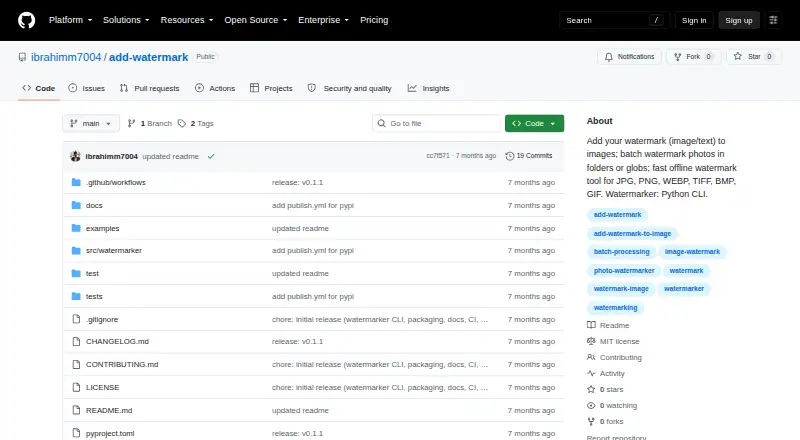
What wmk is
wmk is a free Python command-line tool for applying image or text watermarks to image files. It supports JPG, JPEG, PNG, WEBP, TIFF, BMP, and GIF, and can process folders recursively or take glob patterns for batch jobs. Watermarks can be placed in any corner or at the center, with opacity adjustable from 0 to 100. A dry-run option prints the planned outputs without writing files. By default, folder batches go into a watermarked directory while preserving relative folder structure; existing destination files are not replaced without the overwrite option, and a _watermarked suffix helps avoid collisions. The README describes it as an offline tool that keeps images on the user's machine. Install it with pip, pipx, or from a repository clone; it requires Python 3.10 or newer. The CLI is the primary interface, with an optional Python library interface. The project is MIT-licensed and lists Windows, Linux, and macOS support. GIF processing handles only the first frame. The package metadata links to GitHub Issues for support.
Who it suits
wmk suits desktop users who want to watermark images in repeatable or batch workflows using a command line. It may also suit Python users who want the optional library interface.
What it does well
- Batch processing supports folders and glob patterns.
- Opacity ranges from 0 to 100.
- Dry runs show planned outputs without writing files.
- The README describes offline processing.
What to know first
- Requires Python 3.10 or newer.
- GIF processing handles only the first frame.
- The primary interface is command-line based.
Limits
GIF processing handles only the first frame.
Plans
| Plan | Billed and limits | Price |
|---|---|---|
| add-watermark | MIT-licensed Python CLI; no paid plans listed | Free |
As github.com lists them, read 11 Oct 2026. The maker's own page has the final word.
Getting started
- Install Python 3.10 or newer.
- Install wmk with pip or pipx, or clone its repository.
- Choose image or text watermarking for your files.
- Set a position and opacity from 0 to 100.
- Use a dry run to preview planned outputs, or run the batch job.
Overview
wmk is a free, open-source Python tool for adding text or image watermarks through a command line, with an optional Python library interface. It suits people who can work with command-line tools and want a repeatable way to watermark batches on their own machine. Its format coverage and batch controls are useful; the Python 3.10 requirement and first-frame-only GIF handling narrow its fit.
Key features
Batch jobs can target folders recursively or use glob patterns, making wmk practical for repeatable image-delivery workflows. By default, results go into a watermarked directory while retaining the input folder structure. Existing destination files are protected unless overwrite is enabled; otherwise, wmk uses a “_watermarked” suffix to avoid collisions.
Watermarks can be text or logos, placed in any corner or at the center, with opacity set from 0 to 100. JPG, JPEG, PNG, WEBP, TIFF, BMP, and GIF are supported for input and output. The GIF caveat matters: only the first frame is processed, so this is not a suitable choice when preserving animation is required.
A dry-run option prints planned outputs without writing files, useful for checking a batch before committing it. The README describes processing as offline, keeping images on the user's machine. Installation is through pip, pipx, or a repository clone; the package requires Python 3.10 or newer. The CLI is the primary interface, with a Python library available as an option. A pytest suite and Ruff checks are project trust signals, not a substitute for assessing fit in a particular workflow.
Pricing
add-watermark — free. The MIT-licensed tool has no paid plans listed, so its watermarking features do not sit behind a subscription tier. The license permits use, copying, modification, distribution, sublicensing, and sale subject to its conditions. There is no free trial because the software is free. The trade-off is operational rather than financial: users need Python 3.10 or newer and must be comfortable using a command line.
Platforms
wmk is categorized for Linux, macOS, and Windows desktop use. The package metadata specifically names Windows and Linux as supported platforms. It is a local command-line tool, not a browser-based service.
Who it's for
wmk is a strong fit for photographers, product-image workflows, or other users who need repeatable batch watermarking and are comfortable installing and scripting Python software. Local processing will also appeal to people who prefer images to remain on their machine. Choose another tool if you need a graphical workflow, animated GIF support, or do not meet the Python requirement. Support is routed through the repository's GitHub Issues page.
Pros and cons
- Pros: Recursive folders, glob patterns, and preserved output structure make batch work easier to repeat and organize.
- Pros: Text and logo marks, five placement choices, and adjustable opacity cover core watermarking needs.
- Pros: Offline processing and a dry run offer useful control over image handling and output changes.
- Cons: The command-line-first approach and Python 3.10+ requirement make it a poor fit for users seeking a ready-to-use visual editor.
- Cons: GIF processing handles only the first frame, so animated files will not retain their full sequence.
Alternatives
For a broader platform range and a freemium option, consider Watermarkly: its free batch processing adds a Watermarkly logo, while 1-Year Access costs $19.95 a year and is billed annually without renewal. Terma is another free option across Linux, macOS, self-hosted, web, and Windows, though its stated focus is network services and software development rather than watermarking.
On Apple devices, PictStamp is a free alternative for iOS and macOS. eZy Watermark may suit users seeking watermark templates, 300+ fonts, export to other apps, and high-resolution downloads; its free plan is available, with Premium at $1.99 a month. Watermark.ws offers a free basic tier for one photo at a time, with 1 GB storage, slow processing, and no custom fonts, so it is a less direct match for large batches.
DoWatermark is worth considering for browser-based processing without uploads and saved presets; its free plan allows three images per batch and text or logo marks. Overlay Studio is a free Android, iOS, and web choice with a 25-image batch limit, raised by a supporter code. Watermark Maker targets Android and iOS users who want text and logo marks, tiling, and social export presets; its free tier uses small batches and ads, with a lifetime option at 24.99 USD. For a list of options, see Photo Watermarking Software.
Verdict
Choose wmk if you want free, local, scriptable batch watermarking and are comfortable with Python and the command line. Its practical folder handling, placement controls, and broad still-image format support make it a capable fit for repeatable workflows. Look elsewhere for a graphical interface, animated GIF preservation, or a workflow that does not depend on Python 3.10 or newer.
Verdict
wmk offers batch watermarking, placement controls, and local processing for users comfortable with a command line. Its Python requirement and first-frame-only GIF handling are important limits to check.
Questions
How much does wmk cost?
The listed plan is free. No paid plans are listed.
Which operating systems does it support?
The listed platforms are Linux, macOS, and Windows.
Is wmk open source?
Yes. It is offered under the MIT License, which permits use, copying, modification, distribution, sublicensing, and sale subject to its conditions.
Which image formats does it support?
It supports JPG, JPEG, PNG, WEBP, TIFF, BMP, and GIF for input and output. GIF processing handles only the first frame.
How can I install it?
Install it with pip or pipx, or from a cloned repository. It requires Python 3.10 or newer.
Does wmk offer an API?
API access is listed. The project also provides an optional Python library interface, while the command-line interface is its primary interface.
Facts from wmk's own pages
- Automation
- The CLI is scriptable and the README describes it for repeatable workflows such as product photos and photography delivery. · github.com, 11 Oct 2026
- Batch processing
- It can process folders recursively or accept glob patterns for batch watermarking. · github.com, 11 Oct 2026
- Dry run
- A dry-run option prints planned outputs without writing files. · github.com, 11 Oct 2026
- GIF limitation
- GIF processing handles only the first frame. · github.com, 11 Oct 2026
- Image formats
- It supports JPG, JPEG, PNG, WEBP, TIFF, BMP, and GIF input and output. · github.com, 11 Oct 2026
- Input formats
- The listed input and output formats are JPG, JPEG, PNG, WEBP, TIFF, BMP, and GIF. · github.com, 11 Oct 2026
- Install
- The package can be installed with pip or pipx, or from a repository clone. · github.com, 11 Oct 2026
- Installation
- The package can be installed with pip or pipx, or from a cloned source repository. · github.com, 11 Oct 2026
- Intended audience
- The package metadata classifies the project for desktop end users and multimedia graphics. · github.com, 11 Oct 2026
- License
- The repository provides the software under the MIT License, which permits use, copying, modification, distribution, sublicensing, and sale subject to its conditions. · github.com, 11 Oct 2026
- Local processing
- The README describes the CLI as offline and says images stay on the user's machine. · github.com, 11 Oct 2026
- Output behavior
- By default, batch folder output goes into a watermarked directory and preserves the folder's relative structure. · github.com, 11 Oct 2026
- Overwrite behavior
- Without the overwrite option, existing destination files are not replaced and a _watermarked suffix is used to avoid collisions. · github.com, 11 Oct 2026
- Placement and opacity
- Watermarks can be positioned at the top-left, top-right, bottom-left, bottom-right, or center, with opacity set from 0 to 100. · github.com, 11 Oct 2026
- Privacy
- The README describes wmk as an offline tool and says images stay on the user's machine. · github.com, 11 Oct 2026
- Purpose
- wmk is a Python command-line tool for adding image or text watermarks to images. · github.com, 11 Oct 2026
- Python library
- The project also provides an optional Python library interface, while identifying the CLI as its primary interface. · github.com, 11 Oct 2026
- Python requirement
- The package metadata requires Python 3.10 or newer. · github.com, 11 Oct 2026
- Support channel
- The package metadata links to the repository's GitHub Issues page. · github.com, 11 Oct 2026
- Testing and checks
- The README lists a pytest suite and Ruff lint and formatting checks as project trust signals. · github.com, 11 Oct 2026
Where wmk stands on Freedom251
- Photo Watermarking Software#22 of 33