Freedom251 › Photo Watermarking Software
ToolMole Batch Add Watermark
What ToolMole Batch Add Watermark is
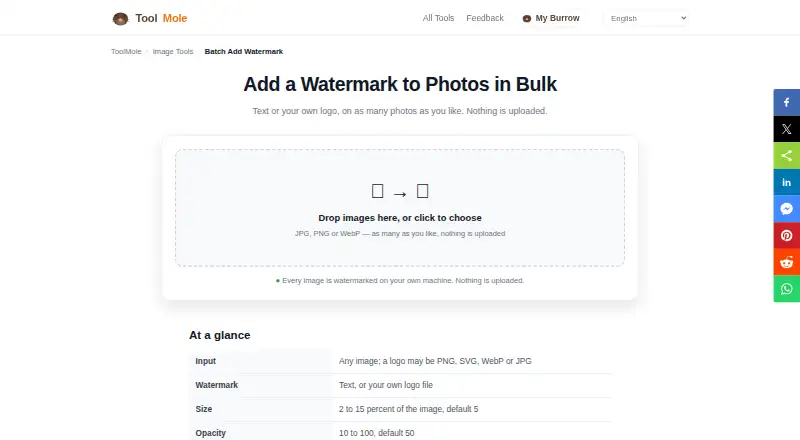
ToolMole Batch Add Watermark is a free web tool for applying text or a user-provided logo watermark to groups of photos. It accepts JPG, PNG, and WebP images; logo files may be PNG, SVG, WebP, or JPG. Users can adjust position, size, opacity, and text color, and add a shadow to text marks. Size is set as a percentage of each image's width, so the watermark scales across photos of different dimensions. A tiled, angled option is available for proofs and previews and is intended to help the mark remain visible after cropping or screenshotting. Processed files retain their format and name, with “-watermarked” added, and can be downloaded individually or as a ZIP. Images are handled in the browser on the user's machine rather than uploaded to a server. After the first visit, the tool works without an internet connection. There is no fixed image-count limit, but images are processed one at a time; a run can be canceled while keeping completed files. PNG output is lossless, while JPG and WebP are re-encoded at high quality and may lose some quality across generations.
Who it suits
This tool suits people who want to watermark batches of photos in a browser, including with their own logo. It may also suit users who need local image processing or offline use after an initial visit.
What it does well
- Free, with no account or sign-up
- Supports text and logo watermarks
- No fixed image-count limit
- Images stay on the user's machine
- PNG output is lossless
What to know first
- Images are processed one at a time
- JPG and WebP output may lose quality
- No ticket system or chatbot for support
Limits
There is no fixed image-count limit, but files are processed one at a time. JPG and WebP output is re-encoded at high quality and may have some generational loss; PNG output is lossless.
Plans
| Plan | Billed and limits | Price |
|---|---|---|
| Free | No account or sign-up · no fixed batch limit · browser processing | Free |
As toolmole.com lists them, read 11 Oct 2026. The maker's own page has the final word.
Getting started
- Visit the ToolMole Batch Add Watermark page in a web browser.
- Add JPG, PNG, or WebP photos to process.
- Choose a text watermark or provide a logo in PNG, SVG, WebP, or JPG format.
- Adjust the mark’s position, size, opacity, and other available controls.
- Download completed images individually or as a ZIP.
Verdict
ToolMole Batch Add Watermark offers adjustable text and logo marks, batch downloads, and browser-based processing. Keep in mind that images are handled sequentially and JPG or WebP files are re-encoded.
Questions
How much does ToolMole Batch Add Watermark cost?
It is free, with a listed price of $0 plan.
Do I need to create an account?
No account or sign-up is required.
Which image formats can I process?
The tool accepts JPG, PNG, and WebP images. Logo files can be PNG, SVG, WebP, or JPG.
Are images uploaded to a server?
No. Images are processed in the browser on your machine.
Can it work offline?
Yes. It works without a connection after the first visit.
How can I get support?
ToolMole says users can email the person who builds the site; its contact page says there is no ticket system or chatbot.
Facts from ToolMole Batch Add Watermark's own pages
- Batch limit
- There is no fixed image-count limit; images are processed one at a time, and users can cancel while keeping completed files. · toolmole.com, 11 Oct 2026
- Batch output
- Processed files retain their original format and name with “-watermarked” added; users can download files individually or as a ZIP. · toolmole.com, 11 Oct 2026
- Input formats
- The tool accepts JPG, PNG, and WebP images; logo files can be PNG, SVG, WebP, or JPG. · toolmole.com, 11 Oct 2026
- Maker
- ToolMole describes itself as a small independent project built and maintained by one developer. · toolmole.com, 11 Oct 2026
- Offline use
- The tool works without a connection after the first visit. · toolmole.com, 11 Oct 2026
- Privacy
- Images are processed in the browser on the user’s machine and are not uploaded to a server. · toolmole.com, 11 Oct 2026
- Purpose
- Adds text or a user-provided logo watermark to batches of photos. · toolmole.com, 11 Oct 2026
- Quality limit
- JPG and WebP files are re-encoded at high quality with some generational loss, while PNG output is lossless. · toolmole.com, 11 Oct 2026
- Relative sizing
- Watermark size is set as a percentage of each image’s width, so it scales across differently sized images. · toolmole.com, 11 Oct 2026
- Support
- Users can email the person who builds the site; the contact page says there is no ticket system or chatbot. · toolmole.com, 11 Oct 2026
- Tiled watermark
- A tiled angled watermark is offered for proofs and previews and is described as helping the mark survive cropping and screenshotting. · toolmole.com, 11 Oct 2026
- Watermark controls
- Users can set position, size, opacity, and text color, and enable a shadow for text watermarks. · toolmole.com, 11 Oct 2026
Where ToolMole Batch Add Watermark stands on Freedom251
- Photo Watermarking Software#20 of 33