Freedom251 › Photo Watermarking Software

Private Marker
What Private Marker is
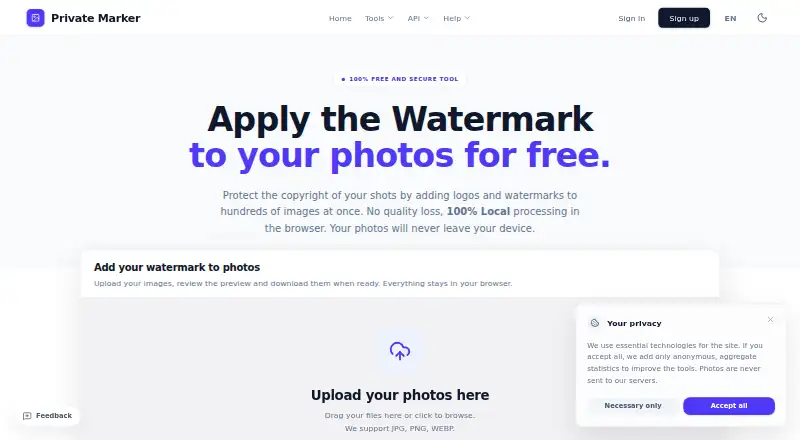
Private Marker is a browser-based tool for watermarking batches of photos and downloading the finished images in a ZIP file. Users can position, resize, rotate, and change watermark opacity with a real-time preview. Its logo tools include AI background removal, smart cropping, and filters such as black and white, inversion, and embossing. The maker says processing happens in the browser and photos are not uploaded to its servers.
The watermark tool supports JPG, PNG, and WEBP, with no file-size or resolution limits listed. Exports can preserve original resolution, with Standard (85%) and Maximum Quality (100%) options. The free plan allows batches of up to 50 watermarked photos without an account or 100 with a free account. Private Marker also provides browser-based metadata removal and image compression or WebP conversion. Metadata removal supports JPG, PNG, WEBP, HEIC, and HEIF and covers common EXIF, XMP, IPTC, GPS, date, and device information. Google sign-in can save a logo and preferred settings. It works in web and mobile browsers.
Who it suits
Private Marker suits photographers, content creators, e-commerce businesses, agencies, and other image publishers who need batch watermarking or browser-based photo tools.
What it does well
- Batch watermarking includes a real-time preview.
- The maker says photos stay in the browser.
- Free accounts can watermark up to 100 photos per batch.
- Metadata removal supports five listed image formats.
What to know first
- Saving a logo and settings requires an account.
- Watermark batches are capped at 50 without an account.
- No API access is listed.
Limits
Watermark batches are limited to 50 images without an account and 100 with a free account. Without an account, metadata removal supports up to 100 photos per desktop batch or 25 per phone batch; saving a logo and settings requires an account.
Plans
| Plan | Billed and limits | Price |
|---|---|---|
| Free | Free; no subscription · Watermark batches up to 50 photos without an account; free account raises batch limit to 100 · metadata removal: up to 100 photos per batch on desktop and 25 on a phone without an account · saved logo and settings require an account | Free |
As privatemarker.com lists them, read 5 Oct 2026. The maker's own page has the final word.
Getting started
- Open https://www.privatemarker.com/ in a web or mobile browser.
- Choose the watermark tool and add JPG, PNG, or WEBP photos.
- Edit watermark placement, size, rotation, and opacity using the preview.
- Download the watermarked batch as a ZIP.
- Sign in with Google to save a logo and preferred settings.
Verdict
Private Marker combines browser-based batch watermarking with metadata removal and image conversion tools. The free plan raises the watermark batch limit from 50 to 100 when a user creates an account.
Questions
How much does Private Marker cost?
The Free plan costs nothing, with no subscription.
Is there a free trial?
No. Private Marker has a free plan and no free trial.
Which platforms does it support?
It runs in web and mobile browsers.
What image formats can I watermark?
The homepage lists JPG, PNG, and WEBP support.
Do I need an account to use it?
Watermarking supports up to 50 photos per batch without an account. A free account raises that limit to 100 and is required to save a logo and preferred settings.
Does Private Marker offer an API?
No, API access is not offered.
Facts from Private Marker's own pages
- Batch limits
- The August 2026 changelog says free watermark batches support up to 50 images and a free account raises the limit to 100. · privatemarker.com, 5 Oct 2026
- Export quality
- The maker says exports can preserve original resolution and offers Standard (85%) and Maximum Quality (100%) options. · privatemarker.com, 5 Oct 2026
- Headquarters
- Spinea, Venice, Italy · privatemarker.com, 28 Sept 2026
- Intended users
- The maker presents the tools for photographers, content creators, e-commerce businesses, agencies, and other image publishers. · privatemarker.com, 5 Oct 2026
- Local processing
- The maker says image processing happens locally in the browser and photos are not uploaded to its servers. · privatemarker.com, 5 Oct 2026
- Logo tools
- The watermark tool includes AI background removal, smart cropping, and filters including black and white, inversion, and embossing. · privatemarker.com, 5 Oct 2026
- Metadata removal
- The metadata tool supports JPG, PNG, WEBP, HEIC, and HEIF and removes common EXIF, XMP, IPTC, GPS, date, and device information. · privatemarker.com, 5 Oct 2026
- Other tools
- Private Marker also offers browser-based photo metadata removal and image compression or WebP conversion. · privatemarker.com, 5 Oct 2026
- Privacy data
- The privacy policy says registration collects a Google account email, name, and public profile picture, and that these details are not sold or shared for commercial purposes. · privatemarker.com, 5 Oct 2026
- Product
- Private Marker is a browser-based tool for adding watermarks to batches of photos and downloading the results in a ZIP file. · privatemarker.com, 5 Oct 2026
- Sign-in
- Google sign-in can save a user's logo and preferred settings; the maker says it uses sign-in to recognize the user next time. · privatemarker.com, 5 Oct 2026
- Usage statistics
- After a successful download or share, the maker collects listed technical usage data and says it does not collect photos, filenames, metadata, GPS, IP addresses, or search queries. · privatemarker.com, 5 Oct 2026
- Watermark editing
- Users can position, resize, rotate, and adjust the opacity of a watermark, with a real-time preview. · privatemarker.com, 5 Oct 2026
- Watermark formats
- The homepage lists JPG, PNG, and WEBP photo support and says there are no file-size or resolution limits. · privatemarker.com, 5 Oct 2026
Where Private Marker stands on Freedom251
- Photo Watermarking Software#16 of 33