Freedom251 › PC Optimization Software
WhaleClean
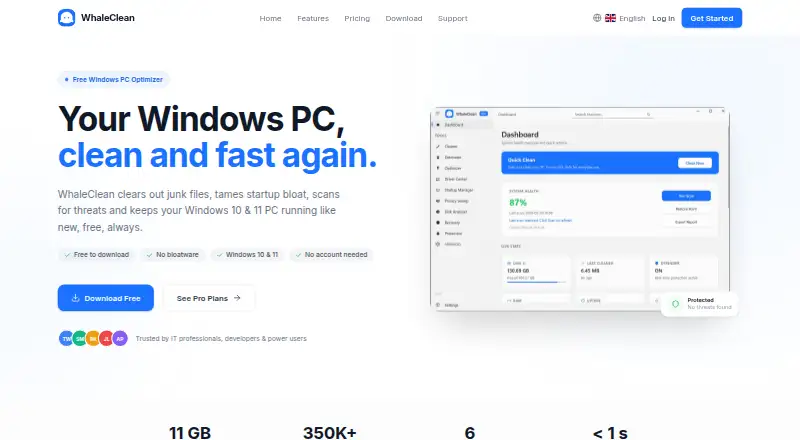
What WhaleClean is
WhaleClean is a Windows PC optimizer for cleaning junk files, managing startup programs, scanning for threats and driver issues, and scheduling maintenance. Its Smart PC Cleaner can remove update caches, temporary files, and log clutter, with cleaning set to a schedule chosen by the user. Scheduled auto-cleaning can run daily, weekly, or monthly. WhaleClean also lists driver updates and a startup manager among its capabilities.
The Free plan provides basic junk cleaning and startup management, with manual scans. Pro adds Deep Clean, Driver Center, Disk Analyser, Duplicate Finder, Privacy Sweep, and Real-time Protection. Its Threat Scanner uses Windows Defender and a database of more than 350,000 hashes. Free costs $0 forever; Pro Monthly costs $4.99 per month, billed monthly. Pro Annual is also named as a plan.
WhaleClean runs on Windows 10 and 11, with 64-bit Windows required. Its free 50 MB installer needs no account and includes required dependencies for offline installation. The maker says it collects only data needed for the application and does not sell or share personal information; it also says it does not use advertising or tracking cookies. Listed security measures include HTTPS/TLS encryption, bcrypt password hashing, and Cloudflare DDoS protection.
Who it suits
WhaleClean suits Windows 10 or 11 users who want junk cleanup and startup management, with the option to add scheduled cleaning and Pro maintenance tools. The Free plan covers basic cleanup and manual scans; Pro is for users who want tools such as Driver Center, Privacy Sweep, or Real-time Protection.
What it does well
- Cleans update caches, temporary files, and log clutter.
- Scheduled auto-cleaning can run daily, weekly, or monthly.
- Free plan includes basic junk cleaning and startup management.
- Pro includes six named additional tools and Real-time Protection.
- Free installer requires no account and supports offline installation.
What to know first
- Free plan allows manual scans only.
- Pro Monthly costs $4.99 per month, billed monthly.
- Windows 10 and 11 64-bit are the listed supported versions.
Limits
The Free plan is limited to basic junk cleaning and startup management, and scans must be run manually. Pro Monthly costs $4.99 per month, billed monthly.
Plans
| Plan | Billed and limits | Price |
|---|---|---|
| Free | $0/forever · Basic junk file cleaner · Startup manager · Manual scans only · Online Support · Windows 10/11 compatible | Free |
| Pro Monthly | $4.99/month · Everything in Free · Deep Clean · Driver Center · Disk Analyser · Duplicate Finder · Privacy Sweep · Real-time Protection · Priority Support | $4.99 a month |
| Pro Annual | — | On request |
As whaleclean.app lists them, read 8 Oct 2026. The maker's own page has the final word.
Getting started
- Open the WhaleClean website.
- Download the 50 MB free installer for Windows 10 or 11 (64-bit).
- Install without creating an account; the installer includes its required dependencies for offline installation.
- Use the Free plan for basic junk cleaning, startup management, and manual scans.
- Choose Pro Monthly for the additional tools and priority support.
Verdict
Choose WhaleClean if you use Windows 10 or 11 and want basic cleanup and startup controls at no charge. Pro is the option for scheduled cleaning and the additional maintenance and protection tools; the listed Pro Monthly price is $4.99 per month, billed monthly.
Questions
Does WhaleClean have a free plan?
Yes. Free costs $0 forever and includes basic junk cleaning, startup management, and manual scans.
How much does WhaleClean Pro cost?
Pro Monthly costs $4.99 per month, billed monthly. Pro Annual is named as a plan.
Which Windows versions does WhaleClean support?
The download page lists Windows 10 and Windows 11, 64-bit.
What does Pro add?
Pro lists Deep Clean, Driver Center, Disk Analyser, Duplicate Finder, Privacy Sweep, and Real-time Protection, along with priority support.
Does installation require an account?
No. The free 50 MB installer is listed as requiring no account and includes required dependencies for offline installation.
What does WhaleClean say about privacy?
The maker says it collects only data needed for the application, does not sell or share personal information, and does not use advertising or tracking cookies.
Facts from WhaleClean's own pages
- Cleaner
- Smart PC Cleaner removes junk files, update caches, temporary files, and log clutter on a schedule the user controls. · whaleclean.app, 8 Oct 2026
- Driver updates
- Yes · whaleclean.app, 21 Sept 2026
- Free plan
- Yes · whaleclean.app, 21 Sept 2026
- Free tier limits
- The Free plan includes basic junk cleaning and startup management, with manual scans only. · whaleclean.app, 8 Oct 2026
- Installation
- The free installer is listed as 50 MB, requires no account, and bundles its required dependencies for offline installation. · whaleclean.app, 8 Oct 2026
- Junk cleanup
- Yes · whaleclean.app, 21 Sept 2026
- Payment and licensing providers
- The privacy policy identifies Stripe for payment processing, KeyAuth for license management and validation, and Cloudflare for DDoS protection and CDN delivery. · whaleclean.app, 8 Oct 2026
- Privacy
- The maker says it collects only data needed for the application, does not sell or share personal information, and does not use advertising or tracking cookies. · whaleclean.app, 8 Oct 2026
- Product
- WhaleClean is a Windows PC optimizer that cleans junk files, manages startup programs, scans for threats and driver issues, and supports scheduled maintenance. · whaleclean.app, 8 Oct 2026
- Pro tools
- The maker lists Deep Clean, Driver Center, Disk Analyser, Duplicate Finder, Privacy Sweep, and Real-time Protection among Pro features. · whaleclean.app, 8 Oct 2026
- Scheduled cleaning
- The changelog says scheduled auto-cleaning can be set to run daily, weekly, or monthly. · whaleclean.app, 8 Oct 2026
- Scheduled maintenance
- Yes · whaleclean.app, 21 Sept 2026
- Security
- The privacy policy lists HTTPS/TLS encryption, bcrypt password hashing, and Cloudflare DDoS protection as security measures. · whaleclean.app, 8 Oct 2026
- Startup manager
- Startup Manager identifies high impact startup programs and lets users disable them. · whaleclean.app, 8 Oct 2026
- Support
- The pricing page lists online support with Free and priority support with Pro; the site provides contact at [email protected]. · whaleclean.app, 8 Oct 2026
- Supported Windows versions
- The download page lists Windows 10 and Windows 11 (64-bit), with 2 GB minimum RAM and 500 MB free disk space. · whaleclean.app, 8 Oct 2026
- Threat scanner
- The Pro Threat Scanner uses Windows Defender and a threat database with more than 350,000 hashes. · whaleclean.app, 8 Oct 2026
- Windows support
- windows 10 and 11 · whaleclean.app, 21 Sept 2026
Where WhaleClean stands on Freedom251
- PC Optimization Software#22 of 97
- PC optimisers#31 of 104