Freedom251 › Digital Waiver Software
WebWaiver
What WebWaiver is
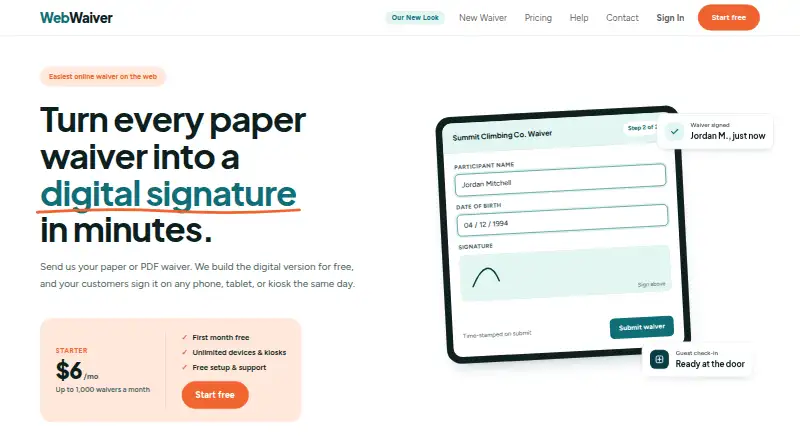
WebWaiver is a web service for replacing paper or PDF waivers with online forms. Businesses can provide an existing waiver, and WebWaiver builds its digital version at no charge. The form builder supports custom wording, text fields, check boxes, dates, headings, and conditional fields. Customers can sign on phones, tablets, computers, or kiosks using digital signature pads; submissions receive timestamps. Forms can be shared through links, website iframes, or QR codes. Signed records are stored online, searchable by name or date, and exportable as PDF or CSV. Optional MailChimp and AutoEmails add-ons cost $2 a month per form, as does Guest Check-In, which tracks waiver submissions and guest entry. Starter costs $6 a month for up to 1,000 waivers, Business costs $10 a month for up to 10,000, Events costs $10, paid once, and Unlimited costs $24 a month. Monthly plans include a free first month, setup, and support.
Who it suits
It suits businesses such as gyms, studios, climbing walls, escape rooms, rentals, ranges, leagues, and spas that need online waiver signing and records.
What it does well
- Converts existing paper or PDF waivers at no charge
- Supports phones, tablets, computers, and kiosks
- Searchable online records with PDF and CSV export
- Monthly plans include setup and support
- Free first month and no contract
What to know first
- No free plan
- Internet connection required
- Offline signing is not available
- No guarantee of service availability
Limits
Starter allows up to 1,000 waivers per month, while Business allows up to 10,000. Events covers one event window and its price varies with event length; offline signing is not available.
Plans
| Plan | Billed and limits | Price |
|---|---|---|
| Business | $10/mo · Up to 10,000 waivers a month · Everything in Starter · Priority support | $10 a month |
| Events | starting at $10 · One event window · Price scales with event length · Digital signature pad included | $10, paid once |
| Unlimited | $24/mo · Unlimited monthly waivers · Everything in Business · Enterprise features | $24 a month |
| Starter | $6/mo · Up to 1,000 waivers a month · Unlimited devices and kiosks · PDF and CSV export · Free setup and support | $6 a month |
As webwaiver.com lists them, read 9 Oct 2026. The maker's own page has the final word.
Getting started
- Open the WebWaiver website
- Send an existing paper or PDF waiver for digital conversion
- Build or adjust the form with fields, wording, and conditions
- Share the form by link, iframe, or QR code
- Choose a monthly plan or Events option; monthly plans include a free first month
Verdict
WebWaiver combines waiver creation, signing, sharing, and record export in a web service. Its plan limits, add-on charges, internet requirement, and stated legal-compliance limitation should be considered before choosing it.
Questions
Is there a free plan?
No. WebWaiver offers a free first month on every monthly plan and a free trial, but no free plan.
What does WebWaiver cost?
Starter is $6 a month, Business is $10 a month, Unlimited is $24 a month, and Events starts at $10, paid once. MailChimp, AutoEmails, and Guest Check-In each cost $2/mo per form.
Which platforms are supported?
WebWaiver is web-based and supports signing on phones, tablets, computers, and kiosks.
Can records be exported?
Yes. Signed waivers can be exported as PDF or CSV.
Does WebWaiver work offline?
No. Its service terms require an internet connection.
Are integrations available?
MailChimp subscribes signers to lists, AutoEmails sends follow-ups, and Guest Check-In manages guest lists and check-ins.
Facts from WebWaiver's own pages
- Compliance limitation
- WebWaiver says it does not warrant that the service meets a customer's specific legal or regulatory requirements and does not provide legal advice. · webwaiver.com, 9 Oct 2026
- Form builder
- The online form builder supports custom wording, text fields, check boxes, dates, headings, and conditional fields. · webwaiver.com, 9 Oct 2026
- Guest check-in
- The Guest Check-In add-on maintains a guest list, tracks who submitted a waiver, and supports checking guests in; it is listed at $2/mo per form. · webwaiver.com, 9 Oct 2026
- Integrations
- The MailChimp add-on subscribes signers to MailChimp lists, and AutoEmails can send a follow-up after submission; each is listed at $2/mo per form. · webwaiver.com, 9 Oct 2026
- Intended customers
- WebWaiver describes its audience as businesses including gyms, studios, climbing walls, escape rooms, rentals, ranges, leagues, and spas. · webwaiver.com, 9 Oct 2026
- Purpose
- WebWaiver turns paper or PDF waivers into online forms that customers can sign on phones, tablets, or kiosks. · webwaiver.com, 9 Oct 2026
- Records and exports
- Signed waivers are stored online, searchable by name or date, and can be exported as PDF or CSV. · webwaiver.com, 9 Oct 2026
- Security and privacy
- The privacy policy says WebWaiver will not disclose customer or user information to third parties except when authorized by the customer or required by law. · webwaiver.com, 9 Oct 2026
- Service limitation
- The terms say an internet connection is required and WebWaiver makes no guarantee of service availability. · webwaiver.com, 9 Oct 2026
- Setup
- Customers can send their existing paper or PDF waiver and WebWaiver will build the digital version for free. · webwaiver.com, 9 Oct 2026
- Sharing
- Forms can be shared by link, embedded on a website using an iframe, or opened from a QR code. · webwaiver.com, 9 Oct 2026
- Signing
- Digital signature pads work on phones, tablets, and computers, and submissions are time-stamped. · webwaiver.com, 9 Oct 2026
- Support
- Every monthly plan includes free setup and support, with priority support included in the Business plan. · webwaiver.com, 9 Oct 2026
- Trial and cancellation
- Every monthly plan starts with a free first month, has no contract, and can be cancelled at any time. · webwaiver.com, 9 Oct 2026
Where WebWaiver stands on Freedom251
- Digital Waiver Software#25 of 25