Web to PDF
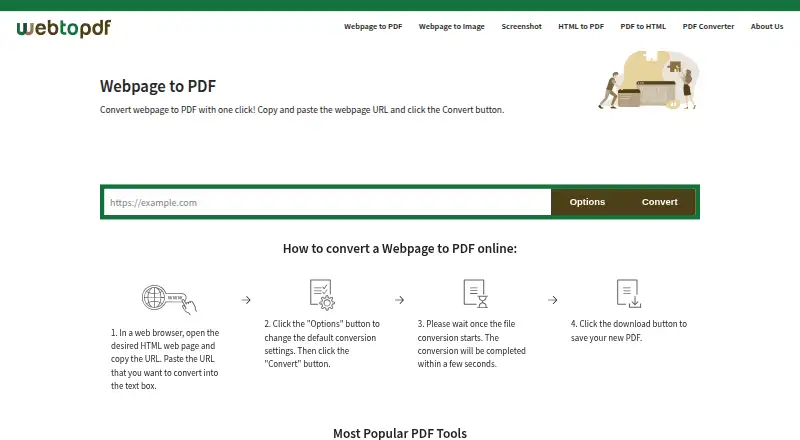
What Web to PDF is
Web to PDF converts webpage URLs into downloadable files for offline sharing or record keeping. It can produce PDF, JPG, PNG, GIF, or TIFF output, and also lists conversions from HTML, HTM, or MHT to PDF and from PDF to HTML. Page controls include size, orientation, margins, and zoom, with custom dimensions available. Users can choose print layout, remove JavaScript or links, add page numbers or bookmarks, select grayscale, and set a wait time. Its rendering engine is based on open-source Chromium and handles page content updated with JavaScript. For PDF files, users can add a text watermark, set a password, or disallow extraction and printing. The service is free and requires no account, email address, or separate license. Its terms allow conversion frequency limits based on usage and server capacity. Files may remain available for download for up to one hour, though users can delete them sooner. Pages requiring a login are not supported. The service says files are machine processed without human review and transferred over HTTPS, but advises against using it for highly sensitive or critical files.
Who it suits
Web to PDF suits people who need downloadable copies of webpages or the listed document conversions without creating an account. Its page-layout and PDF access controls may be useful when output needs specific formatting or restrictions.
What it does well
- No account, email, or license is required.
- Supports custom page dimensions and layout controls.
- Can watermark and password-protect PDF output.
- Files are transferred over HTTPS.
What to know first
- Conversion frequency may be limited by usage and server capacity.
- Login-required webpages are not supported.
- Files may remain available for only up to one hour.
- The service advises against highly sensitive or critical files.
Limits
The Free plan is listed as free and allows unlimited conversions, with no limit on files or pages per file. The terms say conversion frequency may still be limited according to usage and server capacity. Processed files may remain available for up to one hour.
Plans
| Plan | Billed and limits | Price |
|---|---|---|
| Free | Unlimited conversions · no limit on files or pages per file · no account or license required | Free |
As webtopdf.com lists them, read 11 Oct 2026. The maker's own page has the final word.
Getting started
- Open https://webtopdf.com/.
- Enter the webpage URL or choose a listed conversion target.
- Set page layout and conversion options as needed.
- Choose an output format and convert the file.
- Download the result; delete it sooner with the delete button if desired.
Web to PDF turns public webpage URLs and several document formats into downloadable files, with unusually broad control over page layout and output. It suits people who need an occasional, account-free conversion or a configurable capture for sharing and records. Its free, no-license model is compelling, but login-gated pages, possible frequency limits, and brief file retention rule it out for some workflows.
Overview
The service handles URL-to-PDF conversion as well as HTML, HTM, and MHT files to PDF, webpage images in several formats, and PDF-to-HTML. Chromium-based rendering can capture content updated by JavaScript, which makes it more useful for modern pages than a basic static-page capture. No account or email is needed.
The main trade-off is that this is a lightweight web service, not a dependable archive or an authenticated browser session. It cannot convert pages that require a login, and converted files remain available for up to one hour, though users can delete them sooner. The terms also caution against using it for highly sensitive or critical files.
Key features
Control over the result
Users can choose page size, orientation, margins, and zoom, including custom page dimensions. Print layout, optional removal of JavaScript or links, page numbers, grayscale, bookmarks, and a configurable wait time provide further control. That range makes the tool suitable for tailoring a capture to a record or handout rather than accepting a single default rendering.
PDF output can include a configurable text watermark and password protection; users can also disallow extraction and printing. These controls help shape how a shared PDF can be used, but they do not make the service appropriate for sensitive files: processing is machine-only and transfers use HTTPS, while the terms still advise against critical or highly sensitive material.
Formats and constraints
In addition to PDF, webpage output can be JPG, PNG, GIF, or TIFF. The range is useful when a page image is more practical than a document, while PDF-to-HTML adds a reverse conversion path. There is no REST API, so the service is not a fit for teams seeking to automate conversions through an application interface.
Pricing
Free — free. The plan promises unlimited conversions, no limit on files or pages per file, and no account or license requirement. The service is free for individuals, groups, companies, and public institutions, making it accessible for both personal and organizational use without per-seat or license charges.
The headline allowance comes with an important qualification: the FAQ says conversions are free, but the terms permit frequency limits based on usage and server capacity. There is no published paid tier to move to if a workload encounters those limits. The short download window also means the free plan is not a storage option; users should download results promptly.
Platforms
Web to PDF is available through the web. Its supported-platform listing also includes Linux, macOS, and Windows, but the conversion workflow itself is browser-based. The absence of an account requirement lowers setup friction, while the lack of API access keeps it focused on direct use rather than integration.
Who it's for
This is a good choice for individuals or organizations that need occasional, flexible conversions without paying or creating an account. It is especially useful when page dimensions, print layout, image output, or PDF restrictions matter. Choose another workflow for authenticated pages, automated conversion, long-term file availability, or highly sensitive and critical documents.
Pros and cons
- Pro: Free use needs no account or separate license, including for organizations.
- Pro: Layout, rendering, image-output, watermark, and PDF access controls support more tailored results than a bare URL-to-PDF tool.
- Pro: Chromium-based rendering handles JavaScript-updated page content.
- Con: Pages behind a login cannot be converted because the service cannot use the user's authentication session.
- Con: Terms allow frequency limits despite the unlimited-conversion plan wording, leaving heavy use less predictable.
- Con: Files are available for at most one hour, and the service advises against critical or highly sensitive files.
- Con: No REST API is available for automated workflows.
Alternatives
For a wider set of PDF conversion choices, browse PDF Converter Software. Consider HiPDF if you want a freemium option with web access, OCR, and batch processing; its Basic plan is $39.95 a year, billed annually.
HTML2PDF Rocket is worth considering when an API-enabled, credit-based HTML-to-PDF service better suits the workflow: its free plan includes 200 credits per month and a 5 Mb per-PDF limit, with large PDFs consuming credits by network traffic. For an open-source route, MinerU offers free software and API access, while Docling offers a free MIT-licensed library for local installation and offline use after model download.
PDF Agile is another freemium option, with a free tier limited to 2 pages and 5 conversion tasks. Ghostscript is a free alternative. FoxyUtils Online PDF Tools offers a paid Monthly plan at $5.99 a month with unlimited access, no watermark, OCR, Cloud Connect, and no ads. PDFCreator is a freemium option for Windows and self-hosted use.
Verdict
Web to PDF is a strong fit for people who want free, account-free webpage conversion with meaningful control over layout, formats, and PDF access. Its combination of broad options and no license requirement is the clearest reason to choose it. Look elsewhere if you need login-protected capture, reliable high-volume automation, durable file storage, or a service suitable for sensitive records.
Verdict
Web to PDF offers a broad set of page, output, and PDF controls at no charge. Consider its login-page restriction, possible frequency limits, and short file retention when deciding whether it fits a workflow.
Questions
How much does Web to PDF cost?
The Free plan is listed as free. The service says it is free for individuals, groups, companies, and public institutions, with no separate license required.
Do I need to register?
No. Users do not need an account or email address to convert files.
What can it convert?
It converts webpage URLs to PDF, and webpages to JPG, PNG, GIF, or TIFF. Listed targets also include HTML, HTM, or MHT to PDF and PDF to HTML.
Can it convert pages that require a login?
No. It cannot share an authentication session with pages that require a login.
Does Web to PDF have an API?
The FAQ says it does not provide a REST API and describes API services as under development.
How long are converted files available?
Processed files can remain available for download for up to one hour. Users can delete them sooner with the delete button.
Facts from Web to PDF's own pages
- API limitation
- The FAQ says Web to PDF does not provide a REST API and describes API services as under development. · webtopdf.com, 11 Oct 2026
- Conversion options
- Options include print layout, removing JavaScript or links, page numbers, grayscale, bookmarks, and a configurable wait time. · webtopdf.com, 11 Oct 2026
- File retention
- Processed files can remain available for download for up to one hour and can be deleted sooner with the delete button. · webtopdf.com, 11 Oct 2026
- Free use
- The service is free for individuals, groups, companies, and public institutions, with no separate license required. · webtopdf.com, 11 Oct 2026
- Login-page limitation
- The service does not support converting webpages that require a login because it cannot share an authentication session with them. · webtopdf.com, 11 Oct 2026
- No registration
- Users do not need to create an account or provide an email address to convert files. · webtopdf.com, 11 Oct 2026
- Output formats
- The converter supports PDF, JPG, PNG, GIF, and TIFF output. · webtopdf.com, 11 Oct 2026
- Page layout
- Users can set page size, orientation, margins, and zoom, including custom page dimensions. · webtopdf.com, 11 Oct 2026
- Privacy and security
- The site says files are machine processed without human review and transferred over HTTPS; its terms advise against using the service for highly sensitive or critical files. · webtopdf.com, 11 Oct 2026
- Purpose
- Web to PDF converts a webpage URL into a downloadable PDF for offline sharing or record keeping. · webtopdf.com, 11 Oct 2026
- Rendering engine
- The conversion engine is based on the open-source Chromium project and renders JavaScript-updated page content. · webtopdf.com, 11 Oct 2026
- Support
- Support is available by email at [email protected], and the site recommends checking its FAQ for common issues. · webtopdf.com, 11 Oct 2026
- Usage limits
- The FAQ says conversions are free, while the terms say conversion frequency may be limited based on usage and server capacity. · webtopdf.com, 11 Oct 2026
- Watermarks and access controls
- Users can add a configurable text watermark and set a PDF password or disallow extraction and printing. · webtopdf.com, 11 Oct 2026
Where Web to PDF stands on Freedom251
- PDF converters#3 of 22
- PDF Converter Software#12 of 47