Freedom251 › PDF Converter Software

Docling
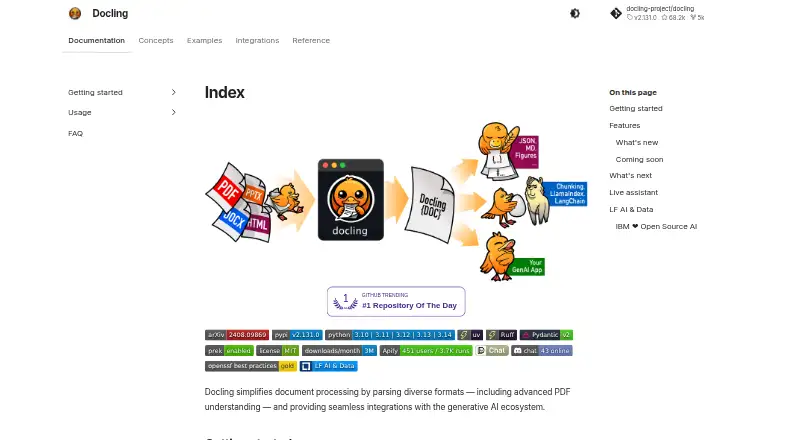
What Docling is
Docling is an open-source project for converting documents into structured data for AI workflows. It accepts formats including PDF, DOCX, PPTX, XLSX, HTML, EPUB, images, audio, video, email, and Apple iWork files. Its PDF processing handles page layout, reading order, tables, code, formulas, and image classification. Output options include Markdown, HTML, WebVTT, DocLang, DocTags, lossless JSON, text, LaTeX, and JSONL chunks. The project supports OCR engines such as EasyOCR, Tesseract, OcrMac, and RapidOCR, and documents integrations with LangChain, LlamaIndex, Haystack, Crew AI, and other AI frameworks and agent tools. Docling can run as a local Python library, a self-operated HTTP service, or through managed and private deployment offerings. Local processing can continue offline after models are downloaded and cached, without uploading documents. Managed service requests have size, rate, and concurrency limits; provider terms determine retention and processing boundaries. The open-source library is free and MIT licensed. A separate IBM watsonx trial is free for 5,000 pages for 30 days. The project is hosted by the LF AI & Data Foundation and was started by IBM Research Zurich’s AI for knowledge team.
Who it suits
Docling suits developers and teams that need to convert varied documents into structured material for AI workflows. Local operation may fit users who want to process documents without uploading them.
What it does well
- Accepts documents, images, audio, and video.
- PDF processing handles layout, tables, and formulas.
- Supports several OCR engines.
- Can run offline after models are cached.
- Free open-source library is MIT licensed.
What to know first
- Managed requests have size, rate, and concurrency limits.
- Provider terms determine managed-service retention and processing boundaries.
- Offline use requires models to be downloaded and cached.
Limits
The open-source library is free, with local installation and offline use after model download. The IBM watsonx trial is free for 30 days and 5,000 pages; managed service requests have size, rate, and concurrency limits.
Plans
| Plan | Billed and limits | Price |
|---|---|---|
| Docling open-source library | MIT licensed · local install · offline after model download | Free |
| Docling for IBM watsonx trial | 30-day trial · free for 5,000 pages | Free |
As docling-project.github.io lists them, read 5 Oct 2026. The maker's own page has the final word.
Getting started
- Visit the Docling project website.
- Choose the local Python library, self-operated HTTP service, or a managed or private deployment.
- For offline local processing, download and cache the required models first.
- Use the free IBM watsonx trial for 30 days and up to 5,000 pages if that offer suits your workflow.
Docling is a document conversion project for turning varied files into structured data for AI workflows. It suits developers and teams building document pipelines, especially those who need local processing; the free library’s breadth is compelling, while managed deployments bring operational and provider constraints.
Overview
Docling’s PDF processing accounts for layout, reading order, tables, code, formulas and image classification, making it more useful than a plain text extractor when downstream systems need document structure. The project is hosted by the LF AI & Data Foundation and began with IBM Research Zurich’s AI for knowledge team.
It can run as a local Python library, a self-operated HTTP service, or through managed and private deployment offerings. Local use can continue offline once models are downloaded and cached, without uploading documents—a strong fit for sensitive material. Managed service requests face size, rate and concurrency limits, and provider terms determine retention and processing boundaries, so teams should evaluate those terms before sending documents to a provider.
Key features
- Broad conversion coverage: Inputs include PDF, DOCX, PPTX, XLSX, HTML, EPUB, audio, video, images, email and Apple iWork files. Outputs span Markdown, HTML, WebVTT, DocLang, DocTags and lossless JSON, with conversion targets also including text, DocLang XML, DocLang archive, JSONL chunks and LaTeX. That range can serve varied downstream pipelines without reducing every source to plain text.
- PDF structure and OCR: Layout, reading order, tables, code, formulas and image classification are handled alongside OCR. Supported engines include EasyOCR, Tesseract, OcrMac and RapidOCR; multiple options give teams a choice of recognition engine within their conversion workflow.
- AI workflow connections: Documented integrations include LangChain, LlamaIndex, Haystack and Crew AI, as well as other frameworks and agent tools. This makes Docling a practical candidate for teams already assembling AI pipelines, rather than a standalone document-reading app.
- Batch and API conversion: Batch conversion and API access support automated workloads. Local library and self-operated HTTP deployment offer control over where processing runs; managed use trades some of that control for provider-run service subject to limits and terms.
- Community support: A community Discord and live assistant provide support channels, though they are not a substitute for a defined enterprise support commitment.
Pricing
Docling’s pricing model is free and open source, with two distinct paths. The Docling open-source library costs free and is MIT licensed; it is installed locally and can work offline after model download. It is the clearest fit for developers who can operate their own conversion pipeline. The trade-off is that setup and operation remain with the user.
The Docling for IBM watsonx trial costs free and runs for 30 days, with up to 5,000 pages free. That capped trial suits teams evaluating a managed route, but its duration and page allowance make it distinct from the uncapped open-source library rather than a permanent hosted tier. Managed service use also carries size, rate and concurrency limits, with retention and processing governed by provider terms.
Platforms
Docling supports Windows, macOS and Linux, as well as API and self-hosted deployment. This mix favors technical users who need to place conversion in their own environment or connect it to software; it is not positioned as a broad consumer-facing web app.
Who it's for
Choose Docling if you are building document ingestion for AI and need structured outputs, broad source formats, OCR, batch processing or local/offline handling. It is particularly relevant where documents should not be uploaded to a third party, provided your team is prepared to install and operate the library. It is less suitable for someone who simply wants a ready-made interface to ask questions about a few PDFs, or for teams that need managed throughput without first checking provider limits and data terms.
Pros and cons
- Pro: The free MIT-licensed library supports local, offline processing after model download, allowing sensitive workflows to keep documents off a provider service.
- Pro: Broad input and export formats, OCR engines and AI framework integrations make it adaptable to structured conversion pipelines.
- Pro: Batch conversion and API access support automation beyond one-file-at-a-time use.
- Con: Local use requires installation and operational responsibility, so it is not the most direct option for users seeking a polished document chat app.
- Con: The watsonx offer is a 30-day trial capped at 5,000 pages, while managed services impose request limits and provider-specific data boundaries.
Alternatives
For a dedicated PDF question-and-answer experience, ChatPDF offers a free plan limited to two documents per day and a Plus plan for unlimited document analysis and advanced features. LightPDF is another option for users who want web access and an AI agent: its free plan is web-only, caps files at 10MB, keeps five cloud files for a year and allows three AI Agent questions per day.
AskYourPDF may fit readers who want a document-analysis service with a paid annual option: Premium is $11.99 a year, billed monthly and billed yearly, with stated limits of 2,500 pages per document, 31MB per upload, 50 documents per day and 1,200 questions per day. For an API-oriented alternative, Veryfi API has a free tier of up to 100 documents per month across document types, with limited storage and email support; its Starter plan is $500 a month with a $500 monthly minimum.
Reducto is worth considering when a metered API model is preferred: its Standard offer includes $150 in free usage, pay-as-you-go thereafter, up to five Studio seats and no page limits. SciSpace is an alternative for readers looking for a research-oriented tool; its Basic plan includes 100 monthly credits, while Advanced is $70 a year, billed annually.
Amazon Textract AnalyzeExpense is a paid API option focused on expense analysis, with a free tier for new AWS customers lasting three months and allowing up to 100 pages per month. Avidnote is a web-based alternative for paper work; its free plan includes 10 papers, 300MB storage, 20,000 AI-generated words, 10 AI Reading uses and two hours of AI Transcription.
Browse AI PDF Tools or PDF Converter Software for more options in those categories.
Verdict
Docling is a strong choice for developers and teams that need structured document conversion inside AI pipelines, especially when local or offline handling matters. Its free, open-source library and broad formats are the main reasons to choose it; look elsewhere if you need a ready-to-use document chat interface or a managed service whose limits and data terms already fit your requirements.
Verdict
Docling offers broad document conversion options, including local processing and AI framework integrations. Consider whether its local setup or managed-service limits best match your workflow.
Questions
Is Docling free?
The open-source library is free and MIT licensed. IBM watsonx also has a free trial for 30 days and 5,000 pages.
What platforms does it support?
Docling is available for Windows, macOS, Linux, API access, and self-hosting.
Can it process documents offline?
Yes. The project says local processing can run offline after its models are downloaded and cached, without uploading documents.
Which formats can it convert?
Supported inputs include PDF, DOCX, PPTX, XLSX, HTML, EPUB, audio, video, images, email, and Apple iWork files. Output options include Markdown, HTML, WebVTT, DocLang, DocTags, JSON, text, LaTeX, and JSONL chunks.
Who started the project?
Docling is hosted as a project in the LF AI & Data Foundation and was started by IBM Research Zurich's AI for knowledge team.
Facts from Docling's own pages
- AI integrations
- Documented integrations include LangChain, LlamaIndex, Haystack, Crew AI, and other AI frameworks and agent tools. · docling-project.github.io, 5 Oct 2026
- Deployment options
- Docling can run as a local Python library, as a self-operated HTTP service, or through managed and private deployment offerings. · docling.ai, 5 Oct 2026
- Exports
- Docling can export to formats including Markdown, HTML, WebVTT, DocLang, DocTags, and lossless JSON. · docling-project.github.io, 5 Oct 2026
- Local privacy
- The project says it can run locally, including offline after its models are downloaded and cached, without uploading documents. · docling.ai, 5 Oct 2026
- Managed service limits
- The deployment page says managed service requests have size, rate, and concurrency limits, and provider terms determine retention and processing boundaries. · docling.ai, 5 Oct 2026
- OCR
- The project supports multiple OCR engines, including EasyOCR, Tesseract, OcrMac, and RapidOCR. · docling-project.github.io, 5 Oct 2026
- PDF understanding
- Its PDF processing handles page layout, reading order, table structure, code, formulas, and image classification. · docling-project.github.io, 5 Oct 2026
- Platforms
- The installation documentation says Docling works on macOS, Linux, and Windows on x86_64 and arm64 architectures. · docling-project.github.io, 5 Oct 2026
- Project home
- Docling is hosted as a project in the LF AI & Data Foundation and was started by IBM Research Zurich's AI for knowledge team. · docling-project.github.io, 5 Oct 2026
- Purpose
- Docling converts documents such as PDFs, Office files, HTML, images, and audio into structured data for AI workflows. · docling.ai, 5 Oct 2026
- Support
- The documentation links to a Docling community Discord and a live assistant for support. · docling-project.github.io, 5 Oct 2026
- Supported inputs
- The documentation lists formats including PDF, DOCX, PPTX, XLSX, HTML, EPUB, audio, video, images, email, and Apple iWork files. · docling-project.github.io, 5 Oct 2026
Where Docling stands on Freedom251
- PDF Converter Software#3 of 47
- AI PDF Tools#6 of 30