Freedom251 › Cross-Browser Testing Software
Web Platform Tests
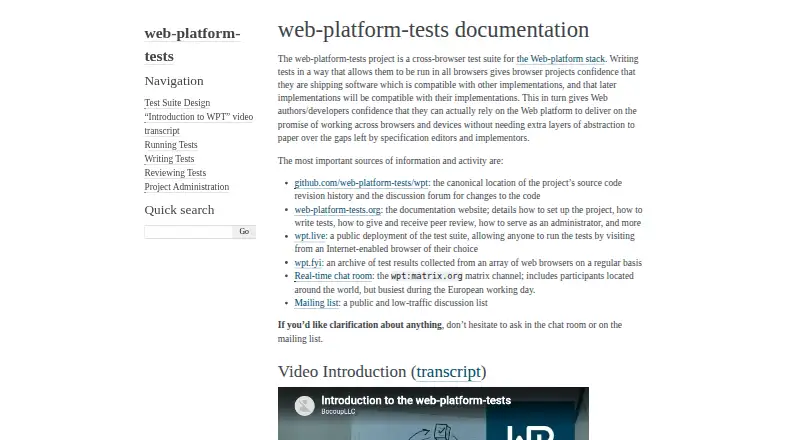
What Web Platform Tests is
Web Platform Tests is a cross-browser test suite that helps browser projects check whether web platform features behave consistently across implementations. Anyone can run tests through the public wpt.live deployment in an internet-enabled browser, or clone the suite for local execution on Linux, macOS, or Windows. Its test types include JavaScript APIs, rendering, crashes, WebDriver, and manual checks. The `wpt` command runs tests in a selected browser and can produce JSON reports and screenshots. It can also save and load expected results for continuous integration and regression tracking. Regularly collected browser results are archived at wpt.fyi. Local setup requires Python 3.9 or higher and configuring test domains in the system hosts file. The project is open source and free, with a listed Free plan at no cost. Running tests in multiple browser processes can make results less deterministic and noisier than single-process execution.
Who it suits
It suits browser projects and contributors checking web-platform compatibility across implementations. Teams needing local runs, automated testing, or archived cross-browser results may find its command-line and reporting options useful.
What it does well
- Public deployment lets anyone run tests in a browser.
- Covers JavaScript, rendering, crash, WebDriver, and manual tests.
- Command-line runs can produce JSON reports and screenshots.
- Expected results support CI and regression tracking.
- Free and open source.
What to know first
- Local setup requires Python 3.9 or higher.
- Test domains must be configured in the hosts file.
- Multiple browser processes can make results less deterministic.
Plans
| Plan | Billed and limits | Price |
|---|---|---|
| Free | Cross-browser test suite and public web runner | Free |
As web-platform-tests.org lists them, read 7 Oct 2026. The maker's own page has the final word.
Getting started
- Open the Web Platform Tests website.
- Run tests in a browser through the public wpt.live deployment, or clone the suite for local execution.
- For local use, install Python 3.9 or higher and configure the test domains in the system hosts file.
- Use the `wpt` command to select a browser and run tests.
- Save or load expected results for continuous integration and regression tracking.
Web Platform Tests is a free, open-source suite for checking web-platform compatibility across browser implementations. It fits browser engineers, standards contributors, and teams that need shared tests they can run publicly or in their own environments. The main attraction is unusually broad coverage without licensing cost; the main caution is the configuration work behind local runs and the extra variability of parallel browser processes.
Overview
The suite covers JavaScript APIs, rendering behavior, crashes, WebDriver interactions, and manual checks. That range makes it suitable for platform-level compatibility work rather than only end-to-end page testing. Anyone with an internet-enabled browser can use the public wpt.live runner, while wpt.fyi preserves regularly collected results from an array of browsers for comparison over time.
Teams can clone the tests for local execution and use the wpt command to target a selected browser. The command produces machine-readable JSON reports and screenshots, so results can feed automated analysis or visual review. It also saves and loads expected results for continuous-integration regression tracking. This is a practical path from exploratory checking to repeatable engineering, provided the team is prepared to maintain the environment.
Key features
- Broad test mix: API, rendering, crash, WebDriver, and manual tests expose different classes of browser defect. The breadth is valuable for browser projects, but may be more than a product team needs for ordinary UI acceptance testing.
- Public execution and history: wpt.live offers immediate browser-based access, and wpt.fyi adds regularly gathered cross-browser results. Together they help investigate compatibility before committing to local infrastructure.
- Local command line: The wpt tool runs a chosen browser and emits JSON reports or screenshots. That suits scripted pipelines and visual checks better than a workflow limited to a web dashboard.
- CI regression workflow: Saving and loading expected results lets continuous integration distinguish known outcomes from regressions. Contributors with repository write access can trigger full project CI runs, with outcomes submitted to wpt.fyi.
- Project collaboration: GitHub handles issues and submissions, while pull requests receive automatic labels and reviewer notifications from directory metadata. Contributions are reviewed publicly and require approval from at least one project collaborator before merging.
- Community support: Questions are directed to a Matrix room and a public, low-traffic mailing list. This is appropriate for an open-source project, though it is less structured than a commercial support desk.
- HTTPS operations: Documentation says certificates for HTTPS-enabled domains are obtained through Let’s Encrypt, supporting secure test endpoints without a separate certificate vendor.
Pricing
Web Platform Tests is free and open source. The Free plan costs nothing and includes the cross-browser test suite and public web runner. There is no paid tier, free-trial period, seat charge, or usage quota described, so the choice is straightforward for individuals and organizations able to operate the tooling themselves. The trade-off is that the project does not package commercial support or managed execution into a subscription.
| Plan | Price | Includes | Best for |
|---|---|---|---|
| Free | free | Cross-browser test suite and public web runner | Browser projects, standards work, and teams comfortable with open-source infrastructure |
Platforms
Runs are supported on Linux, macOS, Windows, self-hosted environments, and the web. Local setup documentation covers all three desktop operating systems. It requires Python 3.9 or higher and configuration of test domains in the system hosts file, so a local installation is not a one-click browser extension. Multiple browser processes can make results less deterministic and add noise compared with the default single-process mode; parallelism should therefore be used deliberately when signal quality matters.
Who it's for
Choose it for browser engines, standards implementers, web-platform contributors, and engineering teams that need a common compatibility corpus, reproducible command-line output, screenshots, and CI regression data. It is also useful when public runs and archived cross-browser results are enough to answer an initial compatibility question.
Look elsewhere if you want a hosted service with managed browser capacity, a polished test authoring interface, or vendor-backed support. Web Platform Tests supplies the test suite and tooling, but local users still own Python, hosts-file, browser-process, and CI maintenance.
Pros and cons
- Pros: No license cost; extensive coverage across APIs, rendering, crashes, WebDriver, and manual cases; public runner and historical results; JSON reports and screenshots; expected-result handling for CI; support for both local and automated testing.
- Cons: Local setup requires Python 3.9+ and hosts-file changes; noisy, less deterministic outcomes are possible with multi-process runs; support is community-based; full CI runs require repository write access.
Alternatives
For a broader buying shortlist, see Cross-Browser Testing Software and Browser Testing Software.
- Katalon TestCloud is the better fit when you want a paid hosted product with a free plan, trial, local record-and-playback, and support across desktop and mobile platforms.
- TestCafe suits teams seeking a free, MIT-licensed test runner with optional paid personal plans and broad operating-system coverage.
- TestMu AI Web Automation (formerly LambdaTest Web Automation) is preferable when a freemium service with mobile and web automation, parallel sessions, and accessibility testing matches your workflow.
- CodeRush is an alternative for developers wanting a free commercial-use extension with the same features across its subscriptions.
- Selenium is a natural choice for open-source browser automation tools and libraries rather than a cross-browser compatibility corpus.
- Aerokube Moon fits teams that need containerized browser sessions with a free allowance or paid per-parallel-session licensing.
- IE NetRenderer is a simple free service focused on Internet Explorer rendering.
- Browserling is better when you want a freemium, hosted browser-access service with screenshots and defined monthly usage tiers.
Verdict
Web Platform Tests is the right choice for browser and standards engineering that needs broad, shared compatibility tests, public evidence, and CI-ready results at no license cost. Choose it when your team can handle local configuration and interpret occasional parallel-run noise. Look to a managed alternative when minimizing infrastructure ownership and obtaining product-style support matters more than an open test corpus.
Verdict
Web Platform Tests offers public and local routes for checking browser compatibility, plus command-line reporting and CI support. Local setup has specific requirements, and multi-process runs can add noise.
Questions
Is Web Platform Tests free?
Yes. Its pricing model is free, and the Free plan is listed as free.
Can I run tests without installing the suite?
Yes. Anyone can run tests through the public wpt.live deployment in an internet-enabled browser.
Which platforms does it support?
The listed platforms are Linux, macOS, self-hosted, web, and Windows. Local setup documentation covers Windows, macOS, and Linux.
What does local setup require?
It requires Python 3.9 or higher and configuring test domains in the system hosts file.
Can it be used in continuous integration?
Yes. The command-line interface can save and load expected results for continuous integration and regression tracking.
Where can I ask questions about the project?
The project directs users to its Matrix chat room and public low-traffic mailing list.
Facts from Web Platform Tests's own pages
- CI integration
- The command-line interface supports saving and loading expected test results for continuous integration and regression tracking. · web-platform-tests.org, 7 Oct 2026
- CI runs
- Contributors with repository write access can trigger full runs in the project’s CI systems, with results submitted to wpt.fyi. · web-platform-tests.org, 7 Oct 2026
- Command line
- The wpt command can run tests in a chosen browser and supports machine-readable JSON reports and screenshots. · web-platform-tests.org, 7 Oct 2026
- Execution limitation
- Running tests in multiple browser processes can make results less deterministic and introduce more noise than the default single-process mode. · web-platform-tests.org, 7 Oct 2026
- Integrations
- GitHub is used for issue tracking and test submissions, and pull requests receive automatic labels and reviewer notifications based on directory metadata. · web-platform-tests.org, 7 Oct 2026
- Local execution
- Tests can be cloned and run locally, and the project documents Windows, macOS, and Linux setup. · web-platform-tests.org, 7 Oct 2026
- Public runner
- Anyone can run the tests by visiting the public deployment, wpt.live, in an internet-enabled browser. · web-platform-tests.org, 7 Oct 2026
- Purpose
- Web Platform Tests is a cross-browser test suite for the Web platform, intended to help browser projects check compatibility across implementations. · web-platform-tests.org, 7 Oct 2026
- Requirements
- Local setup requires Python 3.9 or higher and configuration of test domains in the system hosts file. · web-platform-tests.org, 7 Oct 2026
- Review policy
- Test contributions are reviewed publicly, and each pull request needs approval from at least one project collaborator before merging. · web-platform-tests.org, 7 Oct 2026
- Security
- The project documentation says SSL certificates for HTTPS-enabled domains are obtained through Let’s Encrypt. · web-platform-tests.org, 7 Oct 2026
- Support
- The project directs users to its Matrix chat room and public low-traffic mailing list for questions. · web-platform-tests.org, 7 Oct 2026
- Test archive
- wpt.fyi archives test results collected regularly from an array of web browsers. · web-platform-tests.org, 7 Oct 2026
- Test types
- The suite includes JavaScript API tests, rendering tests, crash tests, WebDriver tests, and manual tests. · web-platform-tests.org, 7 Oct 2026
Where Web Platform Tests stands on Freedom251
- Cross-Browser Testing Software#10 of 25
- Browser Testing Software#18 of 34