Freedom251 › Browser Testing Software

Selenium
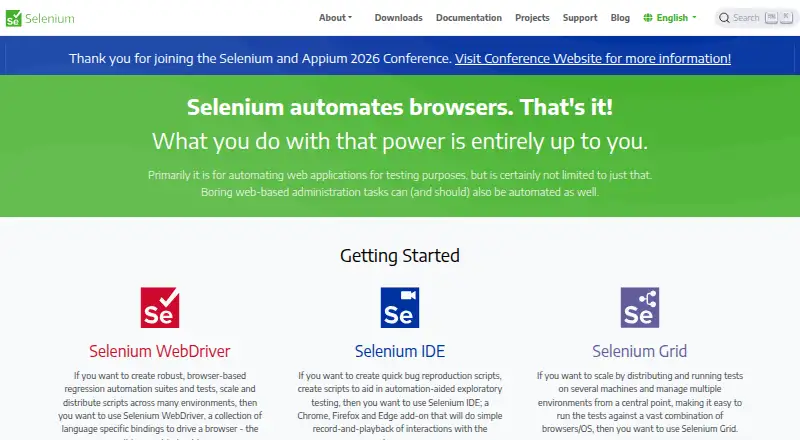
What Selenium is
Selenium is a free suite of tools for automating web browsers, primarily to test web applications. WebDriver provides language bindings for driving browsers locally or remotely and is a W3C Recommendation. The project supports .NET/C#, Ruby, Java, Python and JavaScript. Selenium IDE is a browser add-on that records and replays interactions in Chrome, Firefox and Edge. Selenium Grid distributes tests across machines and combinations of browsers and operating systems, with Standalone, Hub and Node, and Distributed configurations. Selenium Manager can discover, download and cache browser releases and drivers. Documentation lists browser-specific functionality for Chrome, Edge, Firefox, Internet Explorer and Safari, and Grid guidance gives GitHub Actions and Jenkins as CI/CD examples. Grid has no authentication by default, and the project advises protecting it from external access and placing it behind a secure network. The project dates to 2004, when Jason Huggins built its initial Core mode at ThoughtWorks in Chicago. Selenium states that the latest Opera driver functionality is unsupported.
Who it suits
Selenium suits developers and teams automating web application tests across browsers, languages or machines. It also fits people who want a free browser add-on to record and replay interactions.
What it does well
- Free browser automation suite
- WebDriver supports local and remote browsers
- Five language binding options
- Grid distributes tests across machines
- IDE supports recording in Chrome, Firefox and Edge
What to know first
- Grid has no authentication by default
- Latest Opera driver functionality is unsupported
Plans
| Plan | Billed and limits | Price |
|---|---|---|
| Selenium | Open source browser automation tools and libraries | Free |
As selenium.dev lists them, read 2 Oct 2026. The maker's own page has the final word.
Getting started
- Open selenium.dev and choose the Selenium tools for your workflow.
- Select a supported language binding for WebDriver, or use Selenium IDE in Chrome, Firefox, or Edge.
- Use Selenium Manager to discover, download, and cache browser releases and drivers.
- For distributed tests, configure Grid as Standalone, Hub and Node, or Distributed.
- Keep Grid behind a secure network and restrict external access.
- Set up Grid with a CI/CD tool such as GitHub Actions or Jenkins, if needed.
Overview
Selenium is a free suite for automating browsers, best suited to developers and test teams prepared to write and maintain code. Its combination of WebDriver, a record-and-playback IDE, and Grid supports flexible browser testing; teams seeking a managed service or built-in Grid authentication should look elsewhere.
The project began in 2004 at ThoughtWorks in Chicago. Its main strength is breadth: WebDriver can control browsers locally or remotely, while Grid distributes runs across machines and browser and operating-system combinations. That flexibility puts deployment and security responsibilities on the team.
Compare it with Browser Automation Tools, Cross-Browser Testing Software, Browser Testing Software, End-to-End Testing Software, Functional Testing Software, and GUI Testing Software.
Key features
WebDriver and browser coverage
WebDriver is a W3C Recommendation with bindings for .NET/C#, Ruby, Java, Python, and JavaScript. It can drive browsers on the same machine or remotely, making it a practical foundation for teams already working in those languages. Documentation covers browser-specific functionality for Chrome, Edge, Firefox, Internet Explorer, and Safari; Selenium does not support the latest Opera driver functionality, whose driver is officially unsupported.
Selenium Manager can discover, download, and cache browser releases and drivers. That eases driver setup, though it does not change the need to author and maintain test code.
IDE and distributed execution
Selenium IDE records and replays browser interactions as an add-on for Chrome, Firefox, and Edge. It offers a less code-centered way to capture interactions, but its supported browser set is narrower than the browser coverage documented for WebDriver.
Grid runs tests across machines and browser and operating-system combinations. Teams can choose Standalone, Hub and Node, or Distributed configurations, and deployment resources include Docker and Kubernetes. The Grid guide names GitHub Actions and Jenkins as CI/CD examples. This makes Selenium adaptable to existing infrastructure, but the team must configure and operate that infrastructure.
Grid has no authentication by default. The project warns that an exposed Grid can provide access to infrastructure, internal apps and files, or custom binary execution; it should be kept behind a secure network and protected from external access with appropriate firewall permissions.
Pricing
Selenium is open-source browser automation software with a free plan at free. The plan includes browser automation tools and libraries, code-based test authoring, cross-browser testing, a self-hosted runner, and mobile web testing. It suits teams that can supply their own code, execution environment, and operational support; there is no paid tier described to trade cost for a hosted runner or managed service.
Platforms
Selenium supports Linux, macOS, Windows, web, and self-hosted use. The self-hosted option fits teams that need to run browser automation in their own environment, while Grid can distribute tests across machines. The project also provides Docker and Kubernetes deployment resources.
Who it's for
Selenium is a strong fit for engineering teams that want browser automation in established programming languages and need local or remote control, cross-browser coverage, or distributed execution. Its free price and self-hosted approach make it suitable for teams able to maintain test code and secure their own Grid deployment.
It is a weaker fit for teams that want a turnkey hosted testing service, require native Grid authentication by default, or depend on the latest Opera driver functionality. The record-and-playback IDE may help capture interactions, but Selenium's core test authoring model is code.
Pros and cons
Pros
- Multiple language bindings: WebDriver supports .NET/C#, Ruby, Java, Python, and JavaScript, letting teams build around those ecosystems.
- Local, remote, and distributed runs: WebDriver and Grid cover browser control on one machine as well as execution distributed across machines and browser/OS combinations.
- Free and self-hosted: The open-source tools have no software charge, and teams can run them in their own environments.
- Driver setup support: Selenium Manager can find, download, and cache browser releases and drivers.
Cons
- Grid needs deliberate protection: It has no authentication by default, and external exposure can put infrastructure and internal resources at risk.
- Code is central: Test authoring is code-based, so teams seeking a fully visual testing workflow may find it a poor fit.
- Opera limitation: The latest Opera driver functionality is unsupported.
- Operational burden: Grid configurations and self-hosted execution give teams control but also leave deployment and security work to them.
Alternatives
Choose TestCafe if you want another free, open-source test runner and need its broader listed platform coverage, including Android and iOS; its framework plan is free.
CloudQA is worth considering if a freemium option with local execution and API tests suits your workflow: its free Kickstart plan includes unlimited API tests, seven days of test history, and Chrome.
Choose DiffiCat for desktop use without usage limits or browser comparison and page-discovery quotas; its free plan caps those browser activities.
Percy is an alternative to compare for paid screenshot-based plans, including Desktop at $199 a month billed annually with 10,000 screenshots per month.
Web Platform Tests is a free cross-browser test suite with a public web runner, a better match when that is the specific need.
Browsersync is another free, open-source option for readers comparing browser-related tools.
Galen Framework is a free option to consider if its Apache-licensed framework and Java 1.8-or-greater requirement fit your environment.
Happo may suit teams focused on visual and accessibility testing; its free plan includes 5,000 snapshots per month, Chrome, and no time limit or credit card requirement.
Verdict
Choose Selenium if your team wants free, code-driven browser automation across familiar languages and can run and secure its own infrastructure. WebDriver's local and remote control plus Grid's distributed execution are the central reasons to pick it. Look elsewhere if you need a hosted, low-operations service, default Grid authentication, or current Opera driver support.
Verdict
Selenium offers browser automation through WebDriver, IDE and Grid, with no listed price. Anyone deploying Grid should account for its default lack of authentication and restrict external access.
Questions
How much does Selenium cost?
Selenium is free. Its listed plan is open source browser automation tools and libraries.
Which programming languages does Selenium support?
The main project supports client bindings for .NET/C#, Ruby, Java, Python, and JavaScript.
Which browsers are covered?
The documentation lists browser-specific functionality for Chrome, Edge, Firefox, Internet Explorer, and Safari. Selenium IDE supports Chrome, Firefox, and Edge.
Can Selenium run tests across machines?
Yes. Selenium Grid distributes tests across machines and browser and operating system combinations. It offers Standalone, Hub and Node, and Distributed configurations.
Does Grid include authentication by default?
No. Selenium advises placing Grid behind a secure network and restricting external access, and documents ways to secure it.
Who makes Selenium, and when did it begin?
Selenium began in 2004 at ThoughtWorks in Chicago, where Jason Huggins built its initial Core mode. The project is a member of the Software Freedom Conservancy.
Facts from Selenium's own pages
- Browser downloads
- Since Selenium Manager 4.11, Chrome, Firefox and Edge browsers can also be downloaded and cached automatically when absent. · selenium.dev, 15 Oct 2026
- Browsers
- The documentation lists browser-specific functionality for Chrome, Edge, Firefox, Internet Explorer, and Safari. · selenium.dev, 2 Oct 2026
- Browser support
- Official documentation covers Chrome, Edge, Firefox, Internet Explorer and Safari browser capabilities. · selenium.dev, 15 Oct 2026
- Chrome extension status
- The official downloads page says the previous Selenium IDE version 3 extension is no longer maintained or available in the Chrome Web Store, though Firefox and Edge installations remain available. · selenium.dev, 15 Oct 2026
- CI integrations
- The Grid guide names GitHub Actions and Jenkins as examples of CI/CD tools where Grid can be set up. · selenium.dev, 2 Oct 2026
- Company legal name
- Selenium sponsorship instructions identify Software Freedom Conservancy, Inc. as the payee and provide a Brooklyn, New York address. · selenium.dev, 15 Oct 2026
- Deployment
- Grid can run in Standalone, Hub and Node, or Distributed configurations; the downloads page also links to Docker and Kubernetes deployment resources. · selenium.dev, 2 Oct 2026
- Documentation depth
- The documentation includes getting started guides, driver sessions, browser support, waits, elements, interactions, BiDi, Grid and troubleshooting. · selenium.dev, 15 Oct 2026
- Documentation maintenance
- Selenium says its documentation is maintained entirely by volunteers and accepts issue reports and contributions through GitHub and Slack. · selenium.dev, 15 Oct 2026
- Driver management
- Selenium Manager can discover, download, and cache browser releases and drivers for Selenium. · selenium.dev, 2 Oct 2026
- Firefox extension users
- The Selenium IDE Firefox add-on page reports 30,968 users and version 3.17.4. · addons.mozilla.org, 15 Oct 2026
- Founded
- 2004 · selenium.dev, 28 Sept 2026
- Governance
- A Project Leadership Committee connects Selenium with the Software Freedom Conservancy and oversees continuity, legal matters and project spending. · selenium.dev, 15 Oct 2026
- Grid
- Selenium Grid runs WebDriver tests on different machines, browsers and operating systems, including parallel execution. · selenium.dev, 15 Oct 2026
- Grid authentication
- The Selenium project says Grid has no authentication by default and advises placing it behind a secure network; it documents ways to secure it. · selenium.dev, 2 Oct 2026
- Grid deployment
- Official downloads link Docker resources for popular browsers and a Helm chart for Kubernetes deployment. · selenium.dev, 15 Oct 2026
- Grid prerequisites
- The Grid quick start requires Java 11 or newer, installed browsers and drivers, and a Selenium Server jar. · selenium.dev, 15 Oct 2026
- IDE
- Selenium IDE records, edits and replays browser interactions and is available as a standalone Windows, macOS and Linux application. · selenium.dev, 15 Oct 2026
- JavaScript API
- The JavaScript binding installs with npm, requires Node.js 22 or newer, supports remote URLs and is Apache 2.0 licensed. · selenium.dev, 15 Oct 2026
- Languages
- The main project supports client bindings for .NET/C#, Ruby, Java, Python, and JavaScript. · selenium.dev, 2 Oct 2026
- License
- Selenium code and documentation are released under the Apache License 2.0 with Software Freedom Conservancy as copyright holder. · selenium.dev, 15 Oct 2026
- Limit: complex automation
- Capterra reviewers say Selenium IDE is easy for basic recording but lacks scripting flexibility and becomes difficult to maintain for complex, dynamic or large suites. · capterra.com, 15 Oct 2026
- Limit: no built-in test framework
- The project explicitly states that Selenium itself does not provide a testing framework, so framework selection and integration are left to users. · selenium.dev, 15 Oct 2026
- Limit: setup complexity
- TrustRadius reviewers describe a learning curve for people unfamiliar with HTML, VBA or scripting and note that Selenium is code-based without a GUI. · trustradius.com, 15 Oct 2026
Where Selenium stands on Freedom251
- Browser Testing Software#1 of 34
- Cross-Browser Testing Software#1 of 25
- Functional Testing Software#2 of 38
- GUI Testing Software#2 of 34
- Testing And Qa#2 of 33
- Software Testing Tools#2 of 33
- Browser Automation Tools#4 of 63
- End-to-End Testing Software#2 of 29
- Automated Testing#3 of 34
- Regression Testing Software#3 of 29
- Testing Automation Software#3 of 26
- Developer Tools#4 of 33