Freedom251 › Cross-Browser Testing Software
Aerokube Moon
What Aerokube Moon is
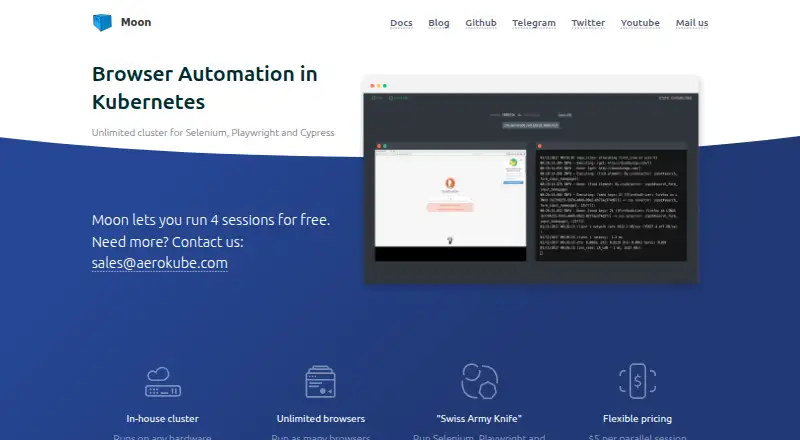
Aerokube Moon runs browser automation sessions for Selenium, Cypress, Playwright, and Puppeteer within a customer-managed Kubernetes or OpenShift cluster. The cluster determines how many browsers can run, while the license sets the concurrent-session limit. Without a license key, Moon allows up to four parallel browser sessions for unlimited use. A paid license costs $5 a month for each parallel session, so the total scales with the number of concurrent sessions. Aerokube recommends installing Moon with its Helm chart. The interface can list and filter running sessions, show browser screens, and start sessions for manual testing. Optional features include session video recording, mobile emulation, clipboard access, file transfer, and browser developer tools. Moon can capture network activity in HAR format and upload it to S3 when S3 is configured. It also exposes Prometheus metrics, including active sessions and the session limit. Moon 2.x has no built-in authentication by default; documented approaches include ingress authentication or sidecars, including an OpenID Connect sidecar.
Who it suits
Moon suits teams that run browser automation inside their own Kubernetes or OpenShift environment and need to set concurrent session capacity. It also supports manual browser sessions and session diagnostics.
What it does well
- Supports Selenium, Cypress, Playwright, and Puppeteer
- Free use allows up to four parallel sessions
- Session interface can display browser screens
- Exposes Prometheus metrics
What to know first
- Paid license costs $5 per parallel session monthly
- S3 configuration is required for HAR uploads
- Moon 2.x has no built-in authentication by default
Limits
Without a license key, Moon permits up to four parallel browser sessions for unlimited use. The paid license costs $5 a month for each parallel session, and its price scales with concurrent sessions.
Plans
| Plan | Billed and limits | Price |
|---|---|---|
| Free | 0–4 parallel browser sessions · unlimited use without a license key | Free |
| Paid license | $5 per parallel session per month · Any desired number of parallel sessions; price scales with concurrent sessions | $5 a month |
As aerokube.com lists them, read 7 Oct 2026. The maker's own page has the final word.
Getting started
- Open the Aerokube Moon website.
- Prepare a customer-managed Kubernetes or OpenShift cluster.
- Install Moon in the cluster; Aerokube recommends its Helm chart.
- Use the no-license option for up to four parallel sessions, or obtain a paid license priced per parallel session.
- Configure authentication for Moon 2.x using ingress authentication or a sidecar if needed.
Aerokube Moon is a browser-automation grid deployed in a Kubernetes or OpenShift cluster that your team operates. It is aimed at organisations with that infrastructure and established Selenium, Cypress, Playwright or Puppeteer suites. The main attraction is session capacity that can grow with the cluster; the cost and operational burden grow with it.
Overview
Moon runs browser sessions inside a customer-managed Kubernetes or OpenShift environment, with Aerokube recommending installation through its Helm chart. The cluster determines the available browser capacity, while the licence sets the maximum number of concurrent sessions. This is a sensible model for platform teams that already manage clusters and want control over where test browsers run, but it is not a hosted grid that removes deployment responsibilities.
Support for Selenium, Cypress, Playwright and Puppeteer covers the main browser-automation stacks. Selenium integration follows the W3C WebDriver specification and supports standard Selenium capabilities and features, making Moon a practical fit for existing WebDriver-based suites.
Key features
The browser-session interface can list and filter active sessions, show their screens and start sessions for manual testing. That combination is useful when an automated run needs visual inspection or a developer wants to reproduce a failure interactively.
Optional video recording, mobile emulation, clipboard access, file transfer and browser developer tools add concrete debugging options. Moon can also capture session network activity as HAR files and upload them to S3, provided S3 is configured. These facilities help diagnose test failures, although Moon does not offer visual-comparison testing.
Operations teams get built-in Prometheus metrics, including running-session counts and the licence session limit. Moon can use a private container-image registry, and its documentation covers TLS for the endpoint and trusted certificate authorities for browser sessions. Authentication is not enabled by default in Moon 2.x, so production deployments need ingress authentication or a sidecar such as its OpenID Connect option.
Pricing
| Plan | Price | What you get |
|---|---|---|
| Free | free | Up to four parallel browser sessions, with unlimited use and no licence key |
| Paid license | $5 a month | $5 per parallel session per month; any desired number of parallel sessions |
The free tier is useful for a small team, a proof of concept or low-volume automation, but four simultaneous sessions is a hard ceiling. Its unlimited duration avoids a short trial deadline, yet it cannot serve a busy regression queue. Paid licensing starts at $5 per parallel session each month and scales directly with the concurrency you reserve, so it is economical when you can forecast demand and more expensive as parallelism expands. The paid plan is the appropriate choice for teams whose cluster can support more than four browsers or whose test pipelines need predictable concurrency.
Platforms
Moon is delivered as a self-hosted service for Linux-based infrastructure, with API and web access. It supports browser automation but not real-device testing, so teams needing physical Android or iOS hardware must use another product alongside it.
Who it's for
Choose Moon if your organisation already runs Kubernetes or OpenShift, wants browser sessions inside that environment and values control over scaling, certificates, registries and monitoring. It also suits teams maintaining Selenium-compatible suites that need manual session inspection and network or video evidence.
Look elsewhere if you want a managed service, physical-device coverage, visual comparison or authentication that is secure by default. Moon's cluster operations and per-session billing require more infrastructure ownership than a purely hosted testing platform.
Pros and cons
Pros
- Concurrency can expand with cluster resources, subject to the licensed session limit.
- Works with four major automation frameworks, including standards-based Selenium support.
- Session screens, manual launches, recordings, HAR capture and developer tools aid troubleshooting.
- Free use supports up to four parallel sessions for an unlimited period.
- Prometheus metrics, private-registry support and TLS configuration fit controlled environments.
Cons
- You must operate a Kubernetes or OpenShift cluster and install Moon yourself.
- Paid cost rises with every additional parallel session.
- Moon 2.x has no built-in authentication by default, requiring ingress or sidecar protection.
- There is no real-device testing or visual-comparison capability.
Alternatives
Katalon TestCloud is the better choice when you want a paid platform with a free plan, free trial and support for Android, iOS, desktop and web environments.
TestCafe fits readers seeking a free, MIT-licensed test runner rather than a Kubernetes browser grid.
TestMu AI Web Automation (formerly LambdaTest Web Automation) is preferable when a freemium service with web and mobile automation, including a free quota, matches your needs.
Web Platform Tests is a free cross-browser test suite with a public web runner.
CodeRush is a free-for-commercial-use development extension, not a direct replacement for Moon's browser grid.
Selenium is the free, open-source option when you want the automation tools and libraries without Moon's cluster layer.
IE NetRenderer is a free web service for a narrower browser-rendering use case.
Browserling suits users wanting a freemium browser-access service with annual Starter billing rather than self-hosted sessions.
Verdict
Moon is a strong choice for infrastructure-capable teams that need scalable, standards-compatible browser automation in their own Kubernetes or OpenShift cluster. Its free four-session tier lowers the barrier, and its session diagnostics are practical. Choose another service if you need hosted operations, built-in authentication, real devices or visual comparison, or if per-session licensing will make high concurrency costly.
Verdict
Moon provides browser automation within a customer-managed cluster, with capacity tied to cluster resources and license limits. The free tier is capped at four parallel sessions, while paid licensing scales by session.
Questions
Is Aerokube Moon free?
Yes. Without a license key, it allows up to four parallel browser sessions for unlimited use.
How much does a paid license cost?
The listed price is $5 a month for each parallel session. The total scales with the number of concurrent sessions.
Where does Moon run?
Moon is installed into a customer-managed Kubernetes or OpenShift cluster. Aerokube recommends installation with its Helm chart.
Which automation tools does it support?
Moon supports Selenium, Cypress, Playwright, and Puppeteer. Selenium compatibility follows the W3C WebDriver specification.
Does Moon include built-in authentication?
Moon 2.x has no built-in authentication by default. Its documentation describes ingress authentication and sidecars, including an OpenID Connect sidecar.
What support is available?
The Moon Assistance Program offers a dedicated support channel, direct access to Moon developers for complex issues, and evaluation license keys until production.
Facts from Aerokube Moon's own pages
- Authentication
- Moon 2.x has no built-in authentication by default; the documentation describes using ingress authentication or sidecars, including its OpenID Connect sidecar. · aerokube.com, 7 Oct 2026
- Browser session UI
- The interface can list and filter running sessions, show browser screens, and launch sessions for manual testing. · aerokube.com, 7 Oct 2026
- Deployment
- Moon is installed into a customer-managed Kubernetes or OpenShift cluster, and Aerokube recommends installation with its Helm chart. · aerokube.com, 7 Oct 2026
- Headquarters
- Tallinn, Estonia · aerokube.com, 28 Sept 2026
- Monitoring
- Moon exposes built-in Prometheus metrics, including running browser sessions and the session limit. · aerokube.com, 7 Oct 2026
- Network capture
- Moon can capture browser session network activity in HAR format and upload it to S3 storage; the documentation says this requires S3 configuration. · aerokube.com, 7 Oct 2026
- Notable limit
- Without a license key, Moon allows at most four parallel browser sessions for an unlimited period. · aerokube.com, 7 Oct 2026
- Private registry
- Moon can be configured to use a private container image registry. · aerokube.com, 7 Oct 2026
- Purpose
- Moon runs browser automation sessions on Kubernetes or OpenShift for Selenium, Cypress, Playwright, and Puppeteer. · aerokube.com, 7 Oct 2026
- Scaling
- Moon can run as many browsers as the cluster allows, subject to the concurrent-session limit of the license. · aerokube.com, 7 Oct 2026
- Selenium compatibility
- Moon is compatible with the W3C WebDriver specification and supports standard Selenium capabilities and features. · aerokube.com, 7 Oct 2026
- Session features
- Moon supports optional session video recording, mobile emulation, clipboard access, file transfer, and browser developer tools. · aerokube.com, 7 Oct 2026
- Support
- The Moon Assistance Program offers a dedicated support channel, direct access to Moon developers for complex issues, and evaluation license keys until production. · aerokube.com, 7 Oct 2026
- TLS and certificates
- The documentation describes configuring TLS for the Moon endpoint and adding trusted certificate authorities for browser sessions. · aerokube.com, 7 Oct 2026
Where Aerokube Moon stands on Freedom251
- Cross-Browser Testing Software#3 of 25