Freedom251 › Cross-Browser Testing Software
IE NetRenderer
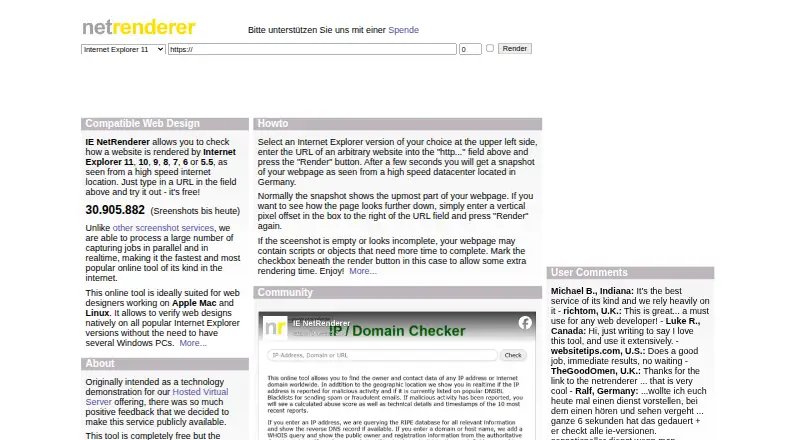
What IE NetRenderer is
IE NetRenderer checks how websites appear in Internet Explorer versions 11, 10, 9, 8, 7, 6, and 5.5. It runs capture jobs in parallel and in real time, using a dedicated virtual Windows environment for each version. The service is free, with donations welcome, and is available on the web and as a Firefox extension. Mixed Overlay and Difference Mode help compare screenshots across Internet Explorer versions. Captures appear at original size, with a ruler marking usable widths for 800x600 and 1024x768 displays. Users can set a vertical pixel offset to capture a lower page section or allow extra time for scripts and page objects to load. The maker says images and URLs are private, and that images are deleted from its servers after users see them; requests are logged to prevent abuse. It also says visited sites do not receive the user's IP address, operating system, browser version, plugins, or cookies. Java and ActiveX are blocked, while JavaScript remains enabled. The maker describes the tool as suited to web designers working on Apple Mac and Linux workstations.
Who it suits
It suits web designers who need to inspect pages in older Internet Explorer versions, including those using Mac or Linux workstations. The Firefox extension offers another way to send a displayed page for capture.
What it does well
- Checks seven listed Internet Explorer versions.
- Captures run in parallel and in real time.
- Offers screenshot overlay and difference comparisons.
- Allows a delayed capture and a vertical offset.
What to know first
- Java and ActiveX are blocked.
- Requests are logged to prevent abuse.
Limits
The IE NetRenderer plan is free, and donations are welcome. Java and ActiveX are blocked; JavaScript is enabled.
Plans
| Plan | Billed and limits | Price |
|---|---|---|
| IE NetRenderer | Free service; donations welcome | Free |
| Free | No charge; donations invited · IE 5.5–11 screenshots · URL submission · remote rendering from Germany | Free |
As netrenderer.com lists them, read 7 Oct 2026. The maker's own page has the final word.
Getting started
- Open https://netrenderer.com/.
- Use the web service to submit a page for capture.
- Set a vertical pixel offset if you need a lower page section.
- Enable the optional delay if scripts or page objects need more time to load.
- Install the Firefox extension to send the current page from its context menu, Extra menu, or toolbar icons.
Verdict
IE NetRenderer focuses on capturing and comparing website appearance across older Internet Explorer versions. It is free, with donations welcome, and supports both web access and a Firefox extension.
Questions
How much does IE NetRenderer cost?
The IE NetRenderer plan costs nothing. Donations are welcome.
Which Internet Explorer versions does it check?
It checks versions 11, 10, 9, 8, 7, 6, and 5.5.
Can I compare screenshots between versions?
Yes. Mixed Overlay and Difference Mode compare screenshots from different Internet Explorer versions.
Does it have an extension?
Yes. A Firefox extension can send the currently displayed webpage from the context menu, Extra menu, or toolbar icons.
What does it block?
Java and ActiveX are blocked for security, while JavaScript is enabled.
Where is its rendering server?
The rendering server is physically located in Germany.
Facts from IE NetRenderer's own pages
- Bandwidth
- The IE engines are stated to have 200 Mbit/s upload and download bandwidth. · netrenderer.com, 15 Oct 2026
- Blocked technologies
- Java and ActiveX are blocked for security while JavaScript remains enabled. · netrenderer.com, 15 Oct 2026
- Browser maintenance
- The virtual machines automatically receive Microsoft updates. · netrenderer.com, 15 Oct 2026
- Browser restrictions
- Java and ActiveX are blocked for security, while JavaScript is enabled. · netrenderer.com, 7 Oct 2026
- Cache clearing
- Internet Explorer caches are cleared before each rendering job so recent development changes can be checked. · netrenderer.com, 15 Oct 2026
- Company origin
- GEOTEK says IE NetRenderer began as a technology demonstration for its Hosted Virtual Server offering and was later released publicly after positive feedback. · netrenderer.com, 15 Oct 2026
- Comparison modes
- Mixed Overlay and Difference Mode compare screenshots from different Internet Explorer versions to expose positioning differences. · netrenderer.com, 15 Oct 2026
- Comparison tools
- Mixed Overlay and Difference Mode compares screenshots from different Internet Explorer versions. · netrenderer.com, 7 Oct 2026
- Delayed rendering
- An optional extra-wait setting gives JavaScript and third-party page objects more time to load before capture. · netrenderer.com, 15 Oct 2026
- Firefox extension
- A Firefox extension can send the currently displayed page to NetRenderer from context menus, the Extras menu or toolbar icons. · netrenderer.com, 15 Oct 2026
- Free service
- The maker says the tool is completely free and asks users to donate because advertising barely covers hosting costs. · netrenderer.com, 15 Oct 2026
- German rendering location
- Pages are fetched from a high-speed datacenter in Germany rather than from the user's computer. · netrenderer.com, 15 Oct 2026
- Headquarters
- Berlin, Germany · netrenderer.com, 28 Sept 2026
- Image fidelity
- Screenshots are delivered at 100% original size and described as pixel accurate. · netrenderer.com, 15 Oct 2026
- Implementation
- The backend is described as a proprietary C# application with frontend software for preprocessing, error handling, overlays and SQL job statistics. · netrenderer.com, 15 Oct 2026
- Independent comparison feature
- PuntoGeek reported that the tool could superimpose two IE captures to show differences. · puntogeek.com, 15 Oct 2026
- Independent description
- PuntoGeek described the service as a way to submit a URL, select IE 5.5, 6 or 7, and receive a screenshot. · puntogeek.com, 15 Oct 2026
- Independent legacy coverage
- A JavaScript testing book identifies IE NetRenderer as a no-price tool covering IE versions 5.5 through 11. · digitalbreakdown.net, 15 Oct 2026
- Independent research classification
- A cross-browser testing survey lists IE NetRenderer among services that screenshot a specified URL under selected browser and platform combinations. · dspace.ut.ee, 15 Oct 2026
- Intended users
- The maker describes the tool as suited to web designers using Apple Mac and Linux workstations. · netrenderer.com, 7 Oct 2026
- Limit: manual process
- The survey characterizes this class of tools as requiring human checking and making the quality process ad hoc. · dspace.ut.ee, 15 Oct 2026
- Limit: narrow scope
- The survey places IE NetRenderer among tools focused on screenshot-based checking rather than broad behavioral cross-browser testing. · dspace.ut.ee, 15 Oct 2026
- Limit: no automated comparison
- The same survey says screenshot services including IE NetRenderer do not provide automatic comparison, leaving substantial manual work for testers. · dspace.ut.ee, 15 Oct 2026
- Limit: no interactive inspection
- The Stack Overflow discussion distinguishes NetRenderer's screenshots from interactive IE testing with inspector or source-editing tools. · stackoverflow.com, 15 Oct 2026
Where IE NetRenderer stands on Freedom251
- Cross-Browser Testing Software#6 of 25