Freedom251 › AI Voice Changer Software
VoxShift
What VoxShift is
VoxShift is a free desktop app that converts microphone audio in real time using Retrieval-based Voice Conversion (RVC). It is intended for voice chat, games, and video calls, and runs on Windows, macOS, and Linux. The project lists six voices and advanced audio controls: pitch and formant shifts, index ratio, input and output gain, monitor mode, and noise gate or suppression. Users can browse and download community voice models from a marketplace, with categories including anime, masculine, feminine, character, and robotic. They can also train a voice using WAV, MP3, FLAC, or OGG files, with options for training epochs and pitch extraction algorithm.
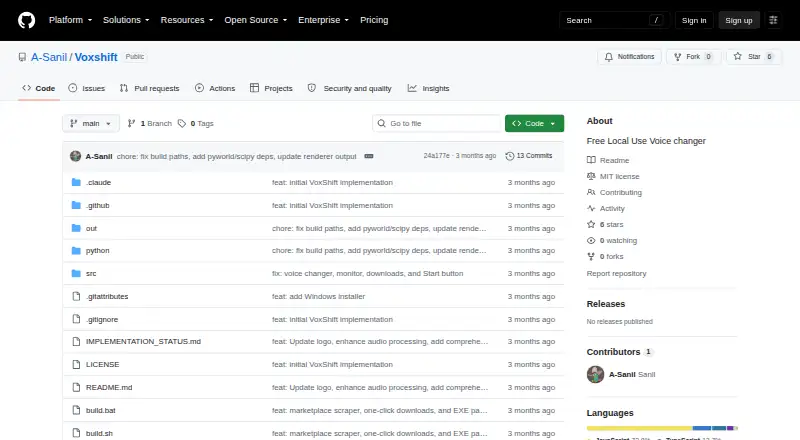
Audio processing takes place on the user’s computer. VoxShift has no telemetry, analytics, crash reporting, or user accounts; network calls are limited to marketplace metadata and optional GitHub auto-updates. The README lists under 200 ms end-to-end latency on a modern GPU and says real-time inference requires PyTorch with CUDA, ROCm, or Metal support. For use in Discord, OBS, or Zoom, processed audio can be routed through a virtual cable. The listed drivers are VB-Audio VB-Cable for Windows, BlackHole 2ch for macOS, and a PipeWire virtual sink for Linux. VoxShift is MIT licensed, and its repository currently has no releases available.
Who it suits
VoxShift suits people who want to change their microphone voice for voice chats, games, or video calls without writing code. It is also for users who want to train voice models or adjust detailed audio controls on their own computer.
What it does well
- Free and MIT licensed.
- Runs on Windows, macOS, and Linux.
- Processes audio locally with no telemetry or user accounts.
- Includes voice training and community model browsing.
- Routes processed audio to Discord, OBS, and Zoom.
What to know first
- Real-time inference requires GPU support through PyTorch.
- The repository has no releases available.
- Using chat and call apps requires a platform-specific virtual audio driver.
Limits
Real-time inference requires PyTorch with CUDA, ROCm, or Metal GPU support. The repository's Releases page has no releases available.
Plans
| Plan | Billed and limits | Price |
|---|---|---|
| Free | Free and open source · local use | Free |
As github.com lists them, read 7 Oct 2026. The maker's own page has the final word.
Getting started
- Visit the VoxShift GitHub repository.
- Choose the virtual audio driver listed for Windows, macOS, or Linux.
- Set up PyTorch with CUDA, ROCm, or Metal support for real-time inference.
- Browse community models or train a voice from supported audio files.
- Route processed audio through the virtual cable for Discord, OBS, or Zoom.
Verdict
Choose VoxShift if you want free, local real-time voice conversion with voice training and detailed controls. Look elsewhere if you need an available release package or cannot use the required GPU acceleration for real-time inference.
Questions
Is VoxShift free?
Yes. It is listed as free, with a Free plan at no cost.
Which platforms does VoxShift support?
Windows, macOS, and Linux.
Does VoxShift process audio locally?
Yes. Processing happens on the user's machine, and audio does not leave the computer.
Does VoxShift have a voice marketplace?
Yes. Users can browse and download community voice models, including categories such as anime, character, masculine, feminine, and robotic.
What is required for real-time conversion?
The README says real-time inference requires PyTorch with CUDA, ROCm, or Metal support for GPU acceleration.
Is VoxShift open source?
The repository identifies VoxShift as MIT licensed.
Facts from VoxShift's own pages
- Audio controls
- Listed controls include pitch shift, formant shift, index ratio, input and output gain, monitor mode, and noise gate or suppression. · github.com, 7 Oct 2026
- Download availability
- The repository's Releases page states that there are no releases available. · github.com, 7 Oct 2026
- Hardware requirement
- The README says real-time inference requires PyTorch with CUDA, ROCm, or Metal support for GPU acceleration. · github.com, 7 Oct 2026
- Integrations
- The README describes routing processed audio through a virtual cable for use as a microphone in Discord, OBS, and Zoom. · github.com, 7 Oct 2026
- Intended audience
- The README presents VoxShift for people who want to use AI voice conversion in voice chat, games, or video calls without writing code. · github.com, 7 Oct 2026
- Latency
- The README lists under 200 ms end-to-end latency on a modern GPU. · github.com, 7 Oct 2026
- License
- The repository identifies the project as MIT licensed. · github.com, 7 Oct 2026
- Local processing
- The project says audio processing happens on the user's machine and audio never leaves the computer. · github.com, 7 Oct 2026
- Network calls
- The README says network calls are limited to the marketplace API for metadata and opt-in GitHub auto-updates. · github.com, 7 Oct 2026
- Privacy
- The README says VoxShift has zero telemetry, no analytics or crash reporting, and no user accounts. · github.com, 7 Oct 2026
- Purpose
- VoxShift is a desktop app that transforms microphone audio in real time using Retrieval-based Voice Conversion (RVC). · github.com, 7 Oct 2026
- Virtual audio drivers
- The README lists VB-Audio VB-Cable for Windows, BlackHole 2ch for macOS, and a PipeWire virtual sink for Linux. · github.com, 7 Oct 2026
- Voice marketplace
- The README describes browsing and one-click downloading community voice models from voice-models.com, with categories including anime, masculine, feminine, character, and robotic. · github.com, 7 Oct 2026
- Voice training
- The README says users can train a voice by dropping WAV, MP3, FLAC, or OGG files and choosing training epochs and a pitch extraction algorithm. · github.com, 7 Oct 2026
Where VoxShift stands on Freedom251
- AI Voice Changer Software#29 of 48
- Game Voice Changers#18 of 29
- Voice Changer Software#33 of 45