Freedom251 › AI Voice Changer Software
Voices AI Live
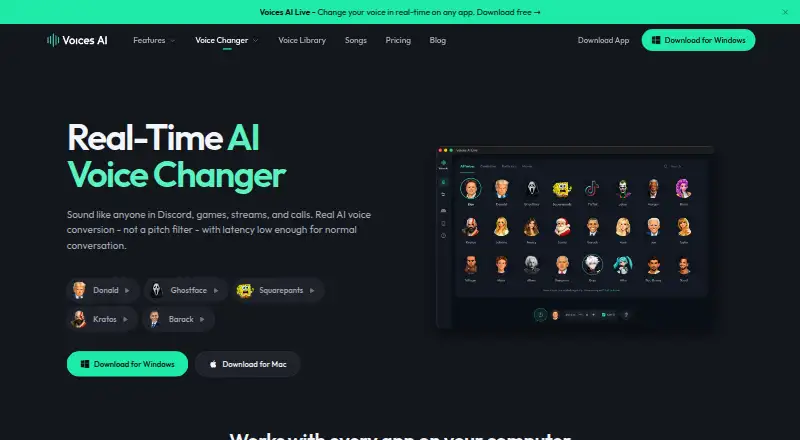
What Voices AI Live is
Voices AI Live converts speech into a selected voice in real time using a neural model rather than pitch changes and sound effects. The maker describes it for voice chat, games, streams, and calls, naming Discord, Zoom, Teams, OBS, Fortnite, and Valorant as use cases. A virtual microphone makes the changed voice available to compatible desktop applications. Users can create a custom voice from a five-second recording; the voice library includes celebrity and character voices, and new voices are added regularly.
The app is available for Windows and macOS, and a local REST API can control the desktop voice changer. The API listens on 127.0.0.1 and must be enabled in the app settings. Its documentation lists API-key authentication, and some voices require an active subscription. Windows requires Windows 10 or later, with an NVIDIA GTX 1060 and 4 GB RAM listed as minimum hardware. The Mac app requires Apple Silicon and macOS 14 or later; the listed minimum is an Apple M1 with 4 GB memory.
Voices AI Live has free voices available and a Pro plan at $9.99 a month. The maker says conversion runs on the user's device and that Voices AI Live does not record or upload audio. The company's privacy policy also says its broader Voices AI services may collect uploaded audio and voice recordings for features such as cloning and speech-to-speech. Fiedler Tech LLC is identified as the company responsible for personal information.
Who it suits
Voices AI Live suits people who want to change their voice during desktop voice chat, games, streams, or calls, including users of the named apps and games. It may also suit users who want to create a custom voice or control the desktop changer through its local API.
What it does well
- Changes speech into a selected voice in real time.
- Works with a virtual microphone for desktop apps.
- Custom voices can be made from a five-second recording.
- Lists celebrity and character voices, with new voices added regularly.
- Conversion runs on the user's device, according to the maker.
- Offers a free plan.
What to know first
- Requires Windows 10 or later, or macOS 14 or later with Apple Silicon.
- Windows minimum hardware includes an NVIDIA GTX 1060 and 4 GB RAM.
- Mac minimum hardware includes Apple M1 and 4 GB memory.
- Some API voices require an active subscription.
Plans
| Plan | Billed and limits | Price |
|---|---|---|
| Free voices | Free voices included; current access details shown in app | Free |
| Pro | $59.99/year · Premium access; plan details shown in app | $59.99 a year |
| Pro | $9.99/month · Premium access; plan details shown in app | $9.99 a month |
As getvoices.ai lists them, read 5 Oct 2026. The maker's own page has the final word.
Getting started
- Visit https://getvoices.ai/voice-changer.
- Choose the Windows or macOS app that matches your computer's requirements.
- Install and open the desktop app.
- Select a voice or create a custom voice from a five-second recording.
- Enable the local REST API in app settings if you want to control the changer through the API.
- Choose the free voices plan or Pro at $9.99 a month.
Verdict
Choose Voices AI Live if you want real-time voice conversion for desktop calls, chats, games, or streams, or want to control the changer through its local API. Recorded-audio changing and audio export are listed as unavailable.
Questions
How much does Voices AI Live cost?
Free voices are listed as free. Pro is listed at $9.99 a month, billed at $9.99/month.
Which platforms does it support?
The app supports Windows and macOS, and a local REST API can control the desktop voice changer. Windows requires Windows 10 or later; macOS requires Apple Silicon and macOS 14 or later.
Can it change recorded audio or export audio?
No. Recorded-audio changing and audio export are listed as unsupported.
Does it upload or record audio?
The maker says real-time conversion runs on the user's device and Voices AI Live does not record or upload audio. The broader Voices AI services may collect uploaded audio and voice recordings for features such as cloning and speech-to-speech.
How does the API work?
The local REST API controls the desktop changer, listens on 127.0.0.1, and must be enabled in app settings. Its documentation lists API-key authentication, and some voices require an active subscription.
Who is responsible for personal information?
The privacy policy identifies Fiedler Tech LLC as responsible for personal information and lists its address as 150 E B Street, Casper, Wyoming 82601.
Facts from Voices AI Live's own pages
- API
- A local REST API can control the desktop voice changer and listens on 127.0.0.1; it must be enabled in app settings. · docs.getvoices.ai, 5 Oct 2026
- API authentication
- The API documentation lists API-key authentication and says some voices require an active subscription. · docs.getvoices.ai, 5 Oct 2026
- Company
- The privacy policy identifies Fiedler Tech LLC as the company responsible for personal information and lists its address as 150 E B Street, Casper, Wyoming 82601. · getvoices.ai, 5 Oct 2026
- Mac requirements
- The Mac app requires Apple Silicon and macOS 14 or later, with an Apple M1 and 4 GB memory listed as minimum. · getvoices.ai, 5 Oct 2026
- Privacy policy
- The company privacy policy says the broader Voices AI services may collect uploaded audio and voice recordings for features such as cloning and speech-to-speech. · getvoices.ai, 5 Oct 2026
- Processing
- The maker says voice conversion runs on the user's device and audio is not recorded or uploaded by Voices AI Live. · getvoices.ai, 5 Oct 2026
- Product
- Voices AI Live converts speech into a target voice in real time using a neural model rather than pitch and sound effects. · getvoices.ai, 5 Oct 2026
- Security
- The privacy policy says the company uses reasonable technical and organizational measures and does not guarantee absolute security. · getvoices.ai, 5 Oct 2026
- Support
- The maker links to a help center with a dedicated Real-Time Voice Changer support category. · support.getvoices.ai, 5 Oct 2026
- Use cases
- The maker says it works with voice chat, games, streams, and calls, including Discord, Zoom, Teams, OBS, Fortnite, and Valorant. · getvoices.ai, 5 Oct 2026
- Voice cloning
- Users can create a custom voice from a five-second recording and use it in real time. · getvoices.ai, 5 Oct 2026
- Voice library
- The site lists celebrity and character voices and says new voices are added regularly. · getvoices.ai, 5 Oct 2026
- Windows requirements
- Windows 10 or later is required; minimum listed hardware is an NVIDIA GTX 1060 and 4 GB RAM. · getvoices.ai, 5 Oct 2026
Where Voices AI Live stands on Freedom251
- AI Voice Changer Software#25 of 48
- Voice Changer Software#28 of 45