Freedom251 › AI Voice Changer Software
Mootboard
What Mootboard is
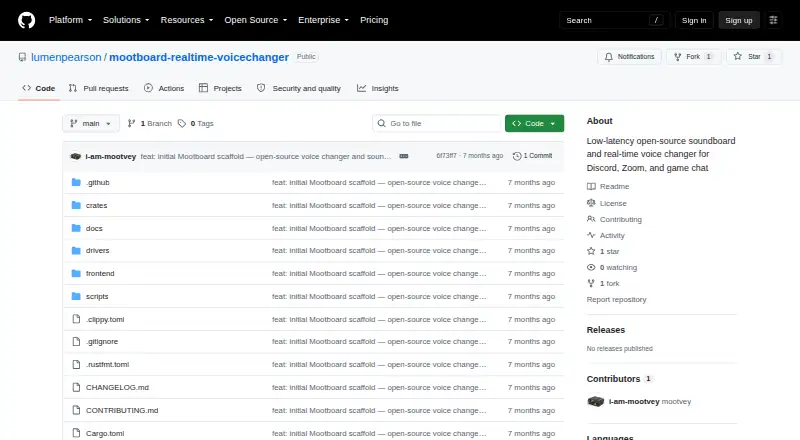
Mootboard is an open-source soundboard and real-time voice changer for Windows and macOS. It processes microphone audio and sends the result to a virtual microphone selectable in Discord, Zoom, and game chat. Listed effects include pitch shift, reverb, EQ, distortion, chorus, flanger, noise gate, and compressor. Effects can be chained, reordered, adjusted per parameter, and switched independently, with named presets for complete effect chains. The soundboard plays imported WAV, MP3, FLAC, and OGG clips through configurable global hotkeys and mixes them into voice output. The README states end-to-end latency of no more than 15 ms at 48 kHz with a 256-sample buffer. First-time setup installs a virtual audio driver and requires administrator access once. Audio processing runs in a Rust engine with a React interface in a Tauri window. Mootboard is MIT licensed; Linux support, noise suppression, accessibility, and OBS integration remain roadmap items.
Who it suits
It suits people who want configurable voice effects and soundboard clips in Discord, Zoom, or game chat. Supported systems are Windows 10/11 x64 and macOS 12 or later on Intel or Apple Silicon.
What it does well
- Includes eight listed real-time effects
- Chains, reorders, and independently toggles effects
- Imports WAV, MP3, FLAC, and OGG
- Saves named effect-chain presets
- Processes audio locally in a Rust engine
What to know first
- Linux is not currently supported
- Driver setup requires administrator access once
- No published releases were shown
Limits
Mootboard currently supports Windows and macOS; Linux is planned for a future phase. Noise suppression, accessibility features and OBS integration are also roadmap items.
Getting started
- Download Mootboard for Windows 10/11 x64 or macOS 12+
- Install the virtual audio driver with administrator access once
- Open the app and select the Mootboard Virtual Mic in Discord or Zoom
- Import WAV, MP3, FLAC or OGG clips
- Configure and reorder effects or load a named preset
- Assign global hotkeys to soundboard clips
Verdict
Mootboard combines a configurable effect rack with hotkey-triggered sound clips and a virtual microphone. It is free and locally processed, though platform support is limited to Windows and macOS for now.
Questions
Is Mootboard free?
Yes. It is offered as a free plan and the repository identifies it as MIT licensed.
Which operating systems are supported?
The README lists Windows 10/11 on x64 and macOS 12 or later on Apple Silicon and Intel. Linux is listed for a future phase.
Which apps can use the processed audio?
The virtual microphone can be selected as the input in Discord and Zoom, and the project also names game chat.
What audio files can the soundboard import?
It accepts WAV, MP3, FLAC and OGG clips.
Does setup require administrator access?
Yes. Installing the virtual audio driver requires administrator access once on Windows and macOS.
What effects are included?
The listed effects are pitch shift, reverb, EQ, distortion, chorus, flanger, noise gate and compressor.
Facts from Mootboard's own pages
- Audio architecture
- The architecture document says audio processing runs in a Rust audio engine, with the interface in a React app inside a Tauri window. · github.com, 8 Oct 2026
- Audio formats
- The usage guide says users can import WAV, MP3, FLAC, and OGG clips. · github.com, 8 Oct 2026
- Audio output
- Mootboard sends processed audio to a virtual microphone that can be selected as the input in Discord or Zoom. · github.com, 8 Oct 2026
- Distribution
- The repository’s Releases page showed no published releases when opened. · github.com, 8 Oct 2026
- Driver setup
- The app guides first-time virtual audio device setup; installing its macOS or Windows driver requires administrator access once. · github.com, 8 Oct 2026
- Effect controls
- Users can chain and reorder effects, adjust parameters, and enable or disable each effect independently. · github.com, 8 Oct 2026
- Effect rack
- Users can chain effects, drag to reorder them, and adjust per-parameter knobs. · github.com, 8 Oct 2026
- Fallback drivers
- The guide names BlackHole as a manual macOS fallback and VB-CABLE as a Windows fallback. · github.com, 8 Oct 2026
- Integration
- The documented workflow routes the Mootboard Virtual Mic into Discord or Zoom, and the project description also names game chat. · github.com, 8 Oct 2026
- Latency
- The README states end-to-end latency of ≤ 15 ms at 48 kHz with a 256-sample buffer. · github.com, 8 Oct 2026
- License
- The repository identifies the project as MIT licensed and credits Mootboard Contributors with © 2024. · github.com, 8 Oct 2026
- Local processing
- The architecture describes a microphone-to-audio-engine-to-virtual-device processing flow; the page makes no data-retention or compliance claims. · github.com, 8 Oct 2026
- Notable limits
- The README places Linux support, noise suppression, accessibility, and OBS integration on its roadmap rather than among supported features. · github.com, 8 Oct 2026
- Platforms
- The README lists Windows 10/11 x64 and macOS 12 or later on Apple Silicon and Intel as supported; Linux is marked as a future Phase 3 target. · github.com, 8 Oct 2026
- Presets
- Users can save and load named configurations of their complete effect chain. · github.com, 8 Oct 2026
- Product
- Mootboard is an open-source, low-latency soundboard and real-time voice changer for Discord, Zoom, and game chat. · github.com, 8 Oct 2026
- Roadmap
- The roadmap lists Linux, spectrogram, noise suppression, and accessibility for Phase 3, and a WASM plugin system, AI voice presets, and OBS integration for Phase 4. · github.com, 8 Oct 2026
- Security and data handling
- The architecture page says audio processing is kept entirely in the Rust audio engine; it does not state a security certification or compliance standard. · github.com, 8 Oct 2026
- Setup requirement
- The first-time setup installs a virtual audio driver, and the README says this requires administrator access once on Windows and macOS. · github.com, 8 Oct 2026
- Soundboard
- The soundboard triggers audio clips through configurable global hotkeys and mixes clips into voice output in real time. · github.com, 8 Oct 2026
- Supported platforms
- The README lists Windows 10/11 (x64) and macOS 12+ (Apple Silicon and Intel) as supported; Linux is listed as a future phase. · github.com, 8 Oct 2026
- Virtual microphone
- Processed audio is output as a virtual microphone for selection in apps such as Discord and Zoom. · github.com, 8 Oct 2026
- Voice effects
- Its listed real-time effects are pitch shift, reverb, EQ, distortion, chorus, flanger, noise gate, and compressor. · github.com, 8 Oct 2026
Where Mootboard stands on Freedom251
- AI Voice Changer Software#30 of 48
- Voice Changer Software#29 of 45
- Game Voice Changers#19 of 29