Freedom251 › Video Review Software
ViTransfer
What ViTransfer is
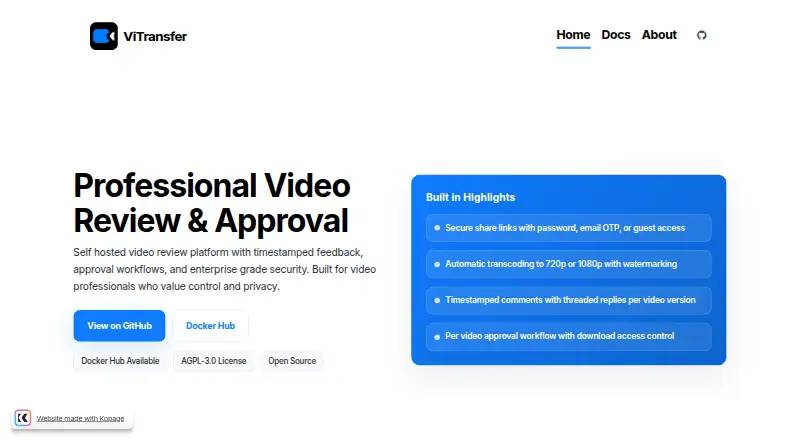
ViTransfer is a free, self-hosted platform for video review and approval. It generates 720p or 1080p previews and supports resumable uploads using TUS. Reviewers can add comments tied to playback timestamps, reply in threads, and approve videos on share pages. Projects can be set to auto-approve once each video has an approved version. Share links may use a password, email OTP, both, or view-only guest access. Projects can also hold images, audio, documents, project files, supporting videos, and captions or subtitles. Watermarks are controlled at project level and can use custom text up to 100 characters. Documented safeguards include rate limits, upload validation, security event logging, encrypted data, and admin passkeys. Authenticated JSON endpoints use bearer tokens; SMTP and Cloudflare Tunnel deployment are documented. The listed setup requires Docker and Docker Compose, with minimums of 2 CPU cores, 4 GB RAM, and 20 GB storage. It is open source under AGPL-3.0, and the project directs support and contributions to GitHub issues and discussions.
Who it suits
It is intended for freelance videographers and editors, production companies, and creative agencies that value self-hosting and data ownership. It also suits teams that can provide the documented Docker-based setup.
What it does well
- Creates 720p or 1080p previews automatically
- Supports timestamped comments and threaded replies
- Share links offer password and email OTP controls
- Open source under AGPL-3.0
What to know first
- Requires Docker and Docker Compose for the listed setup
- Minimum setup requires 2 CPU cores and 4 GB RAM
- Storage is limited by the user's own hardware
Limits
ViTransfer has no subscription charge, but storage is limited by the hardware used to host it. The documented minimum setup requires 2 CPU cores, 4 GB RAM, and 20 GB storage.
Plans
| Plan | Billed and limits | Price |
|---|---|---|
| ViTransfer | Free, with no subscription · Storage limited by your own hardware · self-hosted | Free |
| Free / self-hosted | No subscription; run it on your own infrastructure · Storage limited by your hardware · self-hosted deployment | Free |
As vitransfer.com lists them, read 9 Oct 2026. The maker's own page has the final word.
Getting started
- Visit the ViTransfer website and review its self-hosted setup documentation.
- Provide a server with at least 2 CPU cores, 4 GB RAM, and 20 GB storage.
- Install Docker and Docker Compose for the listed setup.
- Deploy ViTransfer on your own hardware.
- Configure SMTP if you want email notifications.
- Create projects, upload videos, and share review links with clients.
ViTransfer is a self-hosted workspace for video review, client approval, and project-file sharing. It is aimed at freelancers, editors, agencies, and production companies that want control of their infrastructure and data. The central choice is straightforward: a capable open-source workflow with no subscription, in exchange for running and maintaining the service yourself.
Overview
ViTransfer follows a video from upload to sign-off. It generates 720p or 1080p preview files automatically, and resumable TUS uploads can continue after an interrupted transfer. Reviewers can attach comments to exact playback times, reply in threads, and keep the discussion alongside the cut rather than in separate messages.
Clients approve versions from share pages. A project can also auto-approve when every video has an approved version, which suits packages of deliverables that should advance together. The AGPL-3.0 licence and self-hosted model put deployment and data ownership in the customer’s hands, but also make that customer responsible for operating the system.
Key features
Review and approval workflow
Timestamped comments make feedback precise, while threaded replies preserve context as revisions continue. Basic reviewer roles and guest-reviewer access cover ordinary client participation. Share links can require a password, an email one-time passcode, both controls, or optional view-only guest access, so teams can choose between stricter verification and low-friction viewing.
Assets and presentation
A project can hold images, audio, documents, project files, supporting videos, and captions or subtitles alongside the main review material. Project-level watermarks can be switched on or off and can display custom text up to 100 characters. These controls are useful when a client needs a branded, identifiable preview without altering the source media.
Security, integrations, and API
Documented safeguards include rate limiting, upload validation, security-event logging, encrypted data, and administrator passkeys. SMTP configuration supports email notifications, while Cloudflare Tunnel is documented for deployment. Authenticated JSON endpoints with bearer tokens provide an integration route for teams that need to connect ViTransfer to other systems.
Pricing
ViTransfer costs free, billed Free, with no subscription. Storage is limited by the capacity of your own self-hosted hardware, so the apparent unlimited ceiling is really an infrastructure decision. There is no free trial because the product itself is the free plan; there are no paid tiers or published seat quotas to compare.
This is a strong fit for a freelancer or small production team able to supply and maintain a server. Organisations seeking a hosted service, provider-managed storage, or commercial support should budget for those responsibilities elsewhere, since the project describes support as community-driven through GitHub issues, discussions, and contributions.
Platforms
ViTransfer supports API, Linux, macOS, self-hosted deployment, web, and Windows access. The documented setup requires Docker and Docker Compose, with minimums of two CPU cores, 4 GB of RAM, and 20 GB of storage. Those requirements are modest for a dedicated machine but still rule out a hands-off, browser-only deployment model.
Who it's for
Choose ViTransfer if you are a freelance videographer, editor, production company, or creative agency that values data ownership and wants review, approvals, access controls, and related assets in one self-managed system. It is less suitable for teams that do not want to administer Docker deployments, plan storage, or rely on community-led maintenance.
Pros and cons
- Pros: no subscription and an AGPL-3.0 open-source licence; playback-timestamped, threaded feedback; client approvals and project auto-approval; resumable uploads and automatic preview transcoding; password and email-OTP sharing controls; support for broad project assets and custom watermarks; API access and documented security measures.
- Cons: hosting, storage expansion, updates, and availability are your responsibility; Docker and Docker Compose are required for the documented setup; support is community-driven rather than a published commercial service; basic reviewer roles may be limiting for complex permission models.
Alternatives
For a wider shortlist, see Video Review Software.
- Louper is a better fit when livestream rooms, iOS access, and a hosted freemium model matter more than self-hosting.
- Ziflow suits teams wanting unlimited proofs and reviewers with a two-user, 2GB free plan and a 60-day review history.
- Ashore is preferable for a hosted workflow with a free-forever allowance of one user, 30 files per month, and 1GB storage.
- Clapshot is another free, open-source self-hosted option, released under GPLv2.
- Frame.io fits teams wanting hosted collaboration, up to two members, 2GB storage, two projects, and Camera to Cloud on its free plan.
- Vimeo is the alternative when a hosted video platform and broader mobile reach are more important than self-management.
- Cage offers hosted review with unlimited reviewers on its free, one-project plan.
- Krock.io is worth considering for a hosted workspace with AI tokens and unlimited reviewers in its free tier.
Verdict
ViTransfer is a strong choice for video professionals who want an open-source, no-subscription review and approval workflow under their own control. Choose it for precise feedback, flexible sharing, and self-managed data ownership; look elsewhere if you need provider-run hosting, formal commercial support, or a deployment that requires no infrastructure work.
Verdict
ViTransfer brings review, approval, sharing controls, and project assets into a self-hosted workflow. Its hardware requirements and self-managed deployment are important considerations.
Questions
Is ViTransfer free?
Yes. The ViTransfer plan costs nothing, with no subscription. Storage depends on your own hardware.
Is ViTransfer open source?
Yes. It is licensed under AGPL-3.0.
Does ViTransfer support video comments and approvals?
Yes. Reviewers can leave timestamped comments with threaded replies, and clients can approve videos on share pages.
How can share links be protected?
They can require a password, an email OTP, both, or allow optional view-only guest access.
What is required to run ViTransfer?
The listed setup requires Docker and Docker Compose, with a minimum of 2 CPU cores, 4 GB RAM, and 20 GB storage.
How is ViTransfer supported?
The project is community-driven and directs users to GitHub issues, discussions, and contributions.
Facts from ViTransfer's own pages
- Admin passkeys
- Administrators can use WebAuthn passkeys with device tracking, signature-counter checks, and multiple devices. · vitransfer.com, 14 Oct 2026
- Analytics
- Administrators can track project and video page visits plus download events. · vitransfer.com, 14 Oct 2026
- API
- The platform provides authenticated JSON endpoints that use bearer tokens. · vitransfer.com, 9 Oct 2026
- API authentication
- API requests use bearer tokens; login returns access and refresh tokens, and passkey routes are available for administrators. · vitransfer.com, 14 Oct 2026
- Approvals
- Clients can approve videos on share pages, and projects can be set to auto-approve when every video has an approved version. · vitransfer.com, 9 Oct 2026
- Approval workflow
- Videos have individual approval states, projects can auto-approve when every video has an approved version, and approved originals can be downloaded. · vitransfer.com, 14 Oct 2026
- Asset management
- Projects can attach images, audio, subtitles, documents, editing-project files, archives, and supporting videos, with extension and magic-byte validation. · vitransfer.com, 14 Oct 2026
- Assets
- Projects can include images, audio, documents, project files, supporting videos, and captions or subtitles. · vitransfer.com, 9 Oct 2026
- Deployment options
- Installation guides cover Docker Compose, Podman Quadlet, Unraid, and TrueNAS. · vitransfer.com, 14 Oct 2026
- Deployment requirements
- The documented minimums are 2 CPU cores, 4 GB RAM, and 20 GB storage; Docker and Docker Compose are required for the listed setup. · vitransfer.com, 9 Oct 2026
- Docker distribution
- The official Docker Hub image is published as mansivisuals/vitransfer; the page showed more than 10,000 pulls and an update one day before it was opened. · hub.docker.com, 14 Oct 2026
- Documentation depth
- Documentation includes overview, requirements, installation, configuration, feature guides, API reference, deployment, troubleshooting, and security practices. · vitransfer.com, 14 Oct 2026
- Feedback
- Reviewers can leave timestamped comments with threaded replies tied to playback positions. · vitransfer.com, 9 Oct 2026
- GitHub adoption
- The public repository page showed 69 stars, 3 forks, and 3 watchers when opened. · github.com, 14 Oct 2026
- Guest restrictions
- Guests are view-only by default, can be limited to the latest version, and cannot comment, approve, or download before approval. · vitransfer.com, 14 Oct 2026
- Integrations
- ViTransfer documents SMTP configuration for email notifications and Cloudflare Tunnel deployment support. · vitransfer.com, 9 Oct 2026
- Intended users
- The maker says ViTransfer is intended for freelance videographers and editors, production companies, creative agencies, and others who value self-hosting and data ownership. · vitransfer.com, 9 Oct 2026
- Licence
- The repository and documentation identify ViTransfer as open source under AGPL-3.0. · github.com, 14 Oct 2026
- License
- ViTransfer is open source under the AGPL-3.0 license. · vitransfer.com, 9 Oct 2026
- Limit: feature scope
- The project README states that maintenance mode means no new features, so future capability expansion is not currently planned. · github.com, 14 Oct 2026
- Limit: security skepticism
- In the launch discussion, commenters questioned whether a product described as security-first could be trusted when its development used AI-assisted coding. · reddit.com, 14 Oct 2026
- Limit: self-hosting effort
- The documented design makes the operator responsible for Docker infrastructure, storage, backups, updates, HTTPS, and deployment security. · vitransfer.com, 14 Oct 2026
- Maintenance status
- The repository says the product is feature-complete and now receives weekly security patches, with bug fixes for broken normal installs but no new features. · github.com, 14 Oct 2026
- Maker identity
- The project describes its creator as Maikel Mansi of Mansi Visuals, an IT professional and videographer who built the tool for his own workflow. · vitransfer.com, 14 Oct 2026
Where ViTransfer stands on Freedom251
- Video Review Software#2 of 36