Freedom251 › Video Review Software

Louper
by Louper
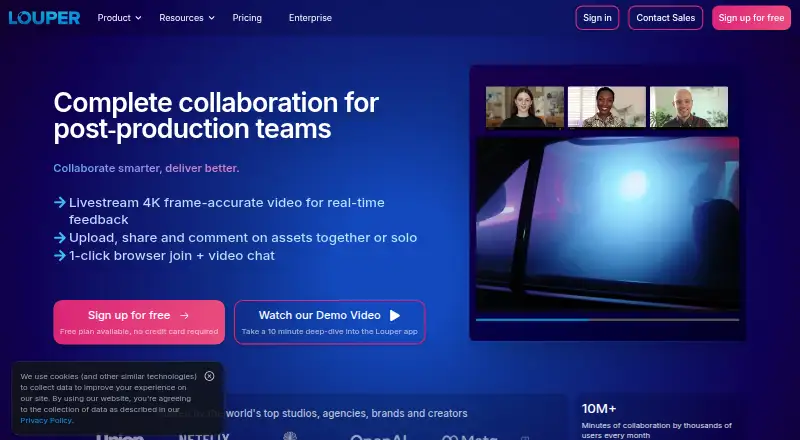
What Louper is
Louper is a livestreaming and real-time collaboration platform for media teams reviewing creative work, including camera feeds, NLE and DAW output, VFX, and grading sessions. Livestreams support frame-accurate video up to 4K, high bitrates, and 48kHz stereo audio. Teams can upload media, watch it together with synchronized playback, and leave comments tied to specific frames and timestamps. Browser-based rooms include video chat and on-screen annotations; Review Links and Showcases support asynchronous review and presentation. Streaming plugins are available for Premiere Pro and Avid Media Composer, with support for NDI, screen capture, and compatible HDMI or SDI hardware. Clients can join browser rooms without downloading an app. Desktop Encoder runs on macOS and Windows, while StreamConnect supports viewing on Apple TV, iOS, and macOS. Louper states it is SOC 2 Type 2 compliant and conducts regular vulnerability and penetration testing. The Free plan costs nothing, with one room, two participants, 20-minute sessions, 10 teammate seats, and 2GB storage. Starter costs $33 a month billed annually at $394 per year.
Who it suits
Louper suits editors, VFX artists, sound designers, colorists, and other video professionals who need live or asynchronous review. Its browser rooms can also accommodate clients who do not want to download an app.
What it does well
- Frame-accurate livestreams support up to 4K.
- Synchronized playback includes frame-specific timestamped comments.
- Browser rooms include video chat and on-screen annotations.
- Native plugins for Premiere Pro and Avid Media Composer.
What to know first
- Free sessions are limited to 20 minutes.
- Free plan includes only 2GB storage.
- Starter is billed annually at $394 per year.
- MediaSilo comment sync is beta and requires team enablement.
Limits
The free plan includes one livestream room, two participants per room, 20-minute maximum sessions with limited sessions per day, ten teammate seats, and 2GB storage. Starter, billed annually at $394 / year, allows one room, three participants, two-hour sessions, three teammate seats, and 50GB storage.
Plans
| Plan | Billed and limits | Price |
|---|---|---|
| Free | Billed annually at $0 / year · 1 Livestream Room · 2 participants per room · 20 min max session duration (limited sessions/day) · 10 Teammate seats · 2GB storage | Free |
| Starter | Billed annually at $394 / year · 1 Livestream Room · 3 participants per room · 2 hr max session duration (unlimited sessions/day) · 3 Teammate seats · 50GB storage | $33 a month |
| Studio | Billed annually at $876 / year · 1 room on base plan (up to 3 max) · 8 participants per room · 8 hr max session duration · 5 teammate seats on base plan (up to 20 max) · 1TB storage on base plan (up to 10TB max) | $73 a month |
| Free — quarterly | — | Free |
| Starter — quarterly | — | On request |
| Studio — quarterly | — | On request |
| Enterprise — quarterly | — | On request |
| Enterprise | Custom rooms, participants, session duration, teammate seats, and storage · Up to 25 participants per room · Up to 24 hour sessions | On request |
As louper.io lists them, read 29 Sept 2026. The maker's own page has the final word.
Getting started
- Open louper.io or use a browser room.
- Choose the free plan or a paid plan.
- Invite teammates within the seat allowance for your plan.
- Start a browser room, or use a supported plugin, NDI, screen capture, or compatible HDMI or SDI hardware.
- Share a Review Link or Showcase for asynchronous review.
Louper is a review platform for video and other media production, combining live streams with shared playback and feedback. It is best suited to editors, colorists, VFX artists and sound designers who need clients or colleagues to review work together. Its strength is connecting live production review to timestamped comments; its entry plans limit how many people can join and for how long.
Overview
Louper covers both live camera or workstation output and uploaded media. Frame-accurate streaming reaches 4K with high-bitrate video and 48kHz stereo audio, while synchronized playback lets reviewers comment on specific frames. That combination makes it more relevant to production teams than to people seeking a general-purpose video meeting tool.
Browser rooms include video chat and on-screen annotations, and clients can join without installing an app. Review Links and Showcases extend review to asynchronous feedback and presentation. Louper is made by a company founded in 2021 and headquartered in London.
Key features
- Live production review: Streams can originate through native plugins for Premiere Pro and Avid Media Composer, NDI, screen capture, or compatible hardware inputs. The Desktop Encoder supports NDI, display capture, and Blackmagic hardware for SDI and HDMI. This breadth suits teams working across editing and grading setups, though some input options depend on compatible hardware.
- Shared playback and feedback: Uploaded media plays in sync, with frame-specific timestamped comments. Approval workflows, version comparison, guest reviewers, and custom reviewer roles add structure for teams managing revisions.
- Viewing options: Rooms run in a browser, while StreamConnect supports viewing on Apple TV, iOS, and macOS. Louper's stated iOS, macOS, web, and Windows platforms cover common desktop and mobile use, with Apple TV as an additional viewing option.
- Security and support: Louper states that it is SOC 2 Type 2 compliant and undergoes regular vulnerability and penetration testing. Enterprise options include client-side watermarking, granular access controls, and enforced livestream encryption. Email support is offered for setup; Enterprise customers also get priority Customer Success access by live chat and email.
Pricing
The Free plan costs nothing, billed annually at $0 / year. It includes one livestream room, two participants per room, a 20-minute maximum session duration with limited sessions per day, 10 teammate seats, and 2GB storage. That is enough to evaluate the workflow, but short sessions and limited daily use constrain real production review.
Starter costs $33 a month, billed annually at $394 / year. It raises the room limit to three participants, allows unlimited daily sessions up to two hours each, and includes three teammate seats and 50GB storage. This is the entry point for regular small-team reviews, but teams must work within a single room and a tight seat allowance.
Studio costs $73 a month, billed annually at $876 / year. The base plan includes one room, five teammate seats, and 1TB storage; room capacity can increase to three, seats to 20, and storage to 10TB. It supports eight participants per room and sessions up to eight hours. This better fits longer reviews and growing teams, with the expanded room, seat, and storage limits available up to their stated maximums.
Enterprise has custom pricing and custom room, participant, teammate, and storage amounts, plus a dedicated success manager and enterprise security features. It suits organizations needing tailored capacity or stronger access protections; included features may vary. The listed quarterly Free plan costs nothing, while no price is given for quarterly Starter, Studio, or Enterprise. Paid annual prices are billed yearly at the stated totals.
Platforms
Louper supports iOS, macOS, web, and Windows. Browser rooms reduce friction for clients joining a review, while desktop encoding and StreamConnect provide separate production and viewing options.
Who it's for
Louper is a strong fit for video professionals whose workflow includes live feed review, shared playback, or frame-specific feedback. Small teams can start with Starter if three seats and one room are enough; teams needing longer sessions, more participants, or substantially more storage should consider Studio. It is a less suitable choice for occasional reviewers who need only lightweight proofing, or teams that need more capacity than the lower tiers permit.
Pros and cons
- Pro: Live streaming and synchronized, timestamped review sit in one workflow, with support for production tools and signal inputs.
- Pro: Browser access lets clients join without downloading an app, and asynchronous links and showcases extend review beyond live sessions.
- Pro: Studio raises session duration to eight hours and storage to 1TB at the base level, with higher stated maximums.
- Con: Free sessions stop at 20 minutes and are limited per day, making the no-cost tier unsuitable for sustained review.
- Con: Starter has only three teammate seats and one room, while its annual billing amounts to $394 / year.
- Con: Enterprise pricing and included features vary, so organizations must obtain a tailored offer to assess the full package.
Alternatives
Ziflow is worth considering for proofing workflows: its free plan includes unlimited proofs and reviewers, with two users, 2GB storage, and one workflow stage, rather than Louper's emphasis on live production streams.
Ashore is another freemium option for file review, with a free plan for one user, 30 files per month, and 1GB storage. Frame.io offers a free plan with up to two members, 2GB storage, two projects, and Camera to Cloud. Vimeo is an alternative with a free plan of one seat and 1GB storage. Cage offers a free plan for one user and one project with unlimited reviewers. Krock.io has a free plan for one user, one workspace, two projects, and unlimited reviewers. QuickReviewer offers a free plan with 100 MB storage, one team member, and unlimited files and proofs. SyncSketch has a free Light plan for non-commercial use, with five seats, 1 GB storage, and two projects.
Browse Video Review Software for more review tools, or Live Streaming Software for streaming-focused options. Live TV streaming services are a different category for viewers seeking TV programming.
Verdict
Choose Louper if your production team needs to review live feeds and uploaded media in the same frame-aware workflow, especially when browser access and editing integrations matter. Its key advantage is the mix of live, synchronized review and structured feedback; look elsewhere if you need generous entry-tier capacity without annual billing or a simple proofing tool rather than production streaming.
Verdict
Louper combines live creative review with synchronized media playback and frame-specific comments. The free plan has short session and storage limits; paid plans add capacity, with Starter listed at $33 a month billed annually.
Questions
Is Louper free?
Yes. Its Free plan costs nothing, with one livestream room, two participants per room, 20-minute maximum sessions, ten teammate seats, and 2GB storage.
How much do paid plans cost?
Starter is $33 a month when billed annually at $394 / year. Studio is $73 a month when billed annually at $876 / year. Enterprise pricing is individually structured.
Which platforms can I use?
Louper lists iOS, macOS, web, and Windows. Its Desktop Encoder is available for macOS and Windows; StreamConnect supports viewing on Apple TV, iOS, and macOS.
Do clients need to download an app to join?
No. Louper rooms run in a browser, so clients can join without downloading an app.
Which editing integrations are available?
Native streaming plugins are available for Premiere Pro and Avid Media Composer. Louper also supports NDI, screen capture, and compatible HDMI or SDI inputs.
Who makes Louper?
Louper is the maker. The company is based in London, United Kingdom, and was founded in 2021.
Facts from Louper's own pages
- Browser access
- Louper rooms run in a browser, so clients can join without downloading an app. · louper.io, 29 Sept 2026
- Collaboration tools
- Browser-based rooms include video chat and on-screen annotations, while Review Links and Showcases support asynchronous review and presentation. · louper.io, 29 Sept 2026
- Desktop apps
- Louper Desktop Encoder is available for macOS and Windows and supports NDI, display capture, and Blackmagic hardware for SDI and HDMI streams. · louper.io, 29 Sept 2026
- Enterprise security
- Enterprise options include client-side watermarking, granular access controls, and enforced livestream encryption; plans are individually structured and included features may vary. · louper.io, 29 Sept 2026
- Founded
- 2021 · louper.io, 28 Sept 2026
- Free plan
- Yes · louper.io, 20 Sept 2026
- Integrations
- Native streaming plugins are available for Premiere Pro and Avid Media Composer, and Louper supports NDI, screen capture, and HDMI or SDI inputs through compatible hardware. · louper.io, 29 Sept 2026
- Intended users
- Louper describes itself as a collaboration platform for editors, VFX artists, sound designers, colorists, and other video professionals. · louper.io, 29 Sept 2026
- Live streaming
- Louper supports frame-accurate livestreaming up to 4K with high-bitrate video and 48kHz stereo audio. · louper.io, 29 Sept 2026
- MediaSilo integration
- Louper release notes describe a beta MediaSilo integration that syncs timestamped comments between platforms, available only to teams with the integration enabled. · docs.louper.io, 29 Sept 2026
- Purpose
- Louper is a livestreaming and real-time collaboration platform for media creators, including teams reviewing camera feeds, NLE and DAW output, VFX, and grading sessions. · docs.louper.io, 29 Sept 2026
- Security
- Louper states that it is SOC 2 Type 2 compliant and undergoes regular vulnerability and penetration testing. · louper.io, 29 Sept 2026
- Paid from
- 33 · louper.io, 20 Sept 2026
- Support
- Louper offers email support for setup help, and Enterprise customers have priority access to Customer Success by live chat and email. · louper.io, 29 Sept 2026
- Synchronized review
- Users can upload media, watch it together with synchronized playback, and leave frame-specific timestamped comments. · louper.io, 29 Sept 2026
- Viewer apps
- Louper StreamConnect provides stream viewing on Apple TV, iOS, and macOS. · louper.io, 29 Sept 2026
Where Louper stands on Freedom251
- Video Review Software#9 of 36
- Live TV streaming services#51 of 169
- Live Streaming Software#52 of 137
- Live streaming software#51 of 134