Freedom251 › Design Proofing Software

QuickReviewer
What QuickReviewer is
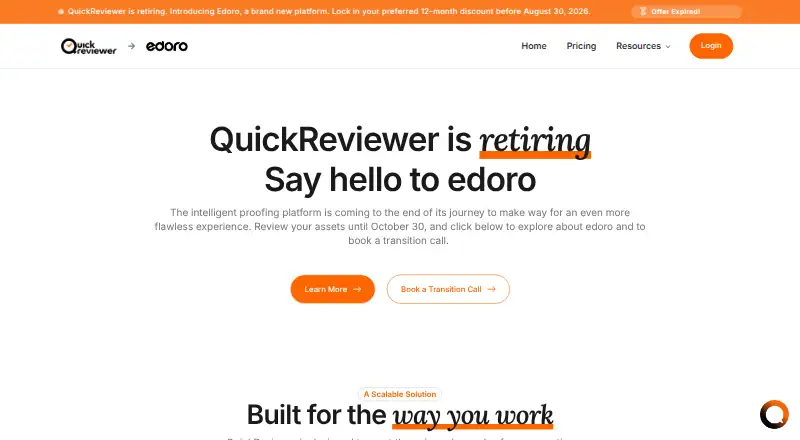
QuickReviewer is an online proofing platform for organizing creative feedback and review workflows. It supports more than 150 file types, including PDFs, Adobe files, live websites, 3D models, and professional video formats. Reviewers can add contextual comments and annotations, discuss them in threads, mention colleagues, and compare versions side by side. Workflow tools cover multi-stage approvals, automated notifications, conditional routing, and third-party triggers. Listed integrations include Adobe Creative Cloud, Google Drive, Box, Dropbox, YouTube, Vimeo, Jira, Asana, Trello, Slack, Microsoft Teams, Zapier, Make.com, and Canva. Its API supports proof creation, user-data syncing, review metrics, and custom actions. The desktop uploader for Windows and macOS supports files up to 25GB. QuickReviewer lists compliance with SOC 2 Type II and GDPR, encryption, single sign-on, SCIM, role permissions, and password-protected share links. The Forever Free plan includes 100 MB of storage and one team member. The company says the platform is retiring and customers can review assets until October 30, 2026.
Who it suits
QuickReviewer is suited to creative, design, editorial, and marketing teams, as well as freelancers, agencies, enterprises, and project managers who need to collect feedback on varied assets. The stated retirement date is important for anyone considering it.
What it does well
- Supports more than 150 file types
- Includes threaded comments and version comparisons
- Automates multi-stage approval workflows
- Forever Free includes unlimited files and proofs
What to know first
- Platform retiring; asset review ends October 30, 2026
- Forever Free includes 100 MB storage
- Forever Free allows one team member
Plans
| Plan | Billed and limits | Price |
|---|---|---|
| Forever Free | 100 MB storage · 1 team member · unlimited files and proofs · unlimited free reviewers | Free |
| Premium | Billed Monthly · 1 TB storage · 20 team members · unlimited files and proofs · unlimited free reviewers | $169 a month |
| Pro | Billed Monthly · 500 GB storage · 10 team members · unlimited files and proofs · unlimited free reviewers | $79 a month |
| Enterprise | Call us for storage and team member limits · unlimited files and proofs · unlimited free reviewers | On request |
As quickreviewer.com lists them, read 30 Sept 2026. The maker's own page has the final word.
QuickReviewer is an online proofing platform for teams reviewing creative assets and managing approvals. It suits organizations with varied media and structured sign-off needs, but its retirement date makes it a short-term option rather than a durable choice.
Overview
QuickReviewer brings feedback and review workflows into one place, with support for more than 150 file types, including PDFs, Adobe files, live websites, 3D models, and professional video formats. That range is valuable for teams handling mixed media: reviewers can keep feedback attached to the work rather than scattering it across separate processes. The platform is scheduled to retire, and customers can review assets until October 30, 2026. That cutoff is a serious constraint for anyone starting a workflow meant to continue beyond it.
Key features
Reviewers can leave contextual comments and annotations, reply in threads, mention colleagues, and compare versions side by side. These tools suit iterative creative work, where feedback needs context and changes need checking between rounds. Version history, guest reviewers, video proofing, and custom branding extend that collaborative approach.
Approval workflows include multiple stages, automated notifications, conditional routing, and triggers to third-party systems. This makes QuickReviewer a stronger fit for repeatable sign-off processes than for teams that only need occasional informal comments. Integrations include Adobe Creative Cloud, Google Drive, Box, Dropbox, YouTube, Vimeo, Jira, Asana, Trello, Slack, Microsoft Teams, Zapier, Make.com, and Canva. Its API can automate proof creation, sync user data, retrieve review metrics, and trigger custom actions, useful for teams connecting review to other systems.
The Desktop Uploader for Windows and macOS supports files up to 25GB, which helps with large assets. The stated security measures include SOC 2 Type II and GDPR compliance, AES-256 encryption, and TLS 1.2 or higher. Access controls include single sign-on, SCIM, role-based permissions, and password-protected share links—relevant controls for organizations managing access across teams.
Pricing
The Forever Free plan costs nothing and includes 100 MB of storage, one team member, unlimited files and proofs, and unlimited free reviewers. It is a narrow entry point for an individual working with guest feedback; the storage and single-seat caps are limiting for a team or media-heavy workflow.
Pro costs $79 a month, billed monthly, and provides 500 GB of storage and 10 team members, with unlimited files and proofs and unlimited free reviewers. It is the lower paid tier for small teams needing substantially more storage and seats. Premium costs $169 a month, billed monthly, and raises those allowances to 1 TB and 20 team members, while retaining unlimited files, proofs, and free reviewers. It makes sense for a larger group with heavier storage needs, though the retirement timeline weakens the case for either paid plan as a long-term commitment.
Enterprise has custom pricing. Storage and team-member limits are determined by the arrangement, while files, proofs, and free reviewers remain unlimited. The pricing table reserves ePub review, AutoCAD proofing, audiobook proofing, AI tools, and bespoke API integrations for Enterprise. A free trial is not offered.
Platforms
QuickReviewer supports web, macOS, Windows, and API access. The desktop uploader is available for macOS and Windows; no mobile platform is stated.
Who it's for
The product presents itself for freelancers and startups, creative agencies, enterprises, marketing teams, creative and design teams, editorial teams, and project managers. Its broad file support and configurable approvals are most compelling for teams coordinating varied assets and formal reviews. The announced cutoff makes it unsuitable for buyers who need a platform to support ongoing work after October 30, 2026.
Pros and cons
- Pros: More than 150 supported file types cover a wide mix of creative media, including 3D and professional video.
- Pros: Threaded feedback, version comparison, and multi-stage approvals keep discussion and sign-off connected to review work.
- Pros: Broad integrations, API automation, and enterprise access controls can support connected team workflows.
- Cons: Retirement by October 30, 2026 limits its suitability for new processes intended to last.
- Cons: The free plan's 100 MB and one team member make it a constrained option for team use or large assets.
- Cons: ePub, AutoCAD, audiobook, AI, and bespoke API features require Enterprise, whose price is custom.
Alternatives
Ziflow is worth considering for a free workflow needing two users, 2GB of storage, one workflow stage, and 60 days of review history; it also offers a free trial and broader platform coverage, including Android and iOS.
Artwork Flow may suit a small team seeking a free plan with three users, unlimited guest reviewers, 2 GB of storage, and 20 creative reviews per month.
Ashore is an option for a user who can work within its free plan's one user, 30 files per month, and 1 GB of storage.
WebProof may fit teams that value a free plan with four users, four sharing users, 1 GB of storage, and unlimited projects.
Cage is an alternative for a single user needing a free plan with one project, 2 GB of storage, and unlimited reviewers.
Filestage offers a free plan capped at one active project, five new files per month, and 2 GB of storage, and includes a free trial.
Flatproof may suit users who need a free web-based plan with 200MB of storage and unlimited creators and reviewers.
Priflow is a neutral alternative to consider.
Browse Design Proofing Software, Online Proofing Software, and Video Review Software for more options.
Verdict
QuickReviewer is best for teams that need broad creative-file support, collaborative markup, and structured approval routing in one platform. Its strongest reason to choose it is the combination of media coverage and workflow controls; its decisive reason to look elsewhere is the October 30, 2026 retirement cutoff. Choose it only for work that fits within that window, not as the foundation for a lasting review process.
Verdict
QuickReviewer offers broad file support, collaboration, integrations, and approval workflows. Its stated retirement and October 30, 2026 review cutoff are central considerations.
Facts from QuickReviewer's own pages
- Access controls
- QuickReviewer lists single sign-on and SCIM, role-based permissions, and password-protected share links among its security features. · quickreviewer.com, 30 Sept 2026
- API
- QuickReviewer says its API can automate proof creation, sync user data, retrieve review metrics, and trigger custom actions. · quickreviewer.com, 30 Sept 2026
- Approval workflows
- Its workflow tools support multi-stage approvals, automated notifications, conditional routing, and third-party system triggers. · quickreviewer.com, 30 Sept 2026
- Desktop uploader
- The Desktop Uploader for Windows and macOS supports uploads of files up to 25GB. · quickreviewer.com, 30 Sept 2026
- Enterprise-only features
- The pricing table lists ePub review, AutoCAD proofing, audiobook proofing, AI tools, and bespoke API integrations as Enterprise features. · quickreviewer.com, 30 Sept 2026
- Free plan limits
- The Forever Free plan lists 100 MB of storage and one team member, with unlimited files and proofs and unlimited free reviewers. · quickreviewer.com, 30 Sept 2026
- Integrations
- The listed integrations include Adobe Creative Cloud, Google Drive, Box, Dropbox, YouTube, Vimeo, Jira, Asana, Trello, Slack, Microsoft Teams, Zapier, Make.com, and Canva. · quickreviewer.com, 30 Sept 2026
- Markup and collaboration
- Reviewers can add contextual comments and annotations, reply in threads, mention colleagues, and compare asset versions side by side. · quickreviewer.com, 30 Sept 2026
- Purpose
- QuickReviewer is an online proofing platform that centralizes creative feedback and review workflows. · quickreviewer.com, 30 Sept 2026
- Retirement
- QuickReviewer says the platform is retiring and customers can review assets until October 30, 2026. · quickreviewer.com, 30 Sept 2026
- Security
- The feature page states that the platform is SOC 2 Type II compliant, GDPR compliant, and encrypts data with AES-256 and TLS 1.2 or higher. · quickreviewer.com, 30 Sept 2026
- Supported content
- The platform supports more than 150 file types, including PDFs, Adobe files, live websites, 3D models, and professional video formats. · quickreviewer.com, 30 Sept 2026
- Who it serves
- The site presents solutions for freelancers and startups, creative agencies, enterprises, marketing teams, creative and design teams, editorial teams, and project managers. · quickreviewer.com, 30 Sept 2026
Where QuickReviewer stands on Freedom251
- Design Proofing Software#6 of 29
- Markup Software#7 of 26
- Video Review Software#10 of 36
- Digital Asset Proofing Software#4 of 12
- Online Proofing Software#12 of 27