Freedom251 › Presentation Sharing Software
Viewora
What Viewora is
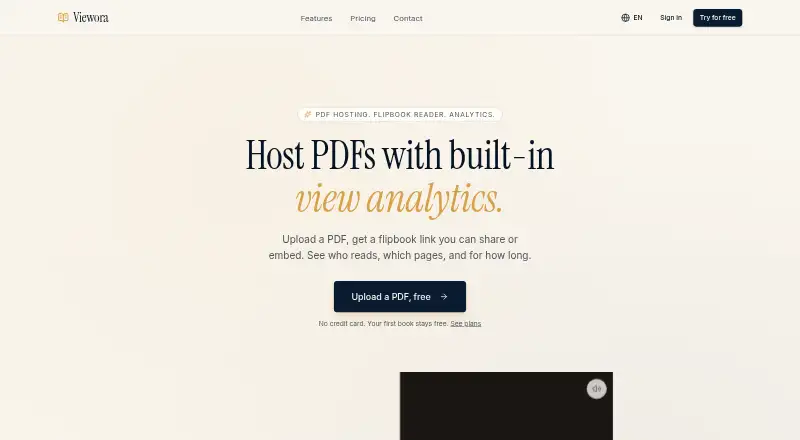
Viewora turns PDFs into online flipbooks that can be shared by public link or placed on a website. Readers can open public books without creating accounts. The reader presents 3D page turns with depth and shadow, with optional sound that publishers can disable for an individual book. A one-line iframe embed works with Notion, Webflow, Wix, and other CMS platforms. Viewora also provides analytics for sessions, unique visitors, time on each page, and total dwell, while books can be customized and use editorial typography by default.
The Free plan costs nothing and includes three published PDFs, 100 monthly views per book, basic analytics, an iframe embed, page-turn animation and sound, and a Viewora watermark. Pro costs $19 a month, with unlimited PDFs, 10,000 monthly views, full analytics including page dwell, watermark removal, and email support. Studio costs $49 a month and raises the allowance to 100,000 monthly views, with custom logo and colors and priority support. Viewora describes Pro for regular creators and Studio for teams and studios. Studio team seats are marked as coming soon. The first book stays free, and no credit card is required to start.
Who it suits
Viewora suits creators who want to share or embed PDF publications and see how readers engage with them. Its Pro plan is aimed at regular publishers, while Studio is described for teams and studios.
What it does well
- Public links let readers open books without accounts.
- One-line iframe embeds support Notion, Webflow, Wix, and other CMS platforms.
- Analytics cover sessions, unique visitors, page time, and total dwell.
- Page-turn audio can be disabled for each book.
- The first book stays free, with no credit card required to start.
What to know first
- The Free plan allows three published PDFs and 100 monthly views per book.
- The Free plan includes a Viewora watermark.
- Studio team seats are marked as coming soon.
Limits
The Free plan allows three published PDFs and 100 monthly views per book, and displays a Viewora watermark. Pro allows 10,000 monthly views; Studio allows 100,000, and its team seats are coming soon.
Plans
| Plan | Billed and limits | Price |
|---|---|---|
| Free | $0 /mo · 3 published PDFs · 100 monthly views per book · Website embed (iframe) · Viewora watermark · Page turn animation and sound · Basic analytics | Free |
| Pro | $19 /mo · Unlimited PDFs · 10,000 monthly views · Website embed (iframe) · Remove watermark · Full analytics, page dwell · Email support | $19 a month |
| Studio | $49 /mo · Everything in Pro · 100,000 monthly views · Custom branding (logo + colors) · Website embed (iframe) · Priority support · Team seats (coming soon) | $49 a month |
As viewora.app lists them, read 9 Oct 2026. The maker's own page has the final word.
Getting started
- Open the Viewora website.
- Start with the first book free; no credit card is required.
- Publish PDFs within the Free plan's three-PDF limit, or choose Pro or Studio for higher allowances.
- Share a public link or embed the book with an iframe.
- Review analytics for sessions, visitors, page time, and total dwell.
Verdict
Choose Viewora if you want a public or embeddable PDF flipbook with reader analytics, or need more publishing capacity through Pro or Studio. Look elsewhere if you need Studio team seats now, since they are marked as coming soon.
Questions
Is Viewora free?
Yes. The Free plan costs nothing, and Viewora says the first book stays free with no credit card required to start.
What does the Free plan include?
It includes three published PDFs, 100 monthly views per book, an iframe embed, a Viewora watermark, page-turn animation and sound, and basic analytics.
How much do the paid plans cost?
Pro costs $19 a month. Studio costs $49 a month.
Can I embed a Viewora book?
Yes. Viewora provides a one-line iframe embed for Notion, Webflow, Wix, and other CMS platforms.
What analytics are available?
Analytics include sessions, unique visitors, time per page, and total dwell. Pro includes full analytics with page dwell.
Can readers open books without signing up?
Yes. Books can be shared through a public link, and readers do not need accounts.
Facts from Viewora's own pages
- Audio
- Page-turn audio is optional and can be toggled off per book. · viewora.app, 9 Oct 2026
- Customization
- The site says books can be customized and have editorial typography by default. · viewora.app, 9 Oct 2026
- Embedding
- Viewora provides a one-line iframe embed for Notion, Webflow, Wix, and other CMS platforms. · viewora.app, 9 Oct 2026
- Free offer
- Viewora says the first book stays free and no credit card is required to start. · viewora.app, 9 Oct 2026
- Page turns
- The flipbook reader provides 3D page turns with depth, shadow, and a soft paper-turn effect. · viewora.app, 9 Oct 2026
- Pro audience
- The Pro plan is described as being for creators publishing regularly. · viewora.app, 9 Oct 2026
- Product
- Viewora hosts PDFs as shareable or embeddable flipbooks with view analytics. · viewora.app, 9 Oct 2026
- Reader analytics
- Reader analytics include sessions, unique visitors, time per page, and total dwell. · viewora.app, 9 Oct 2026
- Sharing
- Books can be shared through a public link, and readers do not need accounts. · viewora.app, 9 Oct 2026
- Studio audience
- The Studio plan is described as being for teams and studios. · viewora.app, 9 Oct 2026
- Studio limit
- Team seats are marked as coming soon on the Studio plan. · viewora.app, 9 Oct 2026
- Support
- The Pro plan includes email support, and Studio includes priority support. · viewora.app, 9 Oct 2026
Where Viewora stands on Freedom251
- Presentation Sharing Software#22 of 27