Freedom251 › Presentation Sharing Software

Speaker Deck
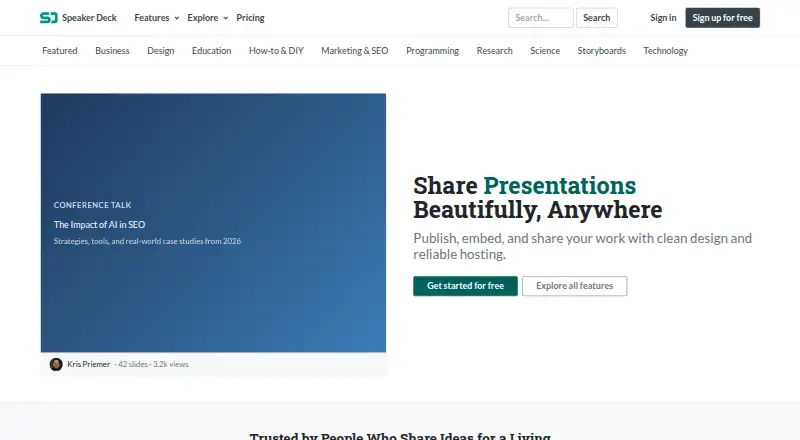
What Speaker Deck is
Speaker Deck is a web service for publishing presentations and sharing them through links or website embeds. It accepts PDF files only. A deck can be embedded with the Speaker Deck WordPress block by entering its URL, or with iframe or JavaScript code; an oEmbed endpoint is also available for displaying decks on other sites. The service documents sharing to Twitter and Facebook. Free accounts can upload 10 presentations per day, with 100 uploads total and a 150 MB maximum file size. Pro has unlimited uploads and permits files up to 250 MB. Pro also adds password protection, private URLs, controls over which domains can embed a deck, scheduled publishing, slide notes, collections, companion video links, and resource links; Pro is ad-free. Monthly Pro costs $8 a month, while yearly Pro costs $80 a year. Speaker Deck launched in 2012 and describes use cases for designers, developers, educators, founders, marketers, and consultants, as well as speakers, scholars, coders, storyboard artists, creatives, and instructors. The service includes viewer analytics and custom branding. Its privacy policy says it uses commercially acceptable means to protect personal information, while noting that absolute security cannot be guaranteed.
Who it suits
Speaker Deck suits people who need to publish and share PDF presentations, including designers, developers, educators, founders, marketers, and consultants. Pro may suit publishers who need password-protected or private decks, domain restrictions, or its additional publishing tools.
What it does well
- Share decks by link or embed them on websites.
- WordPress block, iframe, JavaScript, and oEmbed options are available.
- Pro adds password protection and private URLs.
- Pro includes scheduled publishing, slide notes, collections, and resource links.
- Viewer analytics and custom branding are available.
What to know first
- Only PDF presentations are accepted.
- Free accounts are capped at 10 uploads per day and 100 total.
- Free uploads have a 150 MB maximum file size.
Limits
Free permits 10 uploads per day and 100 total, with a 150 MB maximum per file. Pro has unlimited uploads and a 250 MB maximum per file.
Plans
| Plan | Billed and limits | Price |
|---|---|---|
| Free | Free · 10 uploads per day · 100 lifetime uploads · 150 MB per upload · website embeds | Free |
| Pro (monthly) | Monthly · Unlimited uploads · up to 250 MB per upload · privacy and publishing controls · ad-free | $8 a month |
| Pro (yearly) | Yearly; save 17% · Unlimited uploads · up to 250 MB per upload · privacy and publishing controls · ad-free | $80 a year |
As speakerdeck.com lists them, read 7 Oct 2026. The maker's own page has the final word.
Getting started
- Open https://speakerdeck.com/.
- Choose the Free plan or a Pro plan.
- Upload a PDF presentation.
- Share the deck by link or embed it on a website.
Verdict
Choose Speaker Deck to publish PDF presentations and share them through links or embeds, with a Free option or Pro privacy and publishing controls. Look elsewhere if you need to upload presentation files in a format other than PDF.
Questions
Is Speaker Deck free?
Yes. Its Free plan costs nothing and allows 10 uploads per day and 100 total.
How much does Pro cost?
Pro costs $8 a month or $80 a year.
Which file formats can I upload?
Speaker Deck accepts PDF presentations only.
Can I embed a deck on a website?
Yes. Embedding options include the WordPress block, iframe or JavaScript code, and an oEmbed endpoint.
What does Pro add?
Pro includes unlimited uploads, privacy and publishing controls, and ad-free use. Its tools include password protection, private URLs, scheduled publishing, slide notes, collections, companion video links, and resource links.
Facts from Speaker Deck's own pages
- Founded
- 2012 · speakerdeck.com, 28 Sept 2026
- Intended audience
- The About page says Speaker Deck launched in 2012 and is intended for speakers, scholars, coders, storyboard artists, creatives, and instructors. · speakerdeck.com, 7 Oct 2026
- oEmbed
- Speaker Deck provides an oEmbed endpoint at https://speakerdeck.com/oembed.json for displaying decks on other sites. · speakerdeck.com, 7 Oct 2026
- Pro privacy controls
- Pro includes password protection and private URLs, and lets users restrict which domains can embed a deck. · speakerdeck.com, 7 Oct 2026
- Pro publishing and presentation tools
- Pro includes scheduled publishing, slide notes, collections, companion video links, and resource links. · speakerdeck.com, 7 Oct 2026
- Security statement
- The privacy policy says Speaker Deck uses commercially acceptable means to protect personal information but cannot guarantee absolute security. · speakerdeck.com, 7 Oct 2026
- Sharing
- Decks can be shared by link or embedded on a website, and the site documents sharing to Twitter and Facebook. · speakerdeck.com, 7 Oct 2026
- Support
- The FAQ directs users to email Speaker Deck to report a bug or ask for help. · speakerdeck.com, 7 Oct 2026
- Supported uploads
- Speaker Deck accepts PDF presentations and says it only supports PDF files. · speakerdeck.com, 7 Oct 2026
- Upload limits
- Free accounts are limited to 10 uploads per day and 100 total, while Pro includes unlimited uploads; the comparison page lists maximum file sizes of 150 MB for Free and 250 MB for Pro. · speakerdeck.com, 7 Oct 2026
- What it does
- Speaker Deck lets people publish, embed, and share presentations online. · speakerdeck.com, 7 Oct 2026
- Who it is for
- The site describes use cases for designers, developers, educators, founders, marketers, and consultants. · speakerdeck.com, 7 Oct 2026
- WordPress integration
- WordPress has a Speaker Deck block that accepts a deck URL, and users can also embed using iframe or JavaScript code. · help.speakerdeck.com, 7 Oct 2026
Where Speaker Deck stands on Freedom251
- Presentation Sharing Software#21 of 27