Freedom251 › Classroom Management Software
Veyon
What Veyon is
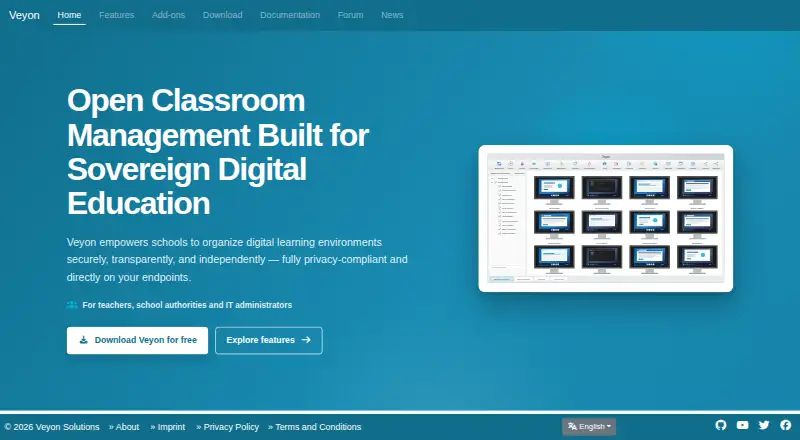
Veyon is classroom management software for teachers, school authorities, and IT administrators working with Windows or Linux computers. It displays connected screens in an overview and supports screen broadcasts and screenshots. Teachers can view and control workstations remotely, send messages, and lock screens. They can distribute files, collect work, open websites, and start programs on selected computers. Administrators can perform remote power actions and centrally manage user logins and logouts on selected devices or groups. Veyon supports LDAP and Active Directory; commercial add-ons include Internet Access Control, Auvidus device controls, Chat, an Entra ID connector, dynamic network discovery, and Screen Recorder. The maker says it runs directly on endpoints without requiring a cloud service and can operate on the customer's own infrastructure. Veyon Core is free and open source under GPLv2. Commercial add-ons are offered through annual licenses valid for 12 months or perpetual licenses, with quotes based on organization and deployment details. The pricing note says paid plans start at €250/yr. Veyon Solutions, based in Chemnitz, Germany, develops the product and offers commercial solutions and services.
Who it suits
Veyon is aimed at teachers, school authorities, IT administrators, and educational institutions managing Windows or Linux computers. Its own-infrastructure option may suit organizations that do not want a mandatory cloud dependency.
What it does well
- Core is free and open source under GPLv2.
- Supports Windows and Linux.
- Teachers can remotely view and control workstations.
- Can run on customer infrastructure without mandatory cloud dependency.
What to know first
- Commercial add-on prices require a quote.
- Commercial add-ons may be licensed annually or perpetually.
Limits
Veyon Core is free. Commercial add-ons require an annual or perpetual license, with quotes based on the organization, sites, faculties, devices, selected add-ons, and license model.
Plans
| Plan | Billed and limits | Price |
|---|---|---|
| Veyon Core | Open source · GPLv2 | Free |
| Veyon Core Free | Free open-source core; no mandatory cloud platform · Classroom monitoring and control · screen broadcast · file distribution · messaging · workstation management | Free |
| Commercial add-ons | Annual or perpetual licensing; quote required · Auvidus · Chat · Entra ID Connector · Internet Access Control · Network Discovery · Screen Recorder | On request |
As veyon.io lists them, read 7 Oct 2026. The maker's own page has the final word.
Getting started
- Visit the Veyon website
- Download Veyon for Windows or Linux
- Install it on the computers to be managed
- Use the free Veyon Core plan
- Request a quote for commercial add-ons if needed
Veyon is a classroom-management system for schools that need direct oversight of Windows and Linux computers. It is best suited to managed labs, classrooms, and IT teams that want endpoint control on their own infrastructure. The strongest case is its broad computer-administration toolkit; the main trade-off is that several integrations and specialist controls require a separately quoted add-on.
Overview
Veyon gives teachers, school authorities, and IT administrators a shared way to supervise connected workstations. Its design centers on activity monitoring and device controls rather than on student messaging, grading, or general engagement workflows. That focus makes it practical where classroom work happens on institution-managed computers, but less suitable as an all-purpose learning platform.
The software can run without a mandatory cloud dependency and can be operated on customer-owned infrastructure. That is a meaningful advantage for schools with strict data-location or network-control requirements, provided they are prepared to manage their own deployment. Veyon Solutions develops the product from Chemnitz, Germany.
Key features
A visual overview of connected screens, live viewing, broadcasts, and screenshots let a teacher see what is happening across a room and present content to student machines. Remote control, messaging, and screen locking add immediate ways to intervene when a workstation needs attention or a class must pause. These controls are well matched to supervised computer sessions; they do not replace a broader classroom communication or learning-management system.
Teachers can distribute files, collect completed work, open websites, and launch programs on selected computers. In practice, that reduces repetitive setup and collection steps in a computer lab, especially when the same resources or applications must reach many machines. Remote power actions and centralized logins and logouts for individual computers or groups extend the product into routine IT administration.
LDAP and Active Directory support provide a path to existing directory services. Microsoft Entra ID connectivity and dynamic network discovery are commercial add-ons, as are Internet Access Control, Auvidus device controls, Chat, and Screen Recorder. Organizations that need those functions should budget for a tailored licensing discussion rather than assume they are part of the free core.
Pricing
Veyon uses a freemium model. Veyon Core costs free and is open source under GPLv2. It covers the core classroom-management software without a subscription charge, making it the natural starting point for schools that need screen oversight and basic remote actions.
Commercial add-ons have custom pricing. Licenses are offered as either an annual license valid for 12 months or a perpetual license, and quotes are calculated from the organization, sites, faculties, devices, selected add-ons, and license model. Volume discounts reach their maximum from 25 schools onward; each additional faculty adds 20% of the base price while allowing unlimited devices. This structure favors larger, centrally managed deployments, while a small school needing only one specialist add-on may find the quote harder to predict.
| Plan | Price and terms | Best fit |
|---|---|---|
| Veyon Core | free; open source, GPLv2 | Schools needing the core monitoring and control tools |
| Commercial add-ons | Custom quote; annual 12-month or perpetual license | Organizations requiring extra identity, network, access, chat, recording, or device controls |
Platforms
Veyon supports Windows and Linux and is self-hosted. The maker publishes Windows downloads and Linux packages for several distributions. There is no macOS, iOS, Android, or web platform identified, so schools standardized on those environments should look elsewhere or confirm compatibility before planning a rollout.
Who it's for
Veyon is a strong fit for teachers supervising computer-based lessons, school IT administrators managing shared workstations, and educational institutions that prefer local infrastructure. Its group controls, power actions, directory support, and file workflows are especially useful where many machines must be prepared and monitored consistently.
It is not the obvious choice for schools primarily seeking mobile-device management, parent communication, assignment discussion, or a broad student-engagement suite. Those needs call for a product whose center of gravity is communication or learning rather than endpoint administration.
Pros and cons
Pros
- Free open-source core: Veyon Core has no license charge and covers substantial monitoring and classroom-control work.
- Deep workstation control: Live views, broadcasts, remote control, locking, messaging, file transfer, program launching, and power actions support both teaching and IT operations.
- Local deployment: Endpoint operation without a mandatory cloud dependency suits organizations retaining infrastructure and data control.
- Directory integration: LDAP and Active Directory support can align access with existing school identities.
Cons
- Add-on costs are variable: Entra ID, discovery, access control, recording, chat, and other extensions require a quote based on deployment details.
- Narrow platform coverage: Windows and Linux support excludes schools seeking a native Apple, mobile, or browser-based classroom tool.
- Computer-centric scope: The product is built around managed endpoints, not a complete engagement, communication, or learning suite.
Alternatives
Browse Classroom Management Software for a wider category comparison. Choose LiveSchool instead if you need Android, iOS, macOS, web, and Windows coverage with a school-year pilot and grade-level limits. Piazza is the better match for class discussion and polling across Android, iOS, and web, with a free contribution-supported model and paid limits on some functions.
ClassDojo suits schools focused on teacher messaging, class points, and story updates, while Anchor offers a free, self-hosted deployment with no license or per-seat charge. For Apple-only environments, Apple Classroom is a free iPad and Mac app. Linux labs wanting open-source computer monitoring can consider Epoptes. Classwize and Lightspeed Classroom are paid alternatives, with Lightspeed positioned within its integrated ecosystem.
Verdict
Choose Veyon if your priority is controlling and supporting Windows or Linux classroom computers from a locally managed system, especially when the free core covers your needs. Look elsewhere if you require mobile or Apple coverage, a browser-first service, or communication and engagement features rather than detailed endpoint administration.
Verdict
Veyon combines classroom screen oversight and remote controls with tools for distributing and collecting work. The free core covers a range of classroom tasks, while organizations considering add-ons need a quote based on their deployment.
Questions
Is Veyon free?
Veyon Core is free and is open source under GPLv2. Commercial add-ons are priced separately.
What platforms does Veyon support?
Veyon supports Windows and Linux, with downloads for both operating systems.
Can Veyon run without cloud services?
The maker says Veyon has no mandatory cloud dependency and can run on the customer's own infrastructure.
Which directory services does it support?
Veyon supports LDAP and Active Directory. An Entra ID Connector is available as a commercial add-on.
How are commercial add-ons priced?
They are offered on annual licenses valid for 12 months or perpetual licenses. Quotes depend on organization and deployment details.
Facts from Veyon's own pages
- Add-on licensing
- Commercial add-ons require a valid license tied to an installation ID; licenses can be installed, transferred through exported configuration and managed with the licensing CLI module. · docs.veyon.io, 15 Oct 2026
- Add-on price example
- The add-on calculator page displays a €425 final price including VAT for its shown configuration and allows annual or perpetual license selection. · veyon.io, 15 Oct 2026
- Administration
- Veyon supports remote power actions and centralized user logins and logouts on selected computers or groups. · veyon.io, 7 Oct 2026
- Audience
- The maker describes Veyon as intended for students, teachers, and educational institutions. · veyon.io, 7 Oct 2026
- CLI
- The veyon-cli tool exposes modules for authentication keys, configuration, LDAP and network-object administration. · docs.veyon.io, 15 Oct 2026
- Commercial add-ons
- Paid extensions add audio, webcam and USB control, chat, Entra ID synchronization, internet blocking, network discovery and screen recording. · veyon.io, 15 Oct 2026
- Company and location
- Veyon Solutions, based in Chemnitz, Germany, develops Veyon and offers commercial solutions and services. · veyon.io, 7 Oct 2026
- Company identity
- The legal imprint identifies the maker as Veyon Solutions, represented by Tobias Junghans, at Hoher Weg 13, 09116 Chemnitz, Germany. · veyon.io, 15 Oct 2026
- Company scale stated
- The maker says the project has dozens of volunteer contributors, more than 100,000 downloads per year and over 20 years of development. · veyon.io, 15 Oct 2026
- Current release
- Veyon 4.11.4 was published on 15 October 2026 for Windows and multiple Linux distributions. · veyon.io, 15 Oct 2026
- Deployment automation
- Windows installers support silent deployment, configuration import and options to omit Veyon Master, the start-menu folder or the interception driver. · docs.veyon.io, 15 Oct 2026
- Developer extensibility
- The repository contains CLI, plugin, server, service and WebAPI components, and the release notes document WebAPI framebuffer support. · github.com, 15 Oct 2026
- Directory integrations
- Veyon supports LDAP and Active Directory, with an optional connector for Microsoft Entra ID users, groups and devices. · veyon.io, 15 Oct 2026
- Documentation depth
- Official documentation includes administrator, user, add-on integration and developer manuals, with downloadable administrator and user PDFs. · docs.veyon.io, 15 Oct 2026
- Files and content
- Veyon can distribute files, collect work, open websites, and start programs on selected computers. · veyon.io, 7 Oct 2026
- File workflow
- Files can be distributed to selected computers or groups and submitted files can be collected centrally. · veyon.io, 15 Oct 2026
- Founded and history
- Veyon says its history began in 2004 with predecessor software iTALC. · veyon.io, 15 Oct 2026
- Headquarters
- Chemnitz, Germany · veyon.io, 28 Sept 2026
- Integrations
- Veyon supports LDAP and Active Directory, with commercial add-ons for Microsoft Entra ID and dynamic network discovery. · veyon.io, 7 Oct 2026
- Licence
- The core project is released under the GNU General Public License version 2. · github.com, 15 Oct 2026
- License pricing
- The add-on page offers annual licenses valid for 12 months and perpetual licenses, with quotes calculated from organization and deployment details. · veyon.io, 7 Oct 2026
- Limit: collaboration gaps
- A G2 reviewer says Veyon lacks folder sharing, assignment correction and richer collaborative group-work tools. · g2.com, 15 Oct 2026
- Limit: connectivity and performance
- G2 reviewers report unexpected disconnects, blank screens after network loss and laggy monitor refresh when viewing video. · g2.com, 15 Oct 2026
- Limit: installation complexity
- Multiple G2 reviews describe setup as lengthy or complicated because client/server roles and security keys must be configured. · g2.com, 15 Oct 2026
Where Veyon stands on Freedom251
- Classroom Management Software#2 of 25