Freedom251 › Classroom Management Software

Epoptes
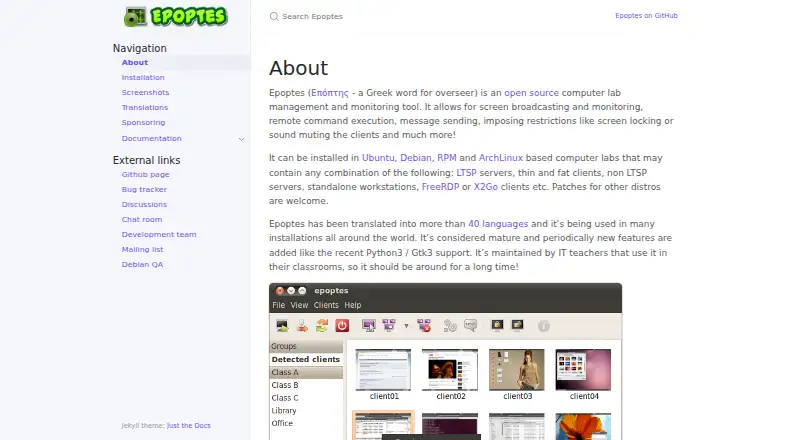
What Epoptes is
Epoptes is a free, open source tool for managing and monitoring computer labs. It supports screen broadcasting and viewing, remote command execution, messaging, screen locking, and sound muting. The system has a server package, epoptes, and a client package, epoptes-client; clients connect to the server for remote commands, and its daemon accepts connections on privileged port 789. Client setup includes fetching an OpenSSL certificate from the server with `epoptes-client -c`. Users need to belong to the epoptes group or a configured alternative group to open the GUI and control clients. Epoptes can be installed in Ubuntu, Debian, RPM, and ArchLinux based labs, including LTSP systems, standalone workstations, FreeRDP clients, and X2Go clients. Multiple GUIs can connect to one daemon, allowing it to serve multiple labs. The project says the two client processes together use about 2 MB of RAM per computer. Packages are available in distribution repositories, and Ubuntu stable and proposed PPAs are also available. It is Linux and self-hosted; there is no Windows client port, and developers report no near-term plans for one.
Who it suits
Epoptes suits administrators of Linux computer labs who need centralized screen monitoring and control. Its supported environments include LTSP, standalone workstations, FreeRDP clients, and X2Go clients.
What it does well
- Supports screen broadcasting and monitoring.
- Can run commands remotely and lock screens.
- One daemon can serve multiple labs.
- Client processes use about 2 MB RAM per computer.
- Packages are available in Ubuntu, Debian, and ArchLinux repositories.
What to know first
- There is no Windows client port.
- Users need group membership to control clients.
- Clients connect to the server on privileged port 789.
Limits
The free plan is the open-source computer lab management and monitoring tool, installed as server and client packages. It has no Windows client port; the developers say they have no near-term plans to implement one.
Plans
| Plan | Billed and limits | Price |
|---|---|---|
| Epoptes | Open source computer lab management and monitoring tool · Installed as server and client packages | Free |
As epoptes.org lists them, read 8 Oct 2026. The maker's own page has the final word.
Getting started
- Visit https://epoptes.org/.
- Install the epoptes server package and epoptes-client on lab computers.
- Use packages from a distribution repository, or an Ubuntu PPA where suitable.
- Fetch the server's OpenSSL certificate on clients with `epoptes-client -c`.
- Add users to the epoptes group or a configured alternative group to launch the GUI and control clients.
Epoptes is a self-hosted control and monitoring system for Linux computer labs. It fits schools, training rooms and other operators standardised on Linux who need instructor visibility and remote intervention without licence fees. The trade-off is a deliberately narrow client platform, so mixed Windows environments should look elsewhere.
Overview
The software is divided into a server package, epoptes, and a client package, epoptes-client. Clients connect to the server for remote command execution, while its daemon listens on privileged port 789. Multiple graphical interfaces can connect to one daemon, allowing one service to support several computer labs rather than requiring a separate server for each room.
Administration is permission-based. A user must belong to the epoptes group, or to a configured alternative group, before launching the graphical interface and controlling clients. Client enrolment includes retrieving an OpenSSL certificate from the server with epoptes-client -c. That adds a defined trust step during setup and is preferable to leaving client connections unauthorised.
Key features
Screen supervision and intervention
Live screen monitoring gives instructors a view of client activity, while screen broadcasting can distribute a screen to the lab. Remote command execution handles repeated administrative actions across machines. Messaging, screen locking and sound muting provide immediate classroom interventions, not just passive observation. Together, these controls suit lessons where an instructor must get attention, stop activity or demonstrate something centrally.
Lightweight, multi-lab architecture
The two epoptes-client processes consume about 2 MB of RAM per computer, according to the project’s architecture description. That is a useful fit for constrained workstations and thin-client deployments. A single daemon accepting several graphical interfaces also gives organisations a practical way to centralise supervision across multiple rooms, provided they are comfortable operating the service themselves.
Linux lab coverage
Packages and installation guidance target Ubuntu, Debian, RPM-based and ArchLinux-based labs. The supported scenarios include LTSP systems, standalone workstations, FreeRDP clients and X2Go clients. Packages are available in stock repositories for distributions including Ubuntu, Debian and ArchLinux, with stable and proposed Ubuntu PPAs as additional routes. The project says it has translations in more than 40 languages, which can help teams serving multilingual users.
Pricing
| Plan | Price | What it includes |
|---|---|---|
| Epoptes | free | Open source computer lab management and monitoring tool, installed as server and client packages |
There is no paid tier, licence charge, seat allowance or free trial to weigh against the free plan. The cost advantage is strongest for schools and organisations able to provide their own Linux administration and hosting. Self-hosting remains the operational responsibility, so teams seeking a vendor-managed classroom service may value a paid alternative more.
Platforms
Epoptes is available for Linux and is self-hosted. It supports the Linux distributions and client arrangements described above, but there is currently no Windows port of epoptes-client, and the developers have no near-term plans to implement one. That rules it out for labs that require Windows endpoints or a single control system spanning Linux and Windows.
Who it's for
Choose Epoptes for a Linux-first school, vocational lab, training room or multi-room deployment where instructors need live views, broadcasting and direct controls. It is particularly sensible when low client resource use, open-source deployment and distribution packages matter more than a hosted service or broad device coverage. It is a poor fit for mixed-platform estates, Windows-led classrooms or buyers who do not want to maintain a server, user groups and client certificates.
Pros and cons
- Pro: The complete feature set is free and open source, removing per-seat licensing from lab budgeting.
- Pro: Monitoring, broadcasting, messaging, locking, muting and remote commands combine supervision with immediate intervention.
- Pro: About 2 MB of RAM for the two client processes keeps the client footprint small.
- Pro: One daemon can serve multiple labs and multiple graphical interfaces.
- Con: Linux-only client support excludes Windows workstations and makes mixed-platform deployment impractical.
- Con: Self-hosting requires administrators to manage permissions, certificates and the server daemon.
Alternatives
For a broader shortlist, see Classroom Management Software.
- LiveSchool is a better direction for schools needing Android, iOS, macOS, web and Windows coverage, with a free school-year pilot and paid plans beyond it.
- Piazza suits course communication on Android, iOS and the web; its free model places polls, statistics and class locking behind a paid licence.
- ClassDojo is aimed at teacher messaging, class points and story updates across Android, iOS and the web rather than Linux lab control.
- Anchor is another free, self-hosted option with web, Windows and extension access, useful when Windows support is required.
- Apple Classroom is the straightforward free choice for iPad and Mac classrooms.
- Veyon offers open-source Linux and Windows coverage, with commercial add-ons for organisations that need more than its GPLv2 core.
- Classwize is a paid classroom-management alternative with browser, desktop and mobile platform support.
- Lightspeed Classroom is a paid option for organisations seeking a quoted product within Lightspeed’s integrated ecosystem.
Verdict
Epoptes is a strong recommendation for Linux-based labs that want capable screen supervision and remote controls at no licence cost. Its lightweight, multi-lab design and broad Linux environment support are persuasive. Look elsewhere if Windows clients, hosted delivery or minimal server administration are requirements.
Verdict
Epoptes provides a free, self-hosted set of lab controls for supported Linux environments. Its lack of a Windows client port makes platform fit an important consideration.
Questions
How much does Epoptes cost?
The Epoptes plan is free. The tool is open source.
What platforms does Epoptes support?
It supports Linux and self-hosted installations, including Ubuntu, Debian, RPM, and ArchLinux-based labs. Supported environments include LTSP, standalone workstations, FreeRDP clients, and X2Go clients.
Does Epoptes have a Windows client?
No. The developers say they have no near-term plans to implement one.
How is Epoptes installed?
It consists of a server package called epoptes and a client package called epoptes-client. Packages are available in repositories including Ubuntu, Debian, and ArchLinux; Ubuntu also has stable and proposed PPAs.
What is required to control clients?
Users must belong to the epoptes group or a configured alternative group to launch the GUI and control clients. Client setup includes fetching an OpenSSL certificate from the server.
Can one server handle more than one lab?
Multiple GUIs can connect to one daemon, allowing one daemon to serve multiple computer labs.
Facts from Epoptes's own pages
- Access control
- Users must belong to the epoptes group, or a configured alternative group, to launch the GUI and control clients. · epoptes.org, 8 Oct 2026
- Architecture
- Clients connect to the server for remote command execution, and the server daemon accepts client connections on privileged port 789. · epoptes.org, 8 Oct 2026
- Connection security
- Client setup includes fetching an OpenSSL certificate from the server with epoptes-client -c. · epoptes.org, 8 Oct 2026
- Distribution packages
- Packages are available in stock repositories of distributions including Ubuntu, Debian, and ArchLinux, with stable and proposed PPAs also available for Ubuntu. · epoptes.org, 8 Oct 2026
- Documentation and help
- The documentation invites contributors to contact the project through its linked chat room. · epoptes.org, 8 Oct 2026
- Multiple labs
- Multiple GUIs can connect to one daemon, allowing one daemon to serve multiple computer labs. · epoptes.org, 8 Oct 2026
- Purpose
- Epoptes is an open source computer lab management and monitoring tool. · epoptes.org, 8 Oct 2026
- Resource use
- The architecture page says the two epoptes-client processes together consume about 2 MB of RAM per computer. · epoptes.org, 8 Oct 2026
- Screen tools
- It supports screen broadcasting and monitoring, remote command execution, message sending, screen locking, and sound muting. · epoptes.org, 8 Oct 2026
- Server and client
- Epoptes consists of a server package called epoptes and a client package called epoptes-client. · epoptes.org, 8 Oct 2026
- Supported environments
- It can be installed in Ubuntu, Debian, RPM, and ArchLinux based computer labs, including LTSP systems, standalone workstations, FreeRDP clients, and X2Go clients. · epoptes.org, 8 Oct 2026
- Translations
- The project says it has been translated into more than 40 languages. · epoptes.org, 8 Oct 2026
- Windows support
- There is currently no Windows port of epoptes-client, and the developers say they have no near-term plans to implement one. · epoptes.org, 8 Oct 2026
Where Epoptes stands on Freedom251
- Classroom Management Software#5 of 25