Freedom251 › Classroom Management Software

Lightspeed Classroom
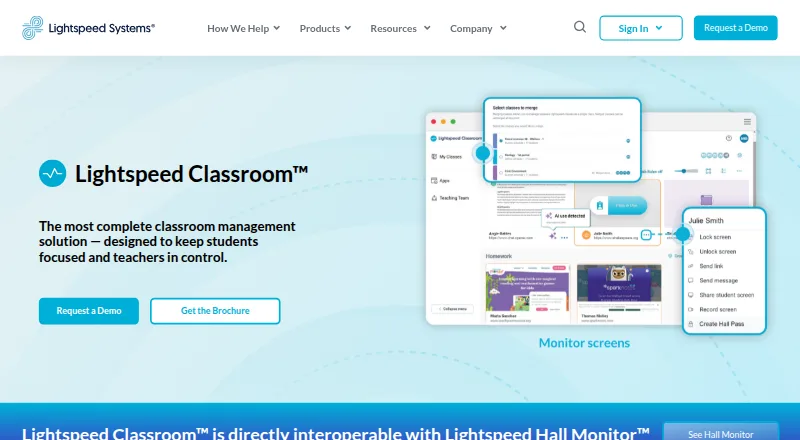
What Lightspeed Classroom is
Lightspeed Classroom is classroom management software that helps teachers guide student screen and web activity. Teachers can view, lock, and record screens, get alerts about unusual browsing, limit web access and tabs, and close off-task tabs. They can create groups with different browsing rules and curriculum links, add co-teachers, and merge classes. The product also provides visibility into classroom AI activity and can show hall-pass reports through its interoperability with Lightspeed Hall Monitor. It integrates with Zoom and Microsoft Teams. Lightspeed Classroom supports Chromebooks, Windows devices, and Macs; its FAQ says third-party screen monitoring is unavailable on iOS. Administrators can choose whether screen monitoring applies off campus. Lightspeed offers weekly live online teacher training, an on-demand video course, documentation, and help materials. Pricing is available on request. The company says customer data is encrypted at rest using AES and in transit using TLS, and that it undergoes an annual independent SOC 2 Type II audit.
Who it suits
It suits teachers and administrators who need controls for student screens, browsing, and classroom activity across supported devices. Districts can consider it at scales Lightspeed describes as 100 to 100,000 students or more.
What it does well
- Teachers can view, lock, and record student screens.
- Custom group rules can include curriculum links.
- Provides visibility into classroom AI activity.
- Integrates with Zoom and Microsoft Teams.
- Weekly live online teacher training is offered.
What to know first
- Pricing is available only on request.
- Third-party screen monitoring does not work on iOS.
Plans
| Plan | Billed and limits | Price |
|---|---|---|
| Lightspeed Classroom | Personalized quote; included in Lightspeed’s integrated ecosystem | On request |
As lightspeedsystems.com lists them, read 29 Sept 2026. The maker's own page has the final word.
Getting started
- Visit the Lightspeed Classroom product website.
- Contact Lightspeed to request a personalized quote.
- Confirm device compatibility, including the iOS screen-monitoring limitation.
- Arrange teacher training through weekly live sessions or the on-demand course.
Verdict
Lightspeed Classroom combines screen oversight, browsing controls, class organization, and visibility into classroom AI activity. Check device needs and request a quote before deciding.
Questions
How much does Lightspeed Classroom cost?
Pricing is available by request through a personalized quote. The product is included in Lightspeed’s integrated ecosystem.
Which devices does it work on?
Lightspeed says Classroom works on Chromebooks, Windows devices, and Mac devices. Its FAQ says third-party screen monitoring does not work on iOS.
Can teachers control student web activity?
Yes. Teachers can restrict web access, set tab limits, close off-task tabs, and create groups with custom browsing rules.
Does Lightspeed Classroom integrate with other products?
It integrates with Zoom and Microsoft Teams. It also works directly with Lightspeed Hall Monitor to show hall-pass reports.
Can administrators choose whether monitoring works off campus?
Yes. Administrators can choose whether Lightspeed Classroom can monitor screens off campus.
What security measures does Lightspeed describe?
Lightspeed Systems says customer data is encrypted at rest using AES and in transit using TLS. It undergoes an annual independent SOC 2 Type II audit, and customers can request the report after signing an NDA.
Facts from Lightspeed Classroom's own pages
- AI visibility
- The product provides notifications and visibility into classroom AI activity. · lightspeedsystems.com, 29 Sept 2026
- Browsing controls
- Teachers can restrict web access, set tab limits, and close off-task tabs. · lightspeedsystems.com, 29 Sept 2026
- Company history
- Lightspeed Systems says it was founded in 1999. · lightspeedsystems.com, 29 Sept 2026
- Encryption
- Lightspeed Systems says customer data is encrypted at rest using AES and in transit using TLS. · lightspeedsystems.com, 29 Sept 2026
- Founded
- 1999 · lightspeedsystems.com, 28 Sept 2026
- Hall passes
- Lightspeed Classroom is directly interoperable with Lightspeed Hall Monitor and can show reports of hall pass use. · lightspeedsystems.com, 29 Sept 2026
- Headquarters
- Lightspeed Systems lists its headquarters at 12013 Fitzhugh Rd., Austin, Texas 78736. · lightspeedsystems.com, 29 Sept 2026
- Instruction tools
- Teachers can create groups with custom browsing rules and curriculum links, add co-teachers, and merge classes. · lightspeedsystems.com, 29 Sept 2026
- Integrations
- The product integrates with Zoom and Microsoft Teams. · lightspeedsystems.com, 29 Sept 2026
- Off-campus monitoring
- Administrators can choose whether Lightspeed Classroom can monitor screens off campus. · lightspeedsystems.com, 29 Sept 2026
- Purpose
- Lightspeed Classroom is a classroom management solution designed to keep students focused and teachers in control. · lightspeedsystems.com, 29 Sept 2026
- Scale
- Lightspeed says Classroom is scalable for districts with 100 to 100,000 students or more. · lightspeedsystems.com, 29 Sept 2026
- Screen monitoring
- Teachers can view, lock, and record student screens and receive notifications about unusual browsing. · lightspeedsystems.com, 29 Sept 2026
- Security audit
- Lightspeed Systems undergoes an annual independent SOC 2 Type II audit, and customers can request the report after signing an NDA. · lightspeedsystems.com, 29 Sept 2026
- Supported devices
- Lightspeed Classroom works on Chromebooks, Windows devices, and Mac devices; its FAQ says it does not work on iOS for third-party screen monitoring. · lightspeedsystems.com, 29 Sept 2026
- Training
- Lightspeed offers weekly live online teacher training, an on-demand video course, documentation, and help materials. · lightspeedsystems.com, 29 Sept 2026
Where Lightspeed Classroom stands on Freedom251
- Classroom Management Software#22 of 25