Freedom251 › Classroom Management Software
Hāpara Highlights
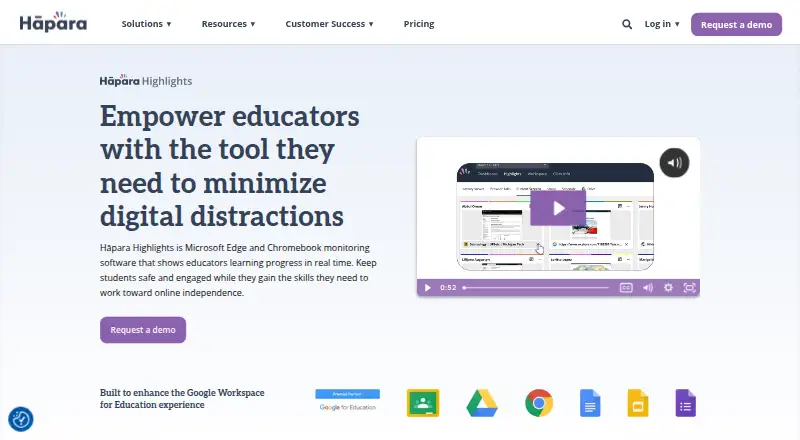
What Hāpara Highlights is
Hāpara Highlights helps educators monitor and guide student browsing during class. Teachers can see activity in Google Chrome or Microsoft Edge in real time, message a class, group, or individual learner, and guide students to selected websites. They can block distracting sites, open websites on student screens, or close sites that interrupt class work. Highlights can import Google Classroom rosters and share assignments, questions, and materials. Teachers can also access learners’ Google Drives to find files, track progress, and share files. The service supports Chromebooks, Windows laptops, and MacBooks when the appropriate Chrome or Edge extension is installed. It does not work on iPads, iPhones, Android devices, Safari, Firefox, or browsers unable to install its extension. Hāpara says teachers can see school-account tabs, a live preview of the active tab, school Google Drive or OneDrive files, and class-session browsing history. It says the tool cannot access camera or microphone hardware, activity outside Chrome or Edge, or activity outside configured monitoring hours. Pricing is on request, with a listed starting point around $1,500 based on student count.
Who it suits
Hāpara Highlights suits schools and educators who need to guide student browsing during class on supported computers. It is not suitable for classes using iPads, iPhones, Android devices, Safari, or Firefox.
What it does well
- Shows student activity in Chrome or Edge in real time
- Messages can target classes, groups, or individuals
- Imports Google Classroom rosters
- Can focus browsing on selected websites
- Includes live virtual and onsite training
What to know first
- Does not work on iPads, iPhones, or Android devices
- Safari and Firefox are unsupported
- Requires the appropriate Chrome or Edge extension
- Pricing is on request
Limits
The Hāpara plan starts around price on request and is based on student count, with volume discounts and multi-year agreements available. The service has no free plan and excludes unsupported mobile devices and browsers.
Plans
| Plan | Billed and limits | Price |
|---|---|---|
| Hāpara | Starts around $1,500 · Based on student count, not devices · Volume discounts and multi-year agreements available | $1,500 |
As hapara.com lists them, read 7 Oct 2026. The maker's own page has the final word.
Getting started
- Open the Hāpara Highlights website
- Arrange pricing for the Hāpara plan
- Deploy the student Chrome or Edge extension
- Configure browser and device policies
- Allow required network traffic
- Verify installation on supported devices
- Request live virtual or onsite staff training
Verdict
Highlights combines live browsing visibility, classroom messaging, and website controls for supported devices. Schools should check its device and browser limits and request pricing based on student count.
Questions
How much does Hāpara Highlights cost?
The Hāpara plan is priced on request, starting around $1,500 and based on student count. Pricing is on request.
Is there a free plan?
No. Hāpara Highlights is a paid service and no free plan is listed.
Which devices and browsers are supported?
It supports Chromebooks, Windows laptops, and MacBooks with the appropriate Chrome or Edge extension. Supported platforms include Chromebook, Windows, macOS, Google Chrome, and Microsoft Edge.
Can teachers use Google Classroom and Drive?
Highlights can import Google Classroom rosters and share assignments, questions, and materials. Teachers can access learner Google Drives to find, share, and track files.
What can teachers see?
Hāpara says teachers can see school-account browser tabs, a live preview of the active tab, school Google Drive or OneDrive files, and class-session browsing history.
Who makes Highlights?
Hāpara makes Highlights; the company was founded in 2011 and is headquartered in Raleigh, North Carolina, United States.
Facts from Hāpara Highlights's own pages
- Browsing controls
- Teachers can focus learners on selected websites, block distracting sites, open websites on student screens, and close distracting sites. · hapara.com, 7 Oct 2026
- Compliance
- Hāpara states that it is CIPA, COPPA, and FERPA compliant. · hapara.com, 7 Oct 2026
- Data practices
- Hāpara says it does not sell or rent user information and does not retain or use user information after a school cancels its subscription. · hapara.com, 7 Oct 2026
- Deployment
- Administrators deploy the student extension, configure browser and device policies, allow required network traffic, and verify installation. · support.hapara.com, 7 Oct 2026
- Device limits
- Highlights does not work on iPads, iPhones, Android devices, or browsers that cannot install its extension, including Safari and Firefox. · support.hapara.com, 7 Oct 2026
- Founded
- 2011 · hapara.com, 28 Sept 2026
- Google Classroom
- Highlights can import Google Classroom rosters and share assignments, questions, and materials. · hapara.com, 7 Oct 2026
- Google Drive
- Teachers can access learners’ Google Drives to find files, track progress, and share files. · hapara.com, 7 Oct 2026
- Headquarters
- Raleigh, North Carolina, United States · hapara.com, 28 Sept 2026
- Live visibility
- Educators can view student activity in Google Chrome or Microsoft Edge in real time. · hapara.com, 7 Oct 2026
- Messaging
- Teachers can send messages to a class, groups, or individual learners. · hapara.com, 7 Oct 2026
- Privacy limits
- The maker says Highlights cannot access camera or microphone hardware, activity outside Chrome or Edge, or activity outside configured monitoring hours. · support.hapara.com, 7 Oct 2026
- Privacy visibility
- The maker says teachers can see school-account browser tabs, a live preview of the active tab, school Google Drive or OneDrive files, and class-session browsing history. · support.hapara.com, 7 Oct 2026
- Purpose
- Hāpara Highlights helps educators monitor and guide student browsing during class. · hapara.com, 7 Oct 2026
- Support
- Hāpara offers live virtual and onsite training tailored to school staff needs. · hapara.com, 7 Oct 2026
- Supported devices
- Highlights supports Chromebooks, Windows laptops, and MacBooks with the appropriate Chrome or Edge extension installed. · support.hapara.com, 7 Oct 2026
Where Hāpara Highlights stands on Freedom251
- Classroom Management Software#20 of 25