Freedom251 › Visitor Behavior Intelligence Software
Vexo
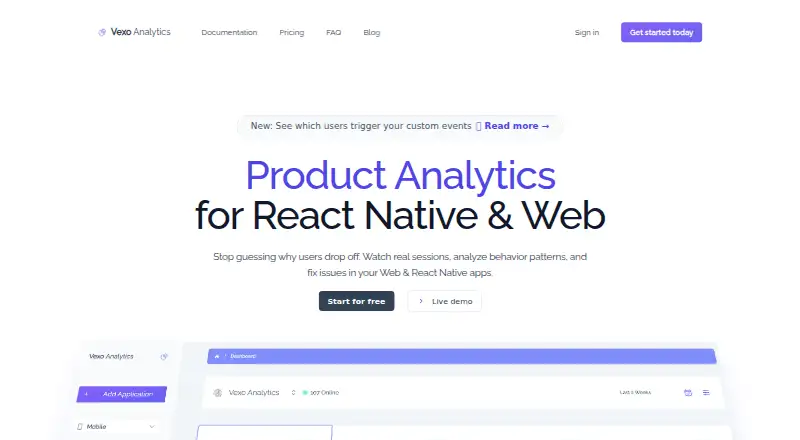
What Vexo is
Vexo provides product analytics for React Native and web apps, with Android, iOS, and web listed as platforms. It automatically tracks app opens, screen views, taps, navigation, API calls, and errors; teams can also define custom events for business-specific metrics. Session replays let teams review user behavior and debug issues, while tap heatmaps can be compared across app versions. The maker describes setup with the vexo-analytics package and a one-line initialization using an API key. Supported stack integrations include React Native CLI, Expo, React Navigation, Next.js, and Vue.js.
The free plan allows up to 500K events per month, 1,000 session replays, heatmaps, and two seats. Sessions, replays, and events are retained for 60 days on the free plan and 24 months on paid plans. Paid plans charge $3 per 1,000 replays after the included 1,000; additional seats cost $4.90 each. Vexo says analytics data is stored on secure servers in the United States and encrypted in transit and at rest. Data can be exported in CSV, and users can delete an app and its associated data. The maker says it does not sell user data, does not offer self-hosting, and provides 24/7 email support.
Who it suits
Vexo suits teams analyzing React Native or web app usage, including teams that want session replays, tap heatmaps, and custom event tracking. It lists integrations for several mobile and web development stacks.
What it does well
- Automatically tracks navigation, API calls, and errors.
- Heatmaps can be compared across app versions.
- Free plan includes 500K monthly events and two seats.
- Analytics data can be exported in CSV.
What to know first
- Free-plan data retention is 60 days.
- Vexo does not offer self-hosting.
- Paid replay charges apply after 1,000 included sessions.
- Additional seats cost $4.90 each.
Limits
The free plan includes up to 500K events per month, 1,000 session replays, and two seats. Sessions, replays, and events are retained for 60 days on free; paid plans retain them for 24 months. The free plan includes heatmaps and session replays.
Plans
| Plan | Billed and limits | Price |
|---|---|---|
| Try it out | Up to 500K/mo events · 1,000 session replays · Session replays and heatmaps · 2 seats | Free |
| Premium | Up to 500K events · 1,000 session replays, then $3 per 1,000 · Unlimited heatmaps · 2 seats · Additional seats $4.90 each | On request |
| Enterprise | Up to 1+ Billion events · 1,000 session replays, then $3 per 1,000 · Unlimited heatmaps · 10 seats · Onboarding and customer success · Custom configuration · Additional seats $4.90 each | On request |
As vexo.co lists them, read 8 Oct 2026. The maker's own page has the final word.
Getting started
- Open the Vexo website and choose the free plan or start a free trial.
- Add the vexo-analytics package to the app.
- Initialize it with an API key using the one-line setup described by the maker.
- Use a supported stack integration such as React Native CLI, Expo, React Navigation, Next.js, or Vue.js.
Vexo is product analytics for React Native and web applications, aimed at teams that need automatic instrumentation alongside replay and interaction analysis. It is strongest for app teams using the supported JavaScript stacks who want a generous free allowance before committing to longer retention or higher event volumes.
Overview
Vexo captures app opens, screen views, taps, navigation, API calls, and errors automatically, then lets teams add custom events for business-specific measurements. That reduces the work of instrumenting routine behavior while preserving a way to measure conversion or feature actions that matter to a particular product.
Session replays show individual journeys for behavioral investigation and debugging. Tap heatmaps reveal interaction patterns, with comparisons across app versions to help identify changes in usage. Together, these tools connect aggregate product questions with the specific sessions behind them.
Installation uses the vexo-analytics package and a one-line initialization with an API key. Analytics data is stored on secure servers in the United States and encrypted in transit and at rest. Vexo says it does not sell user data; app owners can delete an app and its associated data and export analytics as CSV. The important limitation is that analytics data cannot currently be self-hosted.
Key features
- Automatic tracking: Routine lifecycle, navigation, network, interaction, and error events are captured without manual definitions, making initial instrumentation faster.
- Custom events: Teams can add business-specific events when built-in activity does not represent a key metric.
- Session replays: Watching sessions supplies context around errors and confusing flows rather than relying only on event counts.
- Tap heatmaps: Interaction concentrations can be reviewed and compared between app versions, useful when evaluating interface changes.
- Stack integrations: Vexo supports React Native CLI, Expo, React Navigation, Next.js, and Vue.js. Teams outside those stacks should confirm fit before adopting it.
- Operational controls: Advanced privacy controls, CSV export, deletion of app data, and 24/7 email support at [email protected] cover basic governance and assistance needs.
Pricing
Vexo uses a freemium model and offers a free trial. The Try it out plan costs nothing and includes up to 500K events per month, 1,000 session replays, session replays and heatmaps, and two seats. Sessions, replays, and events are retained for 60 days. This is a substantial pilot allowance for a small product team, but the 1,000-replay and two-seat ceilings can constrain a larger organization.
Premium has custom pricing. It includes up to 500K events, 1,000 session replays, then charges $3 per 1,000 additional replays, unlimited heatmaps, and two seats; extra seats cost $4.90 each. Paid plans retain sessions, replays, and events for 24 months, making Premium the practical choice when historical analysis matters more than the free plan's short window.
Enterprise also uses custom pricing and raises capacity to 1+ billion events. It includes 1,000 session replays with the same $3-per-1,000 overage, unlimited heatmaps, 10 seats, onboarding and customer success, and custom configuration. Additional seats cost $4.90 each. It is designed for high-volume products that need implementation help and contractual configuration rather than merely more seats.
When a subscription reaches its event limit, Vexo accepts a limited amount of extra events and sends email alerts. That provides a buffer, not unlimited collection, so teams should monitor usage before relying on event-heavy instrumentation.
Platforms
Vexo supports Android, iOS, and web applications. Its capture coverage is described as supporting both app and web environments, with error context included and advanced privacy controls.
Who it's for
Vexo fits React Native and web teams using React Native CLI, Expo, React Navigation, Next.js, or Vue.js that want automatic capture, replay-based debugging, and heatmaps in one service. The free plan suits early products and evaluations; Premium suits teams needing two-year retention; Enterprise is for very high event volumes or organizations requiring onboarding and custom configuration.
It is a poor fit for organizations that must keep analytics on their own infrastructure, or for teams whose stack falls outside the stated integrations. Replay-heavy teams should also account for the 1,000-session allowance before choosing a paid tier.
Pros and cons
- Pros: Automatic capture covers common product and error activity; replays, heatmaps, and custom events combine diagnosis with product measurement; the free plan allows 500K monthly events; paid retention extends to 24 months; CSV export and data deletion support control.
- Cons: Self-hosting is unavailable; free and Premium plans include only 1,000 session replays before overage pricing; Premium starts with two seats and charges $4.90 for each additional seat; paid prices are custom rather than published.
Alternatives
Choose Rejourney if self-hosting, macOS support, or 5,000 monthly replays with seven-day evidence retention is more important than Vexo's longer paid retention.
FullSession is a better fit when a web-focused free tier with 1,000 sessions per month and 30-day retention, or a published $49-per-month Growth tier for 10,000 sessions, matches your scale.
Pick Fullstory when its free allowance of 30,000 sessions, 10 user seats, and one-year replay and product-analytics retention is the priority.
OpenReplay suits teams that require an open-source, self-managed deployment on premises or any cloud provider.
Choose UXCam for a free allowance of 3,000 sessions per month and two app keys, with paid pricing based on actual usage.
Zipy is an option when a $25-per-month annual Growth plan, one month of retention, and up to 10 projects fit your budget and scope.
Zoho PageSense is preferable for web teams needing 5,000 tracked users per month, one project, and five goals on a forever-free tier.
Crazy Egg is the alternative when web analytics, instant heatmaps, conversion analytics, and surveys are the central requirement.
Verdict
Choose Vexo for a React Native or web product that wants automatic event capture plus replay and heatmap investigation, with a useful free starting allowance and much longer retention on paid plans. Look elsewhere if self-hosting is mandatory, if you need more than 1,000 replays without overage charges, or if published paid pricing is essential.
Verdict
Vexo combines automatic tracking with session replays, heatmaps, and custom events for supported app stacks. Its free plan includes substantial event and replay allowances, while paid plans extend retention; self-hosting is not available.
Questions
Does Vexo have a free plan?
Yes. The free plan includes up to 500K events per month, 1,000 session replays, heatmaps and replays, and two seats.
How much do paid plans cost?
Paid plans start from $30. The Premium and Enterprise plan prices are not given in the supplied plan details.
Which platforms does Vexo support?
Android, iOS, and web are listed platforms. Vexo provides analytics for React Native and web apps.
Which frameworks and integrations are listed?
The maker lists React Native CLI, Expo, React Navigation, Next.js, and Vue.js.
How long is analytics data retained?
Sessions, replays, and events are retained for 60 days on the free plan and 24 months on paid plans.
Can Vexo be self-hosted?
No. Vexo says it does not currently offer self-hosting for analytics data.
Facts from Vexo's own pages
- Automatic tracking
- Vexo says it automatically tracks app opens, screen views, taps, navigation, API calls, and errors. · vexo.co, 8 Oct 2026
- Custom events
- Users can define custom events to track business-specific metrics. · vexo.co, 8 Oct 2026
- Data controls
- The maker says users can delete an app and its associated data, and that it does not sell user data. · vexo.co, 8 Oct 2026
- Event limit behavior
- After a subscription reaches its event limit, Vexo says it accepts a limited amount of extra events and sends email alerts. · vexo.co, 8 Oct 2026
- Export
- Vexo says analytics data can be exported in CSV format at any time. · vexo.co, 8 Oct 2026
- Headquarters
- Wilmington, Delaware, United States · vexo.co, 28 Sept 2026
- Heatmaps
- Vexo provides tap heatmaps and says teams can compare them across app versions. · vexo.co, 8 Oct 2026
- Integration
- The maker describes setup with the vexo-analytics package and a one-line initialization using an API key. · vexo.co, 8 Oct 2026
- Product
- Vexo provides product analytics for React Native and web apps. · vexo.co, 8 Oct 2026
- Retention
- The pricing page says sessions, replays, and events are retained for 60 days on the free plan and 24 months on paid plans. · vexo.co, 8 Oct 2026
- Security and storage
- Vexo says analytics data is stored on secure servers in the United States and encrypted in transit and at rest. · vexo.co, 8 Oct 2026
- Self-hosting
- Vexo says it does not currently offer self-hosting for analytics data. · vexo.co, 8 Oct 2026
- Session replays
- Session replays let teams watch user sessions to understand behavior and debug issues. · vexo.co, 8 Oct 2026
- Stack compatibility
- The maker lists React Native CLI, Expo, React Navigation, Next.js, and Vue.js as supported stack integrations. · vexo.co, 8 Oct 2026
- Support
- The FAQ says customer support is available 24/7 by email at [email protected]. · vexo.co, 8 Oct 2026
Where Vexo stands on Freedom251
- Visitor Behavior Intelligence Software#14 of 23
- Session Replay Software#19 of 26
- Session Recording Software#22 of 30
- Product Analytics Tools#36 of 45