Freedom251 › Heatmap and session replay tools

OpenReplay
What OpenReplay is
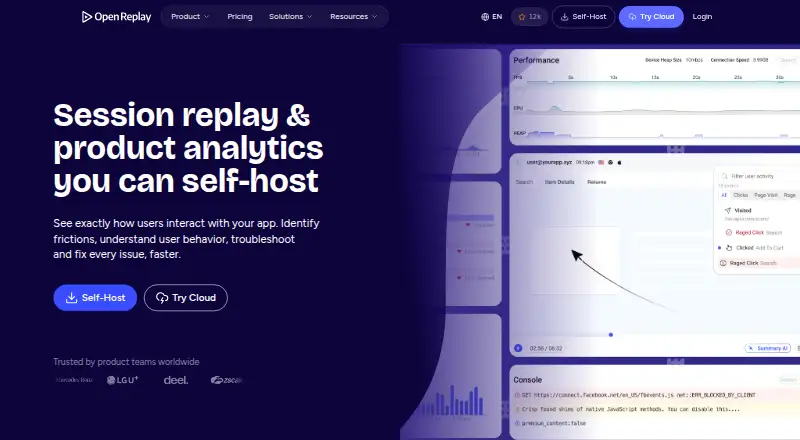
OpenReplay is an open-source platform for session replay, co-browsing, and product analytics. It reconstructs application sessions with DOM structure, clicks, scrolling, inputs, and page changes, allowing teams to review how users move through an app. Analytics include funnels, journeys, heatmaps, traffic metrics, and user segmentation, with links from metrics to individual replays. Web Analytics tracks pages, referrers, traffic volume, engaged users, and navigation drop-offs with replay context. Privacy controls include a private mode that obscures text and DevTools data by default, plus field-level sanitization to limit sensitive data capture. Integrations can pull backend logs from Sentry and Datadog, connect Redux and Vuex state, create Jira or GitHub tickets, and share through Slack. Events can be exported to a data warehouse, and the REST API can fetch sessions, users, events, and live data. OpenReplay offers self-hosting or managed Dedicated deployment. The free Open-Source plan is self-managed; Dedicated is listed at $199 a month, billed hourly. Mobile tracker setup is documented as beta integrations.
Who it suits
It suits product and engineering teams that want to review application sessions alongside analytics and technical context. Teams can self-host or choose a managed Dedicated instance, while mobile capture is documented as beta.
What it does well
- Replays include DOM structure, clicks, inputs, and page changes.
- Analytics cover funnels, journeys, heatmaps, and segmentation.
- Private mode obscures text and DevTools data by default.
- Offers self-hosted and managed Dedicated deployment.
- Events can be exported to a data warehouse.
What to know first
- Mobile tracker setup is documented as beta.
- Open-Source plan uses self-managed storage and retention.
- Dedicated costs $199 a month, billed hourly.
Limits
The Open-Source plan is for low traffic and leaves storage and retention self-managed. Dedicated is limited to up to 4TB storage, 32GB RAM, and 8 vCPUs; its listed price is $199 a month, billed hourly at $0.276/hr.
Plans
| Plan | Billed and limits | Price |
|---|---|---|
| Open-Source | On prem · Any cloud provider · self-managed storage and retention · low traffic · community support | Free |
| Serverless | Usage-based cloud deployment · Pay only for recorded sessions | On request |
| Dedicated | Billed hourly ($0.276/hr) · Managed by OpenReplay · AWS/GCP/Azure · 50 regions · up to 4TB storage · up to 32GB RAM · up to 8vCPUs · custom retention | $199 a month |
| Enterprise | Volume pricing on a multi-year contract · Self-hosted at scale · any cloud provider · auto-scaling · SAML/SCIM · audit logging · dedicated support | On request |
As openreplay.com lists them, read 30 Sept 2026. The maker's own page has the final word.
Getting started
- Visit https://openreplay.com/.
- Choose the free Open-Source plan, usage-based Serverless, managed Dedicated, or Enterprise.
- For self-hosting, deploy on your infrastructure or cloud provider; for managed hosting, select Dedicated.
- Configure session recording and privacy controls.
- Connect analytics, integrations, or the REST API as needed.
Overview
OpenReplay brings session replay, product analytics and technical integrations together for teams investigating how people experience their applications. It suits product and engineering teams that want deployment control as well as behavioral insight. Its main trade-off is between managing storage and retention yourself on the free plan or paying for a managed Dedicated deployment.
Key features
Replay reconstructs a user's experience from page structure, clicks, scrolling, inputs and page changes. Rage-click detection can help flag interaction friction, while a stated monthly limit of 50,000 sessions gives teams a concrete volume ceiling to weigh against expected usage.
Privacy controls are a useful safeguard: Private mode obscures text and DevTools data by default, and field-level sanitization can prevent sensitive data from being captured. Teams can inspect funnels, journeys, heatmaps, traffic metrics and user segments, then move from a metric to related replays. Web analytics adds page and referrer activity, traffic volume, engaged users and navigation drop-offs, giving product teams both aggregate patterns and session context.
Technical integrations make OpenReplay relevant beyond product analysis. It can pull backend logs from Sentry and Datadog, connect Redux and Vuex state, and create Jira or GitHub tickets shared through Slack. Behavioral and technical events can be exported to a data warehouse, while the REST API can fetch sessions, users, events and live data for dashboards, pipelines and support workflows.
OpenReplay can run on a team's infrastructure or as a managed Dedicated instance on AWS, Google Cloud or Microsoft Azure across 50 regions. The cloud service states SOC 2 Type II compliance and administrative, physical and technical safeguards. Mobile capture is supported, but iOS and Android tracker setup remains in beta; that makes mobile a less settled fit than a core requirement would ideally warrant. OpenReplay Spot, a Chrome extension, supports bug recording and reporting with session details.
Pricing
The Open-Source plan costs nothing. It is an on-premises option for any cloud provider, with self-managed storage and retention, and community support through GitHub and Slack. It fits teams comfortable operating their own infrastructure; the low-traffic positioning and self-managed retention make it less attractive to teams seeking a hands-off service.
Serverless uses a usage-based cloud deployment and charges only for recorded sessions, but has custom pricing. That model may suit teams preferring cloud deployment without a fixed published starting price. Dedicated starts at $199 a month, billed hourly ($0.276/hr). OpenReplay manages it on AWS, GCP or Azure; it includes up to 4TB storage, up to 32GB RAM, up to 8vCPUs and custom retention. This is the clearest fit for teams wanting managed infrastructure and room to set retention, though capacity is bounded by those stated limits.
Enterprise has custom pricing and is self-hosted at scale, with SAML/SCIM, audit logging, dedicated support, onboarding architecture services and volume pricing. A 7-day trial is available. The published paid starting point is $199/mo; weigh it against the free plan's operational burden and your expected session volume.
Platforms
OpenReplay supports Android, iOS, web, API, extension and self-hosted deployments. Mobile tracker setup is beta for iOS and Android, so teams evaluating mobile capture should account for that maturity qualification.
Who it's for
OpenReplay is strongest for product and engineering teams that need to connect user behavior to technical evidence, especially when data export, API access or self-hosting matters. It is less compelling for teams that want managed service at no cost, or that require fully mature mobile tracker setup.
Pros and cons
- Pro: Replay, analytics and technical integrations share one workflow, linking aggregate behavior to sessions and backend context.
- Pro: Self-hosting and managed cloud give teams a choice over infrastructure, with the free plan useful when a team can own storage and retention.
- Pro: Default text and DevTools obfuscation plus field-level sanitization provide meaningful privacy controls.
- Con: The free plan leaves storage and retention management to the team, and its positioning is for low traffic.
- Con: iOS and Android tracker setup is beta, a significant caveat for mobile-first evaluation.
- Con: Serverless and Enterprise have custom pricing, limiting cost comparison; Dedicated has explicit storage and compute caps.
Alternatives
Fullstory is worth considering for a free option with 30,000 sessions, 10 user seats, 5,000 server-side events and one-year replay and product analytics retention. Replayfy is a simpler alternative if a free plan capped at 1,000 monthly sessions is enough. UXCam offers a free plan with 3,000 sessions per month and two app keys, making it a smaller-volume alternative.
Zipy may suit teams seeking a published entry price: its Growth plan starts at $25 a month, billed annually, with one month of data retention and up to 10 projects. Crazy Egg is another option for teams focused on web analytics, instant heatmaps, conversion analytics and website surveys. DeepSync has a free plan with 1,000 monthly sessions, 30-day retention, one project, one workspace and one team member.
Inspectlet is a web-only alternative whose free plan includes 2,500 recorded sessions per month across up to three websites, with no credit card or time limit. Microsoft Clarity is worth a look when unlimited heatmaps, websites, team members and traffic are the priority.
For broader comparisons, browse Session Recording Software, Session Replay Software, Heatmap and session replay tools and Mobile App Monitoring.
Verdict
Choose OpenReplay if your product and engineering teams want session-level investigation tied to analytics and technical context, with the option to self-host or move to managed cloud. Its privacy controls and deployment flexibility are persuasive strengths. Look elsewhere if beta mobile tracker setup is a blocker, or if your team needs predictable managed-service pricing without accepting Dedicated's $199 a month starting point.
Verdict
OpenReplay combines session replay, product analytics, and technical integrations, with self-hosting and managed deployment options. Consider the beta status of mobile tracker setup and the storage and support arrangements of each plan.
Questions
Does OpenReplay have a free plan?
Yes. The Open-Source plan is free and includes on-premises deployment, any cloud provider, self-managed storage and retention, low-traffic use, and community support.
How much does Dedicated cost?
Dedicated is $199 a month, billed hourly at $0.276/hr.
Which platforms are listed?
OpenReplay lists Android, API, extension, iOS, self-hosted, and web. Mobile tracker setup is documented as beta integrations.
Can OpenReplay be self-hosted?
Yes. The Open-Source plan supports on-premises deployment and any cloud provider. Enterprise is also listed as self-hosted at scale.
What integrations are listed?
OpenReplay can pull backend logs from Sentry and Datadog, connect Redux and Vuex, create Jira or GitHub tickets, and share through Slack.
Does OpenReplay offer a free trial?
Yes. A 7-day trial is listed.
Facts from OpenReplay's own pages
- API
- Its REST API can fetch sessions, users, events and live data for data pipelines, dashboards and support workflows. · openreplay.com, 30 Sept 2026
- Chrome extension
- The documentation provides OpenReplay Spot, a Chrome Extension for recording and reporting bugs with session details. · docs.openreplay.com, 30 Sept 2026
- Cloud coverage
- Dedicated deployments run on AWS, Google Cloud or Microsoft Azure across 50 regions. · openreplay.com, 30 Sept 2026
- Data export
- Behavioral and technical events can be exported to a data warehouse for internal dashboards and analysis. · openreplay.com, 30 Sept 2026
- Deployment
- OpenReplay can be self-hosted on users’ infrastructure or deployed as a managed Dedicated instance. · openreplay.com, 30 Sept 2026
- Free plan
- Yes · openreplay.com, 21 Sept 2026
- Integrations
- OpenReplay can pull backend logs from Sentry and Datadog, connect Redux and Vuex state libraries, and create Jira or GitHub tickets while sharing through Slack. · openreplay.com, 30 Sept 2026
- Mobile capture
- Yes · openreplay.com, 21 Sept 2026
- Mobile support
- Documentation lists iOS and Android tracker setup as beta integrations, and the session replay page links iOS, Android and React Native SDKs. · docs.openreplay.com, 30 Sept 2026
- Monthly session limit
- 50000 · openreplay.com, 21 Sept 2026
- Privacy controls
- Private mode obscures text and DevTools data by default, and field-level sanitization can prevent sensitive data capture. · openreplay.com, 30 Sept 2026
- Product analytics
- Product analytics includes funnels, journeys, heatmaps, traffic metrics, user segmentation and links from metrics to individual replays. · openreplay.com, 30 Sept 2026
- Rage-click detection
- Yes · openreplay.com, 21 Sept 2026
- Security
- OpenReplay states that its cloud service is SOC 2 Type II compliant and maintains administrative, physical and technical safeguards. · openreplay.com, 30 Sept 2026
- Session recordings
- Yes · openreplay.com, 21 Sept 2026
- Session replay
- It reconstructs users’ visual experiences, including DOM structure, clicks, scrolls, inputs and page changes. · openreplay.com, 30 Sept 2026
- Paid from
- 199 · openreplay.com, 21 Sept 2026
- Support
- The Open-Source plan provides community support through GitHub and Slack, while Enterprise includes dedicated support and onboarding architecture services. · openreplay.com, 30 Sept 2026
- Web analytics
- Web Analytics tracks pages, referrers, traffic volume, engaged users and navigation drop-offs, with session replay context. · openreplay.com, 30 Sept 2026
- What it does
- OpenReplay is an open-source session replay, co-browsing and product analytics platform for understanding how users experience applications. · blog.openreplay.com, 30 Sept 2026
Where OpenReplay stands on Freedom251
- Heatmap and session replay tools#6 of 63
- Session Recording Software#6 of 30
- Visitor Behavior Intelligence Software#5 of 23
- Session Replay Software#7 of 26
- Behavior Analytics#8 of 25
- Mobile App Monitoring#11 of 23