Freedom251 › AI Image Enhancers
VanceAI Image Denoiser
What VanceAI Image Denoiser is
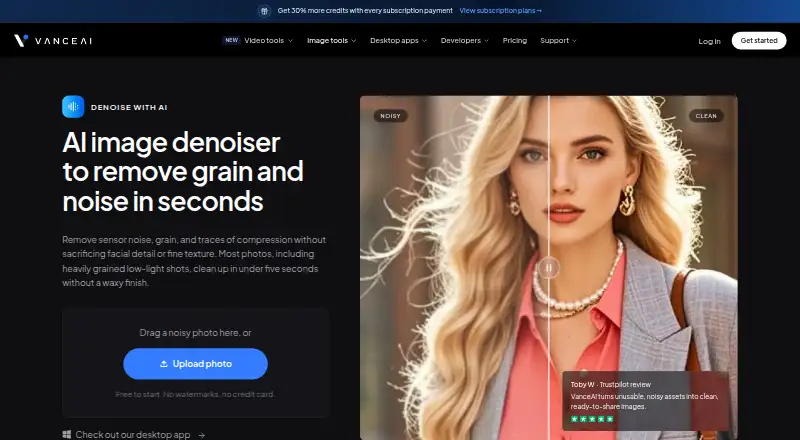
VanceAI Image Denoiser reduces grain, sensor noise, and compression artifacts in photos while aiming to retain facial detail and fine texture. The web tool can process an uploaded image automatically, or users can adjust noise-reduction and sharpness sliders and run it again. Each result costs 1 credit; the free plan includes 10 credits, and paid plans are listed from $9/mo (annual). VanceAI says most photos, including full-resolution images, can be processed in under five seconds. It says uploads are encrypted in transit and deleted within 24 hours after processing. On Windows, VanceAI for PC processes images locally, accepts images of any size, uses no credits, and supports batch denoising. Other access options include an authenticated HTTP API, an Agent Skill for compatible environments, and a ComfyUI custom node for cloud processing with account credits. API v1 checks job completion by polling and has no completion webhooks. Paid web plans accept uploads up to 10MB and 34MP; files beyond those limits are resized or compressed before processing.
Who it suits
It suits people who want automatic photo denoising in a browser, with sliders available for a second pass. Windows users seeking local, credit-free batch processing may prefer VanceAI for PC; developers can use the API or listed integrations.
What it does well
- Automatic denoising requires no masks or manual adjustments.
- Noise reduction and sharpness can be adjusted.
- Free plan includes 10 credits.
- Windows PC version processes locally without credits.
- Web uploads are encrypted in transit and deleted within 24 hours.
What to know first
- Each denoising result uses 1 credit.
- Paid web uploads are limited to 10MB and 34MP.
- API v1 uses polling and has no completion webhooks.
- Free trial is not offered.
Limits
The Free plan provides 10 credits, and each AI Image Denoiser result costs 1 credit. Paid web plans accept uploads up to 10MB and 34MP; larger files are resized or compressed before processing. API v1 uses polling and does not provide completion webhooks.
Plans
| Plan | Billed and limits | Price |
|---|---|---|
| Free | 10 free credits · AI Image Denoiser costs 1 credit · free-tier queue | Free |
| Starter | $180 billed annually · 260 credits / mo · AI Image Denoiser costs 1 credit · unused subscription credits roll over | $15 a month |
| Popular | $360 billed annually · 650 credits / mo · AI Image Denoiser costs 1 credit · unused subscription credits roll over | $30 a month |
| VanceAI for PC — 1 month | Renews monthly, cancel anytime · Unlimited local processing · all features included · license for 1 PC · 100 free web-app credits | $39.90 a month |
| Creator | $540 billed annually · 1,300 credits / mo · AI Image Denoiser costs 1 credit · unused subscription credits roll over | $45 a month |
| Studio | $900 billed annually · 2,600 credits / mo · AI Image Denoiser costs 1 credit · unused subscription credits roll over | $75 a month |
| VanceAI for PC — 1 year | Renews annually, cancel anytime · Unlimited local processing · all features included · license for 1 PC · 200 free web-app credits | $99.90 a year |
| VanceAI for PC — Lifetime | Pay once, use forever · Unlimited local processing · all features included · license for 1 PC · 300 free web-app credits | On request |
The first 8 of 9 plans, as vanceai.com lists them, read 5 Oct 2026. The maker's own page has the final word. Every plan
Getting started
- Open the VanceAI denoiser website or choose a listed API or integration route.
- For web processing, upload a photo; the tool can denoise it automatically.
- Use the noise reduction and sharpness sliders if you want to adjust the result, then process again.
- For local Windows processing, use VanceAI for PC; its listed plans license one PC.
- Use a Free plan with 10 credits, or choose a listed paid plan for additional credits or PC processing.
VanceAI Image Denoiser is a web, API, and Windows tool for reducing grain, sensor noise, and compression artifacts while preserving facial detail and texture. It fits photographers, content teams, and developers who need repeatable cleanup, especially Windows users handling batches locally. The main choice is between metered cloud processing and a Windows license with unlimited local work.
Overview
The web workflow begins with automatic denoising: upload a photo and receive a result without masks, thresholds, or manual setup. Noise-reduction and sharpness sliders provide a second pass when the first balance is too smooth or not clean enough. VanceAI says most images, including full-resolution photos, process in under five seconds, which suits quick edits and production queues where short turnaround matters.
Cloud use is constrained by both credits and upload limits. Each AI Image Denoiser result costs one credit, while paid web plans accept files up to 10MB and 34MP. Larger files are automatically resized or compressed before processing, so photographers working with very large originals may lose control over the source dimensions. Uploaded images are encrypted in transit and permanently deleted within 24 hours. Support is available by ticket, with replies promised within 24 hours.
Key features
- Automatic first pass: No-mask processing removes setup for occasional users and teams handling varied photo sets.
- Manual refinement: Separate noise-reduction and sharpness sliders let users trade smoother backgrounds against retained edge detail, then rerun the image.
- Credit metering: One credit per denoised result makes cloud consumption straightforward to calculate, but frequent processing can exhaust lower plans quickly.
- Windows local mode: VanceAI for PC processes locally, accepts images of any size, uses no credits, and supports batch denoising. It is the stronger option for large archives or sensitive files that should not be uploaded.
- Developer connections: An authenticated HTTP API, an Agent Skill for compatible agent environments, and a ComfyUI custom node extend denoising into automated workflows. API v1 relies on polling and has no completion webhooks, so integrations must manage status checks themselves.
Pricing
The free plan costs $0.00 and includes 10 credits; with denoising priced at one credit per result, it covers a small trial without a credit card or watermark. Processing uses a free-tier queue and there is no free trial beyond that allowance.
Web subscriptions are billed annually: Starter is $15.00 per month ($180 billed annually) for 260 credits monthly, Popular is $30.00 per month ($360 billed annually) for 650 credits, Creator is $45.00 per month ($540 billed annually) for 1,300 credits, and Studio is $75.00 per month ($900 billed annually) for 2,600 credits. Unused subscription credits roll over. Starter suits light recurring work; Popular and Creator fit larger individual or team volumes, while Studio is aimed at high-throughput cloud use. All remain subject to the 10MB and 34MP web limits.
VanceAI for PC costs $39.90 per month, renewing monthly with cancellation anytime, and licenses one PC with unlimited local processing, all features, and 100 free web-app credits. The one-year license is $99.90 per year, renews annually, can be canceled, and includes 200 web credits. Lifetime pricing is custom (pay once, use forever) with 300 web credits. These plans are compelling when local batch work outweighs cloud convenience; the one-PC license is restrictive for distributed teams.
Enterprise has custom pricing and adds volume terms, custom integration, automated batch processing, and direct engineering support.
Platforms
VanceAI Image Denoiser runs on the web, Windows, and through an API. The PC application is Windows-only; cloud integrations include ComfyUI and compatible agent environments.
Who it's for
Choose it for fast, credit-based photo cleanup, adjustable denoising, or a developer pipeline that can tolerate polling. Windows photographers and studios processing large batches should favor the PC edition because local work is unlimited, handles any image size, and avoids credits. It is less suitable for users needing multi-computer licensing, webhook-driven API completion, or unrestricted large-file web uploads.
Pros and cons
- Pros: Automatic and adjustable processing; sub-five-second processing claim; encrypted uploads with deletion within 24 hours; local, credit-free Windows batch processing; API, Agent Skill, and ComfyUI options.
- Cons: Cloud results consume credits; paid web uploads cap at 10MB and 34MP with automatic resizing or compression; API v1 lacks webhooks; PC licenses cover one computer; free access is limited to 10 credits.
Alternatives
Browse AI Image Enhancers for a broader category comparison. Cutout.Pro is the better pick when you need a freemium service spanning Android, iOS, Linux, macOS, web, Windows, and API access. PhotoBoost suits users wanting mobile and desktop coverage plus a free trial and introductory credits, though its free cloud output is limited to 3MP. Viesus is worth considering for a lifetime 50-credit try-out that includes upscaling, face reconstruction, and artifact removal. Palette fits color-enhancement workflows and offers a $49.00 pay-once plan. VanceAI Image Sharpener is the closer alternative when sharpening, rather than denoising, is the priority. YouCam Perfect is a mobile-only choice with free templates and premium AI tools.
Verdict
VanceAI Image Denoiser is a strong fit for people and teams that want quick automatic cleanup with optional controls, or for Windows users who need unlimited local batch processing. Choose it primarily for the local PC workflow or its simple credit-based cloud/API model. Look elsewhere if you require webhook-based automation, multi-PC licensing, or web uploads beyond 10MB and 34MP.
Verdict
VanceAI Image Denoiser offers automatic web processing as well as adjustable controls and local Windows batch processing. Check credit use and the web upload limits, or consider the PC version for local processing.
Questions
Is VanceAI Image Denoiser free?
It has a Free plan with 10 credits, and each denoising result costs 1 credit. The product page says it is free to start, with no watermarks or credit card.
What does a paid plan cost?
Paid plans are listed from $9/mo (annual). The listed Starter plan is $15 a month, billed $180 billed annually.
Which platforms are available?
The listed platforms are web, Windows, and API. The product also lists an Agent Skill for compatible agent environments and a ComfyUI custom node.
What are the web upload limits?
Paid web plans accept uploads up to 10MB and 34MP. Files beyond those limits are resized or compressed before processing.
Does VanceAI offer local processing?
VanceAI for PC processes images locally on Windows, uses no credits, accepts images of any size, and supports batch denoising.
How does API v1 report completed jobs?
API v1 uses polling to check whether a job is complete and does not provide completion webhooks.
Facts from VanceAI Image Denoiser's own pages
- Adjustable output
- Users can adjust noise reduction and sharpness sliders, then process the photo again. · vanceai.com, 5 Oct 2026
- API limitation
- API v1 uses polling to check job completion and does not provide completion webhooks. · vanceai.com, 5 Oct 2026
- Automatic processing
- The product says users can upload a grainy photo for automatic denoising without masks, threshold sliders, or manual adjustments. · vanceai.com, 5 Oct 2026
- Batch processing
- The product page says VanceAI for PC can batch-denoise photos on Windows. · vanceai.com, 5 Oct 2026
- Company background
- VanceAI says it was founded in July 2020 by deep learning researchers in Hong Kong and has offices in Hong Kong and Japan. · vanceai.com, 5 Oct 2026
- Founded
- 2020 · vanceai.com, 28 Sept 2026
- Free access
- The product page says it is free to start, with no watermarks and no credit card, and the pricing page offers 10 free credits. · vanceai.com, 5 Oct 2026
- Headquarters
- Hong Kong, with offices in Hong Kong and Japan · vanceai.com, 28 Sept 2026
- Image credit cost
- The pricing page lists AI Image Denoiser at 1 credit per result. · vanceai.com, 5 Oct 2026
- Integrations
- VanceAI lists an authenticated HTTP API, an Agent Skill for compatible agent environments, and a ComfyUI custom node that processes jobs in the cloud using account credits. · vanceai.com, 5 Oct 2026
- Privacy
- VanceAI says uploaded images are encrypted in transit and permanently deleted within 24 hours after processing. · vanceai.com, 5 Oct 2026
- Speed
- VanceAI says most photos clean up in under five seconds and that full-resolution photos can be denoised in under five seconds. · vanceai.com, 5 Oct 2026
- Support
- The help page says users can send a support ticket and receive a reply within 24 hours. · vanceai.com, 5 Oct 2026
- Web upload limits
- The pricing page states paid web plans accept uploads up to 10MB and 34MP; files beyond stated limits are automatically resized or compressed before processing. · vanceai.com, 5 Oct 2026
- What it does
- VanceAI Denoise AI removes grain, sensor noise, and compression artifacts from photos while aiming to preserve facial detail and fine texture. · vanceai.com, 5 Oct 2026
- Windows local processing
- VanceAI for PC processes images locally on Windows, uses no credits, and accepts images of any size. · vanceai.com, 5 Oct 2026
Where VanceAI Image Denoiser stands on Freedom251
- AI Image Enhancers#18 of 28