Freedom251 › AI Image Enhancers

VanceAI Image Enhancer
What VanceAI Image Enhancer is
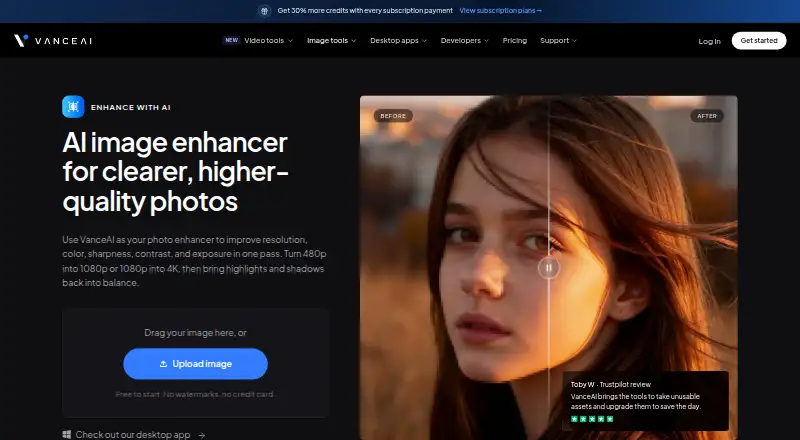
VanceAI Image Enhancer improves image resolution, color, sharpness, contrast and exposure in one pass. Its product page describes enlarging images from 480p to 1080p or from 1080p to 4K, and says most enhancements finish in under five seconds. Sign-up credits cover three free enhancements, and the free tier allows previews without a watermark. Paid web uploads must be under 34 megapixels, 10MB and 8000 pixels on the longest side. VanceAI says uploads are encrypted in transit and permanently deleted within 24 hours of processing. VanceAI for PC processes files locally on Windows, with unlimited local processing and batch processing of hundreds of images. Other options include web access, an HTTP API, an agent skill and ComfyUI custom nodes; ComfyUI processing uses account credits in the cloud. API v1 checks job status through polling and does not provide completion webhooks. Listed uses include e-commerce listings, real estate photos, family photo restoration, social media images and design assets. Paid plans include Starter at $15 a month, billed $180 billed annually.
Who it suits
It suits people improving images for e-commerce, real estate, family photo restoration, social media or design. Windows users can also process files locally in batches.
What it does well
- Adjusts resolution, color, sharpness, contrast and exposure.
- Three free enhancements with sign-up credits.
- Free previews have no watermark.
- Windows PC version offers unlimited local processing.
- Supports an HTTP API.
What to know first
- Paid web uploads must be under 10MB.
- Web upload dimensions are capped at 8000 pixels on the longest side.
- API v1 has no completion webhooks.
- Unused credits may expire when a subscription ends.
Limits
The free tier provides three enhancement credits and watermark-free previews. Paid web files must be under 34 megapixels, 10MB, and 8000 pixels on the longest side; API v1 has no completion webhooks.
Plans
| Plan | Billed and limits | Price |
|---|---|---|
| Desktop Lifetime | Pay once, use forever · Page shows $129.90$199.90 · unlimited local processing · all features · 1 PC license · 300 free web credits · priority technical support | $129.90, paid once |
| Starter | $180 billed annually · 260 credits / mo · 200 credits+60 free · $0.058 / credit | $15 a month |
| Popular | $360 billed annually · 650 credits / mo · 500 credits+150 free · $0.046 / credit | $30 a month |
| Desktop 1 month | Renews monthly, cancel anytime · Unlimited local processing · all features · 1 PC license · 100 free web credits · priority technical support | $39.90 a month |
| Creator | $540 billed annually · 1,300 credits / mo · 1,000 credits+300 free · $0.035 / credit | $45 a month |
| Studio | $900 billed annually · 2,600 credits / mo · 2,000 credits+600 free · $0.029 / credit | $75 a month |
| Desktop 1 year | Renews annually, cancel anytime · Unlimited local processing · all features · 1 PC license · 200 free web credits · priority technical support | $99.90 a year |
| Enterprise | Custom pricing · Volume pricing and custom terms · custom integration · automated batch processing · direct engineering support | On request |
As vanceai.com lists them, read 30 Sept 2026. The maker's own page has the final word.
Getting started
- Open https://vanceai.com/image-enhancer/
- Choose web access, Windows, macOS, or the API
- Sign up to receive credits for three free enhancements
- Upload an image within the paid web limits when applicable
- Use ComfyUI custom nodes with account credits for cloud processing
Verdict
VanceAI offers a free entry point and several ways to process images, including local Windows processing and an API. Check the upload limits and the stated difference between credit rollover and subscription-end expiry before choosing a plan.
Questions
Does VanceAI have a free plan?
Yes. Sign-up credits cover three free image enhancements, and the free tier allows previews without a watermark.
What does VanceAI cost?
The service is freemium, with paid access from 9 /mo. Starter is $15 a month, billed $180 billed annually.
Which platforms are supported?
VanceAI lists web, macOS, Windows, and API access.
Can it process files locally?
VanceAI for PC processes files locally on Windows, with unlimited processing and batch processing of hundreds of images.
Does it provide an API?
Yes. It offers an HTTP API, but API v1 checks job status by polling and does not provide completion webhooks.
How are uploaded images handled?
Uploads are encrypted in transit and permanently deleted within 24 hours of processing.
Facts from VanceAI Image Enhancer's own pages
- API limitation
- API v1 uses polling to check job status and does not provide completion webhooks. · vanceai.com, 30 Sept 2026
- Credit rollover
- Pricing says unused subscription credits roll over, while another pricing FAQ says credits expire when the subscription ends. · vanceai.com, 30 Sept 2026
- Free use
- Sign-up credits cover three free image enhancements, and the free tier allows previewing without a watermark. · vanceai.com, 30 Sept 2026
- Image enhancement
- The image enhancer improves resolution, color, sharpness, contrast, and exposure in one pass. · vanceai.com, 30 Sept 2026
- Integrations
- VanceAI offers an HTTP API, an agent skill, and ComfyUI custom nodes; the latter processes in the cloud using account credits. · vanceai.com, 30 Sept 2026
- Local processing
- VanceAI for PC processes files locally on Windows, with unlimited processing and batch processing of hundreds of images. · vanceai.com, 30 Sept 2026
- Paid upload limits
- Paid web uploads are limited to files under 34 megapixels, 10MB, and 8000 pixels on the longest side. · vanceai.com, 30 Sept 2026
- Privacy
- The product page says uploaded images are encrypted in transit and permanently deleted within 24 hours of processing. · vanceai.com, 30 Sept 2026
- Processing speed
- The product page says most enhancements finish in under five seconds. · vanceai.com, 30 Sept 2026
- Support
- The help center says support tickets receive a response within 24 hours. · vanceai.com, 30 Sept 2026
- Upscaling
- The product page says it can enhance 480p to 1080p or 1080p to 4K. · vanceai.com, 30 Sept 2026
- Use cases
- The product page describes use for e-commerce listings, real estate photos, family photo restoration, social media images, and design assets. · vanceai.com, 30 Sept 2026
Where VanceAI Image Enhancer stands on Freedom251
- AI Image Enhancers#15 of 28