Freedom251 › AI Image Enhancers
Image Enhancer AI
What Image Enhancer AI is
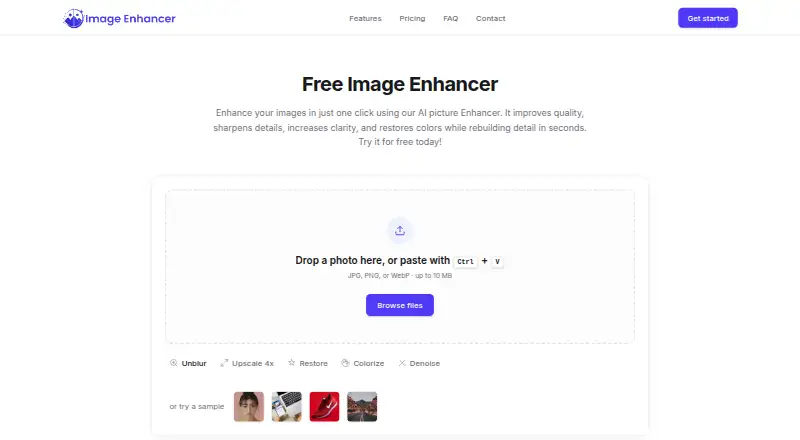
Image Enhancer AI is a web tool for improving image sharpness, clarity, color accuracy, and resolution. Its options include enhancement, upscaling, restoration, sharpening, deblurring, colorization, denoising, and background removal. The tool offers 2x or 4x upscaling and describes premium upscaling as reaching 4K. A typical workflow is to upload an image, customize enhancements, compare a before-and-after preview, and download the result.
Uploads can be JPG, PNG, or WebP files up to 10 MB, with JPG, PNG, and WebP available as output formats. A sign-up bonus gives users three free image enhancements without requiring payment to start. Premium costs $18.99 a month and includes Advanced and Max power levels, all enhancements, PNG and WebP output, and batch uploads of 30 images. The maker describes the tool for photographers, e-commerce businesses, real estate professionals, families, social media users, and creators. Uploaded images are transmitted over TLS, are not used to train AI models without explicit consent, and are deleted within 24 hours after processing. Google Sign-In is available, and API access is described for connecting the tool to a user's own software or internal systems, subject to rate limits, concurrency caps, and quotas.
Who it suits
Image Enhancer AI suits photographers, creators, families, and social media users who want to improve image quality in a browser. Its batch upload option may also suit e-commerce and real estate professionals processing image sets.
What it does well
- Provides sharpening, deblurring, denoising, colorization, and restoration.
- Offers 2x or 4x image upscaling.
- Supports JPG, PNG, and WebP uploads up to 10 MB.
- Free sign-up bonus covers three images without payment.
- Uploaded images are deleted within 24 hours after processing.
What to know first
- Free use is limited to three images via the sign-up bonus.
- Premium costs $18.99 a month.
- Batch upload of 30 images is a Premium feature.
Limits
The free sign-up bonus covers three images and uses standard power level with JPG output. Premium is $18.99 a month and includes batch upload of 30 images, Advanced and Max power levels, all enhancements, and PNG and WebP output.
Plans
| Plan | Billed and limits | Price |
|---|---|---|
| Free | 3 images via sign-up bonus · standard power level · JPG output | Free |
| Premium | $18.99/mo · Advanced and Max power levels · all enhancements · PNG and WEBP output · batch upload (30 images) | $18.99 a month |
As image-enhancer.ai lists them, read 9 Oct 2026. The maker's own page has the final word.
Getting started
- Open the Image Enhancer AI website.
- Sign up to receive the three-image free bonus, or choose Premium at $18.99 a month.
- Upload a JPG, PNG, or WebP image up to 10 MB.
- Customize enhancements and preview the before-and-after comparison.
- Download the result in JPG, PNG, or WebP format.
Verdict
Choose Image Enhancer AI if you want browser-based image repair and upscaling, with a three-image free sign-up bonus. Premium is the relevant option for batch uploads, Advanced and Max power levels, and all enhancements; look elsewhere if its monthly price or image allowance does not fit your needs.
Questions
Is there a free plan?
A sign-up bonus provides three free image enhancements without payment to get started. The Free plan is listed as free.
How much does Premium cost?
Premium costs $18.99 a month.
Which image formats are supported?
Uploads accept JPG, PNG, or WebP files up to 10 MB. JPG, PNG, and WebP are listed as output formats, while the Free plan lists JPG output.
What does Premium add?
Premium includes Advanced and Max power levels, all enhancements, PNG and WebP output, and batch upload of 30 images.
Can I connect Image Enhancer AI to my own software?
API access is described for integration with a user's own software or internal systems, subject to rate limits, concurrency caps, and quotas.
How are uploaded images handled?
Uploads are transmitted over TLS, are not used to train AI models without explicit consent, and are permanently deleted within 24 hours after processing.
Facts from Image Enhancer AI's own pages
- API
- The terms describe API access for integration with a user's own software or internal systems, subject to communicated rate limits, concurrency caps, and quotas. · image-enhancer.ai, 9 Oct 2026
- Batch processing
- Premium features include batch upload of 30 images; the site also promotes bulk image processing for professionals. · image-enhancer.ai, 9 Oct 2026
- Enhancements
- Features include image enhancement, upscaling, restoration, sharpening, deblurring, colorization, denoising, and background removal. · image-enhancer.ai, 9 Oct 2026
- File handling
- The home page accepts JPG, PNG, or WebP uploads up to 10 MB and lists JPG, PNG, and WebP as output formats. · image-enhancer.ai, 9 Oct 2026
- Free usage limit
- The site says users can enhance 3 images free through a sign-up bonus, with no payment required to get started. · image-enhancer.ai, 9 Oct 2026
- Google sign-in
- The privacy policy says Google Sign-In is available and uses Google's OAuth 2.0 protocol. · image-enhancer.ai, 9 Oct 2026
- Image privacy
- Uploaded images are transmitted over TLS, are not used to train AI models without explicit consent, and are permanently deleted within 24 hours after processing. · image-enhancer.ai, 9 Oct 2026
- Image workflow
- Users can upload an image, customize enhancements, preview a before-and-after comparison, and download the result. · image-enhancer.ai, 9 Oct 2026
- Intended users
- The maker describes use by photographers, e-commerce businesses, real estate professionals, families, social media users, and creators. · image-enhancer.ai, 9 Oct 2026
- Pricing availability
- The pricing page displays plan names and a monthly/yearly selector but reports that it could not retrieve live pricing details. · image-enhancer.ai, 9 Oct 2026
- Security measures
- The privacy policy lists TLS 1.2 or higher in transit, hashed passwords, need-to-know access controls, security reviews, vulnerability assessments, and penetration testing. · image-enhancer.ai, 9 Oct 2026
- Support
- The contact page says form submissions receive a response within 24 hours and provides an email contact channel. · image-enhancer.ai, 9 Oct 2026
- Upscaling
- The tool says it can upscale images 2x or 4x and describes premium upscaling up to 4K. · image-enhancer.ai, 9 Oct 2026
- What it does
- The AI image tool improves photo sharpness, clarity, color accuracy, and resolution. · image-enhancer.ai, 9 Oct 2026
Where Image Enhancer AI stands on Freedom251
- AI Image Enhancers#13 of 28