Freedom251 › AI Image Enhancers
Photo Enhance AI
What Photo Enhance AI is
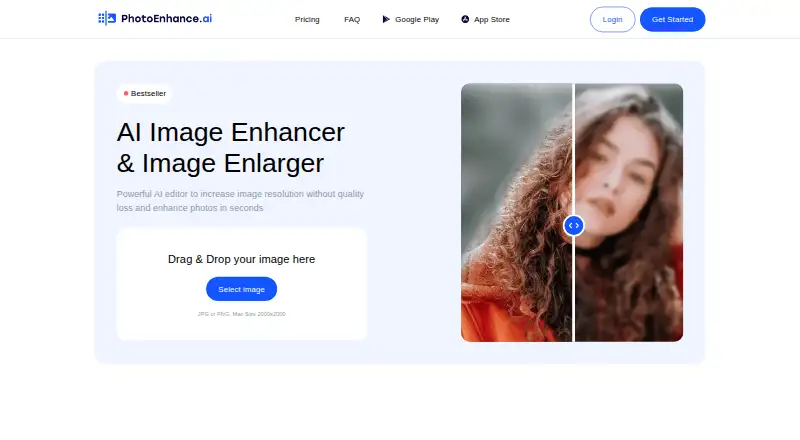
Photo Enhance AI is an image enhancer and enlarger that improves photos and increases their resolution. Its tools can sharpen faces, reduce background noise, colorize black-and-white images, remove scratches, and correct lighting. Users can apply enhance, colorize, and lighten in any sequence, and the service can process multiple photos at once. The upload area accepts JPG or PNG images up to 2000×2000. Processing takes an average of 5 to 60 seconds, depending on the feature. Signing up provides 10 free tokens without requiring a credit card; unused tokens can accumulate for up to five months. Photo Enhance AI is available on the web and promotes mobile apps for Android and iOS. It lists social media users, photographers, printing services, e-commerce businesses, and website graphics teams among its intended audiences. The service says it uses Stripe for payment processing, does not save credit card data, and allows subscription cancellation through its customer portal.
Who it suits
Photo Enhance AI suits people and businesses looking to improve or enlarge photos, including photographers, social media users, printing services, e-commerce businesses, and website graphics teams. Its web and mobile availability supports use across those platforms.
What it does well
- Includes 10 free tokens at signup.
- Unused tokens can accumulate for up to five months.
- Can process multiple photos at once.
- Enhance, colorize, and lighten can be used in any sequence.
- Available on web, Android, and iOS.
What to know first
- Uploads are limited to JPG or PNG.
- Maximum image dimensions are 2000×2000.
- Processing time varies by feature.
Limits
Signing up provides 10 free tokens, and unused tokens can accumulate for up to five months. Uploads are limited to JPG or PNG images up to 2000×2000 pixels.
Getting started
- Visit https://photoenhance.ai/.
- Sign up to receive 10 free tokens; no credit card is required.
- Upload a JPG or PNG image up to 2000×2000 pixels.
- Choose enhancement tools; enhance, colorize, and lighten can be applied in any sequence.
- For mobile access, use the promoted app links to Google Play or the App Store.
Verdict
Photo Enhance AI combines resolution enhancement with tools for noise, color, scratches, and lighting. Its free tokens offer a way to start, subject to the stated image-format and dimension limits.
Questions
Is Photo Enhance AI free?
It has a free plan. Signing up provides 10 free tokens, with no credit card required.
Which platforms does it support?
It is available on the web and promotes mobile apps for Android and iOS.
What image types and sizes can I upload?
The upload area accepts JPG and PNG images up to 2000×2000 pixels.
What can its tools do?
They can sharpen faces, denoise backgrounds, colorize black-and-white photos, remove scratches, and correct lighting.
Can I cancel a subscription?
The service says subscriptions can be canceled through its customer portal.
Facts from Photo Enhance AI's own pages
- Batch processing
- The site says it can process multiple photos at the same time. · photoenhance.ai, 9 Oct 2026
- Core purpose
- Photo Enhance AI describes itself as an AI editor for increasing image resolution and enhancing photos. · photoenhance.ai, 9 Oct 2026
- Enhancement tools
- Its listed tools sharpen faces, denoise backgrounds, colorize black-and-white photos, remove scratches, and correct lighting. · photoenhance.ai, 9 Oct 2026
- Free tokens
- Signing up provides 10 free tokens, with no credit card required. · photoenhance.ai, 9 Oct 2026
- Input limits
- The upload area accepts JPG or PNG images up to 2000×2000. · photoenhance.ai, 8 Oct 2026
- Intended users
- The site names social media users, photographers, printing services, e-commerce businesses, and website graphics users as audiences. · photoenhance.ai, 9 Oct 2026
- Mobile apps
- The site promotes two mobile apps and links to Google Play and the App Store. · photoenhance.ai, 9 Oct 2026
- Payment security
- The site says it does not save credit card data and uses Stripe as its payment provider. · photoenhance.ai, 9 Oct 2026
- Processing sequence
- Users can apply enhance, colorize, and lighten in any sequence. · photoenhance.ai, 9 Oct 2026
- Processing time
- The site says processing takes 5 to 60 seconds on average, depending on the feature. · photoenhance.ai, 9 Oct 2026
- Purpose
- The service describes itself as an AI image enhancer and image enlarger that enhances photos and increases resolution. · photoenhance.ai, 8 Oct 2026
- Subscription cancellation
- The site says subscriptions can be cancelled through its customer portal. · photoenhance.ai, 9 Oct 2026
- Token accumulation
- Unused tokens can accumulate for up to 5 months. · photoenhance.ai, 9 Oct 2026
- Upload formats and size
- The upload area accepts JPG or PNG and lists a maximum size of 2000x2000. · photoenhance.ai, 9 Oct 2026
Where Photo Enhance AI stands on Freedom251
- AI Image Enhancers#20 of 28