Freedom251 › Game Overlay Software
Valorant Tracker
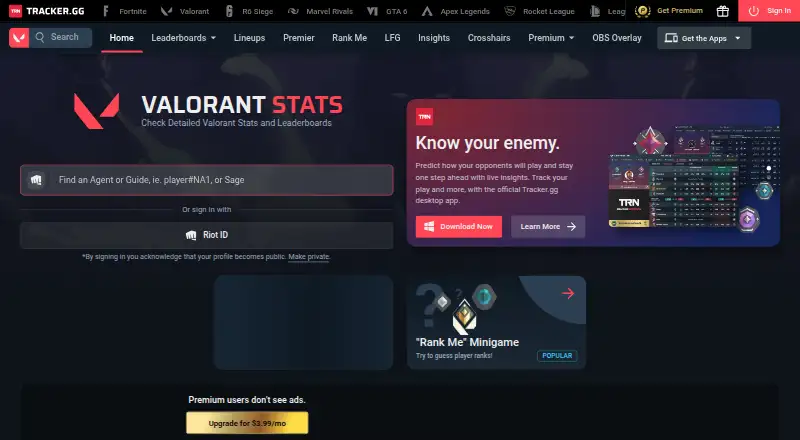
What Valorant Tracker is
Valorant Tracker brings VALORANT player statistics and match tools to web, Windows, Android, and iOS. Its profiles, performance breakdowns, and global and regional leaderboards cover individual players and teams. On desktop, an Overwolf overlay can show ranks for players in the current match, recommend agents based on the map and game mode, and display agent-and-map lineups during the buy phase. Match records include a roster, detailed scoreboard, and timeline; performance views include agent, map, and weapon statistics and key figures from the last 20 matches. The app can also clip notable moments automatically. The mobile app provides profiles, match reports, leaderboards, news, Premier statistics, and lineup guides. A free plan is available, while Premium costs $2.92 a year or $3.99 a month and removes ads, adds profile customization and frames, shop access, and priority support. The desktop overlay does not support console play. Mobile match-confirmation rewards are limited to eligible countries.
Who it suits
It suits VALORANT players who want match breakdowns, scouting information, lineup guides, or leaderboard views on desktop or mobile. The overlay is for Windows PC, not console play.
What it does well
- Free plan includes a Windows PC overlay.
- Shows ranks of players in the current match.
- Match history includes a roster, scoreboard, and timeline.
- Tracks agent, map, and weapon statistics.
- Mobile app includes profiles and match reports.
What to know first
- Desktop overlay is unavailable for console play.
- Match-confirmation rewards are limited to eligible countries.
- Premium costs $2.92 a year or $3.99 a month.
Limits
The free plan is the app with the Windows PC overlay. The overlay is unavailable on consoles. Mobile match-confirmation rewards, including Riot Points and Premium passes, are limited to eligible countries.
Plans
| Plan | Billed and limits | Price |
|---|---|---|
| Free | Free app; Windows PC overlay; not available for console play | Free |
| Premium Annual | $2.92 /mo Save 27% · Remove all advertisements · Profile customization · Profile frames and shop access · Priority customer support | $2.92 a month |
| Premium Monthly | $3.99 /mo · Remove all advertisements · Profile customization · Profile frames and shop access · Priority customer support | $3.99 a month |
As tracker.gg lists them, read 30 Sept 2026. The maker's own page has the final word.
Getting started
- Visit https://tracker.gg/valorant.
- Choose the free plan or a Premium plan.
- For the Windows PC overlay, install Valorant Tracker; its Overwolf installer sets up everything needed in one download.
- For mobile features, get the app from Google Play or the iOS App Store.
- Use the overlay for match scouting, agent suggestions, or lineups, or review profiles and match reports in the app.
Valorant Tracker brings VALORANT profiles, match analysis, scouting, and lineup references into one service. It is the strongest fit for Windows PC players who want both post-match statistics and an overlay during play. Its free core is substantial, but the overlay does not work on consoles and mobile rewards are country-limited.
Overview
Tracker.gg connects performance review with practical in-game context. Players can examine match timelines and agent, map, and weapon statistics, then consult opponent ranks and lineup guides while playing. That breadth makes it more useful than a tracker focused only on scorekeeping; the main caveat is that the live overlay depends on Windows PC play.
Key features
Stats and match review
Player profiles include stat breakdowns, with global and regional leaderboards for comparing results. Match records contain a roster, an advanced scoreboard, and a timeline. Agent, map, and weapon statistics add several angles for spotting patterns, while key-stat timelines cover the last 20 matches. Automatic clips of notable moments offer a way to share highlights, though they complement rather than replace the statistical review.
In-game assistance
The Windows overlay displays current-match player ranks for scouting opponents. Its agent selection assistant detects the map and game mode, then recommends the player's strongest agents. Lineup guides for agents and maps can be viewed during the buy phase, making the overlay useful for tactical reference as well as scouting. These tools are aimed at players who can run the desktop app; they do not extend to console play.
Mobile app and setup
The mobile app provides profiles, match reports, leaderboards, news, Premier stats, and lineup guides on Android and iOS. Match-confirmation rewards, including Riot Points and Premium passes, are restricted to eligible countries, so those rewards should not be a deciding reason to install it elsewhere. The desktop app is built on Overwolf, and its installer sets up what it needs in one download. Tracker.gg says it works with publishers and anti-cheat providers and follows their terms of service.
Pricing
The Free plan costs nothing and includes the free app and Windows PC overlay. It gives players a way to use the core tracker without a subscription, but the overlay is not for console play.
Premium Annual costs $2.92 a year, billed $2.92 /mo, with a stated 27% saving. Premium Monthly costs $3.99 a month, billed $3.99 /mo. Both paid plans remove advertisements, add profile customization and profile frames with shop access, and include priority customer support. Annual Premium suits players committed to keeping those perks; monthly Premium is the shorter-term option. Neither plan is described as adding additional tracking or overlay features, so the free plan is the practical choice if profile perks, ad removal, and priority support do not matter.
Platforms
Valorant Tracker supports Android, iOS, web, and Windows, but those platforms do not provide identical capabilities. Mobile and web access serve profiles and other companion content, while the overlay is a Windows PC feature. Console players cannot use that overlay because required technologies are unsupported on consoles.
Who it's for
Choose Valorant Tracker if you play VALORANT on Windows and want statistics, match review, opponent-rank scouting, and lineup references in one companion. It also suits mobile users who want match reports and guides. Look elsewhere if console overlay support is essential, or if you are outside an eligible country and are choosing the app chiefly for match-confirmation rewards.
Pros and cons
- Pro: Match rosters, scoreboards, timelines, and a 20-match key-stat view give players several ways to review performance.
- Pro: Rank scouting, agent suggestions, and buy-phase lineup guides connect the tracker to decisions during play.
- Pro: A free plan includes the Windows PC overlay, while paid plans focus on removing ads and adding profile and support perks.
- Con: The overlay is unavailable on consoles, limiting its in-game utility to supported PC play.
- Con: Mobile match-confirmation rewards are available only in eligible countries.
Alternatives
For broader options, browse Game Overlay Software or Game Stat Trackers.
- GameGlass is a freemium option for players seeking a companion across Android, iOS, Linux, macOS, web, and Windows; its free Basic plan includes two Shards and no ads.
- OP.GG is another freemium choice with a free membership and a $3.00 USD monthly Ad-free plan, for players considering a different tracker with mobile and desktop platforms.
- MetaTFT offers a free website and in-game app download on web and Windows, making it an alternative for players whose needs fit that platform range.
- Overwolf is free to use on web and Windows; some apps may require a subscription fee. It is worth considering for someone seeking the underlying app platform rather than a VALORANT-specific tracker.
- PLITCH is a freemium option on Android, iOS, and Windows for players looking for a mods and trainers catalog rather than match statistics.
- Porofessor is a freemium web and Windows alternative for players comparing another game companion.
- WeMod is a freemium Android and Windows option whose free tier includes keyboard hotkeys and, for newly created accounts, two hours of mod usage per day; consider it for that use instead of VALORANT match tracking.
- Crosshair X is a Windows alternative with a free trial and a 3.99 USD one-time Steam purchase, for players seeking crosshair tools rather than a full statistics companion.
Verdict
Valorant Tracker is a strong choice for Windows VALORANT players who want match analysis and tactical overlay tools without paying for the core app. Its decisive advantage is the combination of detailed match review with live scouting and lineup guidance; look elsewhere if you need a console overlay or expect mobile rewards in a country that is not eligible.
Verdict
Valorant Tracker combines player stats, match history, scouting, and lineup tools for VALORANT. Its console restriction and country limits on mobile rewards are worth noting before choosing it.
Questions
Is Valorant Tracker free?
Yes. The Free plan costs nothing and includes the Windows PC overlay.
What do the Premium plans cost?
Premium Annual is listed at $2.92 a year, with the billing note “$2.92 /mo Save 27%.” Premium Monthly is $3.99 a month, billed at $3.99 /mo.
Which platforms are supported?
The listed platforms are Android, iOS, web, and Windows. The overlay app is unavailable for console play.
What does the mobile app include?
It offers player profiles, match reports, leaderboards, news, Premier stats, and lineup guides.
What does Premium add?
Premium removes advertisements and adds profile customization, profile frames and shop access, and priority customer support.
Are mobile match-confirmation rewards available everywhere?
No. Rewards such as Riot Points and Premium passes are limited to eligible countries.
Facts from Valorant Tracker's own pages
- Agent suggestions
- The agent selection assistant detects the current map and game mode and suggests the user's strongest agents. · tracker.gg, 30 Sept 2026
- Console limit
- The overlay app is not available for console play because some required technologies are unsupported on consoles. · tracker.gg, 30 Sept 2026
- Founded
- 2010 · tracker.gg, 28 Sept 2026
- Lineup guides
- The overlay provides lineups for agents and maps that players can view in-game during the buy phase. · tracker.gg, 30 Sept 2026
- Live scouting
- The desktop overlay shows player ranks in the current match to help users scout opponents. · tracker.gg, 30 Sept 2026
- Match history
- Match history includes a roster, advanced scoreboard, and timeline for each match. · tracker.gg, 30 Sept 2026
- Mobile app
- The mobile app offers player profiles, match reports, leaderboards, news, Premier stats, and lineup guides on Google Play and the iOS App Store. · tracker.gg, 30 Sept 2026
- Overwolf requirement
- Valorant Tracker is built on Overwolf, and its installer sets up everything needed in one download. · tracker.gg, 30 Sept 2026
- Performance stats
- The app includes agent, map, and weapon stats, plus a timeline of key stats from the last 20 matches. · tracker.gg, 30 Sept 2026
- Publisher terms
- Tracker.gg says it works with game publishers and anti-cheat providers and complies with their terms of service. · tracker.gg, 30 Sept 2026
- Rewards limit
- The mobile app's match-confirmation rewards, including Riot Points and Premium passes, are limited to eligible countries. · tracker.gg, 30 Sept 2026
- Stats and leaderboards
- Tracker.gg provides Valorant stats, player profiles, stats breakdowns, and global and regional leaderboards. · tracker.gg, 30 Sept 2026
- Support
- The support page offers guided contact paths for Tracker websites, Overwolf apps, OBS overlays, developers and APIs, and business inquiries. · tracker.gg, 30 Sept 2026
- Video highlights
- The app can automatically clip notable moments for sharing. · tracker.gg, 30 Sept 2026
Where Valorant Tracker stands on Freedom251
- Game Overlay Software#13 of 25
- Game Stat Trackers#10 of 17