Freedom251 › Interview Scheduling Software

UpSynk
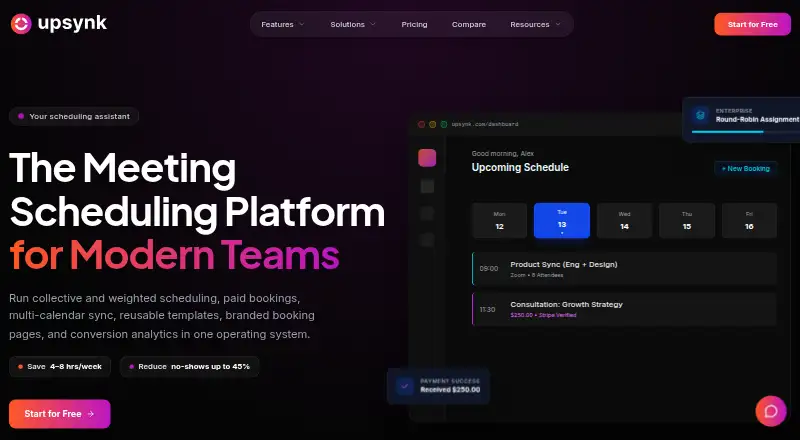
What UpSynk is
UpSynk is a scheduling platform for individuals and teams that need to route leads, coordinate calendars, and manage bookings. It supports one-to-one, group, webinar, round-robin, collective, recurring, and weighted-host appointments. Google Calendar and Outlook syncing includes conflict checks across multiple calendars, and video options include Zoom, Google Meet, Webex, Whereby, and UpSynk Video Room, which generates meeting links. Its Free plan includes one booking page and basic Google Calendar integration. Pro costs $6 a month per seat and adds unlimited events, group and webinar bookings, paid booking pages, templates, and multi-calendar sync. Business costs $12 a month per seat and adds routing options, brand controls, conversion analytics, recordings, AI summaries, transcripts, highlights, polls, and shared notes. Paid booking pages use Stripe checkout, with saved-card support and automatic tax when configured. UpSynk lists Android, iOS, and web access, and presents solutions for sales, recruiting, healthcare, and education. It states that it is SOC-2 Type II certified, GDPR compliant, and ISO 27001 certified, with data encrypted at rest and in transit.
Who it suits
UpSynk suits individuals and teams in sales, recruiting, healthcare, or education who need appointment scheduling and calendar coordination. Teams needing routing, branded booking pages, or meeting intelligence can consider Business.
What it does well
- Supports seven appointment scheduling types.
- Syncs Google Calendar and Outlook with conflict checks.
- Offers five video meeting options.
- Business includes recordings, AI summaries, and transcripts.
- Apps are available for Android and iOS.
What to know first
- Free includes one booking page.
- Free includes only basic Google Calendar integration.
- Pro costs $6 a month per seat.
- Business costs $12 a month per seat.
Limits
The Free plan includes one booking page and basic Google Calendar integration. Pro costs $6 a month per seat; Business costs $12 a month per seat. UpSynk also offers a 14-day trial.
Plans
| Plan | Billed and limits | Price |
|---|---|---|
| Free | 1 booking page · basic Google Calendar integration | Free |
| Business | $12/ month / seat · Round-robin, collective and recurring scheduling · weighted and priority host routing · booking page builder and brand controls · conversion analytics · meeting recording and AI summaries | $12 a month |
| Pro | $6/ month / seat · Unlimited events · group and webinar bookings · paid booking pages · reusable event templates · Google and Outlook multi-calendar sync | $6 a month |
As upsynk.io lists them, read 4 Oct 2026. The maker's own page has the final word.
Getting started
- Visit https://www.upsynk.io/.
- Choose the Free plan, Pro, or Business based on the scheduling features needed.
- Create a booking page; the Free plan includes one page and basic Google Calendar integration.
- Connect Google Calendar or Outlook for multi-calendar sync on Pro or Business.
- Select a supported video meeting option for automatically generated meeting links.
- Install the Android or iOS app, or use UpSynk on the web.
UpSynk is a scheduling platform for individuals and teams coordinating appointments, leads, and paid bookings. It suits teams with varied booking formats or host-routing needs better than people looking for one simple calendar link. The broadest routing, branding, analytics, and meeting-intelligence features require the Business plan.
Overview
UpSynk brings booking management, lead routing, and calendar coordination into one service. Its formats range from one-to-one appointments to groups and webinars, with round-robin, collective, recurring, and weighted-host scheduling for more involved workflows. That range can serve teams in sales, recruiting, healthcare, and education, but it is more than a solo user needs if all they want is a basic appointment page.
Google Calendar and Outlook sync, with conflict checking across multiple calendars. Meetings can use Zoom, Google Meet, Webex, Whereby, or automatically generated links from UpSynk Video Room. UpSynk states that it is SOC-2 Type II and ISO 27001 certified, GDPR compliant, and encrypts data both in transit and at rest.
Key features
Scheduling and calendar coordination
One-to-one, group, and webinar bookings cover common appointment and session types. Round-robin and weighted-host options distribute bookings among hosts; collective scheduling fits meetings requiring multiple hosts, and recurring scheduling supports repeat sessions. The distinction matters for teams with routing rules, but these advanced options sit on Business rather than the entry-level plan.
Paid bookings and meeting tools
Paid booking pages use Stripe checkout, with saved-card support, 3DS authentication, billing addresses, and automatic tax when configured. This gives teams a way to charge during booking, while keeping those pages behind a paid plan. Business adds booking-page brand controls and conversion analytics, plus recording, AI summaries, transcripts, highlights, polls, and shared notes. Those tools are most relevant to teams that need branded booking journeys or want meeting outputs captured alongside scheduling.
Pricing
The Free plan costs nothing and includes one booking page with basic Google Calendar integration. It is a useful starting point for a single-page workflow, but the one-page cap and basic calendar support narrow its usefulness for teams or anyone coordinating multiple calendars.
Pro costs $6 a month, billed $6/ month / seat. It adds unlimited events, group and webinar bookings, paid booking pages, reusable event templates, and Google and Outlook multi-calendar sync. Pro is the sensible step up for users who need more than one basic page, paid appointments, or broader calendar coordination, but it does not include Business routing and meeting-intelligence features.
Business costs $12 a month, billed $12/ month / seat. It adds round-robin, collective, and recurring scheduling; weighted and priority host routing; a booking-page builder and brand controls; conversion analytics; and meeting recording with AI summaries. Teams that depend on routing rules or want booking and meeting analytics have a clear reason to pay the higher per-seat rate; those needing only group bookings and calendar sync can stay on Pro.
A 14-day trial is offered. Email support, phone support, and a dedicated success manager are support options; the plan comparison does not assign each option to a particular tier. Paid booking pages also support saved cards, 3DS, billing addresses, and automatic tax when configured.
Platforms
UpSynk is available on Android, iOS, and the web. Its mobile apps cover booking, payments, and team management, which makes it relevant for users who need to handle scheduling away from a desktop as well as in a browser.
Who it's for
UpSynk is a strong fit for teams that coordinate different kinds of meetings, route leads among hosts, or collect payment at booking. Its range is also relevant to the sales, recruiting, healthcare, and education teams it targets. A solo user who needs only one basic booking page may find the Free plan adequate, while users needing multiple calendars, paid pages, or unlimited events have a practical reason to move to Pro. Teams that do not need Business routing or meeting intelligence should not pay for those additions.
Pros and cons
- Pros: Multiple booking formats, including webinar, collective, recurring, and weighted-host scheduling, support more than one team workflow.
- Pros: Google and Outlook multi-calendar sync with conflict checking can help prevent scheduling collisions across calendars.
- Pros: Stripe checkout and the Business meeting tools cover both paid bookings and post-meeting capture within the same service.
- Cons: Free is capped at one booking page and basic Google Calendar integration, so it is a limited option for teams or users with several workflows.
- Cons: Round-robin, collective, recurring, weighted-host routing, branding controls, analytics, and meeting intelligence require the $12 a month Business plan.
Alternatives
Cal.com is worth considering if a free plan with unlimited event types, unlimited calendars, and 100+ app integrations matters more than UpSynk's stated focus on paid booking pages and team routing.
SchedulingKit is another freemium scheduling option with Android, iOS, web, and API platforms; its free plan is capped at one team member, one event type, and 50 bookings per month.
SimplyMeet.me may suit a solo user whose needs fit its free allowance of three meeting types, 50 meetings per user per month, and one external calendar plus an internal calendar.
Cadence is an alternative to consider for interview scheduling, with a free plan that includes self-scheduling, Google Calendar and Microsoft 365 sync, candidate status pages, consent-gated email, CSV import, scorecards, and dashboards.
Calendly offers a free plan with one event type and one calendar connection, a narrower starting point than UpSynk's paid multi-calendar sync.
Doodle offers a free plan with one group poll, one booking page, and one one-to-one booking; choose it when those meeting formats match your needs.
Arrange is another interview-scheduling option, with a Pro plan at $35 a month per user that includes multiple scheduling flows, hiring-manager calendars, multi-calendar team support, and ATS integrations.
Talview offers tailored-solution pricing with unit-based pricing and a typical minimum commitment of approximately 150 to 200 candidates.
For a wider category comparison, see Interview Scheduling Software.
Verdict
Choose UpSynk if your team needs flexible booking formats, calendar coordination, and a path to host routing or paid appointments in one platform. Its main trade-off is that a free user gets only one page and basic Google Calendar support, while the most distinctive team features cost $12 a month per seat. If those features are unnecessary, a simpler or more narrowly focused alternative may be a better fit.
Verdict
UpSynk combines scheduling, calendar syncing, video options, and paid booking pages, with broader routing and meeting features on Business. The Free plan is limited to one booking page and basic Google Calendar integration.
Questions
Does UpSynk have a free plan?
Yes. Free includes one booking page and basic Google Calendar integration.
How much do the paid plans cost?
Pro is $6 a month per seat, and Business is $12 a month per seat. A 14-day trial is also listed.
Which platforms does UpSynk support?
UpSynk is available on Android, iOS, and web.
Which calendars and video services does it integrate with?
Calendar sync includes Google Calendar and Outlook. Video options include Zoom, Google Meet, Webex, Whereby, and UpSynk Video Room.
What does Business add?
Business includes round-robin, collective, recurring, weighted, and priority host scheduling; booking-page brand controls and conversion analytics; and meeting recording, AI summaries, transcripts, highlights, polls, and shared notes.
What security and compliance measures does UpSynk state?
UpSynk states it is SOC-2 Type II certified, GDPR compliant, and ISO 27001 certified, with data encrypted at rest and in transit.
Facts from UpSynk's own pages
- Branding and analytics
- Business features include booking-page brand controls and booking conversion analytics. · upsynk.io, 4 Oct 2026
- Calendar integrations
- UpSynk says it syncs with Google Calendar and Outlook and checks conflicts across multiple calendars. · upsynk.io, 4 Oct 2026
- Company history
- The company’s About page says the idea began in 2021 and identifies 2024 as the year it became enterprise-ready. · upsynk.io, 4 Oct 2026
- Free plan limit
- The pricing page says the Free Forever plan includes one booking page and basic Google Calendar integration. · upsynk.io, 4 Oct 2026
- Headquarters
- UpSynk says it is remote-first, with headquarters in San Francisco and engineering hubs in London and Bangalore. · upsynk.io, 4 Oct 2026
- Intended users
- UpSynk presents solutions for individuals and teams in sales, recruiting, healthcare, and education. · upsynk.io, 4 Oct 2026
- Meeting intelligence
- Business includes meeting recording, AI summaries, transcripts, highlights, polls, and shared notes. · upsynk.io, 4 Oct 2026
- Mobile apps
- The site links to UpSynk apps on the Apple App Store and Google Play and describes mobile booking, payment, and team-management features. · upsynk.io, 4 Oct 2026
- Payments
- Paid booking pages use Stripe checkout with saved-card support, 3DS authentication, billing addresses, and automatic tax when configured. · upsynk.io, 4 Oct 2026
- Scheduling
- It supports one-to-one, group, webinar, round-robin, collective, recurring, and weighted-host scheduling. · upsynk.io, 4 Oct 2026
- Security
- UpSynk states it is SOC-2 Type II certified, GDPR compliant, and ISO 27001 certified, with data encrypted at rest and in transit. · upsynk.io, 4 Oct 2026
- Support
- The plan comparison lists email support, phone support, and a dedicated success manager as support options. · upsynk.io, 4 Oct 2026
- Video integrations
- The site lists Zoom, Google Meet, Webex, Whereby, and its built-in UpSynk Video Room for automatically generated meeting links. · upsynk.io, 4 Oct 2026
- What it does
- UpSynk describes itself as a scheduling operating system for teams that routes leads, syncs calendars, and manages booking experiences. · upsynk.io, 4 Oct 2026
Where UpSynk stands on Freedom251
- Interview Scheduling Software#9 of 43