UniRubric
What UniRubric is
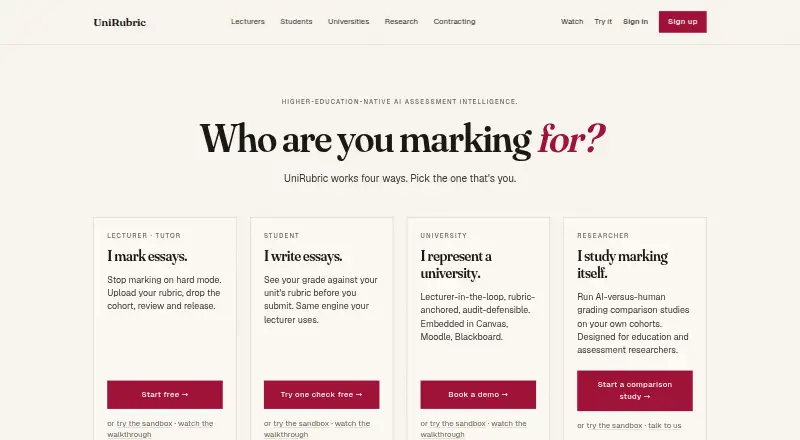
UniRubric is a higher-education assessment platform that drafts rubric-based grades and attaches quoted evidence for lecturer review. Lecturers can upload rubrics in DOCX, PDF, or plain text, then add student submissions one at a time or as a class. Every grade remains a draft until a lecturer reviews, edits, and approves it. The institutional product connects to Canvas, Moodle, and Blackboard through LTI 1.3; Brightspace is also listed for institutional plans. A faculty lead dashboard tracks rubric calibration across markers and can prepare a meeting agenda and schedule a calibration meeting. Data, submissions, rubrics, and grading runs are pinned to Sydney under standard conditions. The maker says customer work is not used to train or fine-tune models, and describes encryption in transit and at rest. Deleted assignments are removed from production within 24 hours and backups within 35 days, while grading-run audit logs are kept for seven years. UniRubric has web and API access, a free lifetime lecturer plan with one marking job, and paid plans from $15/mo.
Who it suits
UniRubric suits lecturers who want draft rubric-based grading with human approval, and institutions using supported LMS platforms. Faculty leads may also find its marker calibration dashboard relevant.
What it does well
- Every grade requires lecturer review and approval.
- Accepts DOCX, PDF, and plain-text rubrics.
- Supports Canvas, Moodle, and Blackboard via LTI 1.3.
- Customer submissions are not used to train models.
- Deleted assignments leave production within 24 hours.
What to know first
- Free lecturer plan includes one lifetime marking job.
- Institutional teacher accounts cost $18/month/account.
- Audit logs are retained for seven years.
Limits
Lecturer Free provides one lifetime marking job. Lecturer Premium includes 15 runs per calendar month, with extra runs available for $1 each through top-up packs; institutional allowances are 10, 25, or 60 runs per student per term depending on plan.
Plans
| Plan | Billed and limits | Price |
|---|---|---|
| Student Free | one-off · 1 pre-check · criterion feedback · estimated grade band · no credit card | Free |
| Lecturer Free | lifetime · 1 marking job · rubric-anchored output · lecturer approval · PDF export · no credit card | Free |
| Top-up packs | per extra run · Small packs · extra runs beyond allowance · requires sign-off | $1, paid once |
| Student pay as you go | per pre-check · Buy packs of 1, 5, or 10 · credits never expire | $1.50, paid once |
| Lecturer Premium · monthly | Monthly · 15 runs per calendar month · $1 per extra run via top-up packs · six-month rollover · priority queue · cancel any time | $15 a month |
| Institutional Standard | per student per term, annual line item · 25 runs/student/term · $18/month per teacher account · local tax added | $15 a year |
| Lecturer Premium monthly | monthly · 15 runs/month · $1 extra run · six-month rollover · priority queue · cancel anytime | $15 a month |
| Lecturer Premium annual | annual upfront · 15 runs/month · $1 extra run · six-month rollover · one month free versus monthly | $180 a year |
The first 8 of 12 plans, as unirubric.com lists them, read 15 Oct 2026. The maker's own page has the final word. Every plan
Getting started
- Open unirubric.com.
- Choose the Lecturer Free plan for one lifetime marking job, or review lecturer and institutional plans.
- Upload a rubric as a DOCX, PDF, or plain-text file.
- Add student submissions individually or as a class.
- For institutional LMS use, connect through a listed integration such as Canvas, Moodle, or Blackboard.
UniRubric is a higher-education assessment platform that uses AI to prepare rubric-based draft grades with quoted evidence. It is aimed at lecturers and institutions that want faster marking while keeping teaching staff responsible for every released result. The review-first workflow is its clearest advantage, but run allowances and institution-level account charges determine whether it fits your workload.
Overview
Lecturers can upload rubrics in DOCX, PDF or plain text and add submissions individually or as a class. UniRubric produces a draft grade anchored to the rubric and supplies quoted evidence for checking. A grade cannot reach a student until a lecturer reviews, edits and approves it, so this is assisted marking rather than unattended automated assessment.
Analytic and holistic rubrics, AI assistance and bulk scoring cover both structured and broader assessment styles. Faculty leads get a dashboard for calibration across markers, plus tools to draft a meeting agenda and schedule a calibration meeting. That makes it more than a personal grading utility, although institutional costs include both student-based marking and teacher accounts.
Key features
- Evidence-backed drafts: Quoted passages give lecturers a concrete basis for checking each rubric judgement. Mandatory approval preserves academic responsibility but means the product cannot remove the review step from a marking process.
- Class and individual intake: Uploading a whole class suits batches; adding students one at a time suits smaller or irregular workloads. Bulk scoring is useful when many submissions share one rubric.
- Rubric flexibility: Support for analytic and holistic rubrics lets departments use either criterion-by-criterion marking or an overall judgement, rather than forcing one assessment model.
- LMS connections: Institutional plans support Canvas, Moodle and Blackboard through LTI 1.3, with Assignment and Grade Services rolling out. The contracting page also lists Brightspace integration for institutional plans, so buyers should confirm the exact integration scope in their quote.
- Calibration tools: The faculty dashboard helps compare marking across markers and organize calibration meetings, a practical fit for coordinated courses rather than solo use only.
- Data controls: Customer data, submissions, rubrics and grading runs are region-pinned to Sydney with no cross-region replication under standard operation. TLS 1.3 protects data in transit, AES-256 protects it at rest, and per-tenant column encryption covers sensitive student identifiers. Submitted material, grades, edits and feedback are not used to train or fine-tune models.
- Retention and support access: Deleted assignments are removed from production within 24 hours and backups within 35 days, while grading-run audit logs remain for seven years. Staff access is limited to institution-directed support tickets and recorded in the audit trail. The security position is described as aligned with the AU Privacy Act, GDPR, FERPA and TEQSA; SOC 2 Type I is a Q4 2026 roadmap target, not a current certification.
Pricing
UniRubric is freemium, with paid plans from $15/mo and a free trial. The free Lecturer Free plan costs nothing, billed as one lifetime marking job. It includes one job, full rubric-anchored output, approval before release, PDF export and no credit card requirement. It is useful for a single evaluation or occasional lecturer, but the lifetime one-job cap prevents sustained free use.
Top-up packs cost $1 per extra run, billed once and sold in small packs. They cover runs beyond the free lecturer job or a Premium allowance, with no charge without sign-off. Lecturer Premium monthly costs $15 a month and includes 15 runs per calendar month, six-month rollover, a priority queue, cancellation at any time and $1 extra runs through top-ups. The annual Premium plan is $180 a year, paid up front, with 15 runs per month, six-month rollover, $1 top-ups and cancellation of renewal at any time. Annual billing costs more upfront but suits predictable teaching cycles.
Institutional Light costs $9 a year per student per term and allows 10 runs per student per term; Standard costs $15 a year per student per term for 25 runs; Heavy costs $25 a year per student per term for 60 runs. Each institutional plan adds teacher account services at $18 a month per account, and local tax is added to the formal quote. These plans fit departments that need LMS and faculty controls, but buyers must budget the per-student, per-term line and account fees together.
Platforms
UniRubric is offered through a web platform and an API. Institutional LMS connectivity covers Canvas, Moodle and Blackboard via LTI 1.3, with Brightspace listed for institutional contracting and Assignment and Grade Services in active rollout.
Who it's for
Lecturers who want evidence-supported drafts without surrendering final approval are the best individual users, especially when marking exceeds the free allowance. Universities and faculty leads gain the most from LMS integration, calibration oversight and institution-controlled data residency. Researchers studying marking are also part of the stated audience. It is a poor fit for anyone seeking grades released automatically or a permanently free, high-volume service.
Pros and cons
Pros
- Every grade remains a lecturer-reviewed draft, reducing the risk of unreviewed AI decisions reaching students.
- Quoted evidence and support for analytic and holistic rubrics make drafts easier to evaluate across different assessment designs.
- Class uploads, bulk scoring and LMS integration address real course-scale workflows.
- Sydney data residency, encryption, restricted support access and a no-training policy provide clear controls for sensitive student work.
- Faculty calibration and meeting tools extend value to departments managing multiple markers.
Cons
- The free plan allows only one lifetime marking job, so it is not a continuing no-cost option.
- Premium plans cap runs at 15 per month, while institutional plans add both per-student, per-term charges and $18-per-month teacher accounts.
- Assignment and Grade Services are still rolling out, so some LMS workflows may not be complete.
- A seven-year audit-log retention period may exceed what some institutions want for operational records.
Alternatives
- Gradescope suits readers wanting Android, iOS and web access, question-by-question grading, dynamic rubrics, assignment statistics and regrade requests on its free Basic plan.
- GradeBoard is a web option for lighter use, with 10 learner submissions per month, limited rubric uploads, basic analytics and 30-day retention on its free plan.
- OpenRubric is the better choice for teams prepared to self-host, with a free first partner event under its stated exchange terms.
- Rubric Scorer fits mobile-first users who need up to three rubrics for one class free on Android and iOS.
- RubriqFlow offers unlimited free faculty and staff accounts, with student access charged per student per semester.
- Pawtograder is a free, self-hosted option for instructors evaluating the community instance.
- Quick Rubric is a free web account for publicly available rubrics with non-commercial reuse limits.
- RubiStar is a free web rubric tool for educational use, without a free trial and with deletion risk for personal or commercial use.
Verdict
Choose UniRubric if you need rubric-anchored AI drafts with quoted evidence, mandatory lecturer approval and institutional controls around LMS delivery and Australian data residency. Its main reason to look elsewhere is cost and volume: the free tier ends after one lifetime job, Premium is run-capped, and institutional deployment combines student charges with teacher-account fees. For departments willing to fund that structure, it is a focused way to accelerate marking without handing final judgement to software.
Verdict
UniRubric pairs rubric-based draft grading with lecturer control over release. Its free lecturer plan is limited to one lifetime marking job; institutional and premium options provide additional allowances.
Questions
Is there a free plan?
Yes. Lecturer Free costs nothing and includes one lifetime marking job, full rubric-anchored output, approval before release, PDF export, and no credit card requirement.
How much do paid plans cost?
Lecturer Premium is $15 a month or $180 a year. Institutional plans cost 9.00 USD, 15.00 USD, or $25 per student per term annually, depending on the plan; teacher account services are $18/month/account and local tax is added to a formal quote.
Which learning management systems does it integrate with?
Institutional integrations include Canvas, Moodle, and Blackboard through LTI 1.3. Brightspace is also listed for institutional plans.
Does UniRubric release grades automatically?
No. Grades are drafts until a lecturer reviews, edits, and approves them.
Does UniRubric use student work to train models?
The maker says customer submissions, rubrics, grades, edits, and feedback are not used to train or fine-tune models.
Where is customer data stored?
Customer data, submissions, rubrics, and grading runs are region-pinned to Sydney, Australia, with no cross-region replication under standard operating conditions.
Facts from UniRubric's own pages
- AI data use
- Customer submissions, rubrics, grades, edits, and feedback are not used to train or fine-tune models. · unirubric.com, 30 Sept 2026
- API status
- The security policy identifies api.unirubric.com as the public API when it reaches general availability. · unirubric.com, 15 Oct 2026
- Audience
- The maker describes the product for lecturers, students, universities, faculty leads, and researchers studying marking. · unirubric.com, 30 Sept 2026
- Audit trail
- Grading runs, edits, approvals, releases, evidence phrases, model versions, approvers, and timestamps are logged immutably. · unirubric.com, 15 Oct 2026
- Bulk submissions
- Student work can be added individually or as a whole class and processed in a parallel queue. · unirubric.com, 15 Oct 2026
- Certification limit
- SOC 2 Type I is described as a Q4 2026 roadmap target, IRAP as a 2027 target, and ISO 27001 as not being pursued. · unirubric.com, 15 Oct 2026
- Company founding
- UniRubric says it was founded in May 2026. · unirubric.com, 15 Oct 2026
- Company headquarters
- The company identifies Adelaide, South Australia as its headquarters. · unirubric.com, 15 Oct 2026
- Company leadership
- Nawras Alali is identified as founder, chief executive officer, and chairman, while Suresh Naipal is chief technology officer. · unirubric.com, 15 Oct 2026
- Compliance
- UniRubric states alignment with the Australian Privacy Act, GDPR, FERPA, and TEQSA requirements. · unirubric.com, 15 Oct 2026
- Data residency
- Customer data is region-pinned to Supabase Pro in Sydney with no cross-region replication under standard operation. · unirubric.com, 15 Oct 2026
- Encryption
- The security page states TLS 1.3 in transit, AES-256 database encryption at rest, and per-tenant column encryption. · unirubric.com, 15 Oct 2026
- Evidence anchoring
- Each criterion score links to a verbatim phrase from the rubric and a verbatim phrase from the student's submission. · unirubric.com, 15 Oct 2026
- External evidence limit
- A 2024 study of 60 political-science essays found GPT-4 matched mean human scores but had low inter-rater reliability and risk-averse grading. · arxiv.org, 15 Oct 2026
- Faculty calibration
- Faculty dashboards show marker variance by rubric criterion and can draft calibration-meeting agendas. · unirubric.com, 15 Oct 2026
- Faculty tools
- The faculty lead dashboard shows rubric calibration across markers and can draft a meeting agenda and schedule a calibration meeting. · unirubric.com, 30 Sept 2026
- Founded
- 2026 · unirubric.com, 23 Sept 2026
- Headquarters
- Adelaide, South Australia · unirubric.com, 23 Sept 2026
- Human approval
- Every grade is a draft and is not released to a student until a lecturer reviews, edits, and approves it. · unirubric.com, 30 Sept 2026
- Integrations
- The institutional product supports Canvas, Moodle, and Blackboard through LTI 1.3, with Assignment & Grade Services in active rollout. · unirubric.com, 30 Sept 2026
- Lecturer approval
- Grades remain drafts and cannot be released until a lecturer reviews, edits, and approves them. · unirubric.com, 15 Oct 2026
- Limit: free allowance
- The lecturer free tier provides only one lifetime marking job before payment or top-ups are required. · unirubric.com, 15 Oct 2026
- Limit: human review required
- Because every grade requires lecturer approval, the product does not support unattended automatic grade release. · unirubric.com, 15 Oct 2026
- LMS integrations
- Institutional workflows embed in Canvas, Moodle, and Blackboard, with Brightspace listed for institutional plans. · unirubric.com, 15 Oct 2026
Where UniRubric stands on Freedom251
- Rubric Software#10 of 22