
GradeBoard
What GradeBoard is
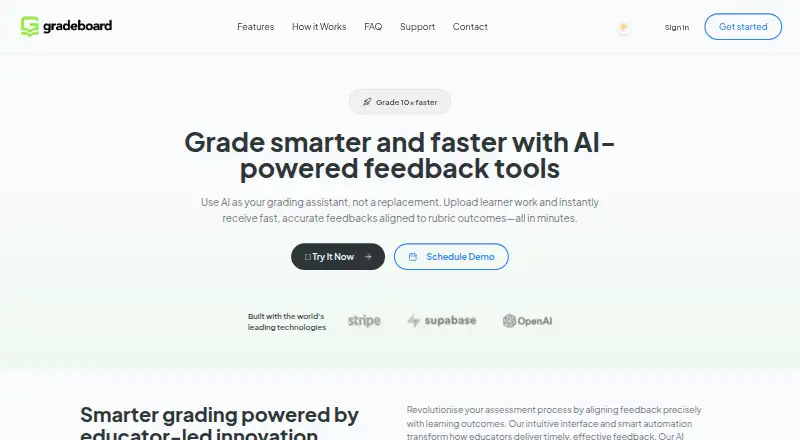
GradeBoard is a web-based grading platform that uses AI to produce feedback aligned with rubric outcomes. Educators can upload PDF, DOCX, TXT and image files, with OCR text extraction listed for images. The analysis semantically aligns learner work with rubrics and can generate inline comments, summative feedback and annotations that remain editable before export. Batch processing can handle 50 or more submissions at once. Analytics track performance trends, time savings and the distribution of student progress. Paid plans list annotated DOCX downloads and batch feedback ZIP downloads. The free plan costs nothing and includes 10 learner submissions monthly, a standard AI model, limited rubric uploads, annotated DOCX download, basic analytics, 30-day data retention and email support. Pro costs £24.99 a month and includes 200 submissions, a priority AI model, batch grading, advanced developmental feedback, OCR and six-month retention. Enterprise is listed from £250 a month, billed From, with unlimited submissions, SSO, team management, custom API/LMS integration, 12-month retention and a dedicated success manager. GradeBoard presents itself for educators, from individual submissions to institutional batch processing.
Who it suits
It suits educators who want rubric-aligned AI feedback, whether grading individual submissions or processing batches. Enterprise features are listed for institutions needing SSO, team management or custom API/LMS integration.
What it does well
- Accepts PDF, DOCX, TXT and image uploads.
- Batch processing handles 50+ submissions simultaneously.
- Annotations are editable before export.
- Free plan includes 10 learner submissions monthly.
- Analytics track student progress distribution.
What to know first
- Free plan has limited rubric uploads.
- Free plan retains data for 30 days.
- Pro costs £24.99 a month.
- Enterprise is listed from £250 a month.
Limits
Free allows 10 learner submissions per month, limited rubric uploads, and 30-day data retention. Pro allows 200 submissions per month and six-month retention; Enterprise lists unlimited submissions and 12-month retention.
Plans
| Plan | Billed and limits | Price |
|---|---|---|
| Free | 10 learner submissions/month · Standard AI model · Limited rubric uploads · DOCX annotated download · Basic analytics · 30-day data retention · Email support | Free |
| Pro | 200 submissions/month · Priority AI model · Batch grading · Advanced developmental feedback · OCR · 6-month data retention | £24.99 a month |
| Enterprise | From · Unlimited submissions · SSO · Team management · Custom API/LMS integration · 12-month data retention · Dedicated success manager | £250 a month |
As gradeboard.io lists them, read 4 Oct 2026. The maker's own page has the final word.
Getting started
- Visit https://gradeboard.io/.
- Use the web platform.
- Choose Free, Pro at £24.99 a month, or Enterprise from £250 a month.
- Upload learner work as PDF, DOCX, TXT, or an image.
- Review the generated comments and edit annotations before export.
GradeBoard is a web platform for AI-assisted, rubric-aligned assessment. It suits educators who need to give feedback across individual work or large batches. Its appeal is the mix of editable feedback, batch grading and analytics; the trade-off is a free tier capped at 10 submissions a month, with higher-volume use on paid plans.
Overview
GradeBoard’s AI analyzes learner work against rubric outcomes and generates feedback, rather than treating grading as a score-only task. Educators can review and edit annotations before exporting, which keeps a human review step in the workflow. Batch processing and progress analytics make it more suited to recurring assessment than a one-off rubric builder.
Key features
Uploads accept PDF, DOCX, TXT and images, with OCR text extraction. The platform offers inline comments and summative feedback, plus editable annotations before export. That combination gives educators several ways to communicate feedback, though the Free plan’s limited rubric uploads may constrain teachers working across many courses.
Batch grading can process 50 or more submissions simultaneously, a practical advantage for larger classes. Analytics track performance trends, time savings and student progress distribution, helping educators see patterns beyond an individual assignment. Paid plans include annotated DOCX and batch feedback ZIP downloads.
GradeBoard says it complies with GDPR and other data protection regulations. Retention varies by plan, so institutions handling learner work should consider the shorter Free retention period alongside their own requirements.
Pricing
Free — free. Includes 10 learner submissions per month, a Standard AI model, limited rubric uploads, DOCX annotated download, basic analytics, 30-day data retention and email support. It is a useful entry point for light use, but the submission cap and limited rubric uploads make it a poor fit for regular high-volume grading.
Pro — £24.99 a month. Raises the allowance to 200 submissions per month and adds a Priority AI model, batch grading, advanced developmental feedback and OCR, with six-month data retention. This is the more suitable plan for educators managing repeated coursework or sizable classes; it still has a fixed monthly quota.
Enterprise — £250 a month, billed From. Includes unlimited submissions, SSO, team management, custom API/LMS integration, 12-month data retention and a dedicated success manager. It is aimed at institutional use where administration and integration matter as much as grading volume. The listed price is a starting point, not a flat quote.
Platforms
GradeBoard runs on the web and lists LMS integration. No other platform is listed.
Who it's for
GradeBoard is best for educators who want rubric-aligned AI feedback with the option to review annotations, then manage repeated or batch assessment. Pro fits individual educators with substantial monthly workloads; Enterprise is the clearer fit for institutions needing SSO, team management or custom integration. Those with only occasional submissions can start on Free, provided its cap and shorter retention work for them.
Pros and cons
- Pros: Rubric-aligned analysis pairs inline and summative feedback with editable annotations, so educators can refine comments before export.
- Pros: Batch processing of 50+ submissions and analytics on trends and progress serve workloads beyond single-assignment marking.
- Pros: Enterprise adds unlimited submissions, SSO, team management and custom API/LMS support for institutional workflows.
- Cons: Free allows just 10 monthly submissions and limited rubric uploads, restricting sustained use.
- Cons: Retention ranges from 30 days on Free to 12 months on Enterprise, so longer retention requires a higher plan.
- Cons: Pro is capped at 200 submissions monthly, making Enterprise the listed route for unlimited volume.
Alternatives
For a broader comparison, see Rubric Software.
Gradescope is worth considering for mobile as well as web access, or if its free Basic plan’s dynamic rubrics, question-by-question grading, assignment statistics, regrade requests and data export better match the workflow.
OpenRubric may suit users seeking a self-hosted option; it offers one free event in exchange for sponsor recognition and permission for an anonymized case study.
Rubric Scorer is a mobile option with a free app limited to three rubrics for one class.
RubriqFlow offers unlimited free faculty and staff accounts, with student access priced at $5 a month, billed $5/student/semester.
UniRubric offers a free lifetime marking job with rubric-anchored output, approval before release and PDF export, making it a possibility for a single marking job rather than recurring volume.
Quick Rubric is a free web option for creating rubrics that are publicly available; reuse in other projects is limited to non-commercial use.
RubiStar is another free web option for educational use, though rubrics may be deleted if used personally or commercially.
Rubrical is an alternative for readers who prefer to discuss demos, pricing and pilots directly.
Verdict
Choose GradeBoard if rubric-based feedback, editable annotations and batch grading need to work together in a web platform. Pro is the practical step up for educators whose monthly workload exceeds Free’s 10 submissions; institutions needing unlimited volume and integrations should consider Enterprise. Look elsewhere if a 200-submission ceiling or plan-dependent retention does not suit your workload or data needs.
Verdict
GradeBoard combines rubric-aligned feedback, batch grading and analytics in a web platform. The free tier has a monthly submission cap and shorter retention, while higher-volume work requires a paid plan.
Questions
Is there a free plan?
Yes. Free costs nothing and includes 10 learner submissions monthly.
What are the paid plan prices?
Pro costs £24.99 a month. Enterprise is listed from £250 a month.
Which file types can educators upload?
GradeBoard lists PDF, DOCX, TXT, and image uploads. OCR text extraction is included on Pro.
What export formats are available?
The Free plan includes annotated DOCX download. Batch feedback ZIP downloads are listed on paid plans.
Does GradeBoard integrate with learning systems?
Enterprise lists custom API/LMS integration and SSO integration.
Who makes GradeBoard and where is it based?
GradeBoard lists an address at 128 City Road, London EC1V 2NX, United Kingdom, and [email protected].
Facts from GradeBoard's own pages
- AI analysis
- Its AI analysis uses semantic alignment with rubrics and generates feedback. · gradeboard.io, 4 Oct 2026
- Analytics
- Analytics track performance trends, time savings, and student progress distribution. · gradeboard.io, 4 Oct 2026
- Audience
- The site presents GradeBoard for educators and describes use from single submissions to institutional batch processing. · gradeboard.io, 4 Oct 2026
- Batch grading
- The site says batch processing can handle 50+ submissions simultaneously. · gradeboard.io, 4 Oct 2026
- Contact and location
- The site lists 128 City Road, London EC1V 2NX, and [email protected]. · gradeboard.io, 4 Oct 2026
- Data retention
- Listed retention periods are 30 days for Free, 6 months for Pro, and 12 months for Enterprise. · gradeboard.io, 4 Oct 2026
- Enterprise integrations
- The Enterprise plan lists SSO integration and custom API/LMS support. · gradeboard.io, 4 Oct 2026
- Exports
- The site lists annotated DOCX downloads and batch feedback ZIP downloads on paid plans. · gradeboard.io, 4 Oct 2026
- Feedback
- The platform offers inline comments, summative feedback, and editable annotations before export. · gradeboard.io, 4 Oct 2026
- Headquarters
- London, United Kingdom · gradeboard.io, 28 Sept 2026
- Privacy
- The registration page says GradeBoard complies with GDPR and other data protection regulations. · gradeboard.io, 4 Oct 2026
- Purpose
- GradeBoard provides AI-powered feedback aligned with rubric outcomes for learner work. · gradeboard.io, 4 Oct 2026
- Support
- The Free plan includes email support; Enterprise includes a dedicated success manager. · gradeboard.io, 4 Oct 2026
- Uploads
- The site lists PDF, DOCX, TXT, and image uploads, with OCR text extraction. · gradeboard.io, 4 Oct 2026
Where GradeBoard stands on Freedom251
- Rubric Software#3 of 22